Sending audio bytes over a socket sounds simple. In practice, it isn't. Results vary widely depending on the framework you pick, how you chunk audio, your threading model, and how well you combine synchronous and asynchronous code.
This guide covers the exact steps to build this in Python, the key parameters that determine latency and audio quality, common mistakes teams make, troubleshooting tips, and when it makes more sense to use existing infrastructure instead of building your own.
Key Takeaways
- Pair asyncio WebSocket I/O with threading or
ThreadPoolExecutorfor CPU-bound STT work - Decode base64 PCM or mulaw chunks from JSON messages before any audio processing
- Tune chunk size, sample rate, and queues—the three biggest latency and quality levers
- Ship wss://, reconnection logic, and bounded queues for stable production under load
- Skip a from-scratch build when open-source voice AI infrastructure already covers the stack
How to Stream Real-Time Audio over WebSocket in Python
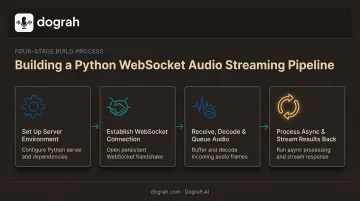
Step 1: Set Up Your WebSocket Server Environment
Start by choosing a framework that matches your project's needs.
- Raw
websocketslibrary - lightweight, asyncio-native; best for a standalone streaming server - FastAPI - best when you also need HTTP routes, auth endpoints, or a fuller app beside the WebSocket route
- Flask-Sock - prefer this over deprecated Flask-Sockets; production still typically needs gevent for concurrency
Next, identify your audio source, since it dictates the payload format you'll receive:
- Browser microphone via the Web Audio API
- A telephony provider's media stream (Twilio-style
<Stream>verb) - A raw RTP feed from a PBX or SIP trunk
Install the packages you need (websockets, fastapi, uvicorn, or flask-sock with gevent). If you're testing inbound streams from an external provider, expose the local server with a tunnel like ngrok so that provider can reach you.
Step 2: Establish and Accept the WebSocket Connection
Write your handler or route, then call the accept or handshake method before reading any data. Skipping this step, or reading data before the handshake completes, is a common source of silent failures.
Once connected, handle distinct message types so the session lifecycle stays predictable. Telephony providers like Twilio use a defined sequence:
connected: fires firststart: arrives once with call metadata (stream ID, account ID, audio format)media: carries the audio chunksstop: signals the end of the call
Before accepting production traffic:
- Enforce wss:// (TLS) rather than plain
ws:// - Validate authentication tokens or API keys during the handshake, not after
- Reject connections that don't pass basic credential checks immediately
Step 3: Receive, Decode, and Queue Audio Chunks
As each message arrives, decode the base64 payload into raw bytes using Python's base64 module. Base64-inside-JSON isn't universal. Some providers, like Amazon Transcribe's direct WebSocket protocol, send raw binary frames instead, so check your source's docs before assuming the format.
Once decoded, push the bytes into a queue rather than processing them inline. This decouples receiving audio from processing it:
- Use
asyncio.Queueif everything stays inside the event loop - Use a thread-safe
queue.Queueif a worker thread will consume the audio - Set a
maxsizeon either queue: an unbounded queue is where latency problems start
Feed the queue to your downstream consumer (async generator or ThreadPoolExecutor) without blocking the event loop.
Step 4: Process Audio Asynchronously and Stream Results Back
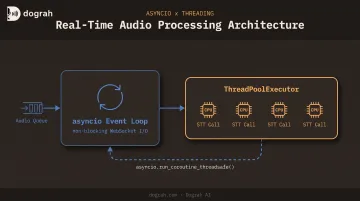
Speech-to-text SDKs and other processing libraries are frequently synchronous. Running them directly on the event loop will stall every other connection your server is handling. Offload that work to a thread pool instead.
To send results back from a worker thread, use asyncio.run_coroutine_threadsafe() so the coroutine is scheduled safely onto the running event loop.
Keep the same connection useful for the full session:
- Stream partial results (interim transcripts, agent responses) as they become available
- On
stopor disconnect, drain queues, cancel tasks, and close open STT/TTS sessions
When Should You Use WebSocket for Real-Time Audio Streaming in Python?
WebSocket streaming earns its complexity when you need continuous, bidirectional, low-latency audio exchange. Live transcription, voice agents, call monitoring, and real-time translation all fit this pattern — audio flows in, results or responses flow back, and both sides need to stay connected for the duration of the session.
It becomes unnecessary overhead for anything that isn't continuous. If you're transcribing pre-recorded files or running batch jobs, a REST API that accepts a file upload and returns a result is simpler, cheaper, and easier to scale. Google Cloud's Speech-to-Text documents separate synchronous and asynchronous REST/gRPC modes for non-streaming audio under an hour. Bidirectional streaming is reserved for real-time use cases.
Concurrency is the other early constraint:
- Each WebSocket connection typically maps to one active call or session
- Handling hundreds of concurrent streams with per-connection threading gets unwieldy fast
- Past a point, teams either invest in async architecture or adopt purpose-built voice infrastructure built for concurrency
Key Parameters That Affect Results When Streaming Audio in Python
Chunk Size and Buffer Duration
Smaller chunks reduce latency but increase per-message overhead. Larger chunks cut overhead but raise end-to-end delay and make packet loss more noticeable when it happens. RFC 3551 recommends a default packetization interval of 20 milliseconds for packetized audio, unless the specific codec calls for something different. That 20 ms figure is a solid starting benchmark even outside pure RTP contexts.
Sample Rate and Audio Encoding
Mismatched encoding between your audio source and your processing pipeline is one of the most common causes of poor transcription accuracy. Telephony audio commonly arrives as 8kHz mulaw (G.711), while browser-captured audio is often 16kHz or higher PCM.
- Google's Speech-to-Text documentation recommends capturing at 16,000 Hz or higher when possible, and explicitly warns against resampling; declare the native rate instead
- Twilio Media Streams fixes telephony input at
audio/x-mulaw, 8000 Hz, mono, so any downstream model needs to expect that format or convert it first
Resampling on the fly adds processing overhead and can degrade accuracy if done carelessly, so matching formats upstream is almost always the better move.
Threading vs. Asyncio Concurrency Model
CPU-bound processing — calling a synchronous STT SDK is the classic example — will block the asyncio event loop if it runs inline. That blocks every other connection your server is managing, not just the one being processed.
ThreadPoolExecutorruns up tomax_workerscalls concurrently; Python 3.13+ defaults this to a formula based on CPU count, with a floor that keeps I/O-bound work responsive- More workers generally improve throughput under multiple concurrent streams, up to the point where thread overhead and the GIL start limiting gains for CPU-heavy work
asyncio.to_thread()is meant for I/O-bound work escaping the loop; it doesn't make ordinary CPU-bound Python code run in parallel
Backpressure and Queue Management
An unbounded queue lets memory grow and latency climb whenever your consumer can't keep pace with incoming audio — a real risk during traffic spikes or slow STT responses.
The websockets library bounds message-buffer memory through max_size * max_queue and pauses network reads once buffers hit a high-water mark (websockets memory docs). That protocol-level backpressure is worth using instead of reinventing it.
For application-level queues, set a maxsize and choose a drop or backoff strategy when full. That keeps behavior predictable under jitter.
Common Mistakes and Troubleshooting Tips
Common Mistakes to Avoid
- Skipping SSL/TLS or authentication: an unsecured
ws://audio endpoint in production is an open invitation for abuse - Running blocking code inside the async handler: synchronous, CPU-heavy processing directly in the event loop stalls every other connection
- Ignoring backpressure: unbounded queues quietly consume memory and add lag until something breaks under load
Troubleshooting Common Issues
| Problem | Likely Cause | What to Check |
|---|---|---|
| Audio arrives choppy or delayed | Network jitter or oversized chunk/buffer settings | Chunk size, queue depth, end-to-end network latency |
| WebSocket disconnects mid-stream | Missing ping/pong keep-alives, or a proxy idle timeout | Heartbeat intervals; reverse proxy timeout settings |
| Processing lags behind live audio | Too few thread pool workers, or a blocking client library call | Worker count; whether an async-compatible SDK exists |
Proxies and load balancers often close idle WebSocket connections after a fixed window. Nginx's default WebSocket proxy timeout is 60 seconds without upstream data, and AWS Application Load Balancers default to the same figure. Sending regular ping frames resets that timer and prevents silent drops.
Alternatives to Building Custom WebSocket Audio Streaming in Python
Building the full pipeline yourself is a valid path, but it isn't the only one. Depending on your constraints, one of these may fit better.
| Option | When It's Better | Key Trade-Offs |
|---|---|---|
| Managed telephony streaming (Twilio Media Streams, PBX-native streaming) | Adding real-time processing to an existing telephony stack without building server infrastructure | Vendor lock-in and recurring per-minute costs |
| Real-time agent frameworks (LiveKit, Pipecat) | Prototyping voice or video agent experiences quickly with pre-built SDKs | Still often requires significant custom code to reach production readiness |
| Open-source, self-hostable voice AI platforms (Dograh AI) | Production-grade WebSocket audio streaming and speech-to-speech orchestration with full data sovereignty—without owning asyncio/threading plumbing | Adopting a platform's existing architecture instead of writing every layer yourself |
If the custom path feels like too much infrastructure just to move audio in and results out, Dograh AI is built for that gap. It is BSD 2-Clause licensed and self-hostable, so you can audit the WebSocket and streaming code instead of treating it as a black box.
What you get out of the box:
- Pre-built telephony integrations (Twilio, Vonage, Telnyx, and SIP trunks)
- Configurable STT/LLM/TTS providers, including local models like Whisper, Kokoro, and Llama
- Speech-to-speech orchestration aimed at lower end-to-end latency
- Audio and transcripts that can stay entirely on your infrastructure
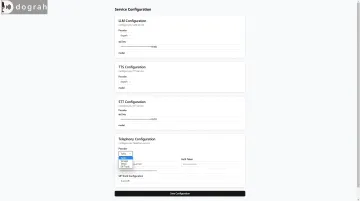
Deploy it as self-hosted OSS, managed cloud, or a fully managed private cloud in your own environment—depending on how much operations you want to keep in-house.
Frequently Asked Questions
What Python library is best for real-time audio streaming over WebSocket?
The websockets library is a lightweight, well-documented choice for a standalone streaming server. FastAPI is better when you also need HTTP routes, templating, or a broader web application around your WebSocket endpoint.
Can I use asyncio and threading together for real-time audio processing?
Yes. Asyncio handles non-blocking WebSocket I/O while threading, via ThreadPoolExecutor, offloads CPU-bound tasks like speech recognition. Bridge the two safely with asyncio.run_coroutine_threadsafe().
How do I stream audio from a phone call to a Python server?
Use your telephony provider's media-streaming feature, such as a <Stream>-style TwiML verb or a PBX's native WebSocket streaming, to forward call audio as base64-encoded JSON messages to your endpoint.
What audio format should I use for real-time WebSocket streaming?
Telephony audio is commonly 8kHz mulaw (PCMU), while browser audio is often 16kHz or higher PCM. Whichever format you receive, it needs to match what your processing pipeline, such as an STT engine, expects.
How do I reduce latency in Python WebSocket audio streaming?
Tune your chunk size, use async generators and bounded queues instead of blocking calls, enable backpressure controls, and offload heavy processing to thread pools or async-native SDKs where they exist.
Is WebSocket better than RTP for streaming audio?
WebSocket is easier to integrate with web and app clients and plays nicer with firewalls. RTP carries lower overhead for pure telephony transport. Many production systems use RTP for audio transport and WebSocket only for control messages and results.