SIP call transfer is the process of moving an already-active, answered call from one party to another using the Session Initiation Protocol — most commonly through the REFER method — without forcing the caller to hang up and dial again.
This matters for VoIP engineers, PBX administrators, contact center architects, and teams building AI voice agents. Get the mechanics wrong, and calls drop silently, escalation context gets lost, or callers sit on dead air waiting for a handoff that never completes.
"Call transfer" gets used interchangeably with forwarding and conferencing, but they're distinct operations at the protocol level. This article breaks down what SIP call transfer actually is, how it works step by step, where it's applied in production systems, and what determines whether it holds up under real traffic.
Key Takeaways
- SIP call transfer uses the REFER method to redirect an active call to a new destination
- Two types exist: blind transfer (immediate redirect) and attended transfer (consultation first)
- Three SIP interactions drive the process: REFER, NOTIFY, and BYE
- Reliability depends on trunk configuration, header handling, and timeout behavior — not just enabling a feature
What Is SIP Call Transfer?
SIP call transfer is a signaling procedure (formalized largely in RFC 5589) that moves an already-established, answered call from one party to a new destination. A third party initiates it using SIP requests and responses.
The outcome is simple in practice: the caller ends up connected to a new party, and the original connection is cleanly released. Done correctly, there's no perceptible gap for the caller.
Transfer vs. Forwarding vs. Conferencing
People often use these terms interchangeably, but they differ at the protocol level:
- Call forwarding redirects a call before it's answered ; there's no active session yet, just a diversion rule
- Call transfer moves a call that's already in progress, with an answered session already established
- Conferencing keeps multiple parties bridged simultaneously; transfer removes the original party once the new connection is confirmed
RFC 5589 even notes that transfer can be modeled briefly as an ad hoc three-party conference during the handoff window , but the transferor deletes that arrangement once the transfer completes. It's a temporary state, not the end goal.
The Three Roles in Every Transfer
Every SIP transfer involves three defined roles:
- Transferor: the party who initiates the transfer
- Transferee: the party being moved to a new destination
- Transfer target: the new party the transferee ends up connected to
Name these three roles on any call flow diagram and REFER, NOTIFY, and BYE sequencing is much easier to track.
How SIP Call Transfer Works (Conceptual Flow)
The transferor sends a REFER request aimed at the transferee, with the transfer target's address in a Refer-To header. That header tells the transferee exactly where to redirect the call.
Two things must already be in place:
- An active, answered call between transferor and transferee
- Destination details for the transfer target
From there, the transferee (or, in trunking setups, the SIP provider) sends a fresh INVITE to the transfer target using that Refer-To header.
Progress comes back through NOTIFY messages with sipfrag bodies (for example, 100 Trying, 180 Ringing, 200 OK). The REFER creates an implicit subscription, so the transferor always knows where the handoff stands.
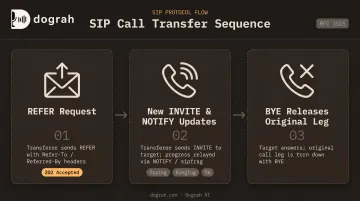
Step 1: REFER Initiates the Handoff
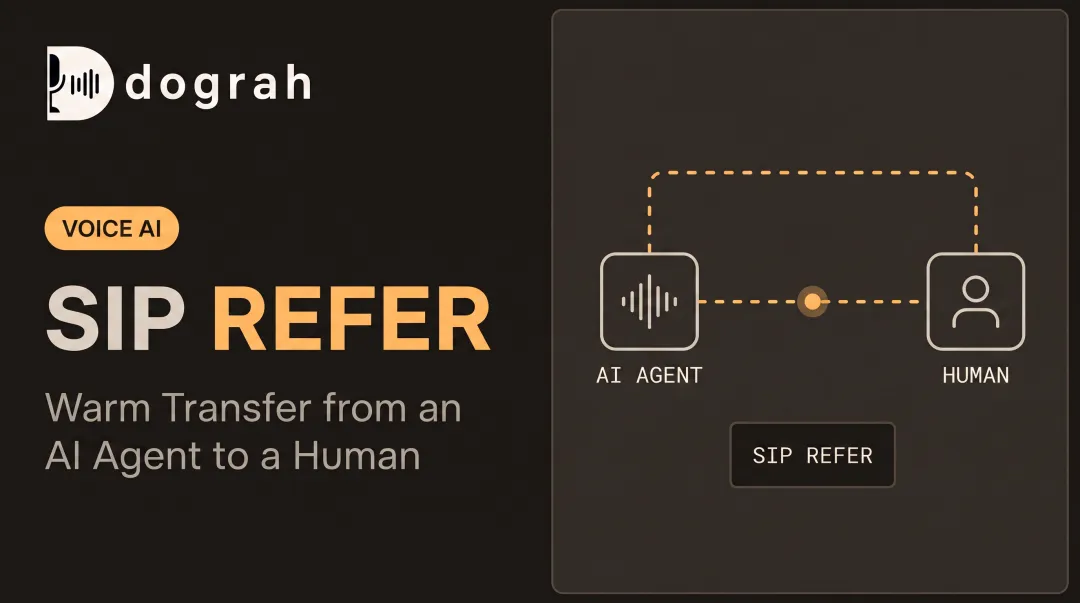
The transferor sends a REFER request with a Refer-To header (the destination) and, typically, a Referred-By header (identifying the originator). Per RFC 3515, the recipient responds with 202 Accepted, which only confirms the request will be attempted, not that anyone answered.
Step 2: New INVITE and Progress Updates
The transferee sends a new INVITE to the transfer target and reports progress back to the transferor via NOTIFY/sipfrag messages. Attended transfers diverge from blind ones here: they use the Replaces header to swap dialogs once the transferor confirms the target is ready.
Step 3: Original Call Leg Is Released
Once the transfer target answers, the original leg between transferor and transferee gets torn down with a BYE request. If the target never answers, the original dialog usually stays on hold until a timeout. Then the transfer fails back, or the transferor resumes the original call, depending on how fallback logic is configured.
Why & Where SIP Call Transfer Is Used
Teams adopt SIP transfer for a handful of practical reasons:
- Continuity — no forced redial when a call needs to move
- Reduced abandonment — callers stay connected instead of hanging up and trying again
- Skill routing — calls reach the right department or specialist without starting over
- Resource efficiency — trunk and agent capacity frees up once a handoff is confirmed
Contact center environments demand reliable signaling, minimal added latency, and clean handling of every handoff. Abandonment is a metric operators take seriously: 85% of organizations now track abandonment rate as a core performance indicator, according to ICMI's 2025 research. Poor transfer handling is one of the fastest ways to inflate that number.
Without proper transfer support, things go wrong in predictable ways: dropped calls that force a manual redial, lost context between hops, and higher abandonment as a result. SIP transfer isn't a regulatory requirement. RFC 5589 is an operational best practice, not a compliance mandate. That makes correct implementation a competitive differentiator rather than a checkbox.
Common Applications
SIP transfer shows up across most modern telephony stacks:
- PBX-to-PSTN trunking — transferring calls out to the public phone network
- Contact center ACD/IVR systems — routing between queues, agents, and departments
- Unified communications platforms — Teams, Zoom, and similar tools handing calls between users
- Voice AI agent platforms — escalating from bot to human
Triggers typically include a caller's explicit request, an escalation threshold being crossed, or a supervisor stepping in.
AI Voice Agents and SIP Transfer
Voice AI agents lean on SIP REFER-based transfer constantly. Once a conversation exceeds what the agent is built to handle, it needs to hand the caller off to a human — cleanly, and without losing what's already been discussed.
Attended transfer with context-passing beats blind transfer for this use case. Passing along intent, a transcript summary, and sentiment signals means the human agent isn't starting from zero, which improves first-call resolution.
Dograh AI's open-source, self-hostable voice agent platform connects directly with SIP trunking providers (Twilio, Vonage, Telnyx, Plivo, plus user-provided SIP trunks and PBX systems) to trigger these handoffs.
Escalation is driven by configurable triggers:
- Low confidence scores
- Detected distress or frustration
- Explicit "talk to an agent" requests
- Failed tool calls (for example, a CRM lookup that errors out twice)
Because the workflow builder is visual and self-hostable, teams define exactly what gets escalated and when, without waiting on a vendor feature request.
Key Factors That Affect SIP Call Transfer
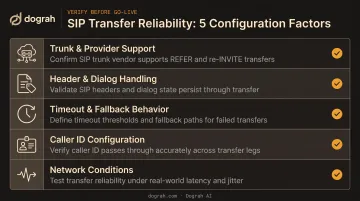
Whether a transfer succeeds or silently fails usually comes down to a handful of configuration details:
- Trunk/provider support: many SIP trunks and PBX/SBC vendors need call transfer (especially PSTN transfer) explicitly enabled before REFER-based handoffs work
- Header and dialog handling: correct
Refer-To,Referred-By, and (for attended transfers)Replacesheaders decide whether the new dialog establishes cleanly - Timeout and fallback behavior: set a ringing timeout so callers aren't left waiting if the target never answers
- Caller ID configuration: whether the target sees the transferee's or transferor's number affects routing, reporting, and compliance
- Network conditions: latency or packet loss during the REFER/INVITE/NOTIFY exchange can cause failed, delayed, or silent handoffs
Early media is a separate gotcha. Some SBC and trunk setups don't pass ringback during a transfer, so callers hear silence instead of ringing. That isn't universal, but it's common enough to test before go-live.
Common Issues, Misconceptions, and When Transfer May Not Be the Right Fit
A few misunderstandings come up again and again in production systems.
Misconception: the transferor stays on the media path. In most implementations, the transferor drops off completely once the handoff completes. The call doesn't stay bridged through them. Media negotiated between the transferee and target is independent of whatever existed before.
Confusion between blind and attended transfer. Teams often default to blind transfer because it's faster to implement, then lose the context that attended transfer would have preserved: the caller's intent, what's already been discussed, and why they're being routed to this person.
Ignoring early media limitations. Not every trunk configuration supports ringback during transfer. Skip testing this and callers hear dead silence during the handoff window.
Transfer isn't always the right call, either:
- Very short interactions where a hold-and-transfer delay does more harm than good
- Unverified target availability, where skill-based queue routing beats a blind handoff to someone who may not pick up
- Cases the AI agent (or IVR) can finish without a human, so transfer only adds latency
Understanding SIP transfer mechanics, not just flipping the feature on, is what separates escalation workflows that hold up under load from ones that fail quietly, one dropped call at a time.
Frequently Asked Questions
What does SIP stand for?
SIP stands for Session Initiation Protocol, the signaling standard used to start, manage, and end real-time communication sessions like voice and video calls.
Is SIP still used today?
Yes. SIP remains the dominant signaling protocol across VoIP, SIP trunking, PBX systems, and modern voice AI platforms.
What is the difference between PSTN and SIP?
PSTN is the traditional circuit-switched telephone network. SIP is the internet-based signaling protocol used to establish calls over IP, often bridging into the PSTN through trunking.
Does SIP use TCP or UDP?
SIP can run over either UDP or TCP, plus TLS for secure signaling. UDP is common for its low overhead, while TCP/TLS is preferred when reliability or encryption matters more.
What is the difference between blind and attended transfer?
Blind transfer redirects the caller immediately with no confirmation step. Attended transfer lets the transferor speak with the target first, sharing context before completing the handoff.
What does the SIP REFER method do?
REFER is the SIP request that instructs a call participant to contact a new destination. It's the core mechanism behind SIP call transfer.