Introduction
Simulating a phone call used to mean one thing: dialing a test number to check if it connected. That's no longer the whole story.
By 2026, teams simulate calls to test AI voice agents before they touch a live customer, train staff against AI personas, and validate telephony routing before a single digit gets dialed.
Gartner found that 44% of customer service leaders were already exploring GenAI voicebots in 2024, with another 11% piloting and 5% fully deployed. That share has only grown since (Gartner, 2024).
"Simulating a call" still produces wildly different results depending on the tool, the simulation type, and how carefully you build the scenario.
This guide breaks down what call simulation means today, walks through a step-by-step method on a modern voice AI platform, and covers the parameters that decide whether your test reflects real calls or only the outcome you hoped to see.
TL;DR
- A simulated call replicates real audio, routing, or conversation conditions without placing an actual live call — for testing, training, or QA
- The leading use case is sandboxing an AI voice agent before it ever touches live telephony
- Accuracy hinges on realistic scripts, correct latency, and deliberate edge-case testing
- Platforms like Dograh AI let teams build and simulate a voice agent flow in under two minutes, with automated post-call analysis before launch
What Does "Simulating a Phone Call" Mean in 2026?
A simulated call is a test of a call scenario, run through software, a script, or an AI persona, that mimics real conditions without a live connection to a customer. No real person picks up. No carrier charges apply. The workflow, routing logic, or conversation still behaves as if they did.
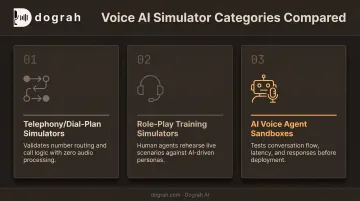
Three categories dominate the space right now:
- Telephony/dial-plan simulators: IT admins validate number routing and trunk config with zero audio
- Role-play training simulators: Human agents practice against AI customer personas before live calls
- AI voice agent sandboxes: Builders test conversation flow, latency, and responses before deploy
Cisco's Dialed Number Analyzer is a clear telephony example: it reports which route patterns and calling-search spaces a dialed number would match before a call ever fires (Cisco, 2024).
Why the Sandbox Category Matters Most Right Now
As AI calling agents move into inbound and outbound business use, the voice-agent sandbox is the highest-stakes category. An untested agent does not fail quietly. It can mishandle hundreds of live calls within minutes of going live, and by the time someone spots the pattern, the damage is done.
For any team shipping a calling agent in 2026, sandbox testing is standard practice, not a nice-to-have.
How to Simulate a Phone Call Using a Voice AI Platform in 2026
Here's a practical, four-step method that works whether you're testing an outbound sales agent or an inbound support triage bot.
Step 1: Define the Call Scenario and Script
Start by writing out the exact call flow you want to test: an outbound appointment reminder, an inbound support triage call, or a sales qualification script.
- Map likely customer responses, objections, and fallback paths so the simulation covers realistic branching, not just a single "happy path"
- Pull from real call transcripts or CRM notes where available, so test inputs reflect how customers actually talk, not generic placeholder dialogue
A script built only around the ideal conversation will pass every test and still fail in production the moment a real caller goes off-script.
Step 2: Build the Voice Agent Workflow
Next, map the conversation into a working agent. Dograh AI's drag-and-drop builder, for example, lets teams describe their use case in plain English. That description becomes the underlying prompt, and a working voice bot is running in under two minutes. The core building blocks typically include:
- Start Call nodes for the opening greeting or general behavior
- Agent nodes for handling main conversation logic
- Decision branches for routing (verification retries, fallback handling, human handoff)
- End Call nodes defining where the conversation terminates
From there, connect the STT, LLM, and TTS models powering the agent. This matters more than it sounds: teams with data sovereignty requirements can plug in locally hosted models such as Whisper, Voxtral, Kokoro, or Llama, keeping sensitive audio off third-party servers entirely.
Configure interruption handling, pacing, and how the agent establishes legitimacy early in the call. Those details separate a natural-sounding conversation from one that feels obviously scripted.
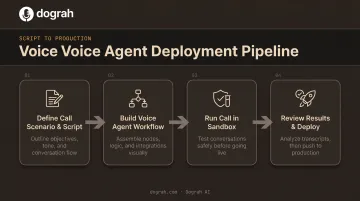
Step 3: Run the Call Inside a Sandbox Environment
Trigger the test as a simulated call inside the platform, not by dialing an actual phone number. No real customer, no carrier, no risk.
Watch the live transcript, audio playback, and latency metrics as the conversation unfolds. Then deliberately break it:
- Talk over the agent mid-sentence
- Introduce background noise or a heavy accent
- Ask an off-script question the workflow wasn't designed for
- Simulate a tool or API failure mid-call
Dograh AI's LoopTalk feature runs this exact stress-test with AI caller personas (angry callers, fast talkers, noisy environments) to expose looping prompts, missed handoffs, and barge-in collisions before a real customer ever finds them.
Step 4: Review Results and Move to Live Deployment
Check the automated post-call analysis before trusting any workflow. Look for:
- Sentiment scoring: positive, neutral, or negative, with a confidence percentage attached
- Miscommunication flags: moments where the agent misunderstood or mishandled a request
- Script adherence: whether the agent stuck to its configured prompt and logic
Iterate on the prompt, routing, or voice settings, then re-run the simulation until results clear your defined success criteria. Once benchmarks are met, connect a live telephony number and roll out to a small batch of real calls before scaling to full volume.
Key Parameters That Affect Simulation Accuracy
A simulation is only as trustworthy as the variables you controlled while building it. Four factors decide most of the gap between "passed in testing" and "works on real calls."
Latency and Response Speed
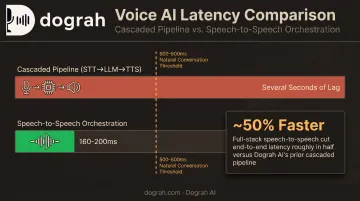
Delayed or robotic-feeling responses reveal problems that will frustrate real callers and drive hang-ups. Traditional cascaded pipelines (speech-to-text, then a language model, then text-to-speech) process each stage sequentially, which stacks up delay.
Speech-to-Speech (S2S) orchestration collapses those stages into one. Research on the Moshi model found this approach can achieve 160ms theoretical latency and around 200ms in practice, compared to cascaded systems that introduce several seconds of lag (Defossez et al., 2024).
Dograh AI's move to full-stack S2S orchestration using models like Gemini Flash Live and GPT-Realtime-2 has roughly halved end-to-end latency compared to its previous cascaded pipeline. That gap matters when 500-800ms is the usual threshold for natural-feeling voice interaction.
Voice Realism
Overly synthetic TTS is easy for callers to spot, and it undermines trust before the conversation even gets going.
A 2026 listening study using natural and cloned speech run through simulated phone channels found human detection accuracy hovered at just 54.8% overall (barely above a coin flip), though accuracy climbed to 63.7% on GSM connections (Warzych et al., 2026). Phone audio compression genuinely does mask some synthetic tells.
Realism isn't only about the acoustic signal. One hybrid approach blends real pre-recorded human voice clips with TTS fallback in the same cloned voice, so the fallback doesn't break continuity with an unrelated-sounding synthetic voice. Dograh AI's version of this feature has cut per-call cost up to 3x while delivering 2x better conversions on outbound campaigns.
Script and Prompt Design
A simulation only tells you something useful if the script anticipates real objections and tone shifts. Opening framing carries real weight.
One large-scale field experiment involving over 6,200 customers found that disclosing chatbot identity before an outbound sales call reduced purchase rates by more than 79.7% and shortened calls significantly (Luo et al., 2019). Timing of disclosure changed the outcome meaningfully.
That's why the opening moments of a call deserve as much testing attention as the middle of the conversation:
- How the agent identifies itself
- How it confirms the recipient
- How it states its purpose
Telephony and Number Configuration
Even a flawless conversation flow fails if number normalization, routing, or outbound trunk settings are wrong underneath it. This is a separate failure layer from conversational AI entirely.
Dial-plan simulators used in enterprise telephony platforms catch misrouted numbers or malformed trunk configurations before an AI-driven call is ever placed, independent of how well the agent itself performs.
When Should You Simulate a Call?
Simulate a call when the cost of a failed live conversation is high enough to matter—before that failure hits real customers.
Best-fit scenarios:
- Launching a new outbound calling campaign
- Migrating telephony or carrier configurations
- Training new agents on complex products or objection-heavy scripts
- Testing a voice agent before a large-scale rollout
When it's overkill: A simple, static IVR message with no branching or dynamic interaction does not need multi-scenario stress testing. Save the effort for conditional logic or live conversation.
Against common alternatives (a small live pilot with real customers, or manual QA call review), simulation is faster and lower-risk. Manual QA often covers under 5% of conversations in typical contact centers, so most calls never get checked.
Simulation stress-tests scenarios at a scale manual review cannot match—without burning a live customer's patience on a bug.
What You Need and Mistakes to Avoid
A solid simulation setup prevents false confidence. Lock down the right inputs first, then avoid the traps that make results look cleaner than production will be.
What You Need Before Simulating a Call
- A sandbox environment fully separate from live telephony, so test calls never reach real customers
- Representative scripts or transcripts reflecting actual call patterns, not generic placeholder dialogue
- Clear success criteria set up front (resolution accuracy, sentiment thresholds, latency targets) so you score runs objectively
Common Mistakes When Simulating a Call
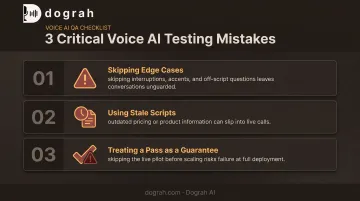
- Skipping edge cases. Testing only the happy path and ignoring interruptions, accents, or off-script questions leaves your agent unprepared for how real people talk.
- Using stale scripts. Outdated transcripts that no longer reflect current pricing or products will pass simulation and fail in production.
- Treating a pass as a guarantee. A clean simulation still warrants a small live pilot before you scale to full volume. Sandbox conditions never fully match network jitter, live accents, or real customer moods.
Frequently Asked Questions
What is a simulated call?
A simulated call recreates the conditions of a real phone call (audio, routing, or conversation flow) without connecting to a real customer. Teams use it for testing, training, or quality assurance.
What's the difference between a call simulator and a live test call?
A simulator runs entirely in a sandbox without touching real telephony or customers. A live test uses an actual phone number and carries higher risk, but it offers validation a sandbox can't fully replicate.
Do call simulations use real customer data?
Most teams use anonymized transcripts or synthetic behavior patterns instead of raw personal data, especially in healthcare or finance. If real data is used, standard data protection rules still apply.
How long does it take to set up a voice AI call simulation?
With modern no-code platforms, a basic workflow and first simulated call can be running in minutes. Dograh AI, for example, lets teams describe a use case in plain English and launch a testable agent in under two minutes.
How accurate are AI-powered call simulations compared to real calls?
Accuracy depends heavily on latency, voice realism, and script quality. Even a strong simulation result should be followed by a small live pilot before scaling to full call volume.
What tools are used to simulate phone calls for training versus for AI voice agents?
Human-agent training usually uses role-play or script-based simulators with AI personas. AI voice agent testing uses sandboxes such as Dograh AI's LoopTalk to stress-test the agent under realistic caller conditions.