Introduction
A voice agent that nails natural conversation but reads "$1,200.50" as "one thousand two hundred dollars point five zero" loses customer trust in seconds. Numbers, dates, and addresses are among the most common sources of embarrassing or confusing output in voice agents, IVRs, and outbound calling systems.
Here's the thing: these errors are rarely a "broken voice" problem. They stem from ambiguous input text, missing context, or normalization gaps — not the quality of the underlying TTS model.
This article covers why TTS misreads numeric content and how to diagnose and fix it step-by-step. You'll learn when to reach for SSML versus rewriting versus switching your setup, and how to stop these issues from resurfacing.
Key Takeaways
- Numeric misreads almost always trace back to input formatting, not voice quality
- Phone numbers, dates, addresses, and currency each fail in distinct, predictable ways
- Fixes range from simple text rewrites to SSML tags to hybrid voice architecture
- Testing across real production data — not one example — is what makes fixes stick
What Is Number Formatting in TTS?
Number formatting is how a TTS engine decides how to speak digits, dates, and symbols. That work sits inside text normalization: converting written forms into spoken words before synthesis — the layer between what's on the screen and what comes out of the speaker.
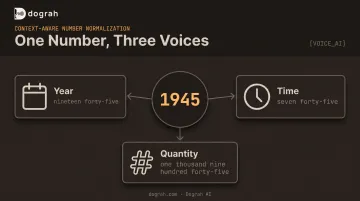
The tricky part: normalization is context-dependent. The digits "1945" could be read as:
- A year ("nineteen forty-five")
- A time ("nineteen forty-five" or "seven forty-five," depending on format)
- A quantity ("one thousand nine hundred forty-five")
The correct reading depends entirely on the words surrounding those digits. Strip away context, and the engine has to guess.
That’s why number formatting is ongoing input prep, not a one-time setup. A new form field, locale, or integration that pulls in user-supplied text will surface edge cases the engine hasn’t handled yet.
Common Problems With TTS Reading Numbers, Dates, and Addresses
Despite different symptoms, TTS misreads follow a small set of recurring patterns across languages and engines. Once you recognize the pattern, the fix becomes obvious.
Phone Numbers and Long Digit Strings Misread
Symptoms: Digits get grouped incorrectly ("987-6543-210" comes out in the wrong clusters), or the whole string sounds rushed and dense, like the engine is trying to get through it as fast as possible.
Likely cause: Most engines default to a generic 3-4-3 grouping rule regardless of the regional or contextual reading pattern the content actually needs.
Dates and Times Read Ambiguously or Incorrectly
Symptoms: A DD/MM date gets read as MM/DD (or the reverse), and decimal-style times like "14.30" trigger an odd pause instead of sounding like a clock time.
Likely cause: Numeric-only date formats with no month name or clear separator give the normalization engine nothing to anchor on.
Microsoft's Azure documentation shows this directly: without a format hint, 10-12-2016 gets read as "October twelfth two thousand sixteen," but adding format="dmy" flips it to "December tenth two thousand sixteen." Same digits, opposite meaning: all from a missing tag.
Addresses Sound Garbled or Fragmented
Symptoms: Unit or apartment numbers blend directly into street numbers, and abbreviations like "St.," "Apt.," or "Blvd." get mispronounced or skipped entirely.
Likely cause: Most TTS engines have no dedicated address normalization layer. Addresses fall back to generic number rules with zero awareness of phrase boundaries — the engine doesn't know where the street number ends and the unit number begins.
Currency, Percentages, and Symbols Misread
Symptoms: "$20" gets read as "twenty" with the currency unit silently dropped, and "%" or other symbols get read literally, or inconsistently, from one sentence to the next.
Likely cause: Currency codes and rare symbols aren't automatically expanded by every engine — they require explicit tagging or rewriting.
This isn't just a synthesis-quality issue. A 2025 Boson AI evaluation (EmergentTTS-Eval) tested the same TTS system across three preprocessing conditions on content packed with numerals, currencies, dates, and phone numbers:
- No normalization: 51.69% pairwise win rate
- Basic normalization: 50.06%
- GPT-4.1-mini-level normalization: 76.74%
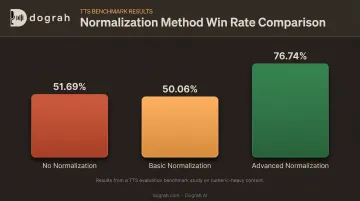
The gap between no normalization and smart normalization is enormous, and it has nothing to do with the voice itself.
Why TTS Misreads Numeric Content (Root Causes)
These failures almost always come from the input, not the voice model. Four patterns show up again and again:
- Ambiguous source formatting: dates, times, and symbols that have multiple valid readings with no tiebreaker
- Missing context clues: no month name, no currency word, no unit label to anchor the interpretation
- Dense, unpunctuated numeric sequences: long digit strings with no pauses for the engine to segment naturally
- Reliance on default normalization: using the engine's out-of-the-box behavior instead of writing intentionally for your target locale
Ignoring this in production isn't a cosmetic problem. It erodes trust in voice agents fast, causes failed OTP deliveries and order confirmations, and creates real compliance risk in regulated industries like finance and healthcare.
It also drives up call transfers and drop-offs. Customers who can't parse a mumbled confirmation number simply hang up and call a human instead.
That risk is already baked into how people feel about automated phone systems. A Vonage-commissioned survey of 2,010 US adults found that 61% said IVR menus made for a poor customer experience. Another 51% said they'd abandoned a business entirely after a bad IVR interaction. A garbled confirmation number is exactly the kind of moment that pushes someone from "mildly annoyed" to "hanging up."
How to Fix TTS Number, Date, and Address Reading (Step-by-Step)
Rewriting text randomly without first identifying the specific misread pattern wastes time and often introduces new errors. This process isolates the exact failure, applies the right fix, and keeps it from resurfacing with new content.
Step 1: Identify the Exact Misread
Listen to the generated audio and note precisely where the numeric content diverges from the intended meaning. Ask:
- Is this isolated to one format (only 2-digit years, for example) or systemic across all numeric content?
- Does it happen with every input, or only specific values?
Document the exact input string that caused the error. You'll need it for reproducibility once you apply a fix.
Step 2: Confirm the Root Cause Category
Before touching anything, determine which bucket the failure falls into:
- Ambiguous source formatting — dates, times, or symbols with more than one valid reading
- Missing normalization support — addresses, currency codes, or rare symbols the engine simply doesn't expand
- Insufficient pausing or segmentation — dense numeric strings with no phrase breaks
Rule out unrelated causes (like voice or model selection) before you start rewriting text. Swapping voices to fix a formatting bug is a common, costly detour.
Step 3: Apply the Fix Based on the Type of Content
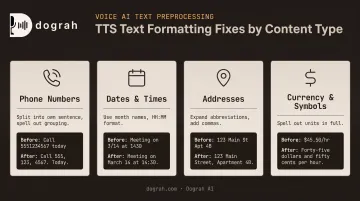
Phone numbers and long digit strings:
- Split long digit strings into their own sentence rather than embedding them mid-sentence
- Write out the exact desired grouping (for example, "double nine, triple eight") when a non-default pattern is required
Dates and times:
- Use unambiguous formats with month names, such as "12 February 2025," instead of numeric-only dates
- Standardize on HH:MM time formats and avoid decimal-style separators that create unnatural pauses
Addresses:
- Add commas at natural phrase boundaries and expand abbreviations before synthesis: "St." becomes "Street," "Apt." becomes "Apartment"
- Separate unit numbers clearly from street numbers so they don't blend into one long digit string
Currency, percentages, and symbols:
- Spell out currency and unit names in full: "20 US dollars" instead of "$20" or "20 USD"
- Define custom pronunciation rules for recurring symbols or currency codes if your platform supports it, rather than fixing the same thing repeatedly
Step 4: Test and Validate Across Real Content
Run the corrected input through the TTS engine using representative production data, not a single cherry-picked example. Confirm the fix holds across varied phrasing and edge cases before deploying at scale. Re-test whenever a new locale or data field enters the pipeline.
Manual Rewriting vs SSML vs Switching Your TTS Setup
Not every misread needs the same level of intervention. The right fix depends on content volume, predictability, and how often the pattern repeats.
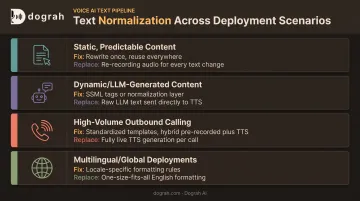
Scenario 1: Static, Predictable Content
Think appointment confirmations and payment reminders: text that rarely changes.
- Fix: Rewrite the text once in its exact intended spoken form
- Replace: Rarely needed — one rewrite is usually the cheapest lasting fix
Scenario 2: Dynamic, LLM-Generated, or User-Supplied Content
Content that changes per call, or comes from LLMs and users, needs runtime handling rather than a one-time rewrite.
- Fix: Apply SSML tags like
<say-as>, or add a pre-processing/normalization layer before text reaches the TTS engine - Replace: Consider a provider with stronger built-in normalization if SSML support is limited
Scenario 3: High-Volume Outbound Calling With Repeated Numeric Fields
Order numbers, loan amounts, and appointment slots that repeat across thousands of calls deserve a data-layer fix, not a one-off patch.
- Fix: Standardize input templates for these fields at the data layer, not just at the prompt layer
- Replace: Use hybrid pre-recorded-plus-TTS for constantly repeated fields (loan amounts, appointment times). Dograh AI blends human-recorded clips with TTS fallback in the same cloned voice, so figures read correctly every time at lower synthesis cost
Scenario 4: Multilingual or Global Deployments
Date, currency, and number conventions shift by language and market.
- Fix: Apply locale-specific date, currency, and number formatting rules per language rather than one global rule set
- Replace: Move to a platform with broad language and accent coverage if formatting inconsistencies keep showing up across markets
Common Mistakes to Avoid When Fixing TTS Number Reading
A few habits derail fixes before they start:
- Assuming a "better voice" will fix it. A higher-tier model won't solve a formatting problem: change the input text, not the voice.
- Leaving formats inconsistent across a script. If one path writes "$20" and another writes "20 dollars," the same call can read amounts two different ways.
- Over-relying on SSML. Reaching for
<say-as>when a plain-text rewrite would work just as well adds needless complexity. - Skipping re-testing. Fixing one date format and moving on often leaves related cases (like 2-digit years) still broken.
Preventive Measures to Avoid Future Issues
Consistent formatting standards mean less QA effort and fewer failed calls once you're operating at scale. A few habits pay off long-term:
- Maintain a house style guide covering how numbers, dates, addresses, and currency should be written before they reach TTS
- Standardize data fields at the source system level (order IDs, phone numbers, addresses) not just inside the prompt
- Audit call recordings regularly for recurring misreads as new content types enter the workflow
- Use platforms with automated post-call analysis to flag miscommunication before it hits large call volumes
Dograh AI's post-call QA, for example, surfaces sentiment and adherence issues automatically so teams catch pronunciation problems before customers do.
Frequently Asked Questions
What is number formatting in TTS?
Number formatting converts written numerals into the right spoken form before synthesis. The engine needs context to know whether "1945" is a year, a time, or a quantity.
What is TTS used for?
Text-to-speech powers voice agents, IVR systems, accessibility tools, audiobooks, and automated notifications by converting written text into natural spoken audio.
How do I get TTS to read phone numbers correctly?
Split long digit strings from surrounding text, and if you need a specific grouping or reading pattern, write it out explicitly rather than leaving raw numerals for the engine to guess at.
Does SSML fix date and number pronunciation issues?
SSML tags like <say-as> help control pronunciation, but they work best alongside clear source text formatting, not as a replacement for it.
Why does TTS read addresses incorrectly?
Most engines lack dedicated address normalization, so unit numbers, abbreviations, and street numbers need to be manually separated and expanded before synthesis.
Can TTS handle multiple languages' number, date, and address formats?
Formatting rules differ by locale for date order, currency names, and address structure. Multilingual deployments need locale-specific rules rather than one global format.