Most tutorials stop at "here's how to set it up." They skip the parts that actually determine whether your agent works well in production: data privacy tradeoffs, latency configuration, prompt design, and the hidden costs of closed ecosystems.
This guide covers all of it — what you need before starting, an exact step-by-step build using an open source platform, the parameters that separate a good agent from a frustrating one, and the mistakes most first-time builders make.
Key Takeaways
- A 30-minute voice agent build is achievable — success depends on platform choice, model config, and prompt design
- The core pipeline is STT → LLM → TTS, or Speech-to-Speech for lower latency
- Dograh AI supports self-hosting via Docker or managed cloud — full data sovereignty, zero per-call platform fees
- The two biggest failure points: weak system prompts and skipped VAD configuration — fix both in under 5 minutes
What You Need Before Getting Started
The 30-minute build assumes prerequisites are in place. Missing any of these can turn a fast deploy into a multi-hour debugging session.
System and Access Requirements
You'll need:
- A server or cloud account capable of running Docker (Docker 20.10+) for self-hosting — or just a browser for managed cloud
- STT provider API key: Deepgram, Gladia, Azure Speech, or a locally hosted Whisper variant
- LLM provider API key: OpenAI, Anthropic, Groq, DeepSeek, or Ollama — or locally hosted Llama, Qwen, or Voxtral
- TTS provider API key: ElevenLabs, Cartesia, Rime, Kokoro, or locally hosted Coqui/Chatterbox
- Telephony provider (Twilio, Vonage, or your existing carrier) if handling calls — web widget deployment doesn't require this
Dograh AI also supports running all three layers locally, meaning no external API dependencies if your data cannot leave your environment.
Use Case Definition
Before writing a single line of configuration, define the agent's scope. Your use case determines your workflow design, prompt strategy, and escalation logic:
- Inbound support → focus on knowledge base integration and escalation logic
- Outbound follow-ups → focus on pacing, the first 15 seconds, and conversion flow
- Web widget → no telephony needed, lower latency tolerance from users
Lock this in first — it keeps configuration fast and focused once you're in the builder.
How to Build and Deploy an Open Source AI Voice Agent in 30 Minutes
Here's how the 30 minutes breaks down: 5 min setup → 8 min model config → 10 min conversation logic → 5 min telephony + test → 2 min production deploy. Each step below maps directly to that timeline.
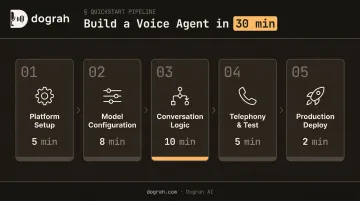
Step 1: Set Up Your Platform (~5 Minutes)
Dograh AI offers two deployment paths:
Self-hosted (Docker):
- Clone the GitHub repository
- Run
docker-compose up - The platform goes live on your own infrastructure under BSD 2-Clause license — fully auditable, no external data routing
Managed cloud:
- Create an account
- Create your first agent in under 2 minutes — no infrastructure setup required
Both paths give you the same visual workflow builder and model flexibility. Once the dashboard loads, take 60 seconds to orient yourself — the workspace includes tabs for call logs, knowledge base (RAG), telephony (VoIP), analytics, provider keys, and configuration.
Step 2: Configure Your AI Model Stack (~8 Minutes)
Go to the Provider Keys tab and connect your chosen STT, LLM, and TTS providers. Dograh supports:
| Layer | Hosted Options | Local Options |
|---|---|---|
| STT | Deepgram, Gladia, Azure | Whisper, Voxtral, Canary |
| LLM | OpenAI, Anthropic, Groq, DeepSeek | Llama, Qwen, Ollama |
| TTS | ElevenLabs, Cartesia, Rime | Kokoro, Coqui, Chatterbox |
Rather than chaining STT → LLM → TTS, models like Gemini Flash Live and OpenAI GPT-Realtime-2 process audio-in to audio-out natively, roughly halving end-to-end latency. If conversational responsiveness is the primary priority, this speech-to-speech mode is worth enabling.
One configuration mistake that catches most first-timers: leaving the language setting at default. Always set language and locale explicitly. Wrong locale causes transcription errors that compound into wrong LLM responses throughout the entire conversation.
Step 3: Build Your Conversation Logic (~10 Minutes)
Two logic modes are available:
- Global Prompt — a single system prompt guiding all agent behavior. Fast to set up, good for general-purpose agents
- Conversational Pathway — a visual drag-and-drop node builder with branching flows, variable extraction, conditional routing, knowledge base lookups, and webhook/API calls. Recommended for booking flows, qualification scripts, or multi-step workflows
Both modes can be combined.
Writing an effective system prompt — include:
- Agent role and persona
- Scope boundaries ("do not discuss X")
- Escalation trigger language ("if the caller asks about Y, transfer to a human")
- Key facts the agent needs to respond accurately
Specificity here is what separates a focused, consistent agent from one that drifts off-script.
Step 4: Connect Telephony and Test (~5 Minutes)
In the VoIP tab, assign a phone number to the agent — connect an existing Twilio, Vonage, or carrier number, or provision one through the platform's telephony integrations. Inbound calls route directly to the agent without additional code.
Before going live, run a Web Call test from the dashboard. Listen specifically for:
- Response latency — does it feel conversational?
- Out-of-scope handling — does the agent redirect cleanly?
- End-of-speech detection — does it cut off natural pauses or wait appropriately?
These three signals surface most configuration issues before any real callers are involved.
Step 5: Deploy and Enable Post-Call Monitoring (~2 Minutes)
Two deployment surfaces:
- Web widget — generate an embed snippet from the Widget tab, paste before the closing
</body>tag in your site or app. For Next.js or React projects, add a custom element type declaration to avoid JSX errors - Telephony — already live after Step 4
Before going live, enable post-call analysis features: call tagging, sentiment detection, and post-call summaries. In the first week, these logs tell you what the agent got right, what it missed, and where callers dropped off — the fastest feedback loop available for iteration.
Key Parameters That Affect Your Voice Agent's Performance
Two agents built on identical platforms can deliver very different user experiences based on how these four parameters are configured.
End-to-End Latency Budget
Voice has a strict perceptual threshold. A 2025 study on intelligent virtual agents found that latency above 4 seconds degrades quality of experience — but 1.5 seconds is the practical target for conversational calls.
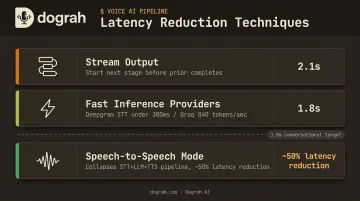
Your total latency budget stacks sequentially: STT processing + LLM inference + TTS generation. Ways to compress it:
- Stream output at every layer — don't wait for complete responses before starting the next stage
- Use fast inference providers : Deepgram's streaming STT delivers under 300ms, and Groq's Llama 3.1 8B Instant runs at 840 tokens/second
- Use Speech-to-Speech mode : Dograh AI's S2S orchestration via Gemini Flash Live or GPT-Realtime-2 collapses the entire pipeline, roughly halving end-to-end latency
Voice Selection and Hybrid Pre-Recorded TTS
The TTS voice is the agent's most user-facing characteristic — a robotic or mismatched voice undermines trust even when the logic is correct.
Dograh AI's hybrid pre-recorded + TTS feature addresses this directly. High-frequency phrases (greetings, confirmations, hold messages) use real human recordings, while the TTS fallback handles dynamic responses in the same cloned voice — consistent throughout.
The impact is measurable: up to 3× cost reduction and **2× better conversions on outbound calling**, because pre-recorded clips eliminate TTS API calls for predictable utterances without breaking voice continuity.
VAD (Voice Activity Detection) Configuration
VAD determines when the user has finished speaking. Misconfigured VAD is the leading cause of "the agent kept cutting me off" complaints.
- Too aggressive : agent interrupts mid-sentence
- Too passive : pauses feel broken to callers
Tune server-side VAD for your expected environment — a quiet office and a noisy contact center require different sensitivity settings. Also configure barge-in explicitly: outbound scripts need different settings than open-ended support flows.
System Prompt Specificity and Knowledge Base Integration
A vague system prompt produces generic, off-brand responses. The solution is two-part:
- Specific system prompt : define the role, boundaries, escalation triggers, and key facts
- RAG knowledge base : upload product docs, policies, or FAQs via the platform's knowledge base tab so the agent retrieves accurate information during calls rather than hallucinating answers
Together, these two inputs give your agent the context to handle real, unpredictable customer queries without going off-script.
Common Mistakes When Building an Open Source Voice Agent
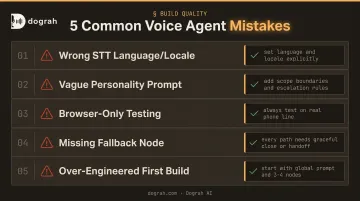
Set language and region explicitly in your STT config — the default setting leads to high transcription error rates that compound into wrong LLM responses. Test with representative audio samples before going live.
Scope your personality prompt with explicit "do not discuss" and escalation instructions — without them, the agent improvises unpredictably. Include a clear list of topics to redirect or hand off.
Always test on an actual phone line, not just a browser — telephony audio introduces 200–400ms more perceived latency than web audio, and what sounds natural in a browser test may feel sluggish to real callers.
Build a fallback or escalation node into every workflow — when the agent fails to understand input or hits a dead end, silence or repetition frustrates callers. Every path should end with a graceful close or a human handoff.
Resist over-engineering your first deployment — complex branching logic is harder to debug. Start with a global prompt and 3–4 nodes covering the most common paths, then layer in complexity after reviewing real call logs.
When Open Source Voice AI Beats Closed Platforms
Closed platforms like Vapi and Retell work for simple deployments. Three scenarios push builders toward open source.
Data sovereignty requirements: Closed platforms route call audio through their cloud infrastructure, which creates HIPAA, GDPR, and SOC 2 processing obligations. Under HHS guidance, any cloud service provider that creates, receives, maintains, or transmits ePHI is a HIPAA business associate — even those storing encrypted data without a decryption key.
A self-hosted Dograh AI deployment eliminates vendor compliance processing entirely. The data never leaves your infrastructure, which removes the compliance bottleneck from enterprise procurement in healthcare, finance, legal, and defense.
Provider flexibility and avoiding lock-in: Open source platforms let you bring your own API keys, swap providers without re-architecting, and run locally hosted models (Whisper, Kokoro, Llama, Voxtral, Qwen). Dograh's MCP support also lets agent platforms like Claude Code, OpenCode, Hermes, and Codex build, configure, and spin up voice agents directly — making integrations into internal tools and CRMs significantly faster.
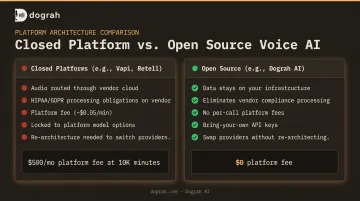
Cost at scale: Lock-in isn't just a flexibility problem — it's a cost structure problem. Closed platforms charge a platform fee on top of underlying API costs. Vapi, for example, charges $0.05/minute just for hosting calls, before any STT, LLM, or TTS costs. At 10,000 minutes/month, that's $500 in platform fees alone.
Dograh AI charges no per-call or per-minute platform fee on either self-hosted or managed cloud deployments. You pay wholesale rates directly to your chosen providers.
Frequently Asked Questions
Can ChatGPT do voice AI?
ChatGPT via OpenAI's Realtime API supports speech-to-speech voice interaction, but it's a closed, hosted API with no self-hosting option. It works well for prototypes but limits production deployments that require data sovereignty, custom telephony, or bring-your-own-model flexibility. It can, however, be used as the LLM backend within an open source orchestration platform like Dograh AI.
What is the best open source voice AI platform?
Look for self-hosting capability, multi-provider STT/LLM/TTS support, a visual workflow builder, telephony integrations, and clear licensing terms. Dograh AI covers all of these — drag-and-drop workflow builder, Docker self-hosting under BSD 2-Clause license, and support for locally hosted models including Whisper, Kokoro, Llama, and Voxtral.
How much does it cost to build an open source voice AI agent?
The platform itself carries no license fee — costs come from STT, LLM, and TTS API usage. Rough benchmarks: Deepgram STT at $0.0065/min, Groq Llama 3.1 8B at $0.05/$0.08 per 1M tokens, ElevenLabs Flash TTS at $0.05/1K characters. Dograh AI's hybrid pre-recorded TTS can cut per-call costs by up to 3× by eliminating API calls for predictable utterances.
How do I reduce latency in my voice AI agent?
Three levers matter most: Speech-to-Speech mode collapses the STT+LLM+TTS pipeline into a single audio-in/audio-out model, streaming output at every layer avoids waiting for complete responses, and speed-optimized providers — Groq for LLM, Deepgram for STT — cut inference time further.
What is the difference between a voice agent and a voice assistant?
Consumer voice assistants (Siri, Alexa) are general-purpose, device-bound, and respond to discrete commands. AI voice agents are business-oriented systems designed for multi-turn task completion — integrated with CRMs and APIs, deployable over telephony at scale, and configured to drive specific outcomes like booking appointments or qualifying leads.
Can I self-host a voice AI agent without coding?
Platforms with visual workflow builders — drag-and-drop node editors, global prompt configuration, and pre-built telephony integrations — allow non-developers to configure and deploy a voice agent without writing code. Self-hosting the platform itself does require basic Docker knowledge, but managed cloud deployments of the same open source platform require none at all.