Introduction
AI voice assistants have moved well past the demo stage. They're handling inbound support queues, qualifying real estate leads, automating appointment bookings, and running outbound sales campaigns across healthcare, fintech, legal, and beyond. According to Gartner, 85% of customer service leaders planned to explore or pilot customer-facing conversational AI in 2025 — and the broader AI voice agents market is projected to grow from $2.54B in 2025 to $35.24B by 2033.
Building a working prototype is accessible today. Building one that performs reliably in production is a different problem. Low latency, accurate transcription, graceful fallbacks, compliant data handling — each layer of the stack involves real trade-offs, and the decisions you make early determine what's possible later.
This guide covers the full build process:
- What the pipeline looks like and how each component fits together
- How to spec and build for production, not just demos
- The parameters that separate production-grade from demo-grade performance
- How to choose the right approach for your team and use case
Key Takeaways
- A voice assistant is a four-stage pipeline: ASR (speech to text) → LLM (reasoning) → TTS (speech output) → orchestration layer
- Success depends on defining use case, metrics, and compliance requirements before selecting components
- End-to-end latency, voice naturalness, fallback design, and data residency are the variables that determine production quality
- You can build from scratch, use a closed managed platform, or use an open-source self-hostable platform — each involves real trade-offs
- Most production failures trace back to three mistakes: sequential batch processing, weak fallback logic, and compliance deferred to post-launch
What Makes Up an AI Voice Assistant
A voice assistant isn't a single model. It's a coordinated pipeline: audio comes in from a microphone or phone line, gets transcribed, reasoned over, converted back to speech, and returned to the caller — all within a few hundred milliseconds.
Here's what each stage does:
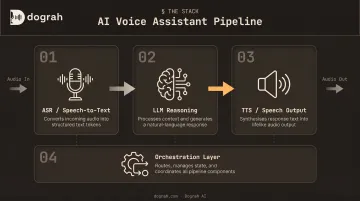
Automatic Speech Recognition (ASR)
ASR converts raw audio into text. But raw accuracy (word error rate) tells only part of the story. Meta's 2024 Interspeech paper found that a speaker with 52.94% WER still achieved 75.86% intent accuracy, while another at 33.87% WER reached 94.86% — meaning WER and downstream task performance don't move in lockstep.
What actually matters for production ASR:
- Domain vocabulary handling (medical terms, financial jargon, acronyms)
- Accent robustness across your user base
- Real-time streaming capability (batch ASR produces unacceptable delays)
- Noise handling in phone-quality audio
Popular options include Deepgram Nova-3, AssemblyAI Universal-3 Pro, and OpenAI Whisper for self-hosted deployments.
Large Language Model (LLM)
Once ASR converts audio to text, the LLM takes over as the reasoning layer. It interprets transcribed text, maintains context across turns, decides what to say or do, and triggers tool calls when backend actions are needed.
Two architectural paths exist here. The traditional cascaded pipeline runs STT → LLM → TTS in sequence. Newer speech-to-speech (S2S) models like OpenAI GPT-Realtime-2 and Gemini Flash Live process audio more directly, eliminating intermediate conversion steps and cutting end-to-end latency.
Dograh AI ships S2S orchestration across the full stack using both of these models, which roughly halves latency compared to the traditional pipeline.
Text-to-Speech (TTS)
TTS converts the LLM's text response into spoken audio. The spectrum runs from rule-based robotic voices to neural TTS with voice cloning — and the difference matters for user trust and outbound call performance.
TTS cost scales with generated characters. Pricing ranges from $16/1M characters (AWS Polly Neural, Azure Neural, Google Neural2) up to $160/1M for premium studio voices. One approach worth noting: Dograh AI's hybrid pre-recorded + TTS feature mixes real human voice clips for predictable phrases with TTS fallback in the same cloned voice — cutting costs up to 3× while producing more natural-sounding output than pure TTS.
Orchestration and Telephony Integration
Orchestration manages pipeline state — deciding which component runs, with what context, and what happens when something fails or the user interrupts mid-response. Key responsibilities include:
- Endpointing: detecting when the user has finished speaking
- Turn-taking logic: managing who speaks when
- Fallback routing and escalation: handling edge cases gracefully
Telephony integration — SIP trunks, WebRTC, carriers — is the channel connecting your pipeline to actual phone lines or web interfaces. Geographic proximity between your telephony infrastructure and processing services directly affects latency.
How to Build an AI Voice Assistant: Step-by-Step
Step 1: Define Your Use Case and Success Metrics
This step shapes every decision that follows. Inbound customer support, outbound sales, appointment scheduling, and HR automation all require different conversation designs, integrations, and performance benchmarks.
Define these before writing a line of code:
- Target containment rate — what percentage of calls should the agent handle without human escalation?
- Acceptable end-to-end latency — under 600ms for natural conversation; above 2 seconds feels noticeably broken
- Languages and accents to support
- Escalation thresholds — what triggers a handoff to a human?
Vague scope produces systems that are hard to test and harder to improve. If you can't state what "good" looks like before you build, you won't know if you've built it.
Step 2: Choose Your Technology Stack
Four decisions, made in sequence:
- ASR provider — Deepgram or AssemblyAI for managed streaming; Whisper for self-hosted
- LLM — GPT-4o or Gemini for cloud-hosted; Llama or Qwen for locally hosted
- TTS — ElevenLabs, Azure Neural, or Google Neural2 for commercial; Kokoro or Coqui for open-source
- Orchestration platform — DIY framework, closed platform, or an open-source visual builder
On orchestration platforms: closed platforms like Vapi or Retell are fastest to start, but they route all call data through their infrastructure — a hard blocker for regulated industries.
Open-source alternatives like Dograh AI offer a visual no-code workflow builder (comparable to n8n, but for voice agents), self-hosting via Docker, support for locally hosted models (Whisper, Kokoro, Llama, Voxtral), and deployment options that keep data within your own infrastructure.
Every component that touches voice data in a cloud vendor's infrastructure becomes a potential compliance surface. Teams in healthcare, fintech, or government should make data residency decisions at the stack selection stage, not after deployment.
Step 3: Design Your Conversation Flow
Voice conversation design differs in important ways from text or chat UI design. Users can't scroll back, can't click menus, and will interrupt mid-sentence.
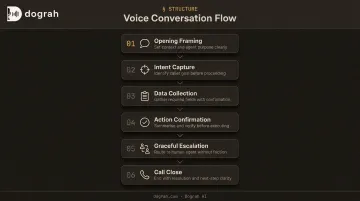
A well-structured flow includes:
- Opening framing — especially critical for outbound; the first 15 seconds determine whether the call continues. Establish legitimacy and purpose immediately.
- Intent capture — short, direct questions; don't make users remember options
- Data collection — one piece of information at a time, with confirmation prompts
- Action confirmation — confirm before executing irreversible actions
- Graceful escalation — make handoffs to humans feel intentional, not like failures
- Call close — clear, definitive endings prevent awkward silences
Keep TTS responses short. Interrupt handling must be explicitly designed — not assumed. Dograh AI offers pre-built templates for common use cases (real estate, customer support, healthcare, finance) that provide starting frameworks for each of these flow elements.
Step 4: Integrate with Backend Systems
A voice assistant with no backend integrations can only answer scripted questions. Real value comes from connecting to CRMs, calendars, ticketing systems, and APIs so the agent can take action mid-conversation — booking appointments, pulling account balances, updating records.
Integration depth affects latency directly. Every API call in the response path adds delay. Mitigation strategies:
- Pre-fetch customer context at call start using caller ID
- Cache frequently accessed data (product catalogs, FAQs)
- Run non-blocking API calls in parallel where possible
Dograh AI integrates with Salesforce, HubSpot, Zendesk, ServiceNow, Twilio, Vonage, and 200+ apps via webhooks and tool calls. It also supports MCP (Model Context Protocol), enabling agent platforms like Claude Code, OpenCode, and Codex to build and configure voice agents directly — cutting integration time with internal systems considerably.
Step 5: Test, Optimize Latency, and Deploy
Three testing layers before production:
- Unit testing — individual pipeline stages in isolation
- End-to-end conversation testing — across accent variations, noise conditions, and edge-case user behavior
- Load testing — confirm the system holds under concurrent calls
Dograh AI includes LoopTalk, an AI-to-AI testing framework that simulates real-world calling scenarios with different personas, accents, and emotional states — catching looping prompts, intent confusion, and tool failure recovery issues before they reach customers.
Deployment decision: Cloud-managed deployments scale faster and iterate more quickly. Self-hosted or private cloud deployments are required when data residency is a hard constraint. Either way, start with a narrow rollout — a single use case, limited call volume — and expand only after validating key KPIs in production.
Key Parameters That Determine Voice Assistant Quality
Two voice assistants built with identical components can perform very differently. These four parameters explain why.
End-to-End Latency
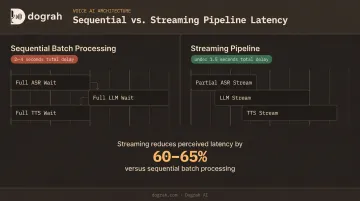
Latency is the most user-visible quality dimension. ACM CUI 2025 research found delays above 2 seconds feel unnatural; above 4 seconds, quality of experience degrades meaningfully. Their measured pipeline averaged 1.47s total, split across ASR (0.11s), LLM (0.49s), and TTS (0.88s).
The common failure is sequential batch processing — wait for full transcript, generate full LLM response, generate full TTS audio, then play. That approach routinely produces 2–4 second delays.
Streaming strategies that actually work:
- Stream partial ASR output to the LLM before transcription is complete
- Stream TTS audio as it's generated rather than waiting for the full response
- Use S2S architectures to skip the STT→LLM→TTS chain entirely where possible
Voice Naturalness and Cost
On outbound calls, voice quality determines whether the conversation survives the first few seconds. The cost trade-off is real: premium neural TTS costs $30–160/1M characters, while standard neural options run $16/1M.
The hybrid approach addresses both dimensions:
- Mix pre-recorded human voice clips for predictable phrases (greetings, confirmations)
- Fall back to TTS in the same cloned voice for dynamic content
- Result: lower cost and better perceived quality than pure TTS alone
ASR Accuracy and Fallback Design
ASR errors compound. A bad transcription produces a misinterpreted intent, which triggers the wrong action, which the user must correct — adding turns and degrading the experience.
When the system is uncertain, it should ask for clarification rather than acting on a bad transcription. Fallback responses must be explicitly designed, not left as generic apologies.
Design fallback as a state machine with explicit handling for:
- Low-confidence transcription
- Out-of-scope queries
- Repeated no-match
- Mid-response interruptions
- Silence or background noise only
Dograh AI supports custom STT dictionaries for domain-specific vocabulary (medical terms, financial abbreviations, product names), which reduces domain-specific transcription errors before they hit fallback logic.
Data Privacy and Compliance Architecture
Where voice data lives determines which compliance frameworks apply. Cloud-routed pipelines require vendor compliance certifications (HIPAA BAA, GDPR DPA, SOC 2) and create data sovereignty exposure.
Key compliance requirements by region:
| Framework | Key Requirement |
|---|---|
| TCPA (US) | Prior express consent; AI voices covered as of FCC 2024 ruling |
| HIPAA | Cloud providers handling ePHI must sign a BAA |
| GDPR (EU) | Transfers outside EEA require adequacy decision or SCCs |
| EU AI Act | Transparency obligations for AI interactions from August 2026 |
Self-hosted deployments keep all data within the customer's own infrastructure, removing the need for third-party compliance certifications entirely.
Dograh AI's fully managed private cloud option handles this by deploying the entire voice agent infrastructure within the customer's own cloud environment. Dograh manages the operations; the customer retains full data ownership.
Common Mistakes When Building AI Voice Assistants
Three mistakes consistently break production deployments — and all three are avoidable at the design stage:
- Sequential batch processing: Waiting for complete transcription, then a full LLM response, then full TTS audio before playback routinely produces 2–4 second delays. Streaming each stage independently isn't an optimization — it's the baseline requirement.
- Missing fallback and interruption handling: No-match responses, low-confidence transcriptions, and mid-response interruptions happen constantly in real calls. Design explicit responses for each failure mode before launch, or users will hang up.
- Deferring compliance to post-launch: Retrofitting data residency controls, consent logging, and audit trails into a live system is significantly harder and more expensive than building them in from the start. Lock in these decisions before selecting any component.
Build From Scratch, Closed Platform, or Open-Source?
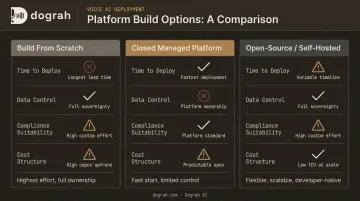
Your architecture choice locks in your cost structure, compliance posture, and how fast you can ship. Three paths exist — each with a fundamentally different trade-off profile.
Build From Scratch (DIY)
Best for: Teams with deep ML engineering capacity who need full control or are integrating into proprietary infrastructure.
Trade-offs to expect:
- Maximum flexibility on every component
- High development overhead — stitching ASR, LLM, TTS, telephony, and orchestration independently
- Production operations (monitoring, failover, scaling) fall entirely on your team
- Months of build time before a production-ready agent
Closed Managed Platforms (Vapi, Retell)
Best for: Teams that want the fastest path to a working demo and are comfortable routing call data through a third-party cloud.
The speed advantage comes with real costs:
- Fast to start; bundled telephony-style orchestration
- Vapi charges $0.05/min base plus model costs passed through; HIPAA compliance is an add-on at $2K/month
- Retell charges $0.07–0.31/min including silence and hold time while STT stays active
- Limited customization; vendor lock-in; data through vendor infrastructure — a liability for regulated industries
Open-Source, Self-Hostable Platforms (Dograh AI)
Best for: Teams that want platform-level speed without surrendering data sovereignty — or operating in regulated industries where vendor cloud routing is a compliance problem.
Dograh AI deploys via Docker (requires Docker 20.10+) and opens the visual workflow builder at localhost:3000. Pre-built templates and a drag-and-drop interface get a working agent deployed in under 2 minutes. The platform supports locally hosted models — Whisper, Kokoro, Llama, Voxtral, Canary, Qwen — alongside managed provider integrations.
Three deployment options:
- Self-hosted OSS — free under BSD 2-Clause license; your infrastructure, your data
- Fully managed cloud — Dograh-managed, fastest to scale
- Fully managed private cloud — Dograh operates the infrastructure within your own environment; all data stays on-premises
The self-hosted OSS version requires infrastructure to run. The fully managed private cloud resolves this while maintaining data sovereignty. No platform fees on the OSS version; bring your own API keys for all components.
Frequently Asked Questions
How do AI voice assistants work?
A voice assistant runs a four-stage pipeline: ASR converts speech to text, an LLM interprets the text and generates a response, TTS converts that response to audio, and an orchestration layer manages context, turn-taking, and error handling across turns. Each stage runs in near-real-time, with streaming between stages to minimize perceived delay.
Can I make ChatGPT my voice assistant?
ChatGPT (or GPT-4o via API) can serve as the LLM reasoning layer, but you still need an ASR layer to convert speech to text and a TTS layer to speak responses. Platforms and frameworks that connect these components make the integration practical without building the full pipeline from scratch.
Can AI do voice recognition?
Yes. AI-powered ASR models like Whisper, Deepgram Nova-3, and AssemblyAI Universal-3 Pro handle voice recognition with high accuracy across accents and languages. Azure Speech alone supports over 140 locales for STT, and all three are standard components in modern voice assistant pipelines.
How can I develop an AI voice of myself?
Most modern TTS providers offer voice cloning from a recorded audio sample. For more natural-sounding output, combining pre-recorded clips of your real voice with TTS fallback in the same cloned voice produces better results than cloned TTS alone. Platforms like Dograh AI ship this as a built-in feature, particularly effective for predictable phrases that repeat across calls.
Are AI calls legal?
AI-generated calls are legal in most jurisdictions but subject to disclosure, consent, and do-not-call rules that vary by country. In the US, the FCC's 2024 ruling covers AI-generated voices under TCPA; in Europe, GDPR and the EU AI Act's transparency obligations (effective August 2026) apply. Always include disclosure at the start of AI-initiated calls and verify applicable regulations before launching outbound campaigns.
Which language is best for voice assistants?
For programming, Python is the dominant choice. Stack Overflow's 2025 Developer Survey shows Python rose 7 percentage points from 2024, driven by AI and data science adoption. For spoken language coverage, Azure Speech supports 140+ locales and AssemblyAI Universal-2 covers ~81 languages — choose based on your target user base.