Self-hosting changes that equation. When all audio, transcripts, and business logic run on your own infrastructure, sensitive data never leaves your environment — which matters enormously for healthcare, fintech, legal, and government use cases.
The catch: results vary widely. The same open-source models can produce a fluid, sub-600ms conversation on one deployment and an unusable, laggy experience on another. Component selection, hardware sizing, and telephony configuration all determine which outcome you get.
This guide covers the exact components you need, the five build steps, the variables that separate production deployments from demos, and the mistakes that cause most self-hosted voice agents to stall.
Key Takeaways
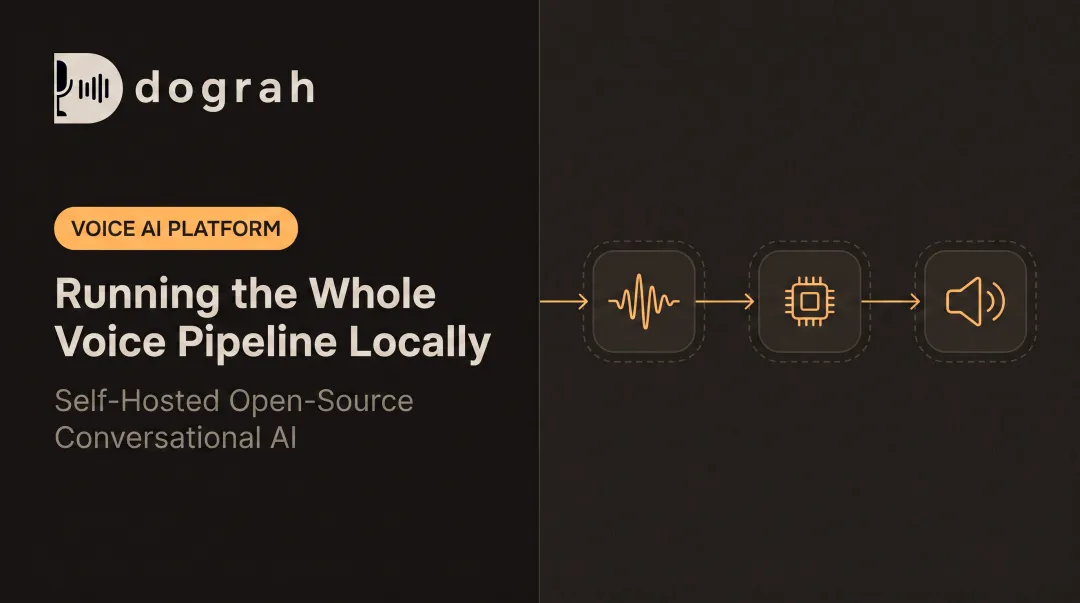
- A self-hosted voice pipeline requires four components: STT engine, LLM, TTS engine, and a telephony layer, all wired together by an orchestration layer that handles real-time audio
- Full self-hosting means complete data sovereignty — no recordings or transcripts leave your infrastructure, eliminating HIPAA BAA and SOC 2 vendor reviews
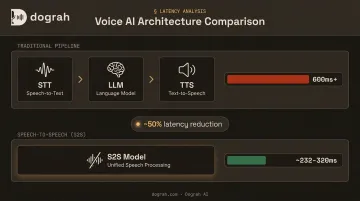
- Speech-to-Speech (S2S) architecture eliminates the STT→LLM→TTS chain and can roughly halve end-to-end latency vs. a traditional pipeline
- Telephony configuration and media server capacity cause more production failures than LLM selection — plan for both before you go live
- Dograh AI (open-source, BSD 2-Clause, Docker-deployable) bundles the full pipeline with a visual workflow builder — no manual component wiring required
What You Need Before You Start
Getting this right upfront saves significant rework later. Hardware sizing, model licensing, and compliance posture all need to be locked in before you write a line of configuration.
Infrastructure and Hardware
Minimum specs to run a real-time voice pipeline locally:
- CPU-only inference: 16GB+ RAM for a 7B–13B parameter LLM; viable but expect higher latency
- GPU-accelerated (recommended for production): 8GB+ VRAM cuts LLM first-token time and is nearly essential for handling concurrent calls
- Concurrent calls: Each simultaneous call requires its own inference thread. Size hardware based on expected peak volume, not average volume
A practical reference: SitePoint's 2026 Ollama guide recommends 8GB RAM minimum for 7B models and 16GB+ for 13B models, with GPU VRAM optional for CPU-only but strongly recommended for production.
Model License and Compliance Readiness
Before selecting any model:
- Verify commercial use rights : some open-weight models have restrictions that create compliance issues for businesses
- Check telephony provider terms for automated/AI calling, especially for outbound : the FCC ruled in 2024 that AI-generated voices are "artificial voices" under TCPA, requiring prior express consent
- Document your data flow : identify every point where audio or text leaves your server before touching regulated data (HIPAA, GDPR, PCI-DSS)
Self-hosting reduces vendor exposure, but compliance responsibility stays with your organization. You still need encryption at rest and in transit, access controls, audit logging, and retention policies.
How to Build a Self-Hosted AI Voice Assistant
Step 1: Define Your Use Case and Deployment Environment
Start here — not with model selection.
Clarify your use case first:
- Inbound call handling (answering inquiries, booking appointments, routing calls): requires fast response to live callers, with slightly higher latency tolerance than outbound
- Outbound dialing (lead qualification, reminders, follow-ups): requires answer detection, compliance handling, and strong opening-second performance
- Both: each has different telephony setup requirements and conversation flow logic
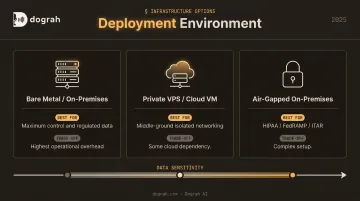
Choose your deployment environment based on data sensitivity:
| Environment | Best For | Trade-Off |
|---|---|---|
| Bare metal / on-premises | Maximum control, lowest latency, regulated data | Highest operational overhead |
| Private VPS / cloud VM | Middle ground; isolated networking | Some cloud dependency |
| Air-gapped on-premises | HIPAA, FedRAMP, ITAR requirements | Complex setup, no external calls |
Step 2: Assemble Your Voice Pipeline Components
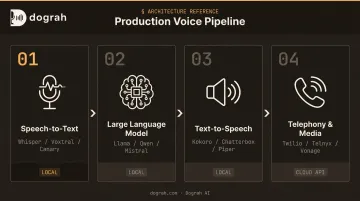
A production voice pipeline has four layers:
Speech-to-Text (STT):
- Local: OpenAI Whisper, Mistral Voxtral, NVIDIA Canary
- Cloud API: Deepgram, AssemblyAI, Google STT (audio leaves your server)
Large Language Model (LLM):
- Local: Llama 3.1 (8B, 70B, 405B), Qwen 2.5 (0.5B–72B), Mistral 7B (all via Ollama)
- Cloud API: GPT-4, Gemini, Claude (call transcripts leave your server)
Text-to-Speech (TTS):
- Local: Kokoro (82M params, Apache licensed), Chatterbox (sub-200ms latency claim), Coqui XTTS-v2, Piper
- Cloud API: ElevenLabs, Cartesia, Azure TTS
Telephony + Media Layer: Twilio, Telnyx, Vonage, or direct SIP trunking (covered in Step 3).
Fully local models give complete data sovereignty and eliminate per-token costs, but require sufficient hardware to run inference fast enough for real-time conversation. API-connected models reduce hardware overhead but mean call audio and transcripts leave your infrastructure.
Dograh AI (open-source, BSD 2-Clause) deploys via Docker and wires all four layers through a visual workflow builder. It uses a bring-your-own-provider model: connect your own STT, LLM, TTS, and telephony keys, and Dograh handles orchestration. Teams without dedicated MLOps capacity avoid most of the manual pipeline setup.
Step 3: Set Up Telephony and Call Routing
Telephony is where most self-hosted deployments hit their first production failure. It's also the layer teams spend the least time preparing for.
Configure your telephony provider:
- SIP trunking: Twilio ($0.0085/min inbound, $0.0140/min outbound in the US), Telnyx ($0.002/min + SIP fee), Vonage ($0.00798/min domestic)
- WebRTC: Browser or app-based voice, lower setup friction
- Hosted number with call forwarding: Simplest setup but adds a routing hop
Set up the real-time audio transport layer. This is the WebSocket bridge or media server that streams audio between your telephony provider and your STT engine. All major providers support this: Twilio via Media Streams, Telnyx via WebSocket media streaming, Vonage via WebSocket endpoint.
This layer is often the bottleneck teams overlook. An under-provisioned media server introduces jitter and delay that no downstream optimization can recover. According to ITU-T G.114, one-way voice delay above 400ms should generally be avoided; telephony routing, carrier hops, and codec processing can easily contribute 200–500ms before your models even see the audio.
Step 4: Build Conversation Logic and Integrations
Design your conversation flow:
- Start minimal — build a linear flow: greeting → one intent → one response → call end
- Validate end-to-end before adding branching logic or tool calls
- Add complexity incrementally: intent detection, slot filling (collecting caller info), branching conditions, escalation triggers
- Wire tool calls last: CRM lookups, calendar availability, webhook calls to external systems
Dograh AI's drag-and-drop workflow builder supports all of this without custom code — you can describe your use case in plain English and the platform generates the LLM prompt and workflow. Tool calls via webhook connect to Salesforce, HubSpot, Google Calendar, Cal.com, or any custom API.
Critical on integration failure paths: A voice agent that crashes silently when a CRM call fails is worse than one that tells the caller to hold. Define explicit failure responses for every external call before going to production.
Step 5: Test, Monitor, and Optimize for Production
Run end-to-end latency benchmarks across each pipeline stage:
- Audio capture and streaming
- STT transcription latency
- LLM first-token time
- TTS audio generation
- Media playback to caller
Find the slowest stage and fix it first. For most deployments, LLM inference speed or an underpowered media server is the bottleneck, not the STT engine.
Set up post-call monitoring before going live:
- Log full call transcripts
- Flag transcription confidence scores below threshold
- Track call completion rates and hang-up timing
More advanced setups add sentiment detection, miscommunication detection, and strict adherence checking. Dograh AI includes post-call analysis capabilities, LangFuse integration for full observability, and LoopTalk: an AI-driven testing engine that simulates real-world customer personas, including interruptions, tool timeouts, and edge-case scenarios, before production deployment.
Without transcripts and latency metrics, silent failures look identical to successful calls. Set monitoring thresholds before the first call goes live, not after you notice drop-off in completion rates.
Key Variables That Affect Performance
Outcomes vary enormously across self-hosted deployments even when using the same models. Four variables account for most of the gap between a usable production agent and one that frustrates callers.
End-to-End Latency
Human turn-taking tolerance is shorter than most builders assume. Research from a 2024 ACL spoken-dialogue paper shows perceived willingness to engage starts dropping after 600ms and steps down significantly around 700–800ms — not the commonly cited 1–2 seconds.
Two main levers:
- Speech-to-Speech (S2S) architecture — models like Gemini Flash Live and GPT-4o Realtime process audio input and generate audio output directly, eliminating the discrete STT→LLM→TTS chain. OpenAI reports GPT-4o responding to audio in as little as 232ms, with a 320ms average. Dograh AI ships S2S orchestration supporting both Gemini Flash Live and OpenAI GPT-Realtime-2.
- Geographic co-location — placing your media server and model inference server close together eliminates the network round-trip between them
Model Size vs. Hardware Capacity
The mismatch between model size and available compute is the most common cause of latency problems in self-hosted deployments.
Quantized models (GGUF 4-bit or 8-bit) cut memory footprint substantially while preserving quality for most customer service conversation flows. The trade-off varies by model, runtime, hardware, and context length — benchmark on your actual hardware before committing.
TTS Voice Quality
Callers judge the agent in the first 3–5 seconds of audio response. A robotic TTS voice increases hang-up rates on outbound and reduces trust on inbound regardless of how accurate the LLM response is.
Dograh AI ships a hybrid pre-recorded + TTS feature that mixes real human voice clips for high-frequency phrases (greetings, acknowledgments, transitions) with neural TTS fallback for dynamic content — delivering up to 3× cost reduction and 2× better outbound conversions compared to pure neural TTS.
STT Accuracy on Telephony Audio
STT errors cascade. A misrecognized word can trigger the wrong intent branch, cause a tool call to fail, or produce a nonsensical LLM response. Most STT benchmarks use clean, high-sample-rate audio — telephony audio is compressed, often 8kHz, and noisy.
Test your STT model on audio that matches your actual caller population:
- Real telephony samples (8kHz, compressed), not studio recordings
- Accents and dialects representative of your caller base
- Background noise levels typical of your target environment
Many deployments perform well on clean audio and degrade sharply on real telephony input.
Common Mistakes When Building a Self-Hosted Voice Agent
Most voice agent deployments don't fail because of bad models — they fail because of avoidable configuration and process mistakes. Here are the four that show up most often.
Treating telephony latency as someone else's problem. An underpowered WebSocket media server or a distant telephony provider can add latency that no model optimization can recover. Fix the transport layer before tuning models.
Building complex conversation trees before validating the basic call flow. Deploy the simplest possible conversation first. Most pipeline failures surface here, not in the branching logic.
Selecting models based on benchmark leaderboards. Leaderboard scores don't reflect telephony-grade audio conditions. Re-evaluate your STT and TTS choices on phone-quality audio before committing to a stack.
Deploying without post-call monitoring. No logs means nothing to diagnose from. You need transcripts, latency metrics, and failure flags to distinguish a healthy agent from one that's silently failing on edge cases.
When Does Self-Hosting a Voice AI Make Sense?
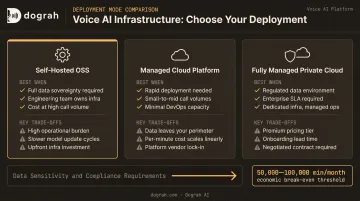
Self-hosting is not always the right fit. Here's a straightforward comparison:
| Deployment Mode | Best When | Key Trade-Offs |
|---|---|---|
| Self-hosted OSS (e.g., Dograh AI on your own infra) | Regulated industries; strict data residency (GDPR, HIPAA, Swiss law); can't accept third-party vendor compliance | Higher operational overhead; eliminates per-minute fees and vendor lock-in; full auditability |
| Managed cloud platform (Vapi, Retell) | Speed-to-deploy is the primary constraint; non-sensitive data; limited infra capacity | Call data on third-party servers; Retell charges $0.07–$0.31/min; limited local model use |
| Fully managed private cloud (e.g., Dograh AI in your cloud) | Needs data sovereignty but lacks internal engineering capacity; enterprise SLA requirements | Higher cost than pure OSS; requires a vendor relationship, but infrastructure stays in your account |
The table above maps cleanly to three distinct risk profiles. As data sensitivity, call volume, and compliance requirements increase, the case for self-hosting strengthens. Based on Dograh AI's platform data, self-hosting becomes economically advantageous at roughly 50,000–100,000 minutes per month, depending on call length and TTS costs — below that, managed platforms may be simpler despite higher per-minute fees.
Frequently Asked Questions
Is there a self-hosted AI voice assistant I can talk to?
Yes — two categories exist. Personal/smart home setups (Home Assistant + Whisper + Piper) handle simple command-response interactions locally. Business-grade platforms like Dograh AI handle phone calls, multi-turn conversations, CRM integrations, and production-scale outbound/inbound calling.
What components do I need to build a self-hosted AI voice assistant?
Four core components: an STT engine, an LLM, a TTS engine, and a telephony/media layer. These are connected by an orchestration layer that manages real-time audio streaming, conversation state, and tool calls between components.
How do I reduce latency in a self-hosted voice AI pipeline?
Two main levers: switch to a Speech-to-Speech architecture (eliminates the discrete STT→LLM→TTS chain) and ensure your media server and model inference server are geographically co-located. Both changes address latency at the source rather than masking it further down the pipeline.
Can I use locally hosted open-source models for a self-hosted voice agent?
Yes. Whisper (STT), Llama/Qwen/Mistral via Ollama (LLM), and Kokoro/Piper/Chatterbox (TTS) all run locally. The trade-offs are hardware requirements and the need to validate performance on telephony-grade 8kHz audio rather than clean studio recordings — so benchmark on telephony-grade audio before committing to a model.
Does self-hosting a voice AI mean it's automatically HIPAA or GDPR compliant?
No. Self-hosting eliminates the voice AI platform as a vendor requiring a BAA or SOC 2 assessment, but your organization retains full compliance responsibility. Encryption, access controls, audit logging, data retention policies, and BAAs for any remaining vendors (telephony, STT/TTS APIs) must still be implemented correctly.
What's the difference between self-hosting and using a platform like Vapi or Retell?
Managed platforms handle infrastructure but process all call data on their servers, charge per-minute fees (Retell: $0.07–$0.31/min), and limit local model use. Self-hosting keeps all data within your infrastructure, eliminates platform fees, and allows any locally hosted model — at the cost of higher operational responsibility.