Introduction
Voice bots have moved well past novelty. They're handling real inbound support queues, qualifying leads, and booking appointments — work that used to require a human agent on every call. But building one that actually works in production isn't just about picking a speech library and calling it done.
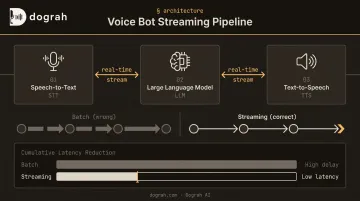
A production voice bot is a three-stage streaming pipeline: Speech-to-Text (STT) → Large Language Model (LLM) → Text-to-Speech (TTS). The architecture is simple enough in theory. Getting latency under control, configuring Voice Activity Detection correctly, and surviving real PSTN call conditions is where most DIY builds break down.
This guide covers the full architecture and exact build steps using open-source tools. It also addresses the parameters that separate a working bot from a production-grade one — including when building from scratch is the right call versus the slowest path to deployment.
Key Takeaways
- Three streaming stages: STT → LLM → TTS must each stream output immediately to the next stage, not wait for completion
- Open-source stack exists for every layer: Whisper (STT), Llama 3/Qwen (LLM), Kokoro/Coqui XTTS (TTS) — giving you full data sovereignty with no vendor dependency
- Latency is your primary KPI: Target under 400ms one-way delay (ITU-T G.114) — streaming, VAD tuning, and service co-location are your main controls
- Building from scratch means maximum flexibility, but real infrastructure overhead — open-source platforms like Dograh AI offer a faster middle path without sacrificing data control
Understanding Voice Bot Architecture Before You Build
Every production voice bot runs on the same backbone: audio in → STT (text) → LLM (response) → TTS (audio out). The critical implementation detail is that each stage must stream its output to the next in real time.
Waiting for stage completion before passing results is the single largest source of unacceptable latency. If your STT waits for a full transcript before sending to the LLM, and your LLM waits for a complete response before sending to TTS, you've stacked three sequential delays into what could be one continuous stream.
Streaming STT: From Audio to Text in Real Time
There are two approaches to transcription:
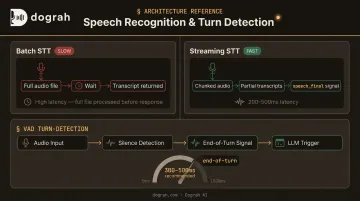
- Batch transcription: Send a complete audio file, wait for the result. Google's batch recognition is asynchronous and designed for files longer than one minute — not built for conversational bots
- Streaming transcription: Transcribe chunk-by-chunk as the user speaks, with Deepgram's Nova-3 streaming achieving sub-300ms latency and total transcript latency typically 200–500ms
For any conversational application, batch transcription simply can't deliver the response times users expect.
Voice Activity Detection (VAD) is the gating layer sitting in front of STT. It detects when the user has stopped speaking and signals the pipeline to proceed. A misconfigured VAD either cuts users off mid-sentence (threshold too short) or creates unnatural dead air (threshold too long). Deepgram's endpointing defaults to 10ms but recommends 300–500ms for conversational contexts.
The LLM Layer: Context, Intent, and Response
The LLM receives the transcript and generates a response — but voice imposes constraints that text chatbots ignore. A 200-word response is readable in a chat window; spoken aloud, it's a 30-second monologue that kills the conversation.
Two constraints apply at this layer:
- Response length: Cap replies at 2–3 sentences. The OpenAI Realtime Prompting Guide recommends this explicitly, including speaking alphanumerics character by character
- Turn memory: Maintain conversation history in the system prompt context. Without it, the bot loses thread after 2–3 exchanges — a failure immediately obvious to callers
Speech-to-Speech as an Emerging Alternative
Speech-to-Speech (S2S) models (including GPT-4o Realtime and Gemini 2.5 Flash Live) bypass the text layer entirely, taking raw audio in and returning audio out. This eliminates STT and TTS as separate pipeline hops entirely.
Dograh AI's full-stack S2S implementation using Gemini Flash Live and OpenAI GPT-Realtime-2 demonstrates the practical impact: end-to-end latency roughly halved compared to the classic STT→LLM→TTS chain. For teams where latency is the primary constraint, S2S is worth evaluating seriously. The tradeoff is reduced flexibility in selecting individual STT and TTS models.
How to Build a Voice Bot from Scratch: Step-by-Step
Step 1: Set Up Your Development Environment
Install core dependencies:
- Python (broadest ecosystem for voice AI libraries)
PyAudioorsounddevicefor microphone capture- A WebSocket library (
websocketsoraiohttp) for streaming connections - Package managers for LLM/STT/TTS dependencies (
pip,conda)
Verify audio driver permissions before writing a line of pipeline code. If you're testing against a local telephony simulator, confirm port availability now — debugging audio driver issues mid-build wastes hours.
Step 2: Implement Voice Activity Detection and Audio Capture
Two widely used open-source VAD options:
- Silero VAD: Processes 30ms+ chunks, under 1ms CPU processing per chunk, supports 8kHz and 16kHz input
- WebRTC VAD: Accepts 16-bit mono PCM at 8kHz/16kHz/32kHz/48kHz, frame durations of 10/20/30ms, aggressiveness tunable from 0–3
Set audio capture to 16kHz mono PCM — this is the format Whisper and most STT models expect, and it minimizes processing overhead.
Step 3: Configure Streaming Speech-to-Text
Self-hosted option (Whisper):
OpenAI Whisper is fully open-source and runs locally — audio never leaves your infrastructure. Key constraints: it processes 30-second sliding windows internally, requires 16kHz input (hard-coded), and needs a GPU for real-time use. On a 29.89-second clip, large-v2 took 5.52 seconds on an A100 GPU and nearly 60 seconds on CPU.
Use faster-whisper for chunked real-time deployment.
API-based option (Deepgram):
Open a streaming WebSocket connection and receive partial transcripts as the user speaks:
import asyncio
import websockets
import json

async def stream_transcription():
    url = "wss://api.deepgram.com/v1/listen?encoding=linear16&sample_rate=16000&channels=1"
    headers = {"Authorization": f"Token {YOUR_API_KEY}"}

    async with websockets.connect(url, extra_headers=headers) as ws:
        async for message in ws:
            result = json.loads(message)
            transcript = result["channel"]["alternatives"][0]["transcript"]
            if result.get("speech_final"):
                # End-of-turn detected — send transcript to LLM
                await handle_end_of_turn(transcript)
Pass the transcript to the LLM as soon as speech_final is detected — not after waiting for a polished final result.
Step 4: Integrate the LLM for Response Generation
Local LLMs via Ollama or vLLM:
# Serve Llama 3 locally
ollama run llama3
vLLM reported 13ms/token TPOT for Llama 3 8B on a single H100 under light load — viable for production if you have the GPU. This eliminates API costs and keeps all conversation data on-premise.
API-based LLMs with streaming:
import anthropic

client = anthropic.Anthropic()

system_prompt = """You are a voice assistant. Rules:
- Respond in 1-2 sentences maximum
- No lists, markdown, or numbered items
- Use natural spoken language
- Never say 'certainly' or 'of course'"""

with client.messages.stream(
    model="claude-opus-4-5",
    max_tokens=150,
    system=system_prompt,
    messages=conversation_history
) as stream:
    sentence_buffer = ""
    for text in stream.text_stream:
        sentence_buffer += text
        if any(sentence_buffer.endswith(p) for p in [".", "!", "?"]):
            await send_to_tts(sentence_buffer)
            sentence_buffer = ""
Send each complete sentence to TTS immediately — don't wait for the full response. The moment a sentence boundary lands in the stream, dispatch it. Every extra second you hold the buffer adds directly to perceived latency.
Step 5: Add Text-to-Speech Voice Synthesis
| TTS Option | Latency | Voice Quality | Deployment |
|---|---|---|---|
| Kokoro-82M | Fast first byte | High (Apache 2.0) | Self-hosted, GPU recommended |
| Coqui XTTS v2 | <200ms streaming | High, voice cloning | Self-hosted, GPU/CPU |
| Piper | Very fast | Moderate | CPU-only, lightweight |
| ElevenLabs Flash v2.5 | 75ms | Very high | API, $0.05/1K chars |
| Cartesia Sonic-3 | 90ms TTFA | High | API, 15 credits/sec |
Self-hosted Kokoro delivers faster first-byte response than most API options but requires a GPU. ElevenLabs Flash and Cartesia Sonic-3 offer sub-100ms latency via API at a per-character cost.
Step 6: Connect to a Telephony Layer
Two main paths to receive real phone calls:
- SIP trunk integration: Asterisk or FreeSWITCH routes calls to your WebSocket server. Asterisk's AudioSocket protocol sends and receives real-time audio streams, handling the handoff between telephony signaling and your processing pipeline
- Telephony SDK: Twilio and Plivo both use WebSocket media streams. Both require
audio/x-mulawat 8kHz — not the 16kHz your STT expects, so you must resample incoming audio before transcription
Your WebSocket server is the coordination layer — audio in from telephony, processed through STT→LLM→TTS, synthesized audio back out. If you want to skip building and maintaining this infrastructure yourself, platforms like Dograh AI provide a self-hostable, open-source alternative that handles the full pipeline out of the box.
Key Parameters That Affect Voice Bot Performance
Parameter tuning is what separates a voice bot that technically works from one that's actually production-ready. Get it wrong and callers hear robotic pauses, clipped responses, and dead air — which kills trust fast.
End-to-End Latency Budget
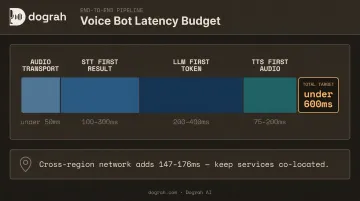
Total latency = STT first-result time + LLM first-token time + TTS first-audio time + network transport.
Based on documented provider figures and LiveKit's architecture reference:
| Stage | Target Range |
|---|---|
| Audio transport | <50ms (WebRTC) |
| STT first result | 100–300ms |
| LLM first token | 200–400ms |
| TTS first audio | 75–200ms |
| Total target | <600ms |
Co-locating all services in the same cloud region eliminates network hop latency. Azure cross-region examples show 147–176ms median RTT between distant regions — that's a quarter of your entire latency budget lost to geography alone.
Once your latency budget is dialed in, the next variable that directly shapes call quality is how well your bot knows when to stop listening.
VAD Turn-Detection Thresholds
The silence threshold (milliseconds of quiet = end of turn) is a direct trade-off:
- Too short: Bot interrupts the caller before they've finished
- Too long: Unnatural pause before the bot responds
Deepgram recommends 300–500ms for conversational contexts. Start at 400ms and adjust based on real call testing.
LLM Prompt and Response Design
Voice-optimized vs. chat-optimized prompts require a completely different approach:
Chat-appropriate (wrong for voice):
"Please provide a comprehensive answer covering all relevant aspects of the customer's question, including background context and any follow-up considerations."
Voice-appropriate:
"Respond in 1-2 short spoken sentences. No bullet points, no lists, no markdown. Speak naturally as if on a phone call."
A 200-word LLM response becomes a 30-second monologue. Constrain output length in the system prompt, not just in max_tokens.
Common Mistakes When Building a Voice Bot from Scratch
Most DIY voice bots fail for the same few reasons. Avoid these before you hit production.
Using batch STT instead of streaming: Sending a complete audio file to a transcription API adds noticeable latency before every response. Deepgram's streaming WebSocket returns transcripts in 200–500ms; batch recognition is designed for files over one minute. It's the single most common reason voice bots feel sluggish.
Designing responses for reading, not listening: Numbered lists, markdown headers, and multi-paragraph answers become incomprehensible when read aloud. Your system prompt must explicitly ban these formats. TTS engines read "asterisk asterisk bold text asterisk asterisk" literally.
Skipping real-phone testing conditions: Developers who test only against a clean USB microphone often find their bots break under real PSTN conditions. Before production, specifically test:
- G.711 μ-law codec compression (8kHz audio, not the 16kHz your STT was trained on)
- Background noise and varied accents
- Caller interruptions mid-response
- Simultaneous speech (barge-in handling)
Use phone-specific STT models — Deepgram's nova-2-phonecall and Google's phone_call model are purpose-built for 8kHz telephony audio.
When to Build from Scratch vs. Use an Open-Source Platform
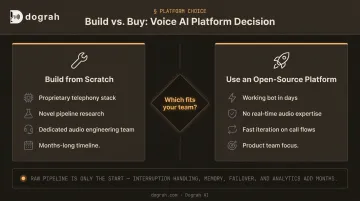
Building from Scratch Makes Sense When:
- You need to integrate a proprietary telephony stack with non-standard protocols
- You're running novel research into voice pipeline components
- Your team has dedicated real-time audio and WebSocket engineering experience
- Your timeline is measured in months, not days or weeks
Building from Scratch Is the Wrong Choice When:
- You need a working bot in days
- You lack real-time WebSocket and audio engineering expertise
- You need to iterate quickly on call flows, integrations, and prompts
- You're a product team, not an infrastructure team
That second list describes most product teams. The raw STT→LLM→TTS pipeline is only the start — adding interruption handling, barge-in detection, multi-turn memory, telephony failover, and post-call analytics turns a side project into a full-time infrastructure job fast.
The Middle Path: Open-Source Self-Hostable Platforms
Open-source platforms handle pipeline orchestration, telephony integration, and infrastructure — leaving teams to focus on the bot's behavior, prompts, and integrations.
Dograh AI is an open-source, self-hostable platform (BSD 2-Clause, deployable via Docker) built specifically to solve this gap. It provides:
- A visual workflow builder (similar to n8n, but purpose-built for voice agents)
- Pre-built VAD, turn-taking, context stitching, and session management
- Native support for locally hosted models — Whisper, Kokoro, Llama, Qwen, Coqui, Voxtral
- Speech-to-Speech orchestration via Gemini Flash Live and GPT-Realtime-2 (roughly halving latency versus the classic chain)
- Twilio and Vonage telephony integration out of the box
- A working voice bot deployable in under 2 minutes
For data-sensitive deployments — healthcare, finance, legal — the fully managed private cloud option keeps all audio and conversation data within your own infrastructure, eliminating HIPAA/GDPR vendor certification overhead entirely.
Frequently Asked Questions
Is making a voice bot illegal?
Building a voice bot is legal — operating one for outbound calling is regulated. The FCC confirmed in 2024 that AI-generated voices are "artificial voices" under TCPA, requiring prior consent; UK PECR and EU GDPR add similar restrictions. Research your jurisdiction before going live.
What is the best TTS engine for Linux?
Three solid open-source options: Kokoro (Apache 2.0, fast, GPU-accelerated, high quality), Coqui XTTS v2 (voice cloning from a 3-second clip, streaming under 200ms, GPU/CPU usable), and Piper (ultra-lightweight, CPU-only, archived as of October 2025 but still functional). Choice depends on whether latency, naturalness, or hardware constraints are your priority.
What is the STT→LLM→TTS pipeline in a voice bot?
It's the three-stage processing chain where speech is transcribed to text (STT), a language model interprets and generates a response (LLM), and the response is converted back to audio (TTS). Each stage must stream output to the next — waiting for stage completion before proceeding stacks delays into an unusable experience.
How do I reduce voice bot latency below 500ms?
Four highest-impact levers: use streaming (not batch) STT, enable token-streaming from LLM to TTS, co-locate all services in the same cloud region, and implement sentence-boundary detection so TTS begins playing the first sentence before the LLM finishes generating the second.
What open-source models work best for a self-hosted voice bot?
Whisper or Voxtral for STT, Llama 3 or Qwen for LLM (served via Ollama or vLLM), and Kokoro or Coqui XTTS for TTS. This stack keeps all audio and conversation data fully on-premise — the default choice for HIPAA, GDPR, and other regulated environments.
Can I build a production voice bot without writing a full custom pipeline?
Yes. Open-source self-hostable platforms like Dograh AI handle the pipeline, telephony, and orchestration layer, leaving your team to focus on prompt design, call flows, and integrations. This approach cuts time-to-production while maintaining full data sovereignty — without the months of custom infrastructure work a raw pipeline requires.