This post covers what it actually takes to move from a working prototype to a voice bot that holds up in production — the architecture decisions, the failure points most tutorials skip, and the path from "it works on my machine" to a reliable deployed system.
Key Takeaways
- A production voice bot pipeline has four layers: STT/ASR, a logic/LLM engine, TTS, and VAD for turn-taking.
- Orchestration is where most builds break — latency compounds, interruptions misfire, and streaming across stages introduces failure points.
- Speech-to-Speech (S2S) orchestration can roughly halve end-to-end latency compared to a traditional ASR → LLM → TTS chain.
- Production deployments need streaming architecture, fallback paths, API key rotation, and a hosting model that fits your data requirements.
- Dograh AI ships this full orchestration stack — including S2S support, fallback handling, and self-hostable deployment — out of the box.
The Four-Layer Stack: Open Source Options Per Stage
Every voice bot — regardless of how it's built — must handle audio input, understand meaning, generate a response, and convert it back to audio. Here's what's available at each layer.
STT/ASR: Turning Speech Into Text
Three models dominate the open source STT landscape:
- OpenAI Whisper — best-in-class accuracy, multilingual, compute-intensive. The original Whisper paper reports WER improving from 24.1% to 15.8% on CallHome and from 17.8% to 13.1% on Switchboard as you move from Tiny to Large — a meaningful gap for telephony use cases.
- Vosk — lightweight, designed for edge and offline deployment, supports multiple languages with small model footprints.
- wav2vec 2.0 — self-supervised, strong for fine-tuning on domain-specific audio where labeled data is available.
One critical tradeoff: streaming vs. batch ASR. Batch ASR waits for end-of-speech, then transcribes. Streaming produces partial transcripts in real time. Whisper-Streaming reports an English WER of 8.1% with roughly 3.3 seconds of average latency in streaming mode versus 7.9% offline — a small accuracy cost for a significant interactivity gain. For any conversational bot, streaming is the right default.
LLM / Logic Engine: Generating Responses
The right logic engine depends entirely on your use case — and there are three distinct paradigms to choose from:
| Paradigm | Examples | Best For |
|---|---|---|
| Rule/tree-based | Keyword matching, decision trees | Narrow, predictable flows |
| Intent-based | Rasa, Snips | Structured NLU, FAQ bots |
| LLM-based | Llama, Mistral, Qwen | Open-ended, flexible conversations |
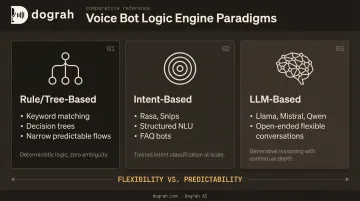
LLM-based engines give you flexibility, but they introduce hallucination risk that matters more in voice than in text — there's no UI for a user to re-read a confusing response. Self-hosted options via Ollama or LlamaEdge keep data on-premise but trade inference speed against hosted API latency.
TTS: Giving Your Bot a Voice
Leading open source options:
- Coqui TTS / VITS — high naturalness, voice cloning support, community-maintained
- Piper — lightweight, runs on Raspberry Pi, impressively natural for its size
- Kokoro — open-weight 82M parameter model with strong multilingual support, currently ranked #1 on the TTS Arena leaderboard
Community consensus on TTS Arena consistently places Kokoro at the top for naturalness-to-size ratio — no single MOS benchmark covers all three with identical methodology, so leaderboard rankings and forum feedback are the best available signal.
Whichever TTS model you choose, one deployment pattern consistently outperforms pure TTS: mixing pre-recorded human voice clips for high-frequency phrases (greetings, confirmations) with TTS fallback for everything else. This cuts both cost and latency without sacrificing naturalness. Dograh AI offers this as a built-in hybrid feature, with their own reported data showing up to 3× cost reduction and 2× better outbound conversion rates versus pure TTS deployments.
Why Voice Bots Break in Production
Production voice bots fail for a predictable reason: the individual components work fine in isolation. The failures happen at the seams — in how those components are connected and sequenced under real call conditions.
The Latency Budget
OpenAI's benchmarks for GPT-4o show audio responses as low as 232ms, with a 320ms average — described as comparable to human conversation latency. The older cascaded voice pipeline averaged 2.8 seconds (GPT-3.5) to 5.4 seconds (GPT-4). That gap explains exactly why a technically capable bot can feel broken: users don't wait 3 seconds in conversation before assuming the line went dead.
The ITU-T G.114 standard treats 0–150ms as acceptable, 150–400ms as tolerable, and above 400ms as generally unacceptable for voice applications. Every component you add to a sequential pipeline compounds latency.
Latency is only one failure mode. The other is turn-taking — and it breaks bots that otherwise perform well on benchmarks.
The Turn-Taking Problem
Real conversations aren't sequential. Users interrupt, say "uh-huh" while the bot is talking, and pause mid-sentence. Without VAD and barge-in handling, a bot will either:
- Talk over users who try to interrupt
- Wait too long after silence, making the conversation feel stilted
- Respond to background noise as if it were speech
Silero VAD is the go-to solution here. It processes a 30ms+ audio chunk in under 1ms on a single CPU thread, supports both 8kHz and 16kHz sampling, and runs directly on telephony audio without upsampling. Fast enough for real-time use, compatible with standard phone audio out of the box.
The Hallucination Problem in Voice
A hallucinated response in text is recoverable — users scroll up, re-read, catch the error. In audio, it erodes trust immediately and there's no correction path. Mitigation approaches:
- Ground the LLM in a retrieval knowledge base for factual claims
- Use strict system prompt boundaries ("only answer questions about X")
- Set explicit fallback responses for out-of-scope queries
- Avoid open-ended instructions that invite model creativity
Designing a Reliable Pipeline
Cascaded vs. Speech-to-Speech
The traditional pipeline chains components sequentially: audio → VAD → ASR → LLM → TTS → audio. Each handoff adds latency. Speech-to-Speech (S2S) orchestration, where a single multimodal model handles audio input and output end-to-end, collapses those handoffs.
Dograh AI's S2S implementation using Gemini Flash Live and GPT-Realtime-2 roughly halved end-to-end latency compared to their cascaded pipeline. The tradeoff: S2S offers less granular control at each stage, which matters if you need per-step logging, fallback handling, or custom processing.
Why Streaming Is Non-Negotiable
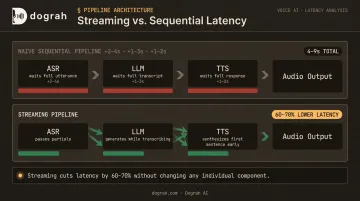
In a naive pipeline, each stage waits for the previous one to finish. That compounds:
- ASR waits for full utterance → adds 2-4 seconds
- LLM waits for full transcript → adds another 1-3 seconds
- TTS waits for full LLM response → adds another 1-2 seconds
With streaming at every stage:
- ASR passes partial transcripts to the LLM as they arrive
- The LLM starts generating before the transcript is complete
- TTS begins synthesizing the first sentence while the LLM is still generating
Streaming alone cuts total pipeline latency by 60–70% without touching any individual component.
The VAD Layer: What Most Tutorials Skip
VAD does two jobs that are both essential:
- Filters non-speech audio before it reaches ASR, preventing hallucinated transcriptions from background noise
- Detects conversation turns, telling the bot precisely when the user has finished speaking
Device-side VAD filters noise before transmission. Server-side VAD (running in 100ms windows on streamed audio) detects conversation turns. Both are needed. Without server-side VAD, bots respond too early, too late, or talk over users entirely, regardless of how good the ASR or TTS layer is.
Fallback Handling at Every Stage
A production pipeline needs explicit fallback paths:
- Low-confidence or empty ASR result: ask for clarification ("Sorry, I didn't catch that — could you repeat?")
- LLM timeout: play a pre-recorded "hold on" message rather than returning silence
- TTS failure: fall back to a simpler backup voice or static audio clip
One more thing most builders skip: API key rotation. LLM, STT, and TTS providers impose concurrency limits, and a production bot handling 50 simultaneous calls will hit single-key caps quickly. Rotating across multiple keys or provider endpoints prevents cascading failures before they reach callers.
Solving Latency, Interruptions, and Accuracy
Latency Optimization in Practice
Key levers, in rough order of impact:
- Enable streaming at every pipeline stage — highest impact
- Choose model size by use case — Whisper Tiny vs. Large is a 24.1% vs. 15.8% WER tradeoff on telephony audio; for many inbound support bots, Tiny is sufficient
- Quantize models — a 2025 study on Whisper quantization found up to 19% latency reduction with INT8 while preserving transcription accuracy
- Pre-synthesize TTS for common phrases — greetings, confirmations, and hold messages don't need runtime synthesis
- Co-locate components — network hops between ASR, LLM, and TTS services add measurable latency at scale
Interruption Handling Architecture
When a user speaks while the bot is talking, the system must:
- Detect speech via VAD on the inbound audio stream
- Immediately stop TTS playback
- Discard any queued LLM responses
- Reset session state
- Restart the pipeline with the new user input
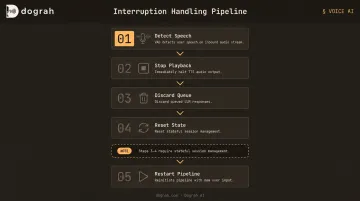
Steps 3 and 4 require stateful session management, a common missing piece in simple open source implementations. Without it, the bot finishes its queued response after being interrupted, breaking conversational flow completely.
Domain-Specific ASR and Noise Handling
General-purpose ASR models degrade on telephony audio (8kHz, compressed), heavy accents, and domain jargon. Whisper-AT research shows WER increases exceeding 50% as SNR drops from 20dB to -10dB for noise types like washing machines, trains, and background chatter.
Fine-tuning helps, but gains are smaller than expected without large domain datasets. A Korean hospital telemedicine study fine-tuned Whisper on 1,300 hours of clinical telephone audio and saw patient WER improve from 22.92% to 22.42% — real improvement, but modest. For most teams, a larger base model will outperform a fine-tuned smaller model until you have substantial labeled domain data.
The First 15 Seconds of Outbound Calls
The opening of an outbound call determines whether a user stays or hangs up. Technical pipeline quality matters less here than:
- How quickly the first word arrives (latency)
- Whether the voice sounds human (naturalness)
- Whether the opener establishes context and legitimacy
Pre-recorded human voice clips for the opening greeting, combined with TTS fallback for the dynamic portion, outperform pure TTS openings by a significant margin. Dograh AI's hybrid voice feature mixes real human clips with TTS in the same cloned voice and has delivered 2× better conversions on outbound calls based on production performance data.
From Prototype to Production: Deployment and Data Sovereignty
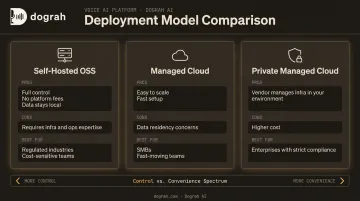
Three Deployment Models
| Model | Pros | Cons | Best For |
|---|---|---|---|
| Self-hosted OSS | Full control, no platform fees, data never leaves | Requires infra and ops expertise | Regulated industries, cost-sensitive teams |
| Managed cloud | Easy to scale, fast setup | Data residency requires careful vendor evaluation | SMBs, fast-moving teams |
| Fully managed private cloud | Vendor manages infra within your environment | Higher cost | Enterprises with strict compliance requirements |
Gartner predicts that by 2027, 70% of enterprises adopting GenAI will cite digital sovereignty as a top criterion for public-cloud GenAI selection. For voice bots specifically, where audio and transcripts contain sensitive PII, this isn't an abstract concern.
The Compliance Advantage of Self-Hosted Open Source
When STT, LLM, and TTS all run within your own infrastructure, the compliance burden shrinks considerably:
- Fewer vendor DPAs required — audio and transcripts don't leave your environment
- Smaller HIPAA/GDPR audit scope — fewer processors touching PHI or PII
- No vendor lock-in on data — retention, deletion, and access controls stay with you
- Faster procurement — regulated enterprises often face months of vendor DPA review; self-hosting eliminates that for the AI processing layer
Dograh AI's self-hosted OSS version (BSD 2-Clause license) supports locally hosted Whisper, Kokoro, Voxtral, and Llama — so teams in healthcare, fintech, and legal can run the full stack within their own infrastructure. The fully managed private cloud option goes further: Dograh AI builds and manages the infrastructure within the customer's own cloud environment, handling orchestration, upgrades, and reliability without requiring internal AI ops expertise.
An orchestration platform at this layer delivers more than model deployment — it gives you streaming architecture, telephony integration, VAD, barge-in handling, fallback logic, and post-call analytics without rebuilding each piece from scratch.
Dograh AI was built precisely because this combination didn't exist. The founders hit this wall while building a voice agent for the visa industry: low-code frameworks like LiveKit and Pipecat required too much custom code, and closed platforms carried data risk they couldn't accept.
Frequently Asked Questions
What are the best open source tools for building a voice bot?
Per layer: Whisper or Vosk for STT, Rasa or an instruction-tuned LLM (Llama, Qwen) for the logic engine, Coqui TTS or Piper for TTS, and Silero VAD for turn detection. Picking the right tools is straightforward. Orchestrating them reliably in production is where most of the real work happens.
What is the difference between speech-to-speech and the traditional voice bot pipeline?
Traditional pipelines chain separate ASR, LLM, and TTS models with latency accumulating at each handoff. S2S models like Gemini Flash Live or GPT Realtime-2 process audio input and generate audio output in a single step, cutting end-to-end latency significantly but offering less per-stage control for logging, fallbacks, or custom processing.
How do I reduce latency in an open source voice bot?
Enable streaming at every pipeline stage first — that's the single highest-impact change. From there:
- Use quantized or smaller model variants where accuracy allows
- Pre-synthesize TTS for common phrases
- Co-locate components to minimize network hops
- Use dedicated low-latency telephony for geographically distributed users
Can I build a voice bot that keeps all my data on-premise?
Yes. A fully on-premise stack using Whisper for STT, Llama or Qwen for LLM, and Kokoro or Piper for TTS, all deployed via Docker on your own hardware, keeps all audio and transcripts within your infrastructure. Dograh AI's OSS version (BSD 2-Clause) provides the orchestration layer for this setup without platform fees.
How does VAD improve voice bot reliability?
VAD filters non-speech audio before it reaches ASR (reducing hallucinated transcriptions from background noise) and detects end-of-turn so the bot knows when to respond. Without server-side VAD, bots respond too early, too late, or talk over users. No amount of ASR or TTS quality improvement fixes that.
What makes a voice bot "production-ready" vs. just a prototype?
The gaps between a prototype and a production system come down to six things:
- Streaming architecture across all pipeline stages
- Explicit fallback handling at each layer
- Interruption and barge-in support with stateful session management
- API key rotation to handle concurrency limits
- Post-call analytics for ongoing QA
- A deployment model that matches your data residency requirements