This guide is written for DevOps and ML infrastructure engineers handling the deployment themselves, or technical leaders evaluating whether DIY on-prem is the right path versus a fully managed private cloud deployment (where a vendor deploys and manages the infrastructure within your own environment). Both paths require understanding the same technical layers.
What follows covers the complete deployment sequence: infrastructure readiness, model stack selection, telephony wiring, multilingual configuration, and post-deployment validation.
Key Takeaways
- On-premise multilingual voice AI runs across three layers: infrastructure, AI model stack (STT + LLM + TTS), and telephony
- Pick STT and TTS models with native multilingual support — English-first models fail non-English speakers
- On-prem eliminates vendor data processing, removing HIPAA/GDPR certification requirements entirely
- GPU acceleration, streaming pipelines, and co-located telephony are the main levers for managing latency
- Test ASR accuracy, language detection, and TTS naturalness per language before go-live — they vary widely
Prerequisites and Stack Readiness
Infrastructure gaps and model compatibility issues discovered mid-deployment are the most expensive kind. Resolve everything below before any software is installed — this section is your pre-flight checklist.
Infrastructure Requirements
Compute: GPU vs. CPU is not a marginal difference for real-time voice AI. OpenAI's Whisper large model requires approximately 10 GB VRAM, while NVIDIA's Canary-1B-v2 needs at least 6 GB RAM and is optimized for NVIDIA GPU systems.
CPU-only deployments can work for development and low-concurrency testing but will consistently miss acceptable latency targets at production call volumes.
Baseline minimums for a production GPU deployment:
- GPU: NVIDIA with 16+ GB VRAM (for large STT models + TTS running concurrently)
- RAM: 32 GB minimum; 64 GB recommended for multi-model pipelines
- Storage: 200+ GB SSD for model weights, call recordings, and logs
- Network: Low-latency LAN between compute and telephony infrastructure
Container runtime: Kubernetes production use reached 82% in the CNCF's 2025 survey, with 66% of organizations running at least some AI inference workloads on Kubernetes. Docker and Kubernetes are the defensible defaults for packaging on-prem AI inference. Confirm GPU drivers and CUDA are accessible to the container runtime before proceeding — missing this step typically surfaces only after hours of environment setup.
Telephony infrastructure: Confirm SIP trunk availability, carrier relationships for DID numbers, and whether existing PBX or IVR systems need bridging. Geographic placement matters: telephony infrastructure co-located with your compute avoids unnecessary network hops that add latency to every call.
Selecting Your AI Model Stack
Every on-prem voice AI stack requires three model layers:
| Layer | Purpose | Locally Hostable Options |
|---|---|---|
| STT | Transcribes caller audio to text | Whisper large-v3 (MIT, 99 languages), Voxtral (Apache 2.0, 13 languages), Canary-1B-v2 (CC-BY-4.0, 25 European languages) |
| LLM | Conversation logic and response generation | Llama 3 (Meta Community License), Qwen3 (Apache 2.0, available 0.6B–32B) |
| TTS | Converts text responses to speech | Kokoro-82M (Apache 2.0), Coqui XTTS-v2 (Coqui Public Model License), Chatterbox (MIT, 23+ languages) |
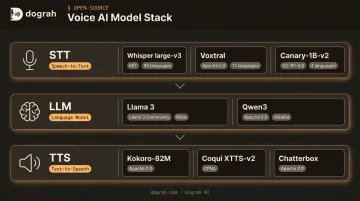
All three layers can run entirely locally. No external API calls required.
Critical language coverage note: Whisper large-v3 reports a mean Word Error Rate of 7.44 on the Open ASR Leaderboard — but that average obscures significant variation. For non-Latin scripts, tonal languages (Mandarin, Thai), and low-resource languages, the model card explicitly warns of lower accuracy.
Whisper also uses CER rather than WER for languages like Chinese, Japanese, and Korean, which makes cross-language accuracy comparisons non-trivial. Validate against your specific language set before committing to a model.
Dograh AI (open-source, BSD 2-Clause, self-hostable via Docker) natively supports connecting Whisper, Voxtral, Canary, Llama, Qwen, Kokoro, Coqui, and Chatterbox as local model endpoints — handling orchestration across all three layers so you're not writing custom glue code for each integration.
Before finalizing your model selection, run a license audit. Llama 3 uses Meta's Community License with attribution and usage restrictions — it's not Apache/MIT. Coqui XTTS-v2 uses the Coqui Public Model License with commercial terms that require review. Mixing components without a license review creates legal exposure.
How to Deploy Multilingual Voice AI On-Premise
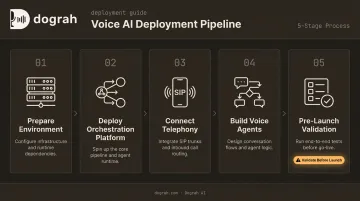
Deployment follows a defined sequence. Skipping or rushing any stage creates failures that are difficult to diagnose after go-live.
Step 1: Prepare the Deployment Environment
- Pull container images for each model component (STT, LLM, TTS)
- Set environment variables: model paths, port assignments, API keys for any external services
- Install GPU drivers and CUDA, then verify they're accessible to the container runtime
- Confirm storage volumes are mounted and have sufficient space for model weights
For Dograh AI's self-hosted deployment, this starts with a single Docker command pulled from the GitHub repository. First startup takes 2–3 minutes to download all required images. Docker 20.10 or later and Curl are the only prerequisites.
Step 2: Deploy the Orchestration Platform
The orchestration layer connects STT → LLM → TTS into a real-time pipeline, managing audio routing, model sequencing, and response timing.
- Install and launch the orchestration platform
- Configure model endpoints to point to locally running instances, not external cloud APIs
- Validate each model in isolation first — confirm STT transcribes correctly, LLM responds to prompts, TTS generates audio — before connecting them into the full pipeline
Testing models independently makes it much easier to isolate failures when the full pipeline is connected.
Step 3: Connect Telephony
- Register SIP trunk credentials and configure inbound/outbound routing
- Assign DID numbers per region or language market
- Test basic call connectivity (audio in, audio out) before enabling AI processing
- Geographic telephony placement should match your compute location — routing calls across regions adds latency to every interaction
Dograh AI integrates with Twilio natively and supports SIP trunks, PBX systems, and unified communications platforms including Cisco, Microsoft Teams, Zoom, Avaya, and RingCentral.
With telephony confirmed, the next step is configuring the agents that will actually handle those calls.
Step 4: Build and Configure Voice Agents
- Define conversation flows, agent personas, and escalation logic using the workflow builder
- Configure tool integrations (CRM, calendar, ticketing) via webhooks or API connectors
- Set language assignment rules: either static (one agent per language) or dynamic (agent detects and switches based on caller input)
Dograh AI's visual drag-and-drop workflow builder handles this configuration without custom code, including CRM integrations with Salesforce, HubSpot, and Zendesk, and calendar scheduling via webhook tool calls.
Step 5: Run Pre-Launch Validation
Before routing real calls, verify each of the following:
- Place test calls across every supported language with native speakers
- Measure round-trip latency end-to-end (target: sub-500ms for conversational naturalness)
- Confirm transcription accuracy per language — not just in aggregate
- Verify no traffic is leaving the network boundary — check that all model endpoints resolve to local instances
- Test human escalation and call transfer paths
Configuring Multilingual Support
Multilingual configuration is not just enabling additional language packs. It requires separate handling for language detection, STT routing, TTS voice selection, and compliance per locale.
Language Detection and Code-Switching
In a real-time voice pipeline, the system must identify the caller's language within the first few seconds of audio and route to the appropriate STT model or agent. Two challenges arise quickly:
Code-switching — callers mixing languages mid-sentence — is a persistent ASR problem. Academic research confirms that large foundational models still struggle on code-switched test cases, and most ASR systems are trained for monolingual input. Detection logic must be capable of shifting mid-conversation, not just locking in a language at call start. Do not assume "multilingual model" means code-switch robust — validate explicitly with mixed-language test audio before go-live.
None of the primary STT models reviewed — Whisper, Voxtral, Canary — explicitly document code-switching robustness in their official model cards. This is a validation gap, not a feature you can assume.
Accent and Dialect Handling
Language coverage on paper doesn't guarantee usable accuracy across dialects. Spanish across Mexico, Spain, and Argentina, or Arabic across Gulf and Levant regions, can produce significantly different WER outcomes from the same base model.
Interspeech 2023 published N-Shot Benchmarking of Whisper on Diverse Arabic Speech Recognition, evaluating robustness under dialect-accented Modern Standard Arabic and unseen dialects — the results underscore that dialect sufficiency is validation-dependent, not a given.
Treat fine-tuning as a real option, not a last resort. If your target-dialect WER is unacceptable after testing with native speakers, fine-tuning on dialect-specific audio is the proven approach. Base models may be sufficient, but only testing with real dialect samples confirms it.
Language-Specific TTS Voice Selection
TTS voices must be validated by native speakers, not just verified as technically functional. Robotic or unnatural speech in a caller's language erodes trust within the first exchange.
For high-frequency phrases in outbound calling, hybrid approaches — mixing pre-recorded human voice clips with TTS fallback — improve naturalness while reducing compute cost. Dograh AI ships this as a native feature: pre-recorded clips and TTS output blend in the same cloned voice, reducing costs up to 3× compared to pure TTS while delivering more natural-sounding calls. This is particularly relevant for languages where current TTS naturalness lags behind English.
Compliance Configuration by Region
The same regional decisions that drive dialect and TTS selection also determine your compliance obligations. On-prem removes vendor data processing requirements from the equation — but your own obligations remain. Each region enforces different rules:
| Region | Key Requirements |
|---|---|
| EU (GDPR) | Data minimization (Art. 5), storage limitation, erasure rights (Art. 17), consent management |
| US (HIPAA) | PHI safeguards for voice transcripts containing health information; applies to audio in any form |
| Russia (242-FZ) | Russian citizens' personal data must be processed on servers physically located in Russia |
| Japan (APPI) | Prior consent required for third-party data transfers; broad cross-border restrictions |
| Saudi Arabia (PDPL) | Cross-border transfer restricted to jurisdictions with adequate protection |
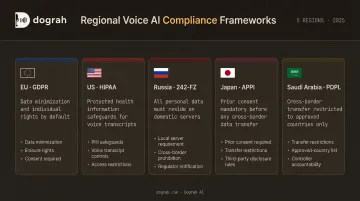
On-prem deployment removes vendor BAAs and data processing agreements from the compliance equation. Dograh AI's private cloud deployments are architected to meet HIPAA, GDPR, and FedRAMP requirements — with complete audit trails under customer control, RBAC access controls, TLS 1.3 in transit, and AES-256 at rest.
That said, you still need to configure consent flows in each supported language, local audit logging, and deletion workflows that satisfy your regulatory environment.
Common Deployment Problems and Fixes
High End-to-End Latency
Problem: Response time exceeds 1 second, causing unnatural pauses.
Likely causes:
- Model inference running on CPU instead of GPU
- Sequential STT → LLM → TTS pipeline rather than streamed processing
- Unnecessary round-trips to external services
Fix:
- Enable GPU acceleration for model inference
- Switch to streaming audio pipelines instead of sequential STT → LLM → TTS
- Enable response caching for common utterances
- Co-locate compute with telephony infrastructure to cut round-trip time
Speech-to-Speech (S2S) orchestration eliminates the intermediate text step — Moshi, an open speech-to-speech framework, reports practical latency as low as 200ms. Dograh AI's S2S orchestration using Gemini Flash Live and OpenAI GPT-Realtime-2 roughly halves end-to-end latency versus cascaded pipelines.
Language Misidentification or Poor ASR Accuracy
Problem: Non-English callers are misidentified or transcribed with high error rates.
Likely causes:
- English-optimized STT model applied to all languages
- No language detection logic configured
- Insufficient acoustic training data for target languages in selected model
Fix:
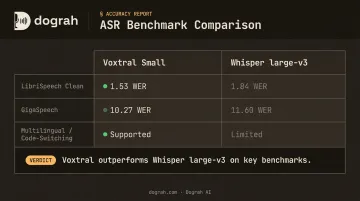
- Replace generic STT with a multilingual model that natively supports your target languages — Voxtral Small outperforms Whisper large-v3 on multiple benchmarks (LibriSpeech Clean: 1.53 vs 1.84 WER; GigaSpeech: 10.27 vs 11.60 WER)
- Add an explicit language detection pre-processing step
- Test each language independently with native speakers — aggregate accuracy metrics hide per-language failure rates
Data Leaving the Network Boundary
Problem: During audit, voice data or API calls are discovered routing to external cloud endpoints.
Likely causes:
- Default model configs pointing to cloud APIs (OpenAI, ElevenLabs) rather than local instances
- Logging or analytics SDKs with external reporting enabled
Fix: Audit all outbound network calls from the deployment environment. Replace any external model API endpoints with local instance URLs. Disable or self-host any telemetry services. Treat network egress monitoring as an ongoing operational control, not a one-time audit.
Pro Tips for a Production-Ready Deployment
Three operational practices consistently separate smooth go-lives from problem-prone ones:
Use S2S orchestration where your stack supports it. Removing the text transcription step between STT and LLM cuts end-to-end latency roughly in half. For teams who want managed S2S without building the pipeline themselves, Dograh AI's fully managed private cloud option deploys the entire voice agent infrastructure within your own cloud environment — on-prem data sovereignty with latency optimization already configured.
Document your stack configuration thoroughly before go-live. Record model versions, container image hashes, port mappings, telephony credentials, and language routing rules. Voice AI spans many components — undocumented configurations create hours of rework during upgrades or incident response.
Treat per-language performance as a separate ongoing metric. Track ASR word error rate, task completion rate, and call drop rate per language independently. Multilingual deployments commonly have one or two languages that underperform — and this only surfaces in per-language analytics, not aggregate totals.
Frequently Asked Questions
What server hardware is needed to run multilingual voice AI on-premise?
GPU-accelerated hardware is strongly recommended for real-time performance — Whisper large requires ~10 GB VRAM, Canary needs 6 GB RAM minimum. Plan for 32–64 GB system RAM and 200+ GB SSD storage. Containerized platforms like Docker reduce hardware compatibility complexity significantly.
How does on-premise deployment eliminate HIPAA and GDPR vendor compliance requirements?
When voice data never leaves your infrastructure, vendor Business Associate Agreements (BAAs), data processing agreements, and associated certifications become unnecessary. No third-party processing means no vendor compliance overhead — removing a major procurement bottleneck and accelerating go-live in regulated industries.
Can I run LLM, STT, and TTS models fully locally without any cloud API calls?
Fully local deployments are possible across all three layers: Whisper or Voxtral for STT, Llama 3 or Qwen3 for LLM, Kokoro or Coqui XTTS-v2 for TTS. Dograh AI natively connects all three as local model endpoints, achieving full data containment with zero cloud API calls.
How do I handle code-switching (callers mixing two languages mid-call)?
You need mid-conversation language detection logic and STT models trained on multilingual or mixed-language audio. Most standard ASR systems are monolingual and degrade sharply on code-switched input — validate explicitly with mixed-language test audio before routing real calls.
What latency should I expect from an on-premise voice AI deployment?
Sub-500ms end-to-end is the target for natural phone conversation. GPU acceleration, streaming pipelines and co-located telephony are the primary levers. Dograh AI's internal targets: STT at 350ms, LLM first-token at 375ms, TTS first-byte at 150ms.
Can I add a new language after the system is already live?
Yes, but it requires work. Adding a language means adding or swapping STT and TTS models with coverage for that language, updating language detection routing logic, and validating with native speakers before routing real calls to the new language path.