The good news? Deployment complexity for voice AI is genuinely manageable today — but only if preparation happens before configuration begins. Most multilingual deployments fail not because of the AI itself, but because teams skip the readiness steps: language data gaps, wrong platform choices, untested telephony connections.
This guide covers the full deployment sequence — readiness checks, platform selection, step-by-step configuration, validation, and go-live — designed to get a production-ready multilingual AI support agent running in hours to days, not weeks.
Key Takeaways
- Deployment takes hours to days — only if language scope, knowledge base, and integrations are locked in before configuration starts
- Top risk areas: skipping language-specific testing, using a platform without native multilingual speech support, and overlooking data residency requirements
- Start with 3–5 high-traffic languages; expand only after quality is confirmed in each
- Connect telephony, CRM, and ticketing before go-live — not after
- Post-deployment validation across intent accuracy, latency, and escalation paths is non-negotiable
Before You Deploy: Prerequisites and Platform Requirements
Three Readiness Areas to Confirm First
Before touching any configuration, three areas need to be locked down:
1. Language coverage data Pull support ticket history, website traffic by country, and existing call logs to identify which languages your customers actually use. CSA Research found that 75% of consumers are more likely to buy again if customer care is in their language — this is a retention requirement, not a nice-to-have.
2. Knowledge base readiness Confirm that FAQs, product content, and SOPs exist in each target language or can be reliably localized before training begins. An agent trained on English-only content will produce English-flavored responses in other languages — even when it speaks them correctly.
3. Integration inventory List every system the agent needs to connect to: CRM, ticketing system, telephony provider, calendar tools, helpdesk. Incomplete integration mapping is one of the most common causes of go-live delays.
Platform Selection Checklist
Not all "multilingual" platforms are genuinely multilingual. When evaluating options, confirm:
- Processes speech natively per language — not translation layers applied after the fact
- Handles voice-first interactions — text-only platforms can't meet audio quality or latency requirements
- Offers flexible deployment models — cloud vs. self-hosted matters significantly for GDPR and HIPAA-sensitive markets
- Supports no-code configuration — visual workflow builders compress deployment timelines substantially
These criteria narrow the field quickly. Dograh AI, for example, covers all four: 70+ languages with native STT/TTS, voice-first architecture, cloud and self-hosted deployment options, and a drag-and-drop workflow builder that lets you configure a working agent in under 2 minutes — which becomes a real advantage when you're iterating across several languages at once.
Non-Negotiables Before Proceeding
Do not start configuration if:
- Your knowledge base is unavailable in any language you intend to support at launch
- Telephony connectivity to your target region hasn't been confirmed
- Data residency requirements haven't been factored into your deployment model
How to Deploy a Multilingual AI Support Agent (Step-by-Step)
Multilingual agent deployment follows a defined sequence. Skipping or reordering steps — particularly skipping validation before go-live — is the most common cause of rework. These steps apply to both voice and chat agents, with specific notes where voice requires additional consideration.
Step 1: Define Language Scope and Use Case
Narrow priority languages to 3–5 for initial rollout. More than that simultaneously creates undertrained agents across all of them.
For each language, define:
- Whether the use case is inbound support, outbound follow-up, or both
- Expected call/conversation flows per language
- Volume estimates to prioritize which languages get the most training data
Step 2: Configure the Agent on Your Platform
Platform-level configuration involves:
- Create the agent and set the base persona, tone, and behaviour rules
- Select STT/TTS models for each priority language — native models, not translation wrappers
- Set language detection behaviour — automatic detection (recommended for inbound) or user-initiated
- Define fallback language rules for cases where the agent can't confidently identify the caller's language
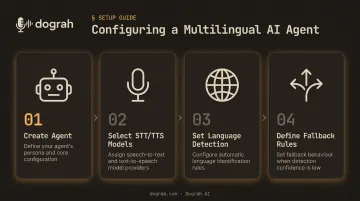
Visual workflow builders eliminate the need to write this logic in code, which reduces configuration errors.
Step 3: Train the Agent on Your Knowledge Base and Localization Rules
Training inputs the agent needs:
- Product FAQs and help centre articles in each target language
- Conversation logs from human agents (invaluable for natural phrasing)
- Localization rules: regional currency formats, time zones, cultural tone adjustments, locale-specific escalation triggers
Localization goes well beyond translation. A Brazilian Portuguese response and a European Portuguese response may use the same words but feel completely different to native speakers. Regional tone, idiom, and formality level all need to be specified.
Step 4: Integrate with Telephony, CRM, and Existing Workflows
Integration steps in sequence:
- Connect a telephony number — local or toll-free for the target region
- Link the CRM — so the agent retrieves customer history and personalises responses in real time
- Connect ticketing or helpdesk systems — for escalation logging and post-call case creation
Dograh AI's MCP support enables platforms like Claude Code and OpenCode to build, configure, and spin up voice agents directly, which cuts custom API work for teams with complex internal systems.
Step 5: Configure Escalation Paths and Post-Call Behaviour
Once integrations are in place, escalation behavior is the final piece before go-live. Every multilingual agent needs a clearly defined human escalation path — configure:
- Escalation triggers: sentiment thresholds, unresolved intent after N turns, explicit customer request
- Handoff format: the conversation summary passed to the live agent should include intent, verification status, actions already taken, and sentiment indicators — in a usable format, not a raw transcript
- Post-call data handling: where recordings, transcripts, and sentiment outputs are stored and who reviews them
Automated post-call analysis cuts manual QA effort, particularly when running multilingual operations across multiple time zones.
Testing and Validating Your Multilingual Agent Before Go-Live
Most silent failures in multilingual agents — wrong language defaults, missed intent in dialect variations, dropped calls at handoff — only surface during live calls. Catching these failures before go-live is the difference between a polished demo and an agent your callers actually trust.
Language-by-Language Functional Testing
Test each priority language independently with realistic caller scenarios. Confirm:
- The agent detects the correct language within the first few utterances
- Responses feel natural, not literally translated from English scripts
- The agent handles code-switching (Hinglish, Spanglish, etc.) without losing context mid-conversation
Over 250 million people in India engage in code-switched communication like Hinglish. If your agent targets Indian markets and can't handle it, you'll lose a substantial portion of callers at the first turn.
Latency and Audio Quality Testing
For voice agents, end-to-end latency (time from caller utterance to agent response) must be measured per language and per region. Research on human conversation timing shows median turn gaps often fall under 300 ms — use this as your engineering benchmark.
ITU-T G.114 defines one-way delay thresholds as:
| Delay Range | Impact |
|---|---|
| 0–150 ms | Acceptable for most applications |
| 150–400 ms | Increasing degradation in call quality |
| 400 ms+ | Significant caller experience impact |
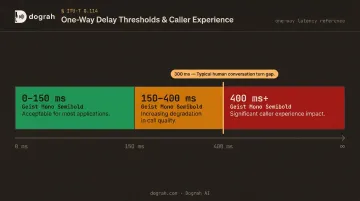
Latency is worse on cross-geography calls when telephony isn't regionally optimized. Running STT/TTS inference closer to the caller's geography is the fix.
Intent Accuracy and Context Retention Checks
Verify the agent correctly classifies caller intent across test scenarios in each language, and that it retains context when a caller switches topics mid-conversation.
Review each language using:
- Conversation logs from test calls
- Sentiment output analysis
- Dialect-specific scenarios that go beyond standard speech patterns
ASR systems regularly underperform on non-standard accents and speaker groups — test with realistic caller profiles, not just clean studio-quality audio.
Intent testing also surfaces gaps in your escalation logic — which makes handoff validation the natural final check.
Escalation Path Validation
Confirm that:
- Human handoff triggers correctly in every language
- The live agent receives a full, usable conversation summary
- The caller is not dropped or looped when escalation fires
These four test areas — language detection, latency, intent accuracy, and escalation — cover the failure modes that matter most before any multilingual agent goes into production.
Common Deployment Problems and How to Fix Them
Problem 1: Agent Defaults to English or Responds in the Wrong Language
What happens: The agent correctly detects the caller's language but responds in English, or reverts to English after the first turn.
Likely cause: The STT-to-LLM pipeline passes text correctly, but the response-generation prompt or TTS model is configured for English only. The system prompt is missing explicit language instructions.
Fix:
- Verify the LLM system prompt explicitly instructs the agent to respond in the detected language
- Confirm a TTS voice model is connected for each target language, not just STT
- Test language persistence across at least 5 turns per language before go-live
Problem 2: High Latency or Degraded Audio Quality on International Calls
What happens: Callers outside your primary server geography experience noticeable delay or choppy audio.
Likely cause: STT/TTS inference is running on servers geographically distant from the caller, or telephony routing isn't optimized for the target region.
Fix:
- Use a platform that offers dedicated regional telephony endpoints or locally hosted model support
- Self-hosted deployments let you colocate telephony, STT, orchestration, and models in your preferred geography, cutting unnecessary round-trip time
- Run services in the same region as your caller base. Of all latency levers, geography tends to have the largest single impact.
Problem 3: Agent Misunderstands Intent in Dialect or Code-Switched Conversations
What happens: The agent works correctly in standard Spanish or French but breaks down with regional dialect, local slang, or mid-sentence language mixing.
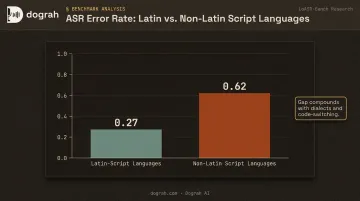
Likely cause: The underlying STT model wasn't trained on dialect variations, or the knowledge base was translated from English without incorporating regional phrasing. LoASR-Bench research shows Latin-script languages average a 0.27 error rate versus 0.62 for non-Latin scripts, a gap that compounds when dialects and code-switching are involved.
Fix:
- Choose STT models with documented dialect coverage for your target regions
- Review and revise knowledge base content with input from native speakers
- Run dialect-specific test scenarios before launching in those markets
Pro Tips for a Faster, More Effective Multilingual Deployment
Scope before you scale. Start with 3–5 languages, validate quality deeply, then expand. This gets you to go-live faster and makes iteration manageable. Prioritize languages where support ticket or call volume is highest today — not where you hope to expand next quarter.
Use hybrid voice for high-volume languages. Pre-recorded human voice clips handle frequent phrases; TTS covers dynamic content — both in the same cloned voice. This matters most for outbound multilingual follow-up calls where high-frequency phrases repeat across thousands of interactions. Dograh AI's hybrid pre-recorded + TTS feature reduces costs up to 3× and delivers measurably better conversion performance on outbound calling compared to fully synthetic TTS.
Document localization rules as a living asset. Capture regional tone preferences, idiom substitutions, and cultural sensitivity flags in a shared knowledge base immediately — not retrofitted after complaints surface. Each language you document properly becomes a reusable foundation, so expanding to the next one doesn't mean starting from scratch.
A quick checklist before you launch:
- Confirm ticket/call volume data to rank your first 3–5 languages
- Enable hybrid voice for any language with high outbound call frequency
- Assign a localization owner per language for ongoing quality control
- Schedule a post-launch review at 2 weeks and 6 weeks to catch drift early
Frequently Asked Questions
How long does it take to deploy a multilingual AI support agent?
Deployment ranges from a few hours to a few days depending on knowledge base readiness, number of languages, and integration complexity. Modern no-code platforms like Dograh AI reduce initial configuration to under 2 minutes for a working agent — the majority of time is spent on training data preparation and pre-launch validation.
Do I need to build a separate agent for each language I want to support?
No. A single well-configured multilingual agent handles multiple languages simultaneously through automatic language detection and locale-aware response generation, eliminating the cost and maintenance overhead of managing separate agents per language.
How do I connect an AI agent to my existing support tools?
Start with these three steps:
- Connect to your CRM, ticketing, and telephony systems via API or native integrations
- Define escalation triggers so live agents receive full conversation context on handoff
- Set up post-call analysis to continuously improve performance over time
How are AI agents used in customer service?
AI agents handle inbound and outbound support interactions — answering FAQs, resolving tier-1 issues, qualifying leads, scheduling follow-ups, and escalating complex cases to human agents — enabling support teams to scale without proportional headcount growth.
How many languages should my multilingual AI agent support at launch?
Launch with 3–5 languages mapped to your highest support ticket or call volume markets, and validate quality thoroughly in each before expanding. Launching too many languages simultaneously without sufficient training data degrades quality across all of them.
How do I ensure my multilingual AI agent stays compliant with data privacy regulations like GDPR?
Choose a platform with a self-hosted or private cloud option so call recordings and conversation data stay within your own infrastructure. Dograh AI's self-hosted OSS deployment keeps data entirely within your environment, removing the need for vendor GDPR or HIPAA compliance reviews and speeding up procurement in regulated industries.