This isn't a fluke, and it isn't your AI model failing. Many builders assume the LLM crashed or the speech engine choked. In reality, this is a well-documented technical fingerprint pointing to one specific layer of your call infrastructure: signaling.
This article breaks down exactly why AI voice agent calls drop at 30 (or 32) seconds, how to confirm the cause in minutes, how to fix it, and when the real answer is better telephony infrastructure rather than another router setting.
TL;DR
- The 30-second drop is almost always a SIP signaling/NAT timeout, not an AI or LLM problem
- It's fixable in most cases without replacing your voice agent platform
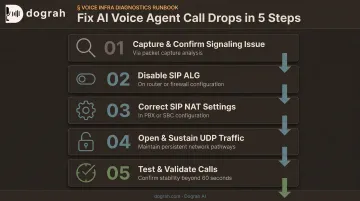
- Fix path: confirm signaling → disable SIP ALG → correct NAT → open UDP fully → re-test past 60 seconds
- If this keeps recurring across regions or carriers, a platform with dedicated, managed telephony stops the drops at the network layer
What's Actually Happening When Your AI Call Drops at 30 Seconds
Every AI voice agent call runs on two separate layers. A signaling layer (SIP or WebRTC) sets up and tears down the call. A media layer (RTP) carries the actual audio between the telephony provider, your PBX or SBC, and your voice AI stack: speech-to-text, the LLM, and text-to-speech.
The signaling layer is where this specific failure lives.
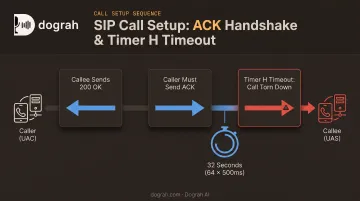
When a call connects, the handshake works like this:
- The callee sends a 200 OK to accept the call
- The caller must send an ACK back to confirm
- Until that ACK arrives, the call isn't fully established
If the ACK never makes it back, the call gets torn down once a protocol timer expires.
Why 30 (or 32) Seconds, Specifically
SIP (defined in RFC 3261) sets a default timer, known as Timer H, for how long a server waits for that ACK before giving up. The default is 64 × 500ms, or exactly 32 seconds.
So when a call dies at almost precisely 30-32 seconds every time, Timer H is firing because the ACK never arrived.
Compare that to random, variable drop timing: 47 seconds one call, 12 seconds the next. That pattern points somewhere else entirely: LLM or TTS latency spikes, a crashed process, or a provider-side outage. Those problems don't have a consistent signature. A signaling failure does.
Why AI Calls Disconnect at Exactly 30 Seconds: The Root Causes
The vast majority of these drops trace back to a small, predictable set of network and configuration issues at the signaling layer. Your voice model is rarely the culprit.
Incorrect SIP NAT Configuration on Your PBX/SBC
When your PBX, SBC, or a remote extension sits behind NAT, the 200 OK response can carry a private, non-routable IP address in its Contact header: something like 192.168.x.x instead of your public IP. The far end has no way to reach that address to send the ACK, so the call dies right on schedule at the timeout.
SIP ALG Enabled on the Router or Firewall
SIP Application-Layer Gateway (ALG) is enabled by default on most consumer and business routers. It's designed to help: it rewrites SIP packet contents like the Contact header's IP or port to assist with NAT. In practice, it frequently corrupts the handshake instead.
This is one of the most common causes of this exact symptom. If you've never touched this setting, there's a good chance it's on right now.
Firewall Blocking Outbound UDP After Call Setup
Some firewalls let the initial signaling packets through, then quietly block sustained UDP traffic needed to complete the ACK or hold the media stream open. The call looks fine at first, then times out right at the ACK window, because that traffic never got a clear path.
Misconfigured SIP Trunk or Remote-Extension Setup
AI voice agents often run from a different network segment, VPN, or cloud region than the PBX or SBC. This topology mismatch is common, and it frequently causes exactly this drop, because:
- The external IP wasn't configured for that specific network path
- NAT identification settings assume a single, local network
- The SBC doesn't know which addresses count as "local" versus "remote"
WebRTC and Telephony-Provider Session Issues (AI-Specific)
Voice agents built on WebRTC hit an analogous failure, just through a different mechanism. Instead of SIP's Timer H, WebRTC relies on ICE candidate refresh and consent freshness checks. Per RFC 7675, consent expires after 30 seconds without a valid STUN response, which lands on nearly the same 30-second window for different reasons.
Builders self-hosting voice agent frameworks report 30-second drops constantly in community forums. The failure mode is not always WebRTC-specific. One detailed LiveKit community thread traced a call ending at 33 seconds to a private IP in the Contact header. The ACK had nowhere to go, and the session died at the 32-second Timer H boundary—the same SIP NAT issue above, not an ICE consent failure.
How to Fix the 30-Second AI Call Drop (Step-by-Step)
Don't jump to fixes before confirming the cause. Guessing wastes time and often "fixes" the wrong layer entirely. Work through these steps in order.
Capture and confirm it's a signaling issue. Run a packet capture (PCAP) on your PBX/SBC or SIP client during a test call. Check whether the 200 OK response contains a private, unreachable IP in the Contact header. If it does, you've confirmed a NAT/ALG issue, not an application-level bug.
Disable SIP ALG on the router or firewall. Find the SIP ALG or "Application Layer Gateway" setting in your router's admin panel and turn it off. Restart the router afterward. This single change resolves a large share of these cases on its own.
Correct SIP NAT settings in the PBX/SBC. Configure the correct external (public) IP and local network identification for every segment or VPN your voice agent traffic crosses. The Contact header must reflect an address the far end can actually reach.
Open and sustain UDP traffic properly. Verify firewall rules allow UDP for the full duration of the call, not just the initial setup packets. Confirm the SIP and RTP port ranges your PBX or telephony provider uses stay open throughout.
Test and validate beyond 60 seconds. Place test calls that deliberately run past 60–120 seconds. Watch SIP traces or call logs to confirm the ACK completes and the call doesn't drop at the old mark. Anything less leaves the fix unverified.
Should You Fix Your Stack or Switch to a Platform With Managed Telephony?
The right answer depends on your setup, not the problem itself.
Fix it directly if: you're running a single self-hosted PBX or SIP trunk behind a straightforward router or firewall. The root cause is almost always one misconfigured setting, and the steps above will resolve it.
Consider a platform change if: you're scaling AI voice agents across multiple regions, carriers, or cloud environments, and NAT/SBC misconfigurations keep recurring in every new deployment. At that point you're patching the same architectural gap in every new environment, not fixing a one-off bug.
That recurring gap is where a platform like Dograh AI fits. Because the stack is 100% open source under a BSD 2-Clause license, teams can audit and instrument the full call path themselves: telephony, media transport, STT, LLM, and TTS. You're not left guessing against a closed vendor's limited logs.
If you don't want to keep firefighting router settings across every new region or carrier, Dograh AI's managed cloud and fully managed private-cloud deployments take telephony operations off your plate. The full voice agent stack runs inside your own cloud environment, and Dograh handles ongoing infrastructure operations.
Common Mistakes to Avoid & Preventive Best Practices
A few habits make 30-second drops worse—or let them return without anyone noticing:
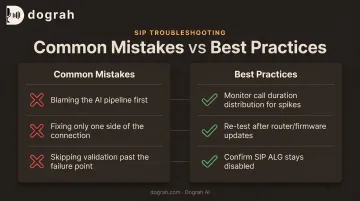
- Blaming the AI pipeline first. Engineering teams often spend hours debugging LLM or TTS timeouts when the real cause sits at the network layer, not the model.
- Fixing only one side. SIP ALG or NAT corrections on the agent side alone won't help if the carrier, SBC, or far-end router has the same misconfiguration.
- Skipping validation past the failure point. If you don't test calls past 60 seconds after a fix, the same issue can resurface without anyone noticing.
Build a few checks into routine ops so the failure mode stays gone:
- Watch call duration distribution for a visible spike around 30 seconds—that pattern is your early warning sign
- Re-test full call flows after any router firmware update or network change
- Confirm SIP ALG and related NAT settings stay disabled after those changes; updates can silently turn them back on
Frequently Asked Questions
Why do calls drop after a certain time?
Consistent drop times point to protocol-level timeouts, like SIP's ACK window, rather than random network issues. Identifying the exact timing is the fastest way to diagnose the underlying cause.
Why does my AI call always drop at exactly 30 or 32 seconds?
This matches SIP's default acknowledgment timeout, known as Timer H, which is 32 seconds by protocol default. That consistency is the signature of a NAT or signaling handshake failure, not a coincidence.
Is SIP ALG the reason my AI voice agent calls disconnect?
It's one of the most common causes. SIP ALG rewrites packet contents in ways that corrupt the handshake, and disabling it on your router is usually the fastest fix to try first.
How can I test if NAT is causing my AI call drops?
Capture a SIP packet trace during a test call and check the Contact header IP in the 200 OK response. If it's a private, unreachable address, NAT is your problem.
Does this 30-second drop affect WebRTC-based voice agents too?
Yes, through a different mechanism. WebRTC can hit an ICE or consent-freshness failure that produces the same 30-second drop, even though the transport differs from SIP.
Can switching telephony providers fix the 30-second call drop?
Rarely. The root cause is usually your local network or NAT configuration, not the carrier. A NAT-aware or managed telephony path removes the recurring failure mode; swapping carriers alone usually does not.