Introduction
Self-hosting a voice agent hands you full control over your data. It also hands you a much harder problem: sizing the GPU correctly.
Get it wrong in one direction, and calls drag past the 800-millisecond threshold where conversations start feeling robotic. Get it wrong in the other direction, and you're paying for idle silicon that never earns its keep.
Global AI infrastructure spending hit $318 billion in 2025, up from $153 billion in 2024. Q4 2025 alone accounted for $89.9 billion, a 62% year-over-year jump, according to IDC. Hardware decisions carry real financial weight now.
This guide breaks down what consumes VRAM in an ASR + LLM + TTS pipeline, which latency numbers matter, and how to avoid undersized or oversized deployments.
Key Takeaways
- Size GPUs to your pipeline’s VRAM, compute, and system needs—not the biggest card you can buy
- Let your latency budget (roughly 500-800ms end-to-end) drive every hardware decision
- Favor model choice and quantization over raw GPU horsepower for most deployments
- Connect local models on platforms like Dograh AI so you right-size instead of over-provision
What Is GPU Sizing for a Self-Hosted Voice Agent?
GPU sizing is the process of matching VRAM, compute throughput, and system RAM/CPU to what your voice agent's inference pipeline needs, within a target latency budget. It targets a response-time goal at the lowest sustainable cost, not maximum theoretical throughput.
This distinction matters because most GPU guidance online is written for training massive models on massive datasets. Voice agent sizing is an inference problem. The priority is consistent low latency across every call, not raw throughput on a one-time training run.
Core Components of a Voice Agent's GPU Workload
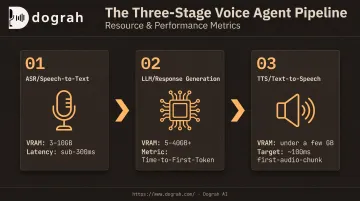
A voice agent's GPU load splits across three distinct stages. Each carries its own VRAM footprint and latency profile, and sizing means accounting for all three running together.
ASR (Speech-to-Text). Automatic speech recognition converts caller audio into text. OpenAI's documentation for Whisper's large models puts full-precision VRAM around 10GB, though quantized implementations (INT8, batched decoding) can run closer to 3-4GB. Of the three stages, ASR is typically the lightest consumer, with well-optimized setups landing in the sub-300ms range.
LLM (Response Generation). This is where most of your VRAM budget goes, and where most latency problems start. VRAM needs range from roughly 5GB for a heavily quantized 7-8B model up to 40GB or more for larger models at higher precision.
Time-to-First-Token (TTFT) is the metric that matters most: how fast the model starts streaming a response. NVIDIA's own benchmarking on a single H100 shows TTFT ranging from about 10ms to over 400ms depending purely on input length, according to NVIDIA's NIM benchmarking data. A "sub-300ms" target is something to design toward, not something every model delivers by default.
TTS (Text-to-Speech). The final stage converts the LLM's output back into audio. Streaming synthesis models are comparatively light on VRAM, often under a few gigabytes, but they carry an outsized effect on perceived naturalness. More than roughly 100ms of dead air before the first audio chunk, and the conversation starts to feel mechanical.
Why Precise Sizing Matters for Self-Hosted Deployments
Getting this right protects four outcomes:
- Fewer abandoned calls — latency creep past your threshold quickly erodes caller patience
- Lower infrastructure spend — an over-provisioned GPU sits idle most of the time while billing at full price
- Data sovereignty without a performance tax — self-hosting only pays off if it doesn't cost you responsiveness
- Predictable scaling — right-sized infrastructure grows in known increments instead of forcing emergency upgrades
What to Consider When Sizing a GPU for Your Voice Agent
These factors translate abstract specs (VRAM, cores, tokens/sec) into outcomes you can measure: latency SLAs and cost per concurrent call. Sizing also isn't universal. A high-volume outbound sales operation making thousands of short calls a day has very different needs than a specialized support line handling a handful of long, complex conversations.
End-to-End Latency Budget
The 500-800ms conversational threshold should anchor every hardware decision. Cross it consistently, and callers notice: pauses start reading as confusion or a dropped connection rather than normal processing time.
Track Time-to-First-Token for your LLM and Time-to-First-Byte for your TTS engine specifically, not aggregate generation speed. A model that generates text quickly once it starts is still failing you if it takes 600ms to produce that first token.
Total VRAM Across the Full Pipeline
ASR, LLM, and TTS models typically share a single GPU, so their VRAM needs stack rather than compete independently. Sizing only for your LLM and assuming the other two "fit somewhere" is a common miscalculation, and it shows up as out-of-memory errors under real call load.
Leave headroom for KV cache growth too. As a conversation's context window grows during longer calls, the cache expands with it, eating into the same pool your models already occupy.
Model Size and Quantization Strategy
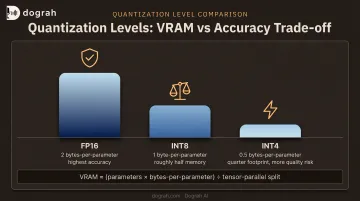
Quantization is the lever that determines whether you need a modest consumer card or a data-center GPU:
- FP16 preserves the most accuracy at the largest footprint
- INT8 roughly halves memory needs
- INT4 cuts footprint closer to a quarter of FP16, with more risk of quality loss on nuanced conversations
Use a formula before committing to a model:
VRAM ≈ (parameters × bytes-per-parameter) ÷ tensor-parallel split
Bytes-per-parameter runs 2 for FP16, 1 for FP8, and 0.5 for INT4. This covers checkpoint memory only. Add headroom on top for KV cache and activations.
Concurrency and Multi-Tenant Capacity
Single-session latency numbers look great on a spec sheet and mean very little in production. What actually determines cost per call is how many simultaneous sessions one GPU sustains while still hitting your latency SLA.
A practical rule of thumb: plan for maximum concurrent sessions at 50-70% of theoretical peak capacity. Running closer to full capacity works fine until a burst of simultaneous inbound calls degrades latency for every caller on that GPU at once.
System RAM and CPU-to-GPU Ratio
System RAM should generally sit around 2x total VRAM, giving the pipeline room for buffers and OS overhead without swapping to disk. Starve this, and you'll see intermittent stalls that look like GPU problems but aren't.
CPU allocation matters just as much. Serving frameworks need several physical cores per GPU accelerator to handle orchestration, I/O, and request queuing without creating an upstream bottleneck. The outcome this protects is stable uptime under sustained volume, not just good performance in a demo.
Deployment Architecture: Single GPU, Multi-GPU, or Private Cloud
A single co-located GPU comfortably handles ASR, LLM, and TTS together for moderate concurrency and models up to roughly the 8-11B range.
Beyond that range, a single card is less reliable. Whether you need a 70B-class model or concurrent volume climbs into the double digits, split stages across multiple GPUs or scale to H100/H200-class nodes.
This decision often comes down to more than scale alone. Regulated industries with data residency requirements frequently need a fully managed private-cloud deployment specifically to keep infrastructure, and the sensitive data running through it, inside a defined jurisdiction.
Recommended GPU Configurations by Deployment Scale
These are directional starting points, not fixed rules. Validate against your actual call volume, model choice, and framework overhead before committing budget.
| Tier | Example GPU | Typical Model | Concurrency |
|---|---|---|---|
| Entry / Development | RTX 3060 (12GB) or RTX 4090 (24GB) | Quantized 7-8B LLM | Prototyping, 1-2 sessions |
| Mid-Tier / Small Production | Higher-end workstation GPU (24-48GB) | 8-11B model + streaming TTS | Single-digit concurrent sessions |
| Production | H100 PCIe-class (80GB) | Full ASR+LLM+TTS pipeline | Double-digit concurrent sessions |
| Enterprise / Multi-GPU | 2x H100 or H200-class | 70B-class models | Very high concurrency |
When each tier fits:
- Entry — Internal testing or a low-traffic support line where an occasional slow response is fine.
- Mid-tier — A handful of concurrent calls when quality rules out heavy quantization.
- Production — Call volume is revenue-critical and downtime is expensive; where most teams land.
- Enterprise — A larger model is non-negotiable, or peak concurrency regularly hits dozens of sessions.
How Dograh AI Helps Teams Right-Size Their Voice Agent Infrastructure
Dograh AI is an open-source, self-hostable voice AI platform built so teams can size GPUs with less guesswork—and keep full data sovereignty without a performance penalty.
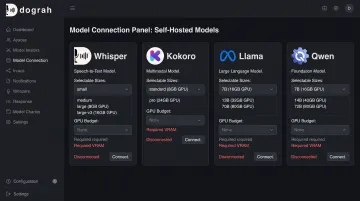
Instead of locking you into one model stack, Dograh AI supports connecting your own locally hosted models, including Voxtral, Whisper, Kokoro, Llama, Canary, Qwen, Chatterbox, and Coqui. You pick model sizes that fit your GPU budget instead of defaulting to whatever is largest.
Two platform features shift the sizing math further in your favor:
- Speech-to-Speech orchestration (Gemini Flash Live, OpenAI GPT-Realtime-2, and similar): roughly halves end-to-end latency, so you need less compute headroom to hit SLAs on modest hardware
- Hybrid pre-recorded + TTS voice: blends human voice clips with TTS fallback in the same cloned voice, cutting compute cost up to 3x and lowering the GPU tier needed for a given call volume
For teams that would rather not manage GPU sizing at all, Dograh AI also offers fully managed private-cloud deployments built inside the customer's own infrastructure, keeping models, data, and GPUs within their own environment while Dograh handles orchestration, upgrades, and reliability.
Conclusion
GPU sizing means matching hardware to your latency budget, model choice, and concurrency needs—not buying the most powerful card available.
Let production priorities guide the decision: cost efficiency for high-volume simple use cases, or headroom for complex, high-concurrency deployments. Neither answer is wrong. They just serve different businesses.
Sizing also isn't a one-time decision. Usage patterns shift, call volume grows, and model upgrades happen. Each of those should trigger a fresh look at your hardware footprint, not an assumption that last year's sizing still holds.
Frequently Asked Questions
How much GPU is required for a self-hosted voice agent?
It depends on the pipeline. A lightweight, quantized 7-8B LLM can run on a single consumer GPU with 12-24GB VRAM. An 11B+ model or higher concurrency typically needs a data-center GPU with 40-80GB VRAM.
Can you run an LLM without a GPU?
Yes, through quantization and CPU-optimized inference engines. Expect noticeably slower response times on CPU, which often pushes total response time beyond the 800ms conversational threshold.
Does agentic AI need more CPU than GPU?
Voice agent inference is GPU-bound for the ASR, LLM, and TTS math itself. CPU mainly handles orchestration, I/O, and system processes, and the common guideline is several CPU cores allocated per GPU accelerator.
What is the minimum VRAM needed for a production voice AI pipeline?
A co-located ASR+LLM+TTS pipeline using a quantized 7-8B model can often run in the 8-10GB range for weights alone. An FP16 11B-class pipeline needs considerably more, once KV cache and runtime overhead are added on top.
Is a single GPU enough to run ASR, LLM, and TTS together?
Yes, for moderate scale and smaller models. Beyond roughly 8-10 concurrent sessions, or when using 70B-class LLMs, splitting stages across multiple GPUs typically becomes necessary.
How many concurrent calls can one GPU handle?
This varies by model size and quantization. NVIDIA's Riva benchmarks show TTS latency alone rising from 22ms at one stream to 323ms at 32 streams on a single A100. Concurrency erodes per-session latency quickly on shared hardware.