This isn't a staffing problem. Adding one more receptionist doesn't fix a structural bottleneck where patient demand is continuous but staff availability isn't. An MGMA poll of 294 practice leaders found that scheduling and eligibility/prior authorization alone account for 76% of the most time-intensive phone tasks — work that follows a predictable, repeatable pattern every single day.
Conversational AI changes the equation. Not a phone tree. Not a hold-music loop. A voice-native AI agent that understands natural speech, holds multi-turn healthcare conversations, integrates with practice workflows, and answers every call — at 2 AM on a Sunday as readily as 10 AM on a Tuesday.
This guide is for practice managers and clinic operators who want to understand what that actually looks like in practice: what the AI handles, what it doesn't, how compliance works, and how to deploy it without disrupting your existing operations.
Key Takeaways
- Conversational AI handles repeatable, high-volume front desk tasks — scheduling, FAQs, reminders, after-hours calls — freeing staff for complex, high-empathy interactions
- AI answers every call instantly, closing the gap for clinics where over 50% of peak-period calls go to voicemail
- Self-hosted or private-cloud deployments keep PHI entirely within your own infrastructure — eliminating the biggest compliance risk
- A hybrid model — AI handling tier-1 calls with seamless escalation to humans — consistently outperforms both fully manual and fully automated approaches
Why Traditional Healthcare Front Desks Are Breaking Down
The Structural Mismatch
Front desks are staffed for business hours. Patient needs are not.
A patient who needs to reschedule a Thursday appointment at 7 PM has three options: leave a voicemail, call back tomorrow, or give up. Each option carries a cost — for the patient and the practice.
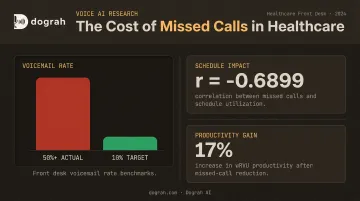
The Valley View Hospital case study, published by MGMA, found that some clinics had more than 50% of incoming calls going to voicemail and set a goal of 10% or lower. They measured an inverse correlation between missed calls and schedule utilization (r = -0.6899), and linked missed-call reduction to a 17% increase in wRVU productivity. Missed calls are not just a patient experience problem — they directly affect revenue.
The Compounding Cost of Repetitive Call Volume
The same MGMA research measured average patient call time at 95 seconds and found that switching from voicemail callbacks to direct call answering reduced phone-related labor by 48 hours per month. That's more than a full work week of staff time, every month, consumed by the mechanics of answering and returning calls rather than actually helping patients.
Front-desk and receptionist roles are also among the highest-turnover positions in medical practices. A 2025 MGMA poll of 357 respondents specifically named front-office staff as turnover hotspots — and 29% of practices reported increased turnover year-over-year. The combination of high call volume, repetitive tasks, and patient frustration accelerates burnout faster than most clinical roles.
Why IVR and Answering Services Didn't Solve It
Legacy phone trees and after-hours answering services were designed for a different era. They consistently fell short in the same ways:
- Rigid menus that patients found frustrating to navigate
- No resolution for most call types — just a path to a voicemail
- Zero integration with the EHR or scheduling system
- Redirected patients back to calling during business hours anyway
They didn't reduce call volume — they deferred it.
What Conversational AI Does at the Healthcare Front Desk
Beyond the Phone Tree
Conversational AI is not an upgraded IVR. The difference is context awareness.
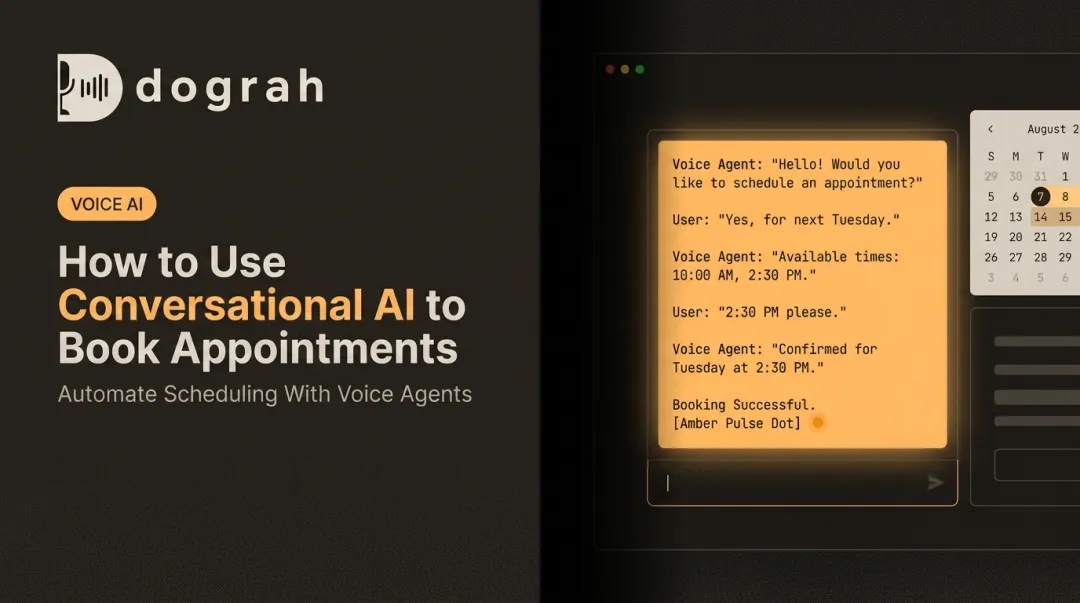
A patient who calls and says "I need to move my Thursday appointment with Dr. Patel — something came up at work and next Tuesday works better" is understood as a rescheduling request, not sorted into a menu category. The AI checks real-time availability, offers options, confirms the change, and sends a confirmation. No menu navigation required.
That multi-turn, intent-driven interaction is what separates modern voice AI from the phone trees that frustrated patients for two decades.
Core Tasks the AI Handles
Appointment scheduling and management:
- Book, reschedule, and cancel appointments in real time via EHR or practice calendar integration
- Handle multi-provider availability checks
- Send confirmation messages automatically
- Available 24/7, including evenings, weekends, and holidays
Routine inquiry resolution (no escalation needed):
- Clinic hours, location, and parking
- Insurance plans accepted
- Referral status inquiries
- Prescription refill request routing
- Pre-visit preparation instructions
- Post-visit follow-up
After-hours and overflow call handling:
- Captures and resolves patient needs outside business hours
- Routes urgent calls to on-call providers following triage protocols
- Creates structured call summaries for staff review the next morning, eliminating the voicemail backlog
Multilingual support:
- Supports 70+ languages, removing the barriers that cause patients to defer care or require on-site interpreter services
- Especially valuable for clinics serving diverse or non-English-speaking communities
Dograh AI includes prebuilt templates for all four workflow types: appointment scheduling, reminders, basic triage routing, and after-hours handling. Each template deploys without custom code.
The Real Business Case for Front Desk Automation
Staff Cost vs. AI Cost
BLS Employer Cost data from December 2025 puts total compensation for office and administrative support roles in private healthcare at $33.60/hour — $23.08 in wages and $10.52 in benefits. For a full-time receptionist at 40 hours per week, that's roughly $70,000 per year in fully loaded compensation before factoring in turnover costs, training time, and temporary coverage.
Voice AI platforms don't publish a single universal price, but the cost structure is fundamentally different: usage-based pricing tied to call volume, without overtime, sick days, or turnover replacement costs. Open-source platforms like Dograh AI go further — no platform fees at all, with organizations paying only their own API costs under self-hosted deployments.
No-Show Reduction Through Automated Reminders
No-shows are an expensive, largely preventable problem. A 2024 systematic review of 16 studies found outpatient no-show rates commonly range from 12% to 42%, with some settings reaching 50%. The same review found that 97.2% of patients favor reminders, with phone and SMS as preferred channels.
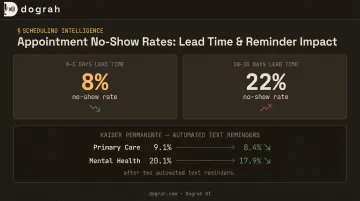
Controlled research supports automated outreach. A randomized Kaiser Permanente Washington study found that two text reminders reduced primary-care no-shows from 9.1% to 8.4% and mental-health no-shows from 20.1% to 17.9%. Three findings from that same 2024 review carry direct operational implications:
- No-show rates run 8% for 0–3 day lead times versus 22% for 28–30 day lead times — shorter booking windows matter
- Filling cancellation slots from a waitlist converts that gap into a revenue lever, not just a scheduling fix
- Conversational AI handles all of this in a single call: reminder, rescheduling, and backfill outreach without staff involvement
Scalability Without Proportional Headcount
Flu season, open enrollment, post-holiday appointment surges — these events reliably spike call volume in ways that staffed front desks cannot absorb without overtime or overflow answering services.
Voice AI scales to concurrent call volume instantly. A platform can handle simultaneous inbound calls during a surge period without a clinic needing to hire temporary staff, route to expensive answering services, or accept missed calls as an inevitable outcome. The cost of handling 200 calls on a busy Monday is not proportionally higher than handling 80 calls on a quiet Wednesday.
Data Privacy and Compliance: The Question Every Healthcare Buyer Should Ask First
Why PHI in Voice AI Is a Specific Risk
Patient conversations at the front desk contain protected health information: diagnoses, medications, insurance details, appointment reasons. Under HIPAA, any third-party platform that processes these conversations is legally a Business Associate — and HHS is explicit that this applies even to encrypted "no-view" cloud services.
Every SaaS voice AI vendor that processes patient audio on shared infrastructure requires a signed BAA, a security review, and ongoing compliance oversight. HHS has documented a resolution agreement involving ePHI stored on a cloud server without a BAA — even for just 3,000 individuals. The compliance stakes are real.
The Vendor Overhead Problem
Most commercial voice AI platforms are closed-source SaaS products running on shared infrastructure. Healthcare organizations evaluating these platforms must conduct full HIPAA, and potentially SOC 2, due diligence before deployment. This adds procurement time and introduces a third-party breach surface the practice cannot directly control.
The HSCC Third-Party AI Risk Guide, summarized by the AHA, identifies specific controls healthcare organizations need around AI vendors: data lineage tracking, model auditability, vendor security attestations, and fail-safe requirements. Each closed-platform vendor relationship carries that full compliance workload.
The Self-Hosted and Private Cloud Alternative
When voice agent infrastructure runs inside the healthcare organization's own cloud environment, patient audio, transcripts, and conversation data never leave organizational control. The vendor is no longer a compliance liability, because they're not processing the data at all.
Two deployment models support this architecture:
- Fully managed private cloud — Dograh AI deploys the entire voice agent stack within the customer's own cloud environment and handles orchestration, upgrades, and reliability, while the customer retains complete control over data residency and access controls.
- Self-hosted open-source — Organizations with internal technical resources can run the BSD 2-Clause licensed codebase directly. Because the code is fully auditable, security teams can inspect exactly how data is processed and stored, which cuts weeks off vendor approval in environments where closed-source platforms are a hard blocker.
Getting the Human-AI Balance Right
Which Model Fits Which Practice
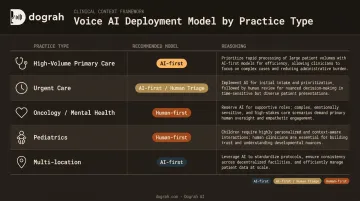
Not every specialty should run the same AI-to-human ratio at the front desk.
| Practice Type | Recommended Model | Reasoning |
|---|---|---|
| High-volume primary care | AI-first with human backup | Majority of calls are routine scheduling and FAQs |
| Urgent care / walk-in | AI-first for scheduling, human for triage | Urgency detection requires fast escalation paths |
| Oncology / mental health | Human-first with AI assist | Emotionally complex conversations require human judgment |
| Pediatrics | Human-first or carefully configured AI-first | Parent communication sensitivity |
| Multi-location practice | AI-first for routing and scheduling | Consistent handling across locations |
The Escalation Design Principle
The most common patient complaint about healthcare AI is being trapped — unable to reach a human when the situation requires one. That's a design failure, not a technology limitation.
Well-configured conversational AI detects escalation signals automatically:
- Distress or urgency in the caller's voice or words
- Requests for a human agent
- Complex situations outside the AI's defined scope
- Emergency intent detection (chest pain, stroke symptoms)
When escalation triggers, the transfer to a live staff member should include full call context: intent, what the patient said, verification status, actions already taken, and recommended next steps. Dograh AI's escalation system produces a structured handoff summary covering all of this — so the receiving agent can act immediately without re-asking the patient for information they've already provided.
What Happens to Staff Roles
Front desk staff in a hybrid model are not replaced — they're repositioned.
When AI absorbs routine call volume, human staff shift toward:
- In-person patient support and care coordination
- Complex insurance problem-solving
- Patient relationship management
- Clinical administrative tasks requiring judgment
This makes the role more skilled and less transactional. That shift typically improves retention — which matters in a segment where front-office turnover is a documented, costly problem.
How to Deploy a Healthcare Front Desk Voice Agent
What You Need Before You Start
Before configuring a voice agent, gather:
- Integration details: EHR or practice management system, telephony provider (Twilio, Vonage, Telnyx, or existing SIP trunk), calendar system
- Clinic-specific information: Provider names and schedules, services offered, insurance plans accepted, clinic hours and locations
- Escalation protocols: On-call provider routing, urgency thresholds, after-hours emergency procedures
- Call type prioritization: Which inbound call types will the AI handle first (typically scheduling and FAQs before expanding to after-hours and outbound reminders)
What to Look for in a Platform
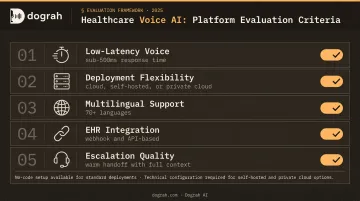
Key evaluation criteria for healthcare voice AI:
- Low-latency voice quality — sub-500ms end-to-end response time is the target for natural conversation; delays over 800ms disrupt conversational flow and increase patient hang-ups
- Deployment model flexibility — cloud-only, self-hosted, or private cloud; this is the compliance decision as much as a technical one
- Multilingual support — essential for clinics serving non-English-speaking patient populations
- EHR integration approach — webhook and API-based integration is more flexible than fixed connector lists
- Escalation and transfer quality — warm handoff with context, not a dropped call
Dograh AI supports all three deployment modes with a visual no-code workflow builder — a clinic administrator can configure and launch a working voice agent in under two minutes using prebuilt healthcare templates, without requiring engineering resources. For complex EHR integrations via webhook or API, technical involvement is needed, but the core scheduling and FAQ workflows are no-code.
How to Measure Success
Establish a 30-day baseline before deployment, then track these metrics to gauge impact:
- Call answer rate (target: 100% — no missed calls)
- Voicemail rate (target: 10% or lower, per Valley View benchmark)
- First-call resolution rate
- Appointment booking conversion from inbound calls
- No-show rate change after automated reminders go live
- Escalation rate to human staff
- Staff hours reclaimed from routine call handling
Use these benchmarks to decide when to expand. Once call answer rate hits target and escalation rate stabilizes below 20%, after-hours coverage and outbound reminders are the logical next layer to activate.
Frequently Asked Questions
How can conversational AI help a healthcare front desk receptionist?
Conversational AI handles the routine inbound volume — scheduling, FAQs, reminders — that consumes most of a receptionist's day. This frees staff to focus on complex in-person interactions, insurance problem-solving, and tasks that genuinely require empathy and clinical judgment.
What tasks can a voice AI agent handle at a medical front desk?
The core task set includes appointment booking and rescheduling, after-hours call answering, prescription refill request routing, insurance and clinic information queries, appointment reminders and confirmations, and seamless call escalation to human staff when the situation requires it.
Is patient data safe when using AI for front desk automation?
Safety depends entirely on the platform's deployment model. Self-hosted or private cloud deployments keep patient audio and conversation data within the organization's own infrastructure. This eliminates third-party vendor data risk and simplifies HIPAA compliance compared to shared-infrastructure SaaS platforms.
How does AI front desk automation reduce patient no-shows?
The AI sends proactive reminders, handles rescheduling in the same conversation, and automatically fills cancelled slots from a waitlist — targeting the two most common no-show drivers before they cost you an appointment.
Can conversational AI integrate with existing EHR or practice management systems?
Yes. Leading voice AI platforms integrate with EHR and practice management systems via webhooks and APIs to check real-time availability, log call outcomes, and sync scheduling data. Verify specific EHR compatibility with the vendor before deployment, as integration depth varies by platform and system.
Do patients actually like talking to AI at a healthcare front desk?
Patient acceptance is high when the AI resolves requests quickly and provides a clear path to a human agent. Frustration arises when AI blocks access to staff rather than routing efficiently — a configuration issue, not a fundamental flaw in voice AI.