The frustrating part? Most teams assume fixing this means months of complex integrations. It doesn't. The setup sequence matters far more than technical complexity, and a well-configured booking agent can be live in under two minutes with the right platform.
This guide covers when conversational AI booking is the right tool, what you need before you start, the step-by-step process, and what separates setups that consistently convert from those that quietly lose bookings.
Key Takeaways
- Nearly half of healthcare appointments are booked outside business hours — and 48% of law firms are unreachable by phone when patients and clients call
- Three prerequisites matter most: a real-time connected calendar, a voice AI platform with workflow tooling, and defined escalation paths
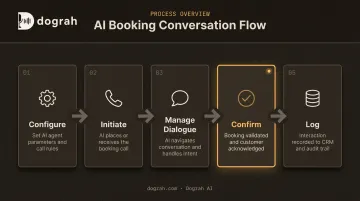
- Five steps, no shortcuts: configure → initiate → manage dialogue → confirm → log. Skip one and you get silent booking failures
- The opening 15 seconds decide whether the caller stays: credible, purposeful framing beats trying to pass as human
- Post-call data is the improvement loop — treat it as part of the system, not an afterthought
When Should You Use Conversational AI to Book Appointments?
Not every booking problem needs a voice agent. Conversational AI delivers consistent results under specific operational conditions — and gets misused just as predictably when those conditions aren't met.
The Right Conditions
Conversational AI booking performs best when:
- Appointment volume is high enough that manual handling creates delays or missed follow-ups
- After-hours coverage is needed — Zocdoc's 2024 patient survey found nearly half of all appointments were booked after hours (5 pm to 9 am local time)
- Inbound call volume exceeds staff capacity — Clio's 2024 study of 500 law firms found 48% were unreachable by phone and only 40% picked up
- Outbound scheduling campaigns are used to reach leads from a CRM list before they go cold
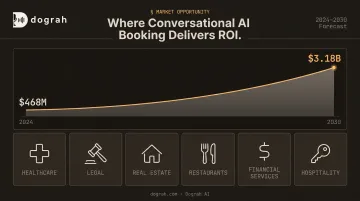
The verticals that see the most direct ROI are those where booking volume is predictable and repetitive: healthcare, legal intake, real estate, restaurants, financial services, and hospitality. Healthcare alone is driving a market expansion from $468M in 2024 to a projected $3.18B by 2030 according to Grand View Research's 2025 report, driven largely by appointment scheduling and reminders.
Where It Gets Misused
The same patterns cause failure across industries:
- Calendar not connected before launch — the agent confidently books slots that are already taken
- Deployed to replace relationship-heavy first conversations — legal consultations, therapy intake, and high-stakes financial discussions need human trust before scheduling is even relevant
- No escalation path defined — when the AI hits its limits with no handoff, callers get looped or dropped
Operational Channels That Work
| Channel | Best Use Case |
|---|---|
| Inbound voice | Answering calls that would otherwise go to voicemail |
| Outbound voice | Proactively scheduling leads from a CRM list |
| Web/chat | Asynchronous booking where callers prefer typing |
What You Need Before Getting Started
Getting a booking agent live requires more than picking a platform. Three things need to be in place first — and skipping any one of them is how double bookings and dropped calls happen.
1. A Connected Calendar with Real-Time Sync
Google Calendar and Outlook are the most commonly integrated options. Without true two-way real-time sync, the agent will offer slots that are already taken, which leads to double bookings.
The test is simple: block a slot manually on your calendar and verify the agent immediately shows it as unavailable. Book a slot through the agent and verify it immediately appears on the calendar. If either check fails, stop and fix the integration before going live.
2. A Voice AI Platform with Workflow Tooling
You need a platform that handles calendar integrations, telephony connectivity, and conversation logic without requiring custom code for every change. Dograh AI's visual workflow builder operates on this principle — it's built like n8n but for voice agents, connecting calendars, CRMs, and automation platforms with a drag-and-drop interface. A working booking agent can be live in under two minutes using the 2 Min Launch feature, which generates a customized workflow from a short use-case description.
The workflow builder covers the structural requirements for a booking sequence that holds up under real-world conditions:
- Conditional branching for qualification questions
- Escalation triggers when the AI needs to hand off to a human
- Webhook-triggered calendar writes to confirm bookings instantly
3. Configuration Inputs Ready Before the First Call
Before connecting any channel, have these defined:
- Business name, hours, and appointment types with durations
- Qualifying questions (service type, location, budget range if relevant)
- Confirmation message format (SMS, email, or both)
- Escalation trigger — the specific condition at which the AI stops attempting to book and routes to a human or sends a callback request
How to Use Conversational AI to Book Appointments
The booking conversation follows a defined sequence: configure → initiate → manage the dialogue → confirm → log. Teams that skip steps typically only discover the failure when a customer shows up and there's no record.
Configure and Connect Your Agent
Set up the agent's personality and opening script before connecting any channel:
- Define tone — professional, friendly, and concise for most booking contexts
- Write an opening line that identifies the business and the agent's purpose within the first two seconds
- Configure qualification questions the agent will ask to determine appointment type and duration before checking availability
- Connect and test calendar sync — run the two-way sync verification described above before going live
The calendar sync test is the most commonly skipped step and the most common source of double bookings. With configuration locked in, the next step is getting the conversation started correctly.
Initiating the Booking Conversation
Initiation works differently depending on direction:
- Inbound: The agent answers immediately when an incoming call or message arrives — no trigger needed
- Outbound: A trigger condition fires the agent to reach out proactively — a new lead added to the CRM, a form submission, or a time-since-inquiry threshold crossing
In practice: the agent greets the caller, identifies itself as an AI assistant for the business, states its purpose, and asks a single open-ended question to establish context. The opening doesn't need to sound human — it needs to sound purposeful and credible. Callers stay on the line when they understand immediately who is calling, why, and what they're being asked to do.
Google's Conversation Design guidance applies Grice's Cooperative Principle here: effective voice systems keep every turn "brief and optimally relevant." The opening turn is where that principle matters most.
Managing the Conversation Correctly
The middle of the conversation has its own operating rules:
- Offer two or three available slots at most — not a full calendar dump, which overwhelms callers and increases drop-off
- Confirm the caller's preference before writing to the calendar
- Read back confirmed details — date, time, location or link, and what to prepare — before closing the booking
Set a turn limit. After a defined number of exchanges without resolution, the agent stops attempting to book and routes to a human or sends a callback request. Without a turn limit, an uncertain caller can loop the agent indefinitely with no outcome for either side.
Confirming and Logging the Appointment
Once a slot is accepted:
- Write to the calendar immediately — don't defer this step
- Send confirmation via SMS, email, or both — Dograh AI supports multi-channel confirmation within the same workflow, triggered automatically after the calendar write
- Log to CRM with caller name, contact details, appointment type, and timestamp — Dograh integrates with Salesforce, HubSpot, and Zendesk, with logging automated in the same workflow
The most common failure at this stage: the agent verbally confirms the appointment, but the calendar write fails silently. The caller believes they're booked and shows up to nothing.
Fix this with a calendar write acknowledgement check — a verification step that confirms the booking was written before the confirmation message goes out. If the write fails, the agent delivers a fallback message rather than a false confirmation. That single check prevents the most frustrating outcome in automated booking: a confident confirmation followed by a no-show record.
Best Practices for Consistent Booking Results
Nail the Opening Before Anything Else
The agent's first turn should implicitly answer three questions the caller hasn't asked yet: who is this, why are they calling, and what do I need to do? Answer all three before asking anything.
For outbound booking, Dograh's operational approach illustrates this: the agent opens by identifying the business, immediately providing context ("calling on behalf of [Agent Name] who helps people with [specific value]"), and then asks a single focused question. The sequence is identity → purpose → ask — not ask → then explain.
Keep Flows Short and Outcome-Focused
Every turn should move toward a booked slot or a clear next action. Qualification questions that appear before availability is shown create friction — callers are being asked to give information before they know there's a slot available for them.
Channel intent also matters. For inbound calls — people who dialed specifically to book — show availability first and qualify second. This keeps the interaction moving toward the outcome the caller already wants.
Test Under Real-World Conditions Before Going Live
Most booking failures in production aren't logic errors — they're handling failures that were never tested:
- Different accents and background noise
- Callers who interrupt mid-sentence
- People who change their requested time after you've already offered slots
- Callers who go silent or ask off-topic questions
Run the agent through all of these before launch.
Build Multi-Stage Follow-Ups for Uncompleted Bookings
If a caller drops off before confirming, configure a follow-up sequence. A 2022 randomized study at Kaiser Permanente Washington covering over 125,000 appointments found that one additional text reminder reduced no-show rates among high-risk visits by 7% for primary care and 11% for mental health. An immediate retry followed by a 24-hour and 72-hour nudge covers most drop-off recovery scenarios.
Use Post-Call Data as Your Primary Improvement Loop
Every completed or abandoned interaction produces signal. The most useful signals to track:
- The turn at which callers disengaged
- Which time slots were declined most often
- How many bookings required human intervention
- Sentiment patterns across call outcomes
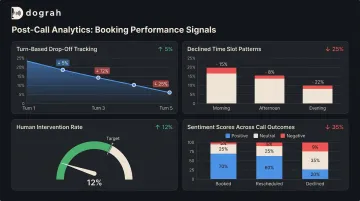
Dograh AI's automated post-call analysis surfaces all of this — sentiment detection, containment analytics (how often the agent resolved calls without human escalation), and drop-off tracking — without manual recording review.
Review this data weekly when the agent is new. Move to monthly once performance has stabilized. The businesses that build this review habit from week one see compounding improvement from the same initial setup investment.
Conclusion
Using conversational AI to book appointments is less about the sophistication of the technology than the discipline of the setup sequence. A correctly configured agent — connected to a real-time calendar, with a strong opening, a turn limit, and a calendar write acknowledgement check — will consistently hit higher booking rates than a technically complex setup that skips those fundamentals.
Build the post-call review habit from day one. The data your agent generates is the instruction set for making it measurably better, and the improvements compound fast once the loop is live.
Frequently Asked Questions
Can conversational AI handle appointment rescheduling and cancellations, not just new bookings?
Yes — provided agents can handle both by checking calendar availability in real time and updating the booking record. This requires explicit rescheduling and cancellation flows built into the workflow; it does not happen automatically from the same new-booking flow.
What is the difference between a conversational AI voice agent and a chatbot for booking appointments?
A chatbot handles text-based exchanges on a website or messaging app. A voice agent conducts a real-time phone conversation using speech-to-text and text-to-speech, making it appropriate for inbound calls and outbound dialing where the customer expects to speak rather than type.
How do you prevent double bookings when using conversational AI?
Prevent double bookings with real-time two-way calendar sync: the agent reads live availability before offering slots and writes the confirmed booking immediately. A write-acknowledgement check then verifies the update succeeded before sending the confirmation to the caller.
Is conversational AI appointment booking compliant with HIPAA and GDPR?
Compliance depends on where call data is processed and stored. Cloud platforms that store recordings or transcripts on vendor servers introduce BAA and DPA requirements. Self-hosted or private-cloud deployments, like Dograh AI's on-premise option, keep data within your own infrastructure and remove third-party vendor compliance obligations entirely.
What happens when a caller goes off-script or asks something the agent isn't prepared for?
A well-designed agent acknowledges it cannot help with that specific question and offers to connect the caller with a team member. The turn limit configuration ensures the conversation reaches a resolution rather than looping indefinitely on an uncertain or off-topic caller.
How long does it take to set up a conversational AI appointment booking system?
With a visual workflow builder and a pre-connected calendar, a basic inbound booking agent can be live in under two minutes. More complex setups, such as CRM integration, outbound campaigns, or multi-location calendars, typically take a few hours to a couple of days.