Introduction
Testing a voice agent used to mean one thing: dialing a real number, burning phone credits, and waiting for a colleague to pick up. It was slow, and it wasn't cheap either.
Twilio's own pricing shows why: voice AI usage starts at $0.07 per minute, on top of standard call rates of $0.0085/min inbound and $0.014/min outbound. Multiply that across dozens of test calls per day, and QA becomes a line item.
You don't need a live phone line to catch most bugs anymore. Browser-based web calls, scripted conversation simulations, and telephony configuration validators can all run without touching a carrier.
These methods aren't interchangeable. Each catches different problems, and each misses others.
This article covers how to test a voice agent without a real call, what you need before you start, what makes results trustworthy, and where the approach still falls short.
Key Takeaways
- No-call testing covers three methods: browser/WebRTC calls, automated persona simulations, and telephony config validators
- Fastest way to iterate on prompts and conversation logic—still can't fully replicate carrier audio or real network latency
- Accuracy hinges on script diversity, latency realism, and a structured scoring rubric, not passive call review alone
- A short round of real-call testing before launch is still worth budgeting for
How to Test a Voice Agent Without Making Real Calls
These four methods build on each other. Start with a quick manual check in your browser, move to automated simulation once the logic feels right, then validate configuration and edge-case audio before anything touches a phone line.
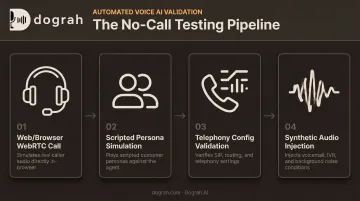
Step 1: Run a Web/Browser Call (WebRTC Test)
A browser-based test call lets you talk to your agent directly: no phone number, no carrier, just wideband WebRTC audio through your computer's microphone.
What you need:
- A mic-enabled browser
- The specific agent version (draft or published) you want to test
This step is good for one thing above all: fast iteration. You can validate conversation logic, prompt adherence, and text-to-speech quality in real time, without waiting on a dial tone.
Dograh AI's dashboard reflects this workflow directly. After naming a bot and describing its use case in a few words, you launch it and click Web Call to start talking. No telephony setup required.
The catch to carry forward: WebRTC audio doesn't reflect real carrier or PSTN conditions. It sounds clean because it is clean. That's useful for logic testing and misleading if you mistake it for a production-readiness signal.
Step 2: Run Scripted Conversation/Persona Simulations
Once the basic flow works, automated simulation testing takes over. Scripted personas and multi-turn scenarios are sent as text or synthetic audio, then scored against pass/fail criteria. No human dialing required.
What you need:
- A library of test scripts covering happy paths and edge cases (interruptions, off-topic questions, frustrated callers)
- Defined success criteria for each scenario
The real value here is scale. These simulations batch-run across hundreds of scenarios in parallel, which makes them ideal for regression testing after every prompt or flow change. Manual call-listening simply can't sustain that pace.
Platforms with a visual workflow builder take this further. In Dograh AI's builder, teams configure branching logic in the flow itself (for example, routing a verification mismatch to a human, or sending an urgent request down a handoff path). They can then run LoopTalk, its AI-to-AI simulation suite, against that flow before any telephony is connected.
LoopTalk uses over 100 documented AI customer personas and can generate thousands of test conversations quickly. Coverage includes:
- Angry or frustrated callers
- Elderly callers with hearing difficulty
- Spanish-speaking callers
- Other edge personas beyond standard happy paths
That persona depth turns a handful of scripted paths into something closer to real coverage.
Step 3: Validate Telephony/Dial Plan Configuration With a Call Simulator
This step answers a different question entirely. Instead of "did the agent respond well," it asks: will the call route correctly?
Configuration validator tools (the kind built into platforms like Genesys Cloud or Interaction Administrator) check number normalization, routing, and classification without placing a live call. Genesys Cloud's call simulator, for example, verifies number-plan matching, outbound route configuration, and destination site setup entirely offline.
What you need:
- Correct admin permissions
- A configured site or dial plan to test against
Use this step when troubleshooting call setup or routing failures, not when you're judging conversation quality. It won't tell you how the agent talks. It only tells you whether the call will get where it's supposed to go.
Step 4: Inject Synthetic Audio for Voicemail, IVR, and Noise Conditions
The last no-call step tests how your agent handles messy audio conditions before it ever meets one on a live line.
Pre-recorded audio clips (voicemail beeps, IVR prompts, background noise, mobile-quality audio) are fed into a simulated call to test detection logic.
What you need:
- Sample audio files representative of real-world caller conditions (voicemail tones, IVR menus, noisy environments)
This catches problems that are easy to miss otherwise: missed voicemail detection, broken IVR handling, or an agent that talks over a beep it never recognized.
Answer-detection logic typically relies on early audio patterns, greeting length, and silence windows. Testing those signals against real recorded fixtures, rather than assuming they'll work, closes a real gap before go-live.
What You Need Before You Start
Preparation determines how much a simulation actually reveals, not just whether it runs.
- A sandboxed test environment with the specific agent version (draft or published) you intend to test
- A script/persona library covering both expected conversations and adversarial or edge-case scenarios
- Defined evaluation criteria (task completion, sentiment, latency thresholds) so results get scored consistently instead of judged by ear
- Full call logs and transcripts for debugging
That last point matters more than it sounds. Self-hosted, open-source platforms give full log visibility because the code is auditable. You can configure partial and final transcripts, per-turn timing, TTS first-audio timing, and audio slices around failures.
Managed cloud offerings usually include run history, timestamps, and call summaries, which covers most day-to-day debugging without setup overhead. Which you need depends on how deep you go when something breaks.
Key Factors That Affect Simulation Accuracy
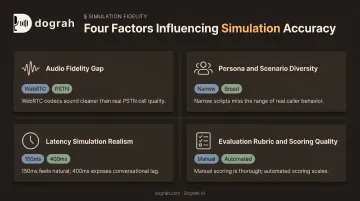
Two teams running "the same" no-call test can land at very different confidence levels. The gap usually comes down to four variables.
Audio Fidelity Gap
Browser and web test calls run on wideband WebRTC audio. Real callers connect over narrowband PSTN codecs, a meaningfully different signal.
Google Cloud's speech-to-text documentation notes that legacy telephony audio commonly uses 8 kHz sampling, which may give less accurate results compared to higher-fidelity input.
In practice, an agent that transcribes perfectly in a browser test can still misread digits or names once real carrier audio degrades the signal. A clean WebRTC pass tells you almost nothing about narrowband mobile performance.
Persona and Scenario Diversity
A narrow set of test scripts only exposes the bugs those scripts happen to trigger. If every test script is a polite, cooperative caller, you'll never find the agent's blind spots.
Broader coverage surfaces failure modes happy-path scripts always miss:
- Accents and non-native speech patterns
- Mid-sentence interruptions and barge-ins
- Off-script questions and topic switches
- Adversarial or deliberately confusing prompts
Persona libraries earn their keep here. Running 100+ distinct personas (frustrated, confused, talkative, hard of hearing) against the same flow finds problems no five-script set ever will.
Latency Simulation Realism
Local or browser-based testing environments typically carry far less network delay than a mobile or carrier connection does.
ITU-T's G.114 standard puts numbers on why this matters: delays below 150 milliseconds one-way feel essentially transparent to callers, while anything above 400 milliseconds is considered unacceptable for general network planning.
Without artificially added latency, simulations can pass cleanly. The same agent then talks over callers or leaves dead air the moment real network delay shows up. If your test environment doesn't deliberately inject delay, it isn't testing for this at all.
Evaluation Rubric and Scoring Quality
Without structured pass/fail criteria, "how did that call go" turns into a subjective, inconsistent judgment call between whoever happens to be listening.
A defined, automated scoring rubric catches regressions consistently across hundreds of simulated scenarios. Manual listening can't scale to that volume. Strong rubrics typically score:
- Task completion
- Sentiment classification
- Policy and script adherence
Automated post-call analysis that flags sentiment on a 0–100% confidence scale does more consistent work than a reviewer's gut feeling ever will.
Common Mistakes & When You Still Need Real-Call Testing
Even solid simulation coverage gets misused. Watch for these patterns:
- Treating a passing simulation as production-ready proof without ever running the agent over a real narrowband carrier line
- Testing only happy-path scripts while skipping DTMF, live transfers, and voicemail/IVR detection (all behave differently on real telephony)
- Re-testing manually after every prompt change instead of automating regression scenarios as the agent grows
- Skipping a final real-call check before go-live entirely
Plan a small batch of real calls over your actual telephony provider before launch. No amount of browser testing or persona simulation fully replicates carrier-specific codec behavior, real DTMF timing, or how your agent handles an actual voicemail greeting on a live line.
Simulation gets you 90% of the way cheaply and fast. The remaining stretch still needs a phone.
Conclusion
Web calls, conversation simulations, and configuration validators together cover most of what you need to iterate quickly and cheaply on a voice agent's logic and setup. They're faster and cheaper to run at scale than dialing real numbers for every test cycle.
But no-call testing isn't a full substitute for real telephony. The safest workflow pairs automated simulation during active development with a short, deliberate round of real-call testing right before launch. Use that pass to catch carrier- and codec-specific issues no simulation fully reproduces.
Frequently Asked Questions
Is there a fake phone call simulator available?
Yes. Browser-based web call testing needs no phone number, and scripted persona simulators mimic real callers. Telephony configuration validators also check routing setup without dialing out.
Can you test a voice AI agent without a phone number?
Yes, through web/browser call testing over WebRTC. You converse with the agent directly in a browser using just a microphone — no phone number or telephony setup involved.
What's the difference between web call testing and phone call testing?
Web calls run over wideband browser audio with no carrier involved. Phone call testing runs over real telephony and validates carrier audio, latency, DTMF, and live transfers that web calls cannot validate.
How do you simulate voicemail or IVR detection without a real call?
Inject pre-recorded voicemail beeps or IVR prompts into a simulated call. That verifies the agent's detection logic before it faces real audio.
Can simulated testing catch latency issues?
Only if realistic network delay is deliberately added. Local and browser test environments are typically far faster than real mobile or carrier connections, so latency bugs stay hidden unless you inject delay on purpose.
Is simulation testing enough before launching a voice agent to production?
Simulation testing catches most logic, prompt, and configuration issues cheaply. A short round of real-call testing over your actual telephony provider is still recommended before a full launch.