Introduction
More builders are asking the same question: can the whole voice pipeline—listening, thinking, and speaking—run entirely on hardware they own, instead of routing every call through a third-party API?
The appeal is obvious. No per-minute cloud fees, no audio leaving your network, no vendor holding your transcripts. But "running it locally" isn't one decision. It's dozens of smaller ones: which GPU, which model, which quantization level, how the pieces talk to each other.
Get those choices wrong and you end up with a voice assistant that pauses for four seconds before answering.
Research on conversational delay found that response times above 4 seconds significantly degrade how people rate an AI voice agent's competence and engagement. Agents with 1.5-second delays were rated most favorably by a wide margin over slower ones.
This article covers how to build a local voice pipeline end to end: the hardware and skills you need, the parameters that drive real-time feel, and the mistakes that sink most first attempts.
Key Takeaways
- Local pipelines chain VAD, STT, LLM, and TTS on-prem so audio and transcripts never leave your network
- Feasibility hinges on GPU VRAM, quantization level, and reliable LLM tool-calling
- Local wins on privacy and cost; cloud still leads on transcription accuracy and structured actions
- Dograh AI connects Whisper, Kokoro, Llama, and Voxtral to a pre-built orchestration layer without glue code
- When compliance or scale outgrows a homelab, hybrid or managed private-cloud deployments are a realistic middle ground
How to Run the Whole Voice Pipeline Locally
Step 1: Map Out Your Voice Sandwich Architecture
The standard local pipeline stacks five layers: voice activity detection (optional but recommended), speech-to-text, LLM reasoning, text-to-speech, and a transport layer moving audio between the client and server.
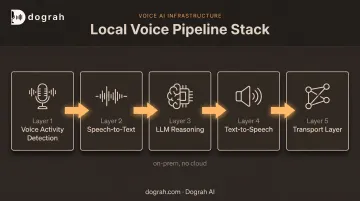
Before writing any code, set a latency budget. Delays under 1.5 seconds test best with users. Past 4 seconds, perceived competence and willingness to keep talking drop hard.
Then decide your deployment shape:
- Single machine: simplest to debug, works fine for one concurrent call
- Distributed setup: GPU server for inference, separate orchestrator, edge devices for microphones (needed once you're handling multiple simultaneous calls)
Step 2: Select and Deploy Local Models for Each Stage
For speech-to-text, test quantized Whisper variants like faster-whisper before committing. GPU acceleration isn't optional if you care about speed.
In faster-whisper's published benchmarks, an RTX 3070 Ti transcribed 13 minutes of audio in 16 seconds using INT8 precision with batching, versus 51 seconds on a Core i7-12700K running a smaller Whisper model with the same batch settings.
For reasoning, pick a small quantized LLM that fits your VRAM. Smaller models respond faster but reason less reliably, especially on structured tasks.
For TTS, test candidates like Piper, Coqui, or Kokoro and measure generation speed against playback speed directly. Don't write client-side patches for choppy audio before confirming the model itself is the bottleneck.
Step 3: Wire the Components Together with an Orchestration Layer
You have two paths here: build custom glue code connecting each stage over a protocol, or use a platform that already handles orchestration.
Open-source platforms like Dograh AI provide this layer out of the box. You drop in locally hosted STT, LLM, and TTS models—STT to text, a reasoning layer for intent and tools, TTS for the spoken reply—without custom transport code for every swap.
Whichever route you take, don't skip:
- System prompts that define tone, scope, and behavior
- Structured tool/function-calling schemas for any action the LLM can trigger
- Explicit safety guardrails preventing unintended device or system actions
- Text-cleanup pass between STT and the LLM when you need to strip filler words and repair broken transcripts
Step 4: Test, Benchmark, and Tune for Real-Time Performance
Published benchmarks describe someone else's hardware, not yours. Measure true end-to-end latency from wake word to spoken response on the actual machine running your stack.
Specifically:
- Benchmark TTS generation speed and STT time-to-first-token separately before assuming the LLM is the slow part
- Trim conversation history to a handful of turns; voice interactions rarely need deep context, and shorter history reduces processing time per turn
- Offload simple commands ("turn off the lights") to rule-based intent matching instead of routing everything through the LLM
What You Need Before Going Fully Local
Under-provisioned hardware or mismatched software is the single biggest reason local pipelines feel unusably slow. Get these three areas right first.
Hardware & System Requirements
VRAM is the constraint that decides what's even possible:
| VRAM | What it typically supports |
|---|---|
| ~4 GB | STT-only workloads (Whisper INT8, unbatched) |
| ~8 GB | Small quantized LLM + STT running together |
| ~16 GB | Comfortable multi-service sharing (STT + LLM + TTS with headroom) |
| 24 GB+ | Larger models with better tool-calling reliability |
These are rough tiers based on component-level measurements, not a guaranteed full-stack number. A 7B model at 4-bit quantization measured 7.83 GB on its own in one evaluation, which leaves little room for simultaneous STT and TTS on an 8 GB card.
Always benchmark your actual combined stack, not individual pieces added up on paper.
Software & Model Compatibility
You'll need:
- Docker + NVIDIA Container Toolkit for GPU passthrough into containers
- An OpenAI-compatible inference server so your orchestration layer can call the LLM consistently
- Quantized model formats (GGUF, GPTQ, AWQ) matched to your specific GPU architecture
Skills & Security Readiness
Self-hosting demands basic Linux, Docker, and networking competence. Make security decisions before the model gets real power:
- Lock down exposed local endpoints so they stay host-only
- Set hard limits on what the LLM can control before granting tool access
Key Parameters That Affect Whether Your Local Pipeline Feels Real-Time
Most "why is this slow" or "why is this unreliable" complaints trace back to a handful of controllable variables.
Model Size & Quantization
Smaller, more compressed models run faster but reason less reliably. A controlled evaluation of a 7B model found that 4-bit quantization retained performance close to the unquantized version (GSM8K accuracy of 0.471 at 4-bit versus 0.508 at full precision), according to a 2024 quantization study.
Dropping below 4 bits produced a much bigger accuracy gap. Four-bit is the sweet spot; going lower trades too much accuracy for memory savings.
GPU/Hardware Acceleration
STT and TTS speed scale with available CUDA and Tensor cores, not just raw VRAM size. That RTX 3070 Ti benchmark above (16 seconds for 13 minutes of audio) versus the CPU result (51 seconds for a smaller model) shows the gap clearly. Underpowered GPUs, or CPU-only setups, push you toward multi-second delays per turn.
Context Window & Conversation History Length
Longer retained history increases prefill-stage processing time and, per research on long-context models, information placed in the middle of a long context is retrieved less reliably than information at the start or end. For voice, this means:
- Trim history to the last few turns, not the full call transcript
- Keep system prompts tight and specific
- Avoid relying on the model to "remember" something buried mid-conversation
Tool-Calling Reliability of the Chosen LLM
Voice assistants that control devices or trigger workflows need consistent structured function calls, not just fluent-sounding text. In a harder mobile-scenario function-calling benchmark, per HammerBench's 2024 evaluation, overall argument accuracy was:
- GPT-4o: 61.11%
- Qwen2.5-7B: 53.28%
- Llama-3.1-8B: 50.99%
- One 7B model: 37.43%
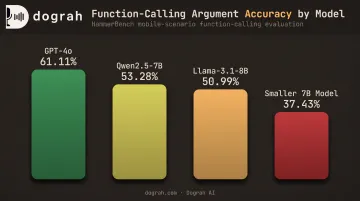
That gap directly affects usability. A model that understands the command but calls the wrong function, or none at all, leaves the user talking to a wall.
Common Mistakes and Troubleshooting When Self-Hosting a Voice Pipeline
A few mistakes show up in almost every first attempt:
- Skipping benchmarks: picking a TTS or STT model without testing generation speed against your actual hardware first
- Wrong model type: deploying a "reasoning" or think-mode LLM that produces long internal monologues before ever speaking, which feels broken in a voice context
- Unrestricted tool access: giving the LLM control over real devices or systems without explicit safety rules baked into the system prompt
Problem: Choppy or Delayed Audio Playback
Likely cause: TTS generation speed running slower than real time on underpowered hardware.
What to check: Measure the generation-to-playback ratio directly. If generation trails playback, upgrade GPU acceleration before patching the issue in client-side buffering code.
Problem: The LLM Understands the Command but Nothing Happens
Likely cause: inconsistent structured function calling, a known weakness in smaller local models.
What to check:
- Add explicit prompt priming around tool use
- Offload simple, repeatable commands to rule-based intent matching
- Route complex requests to a more capable fallback model
When Local Isn't Enough: Alternatives & Hybrid Approaches
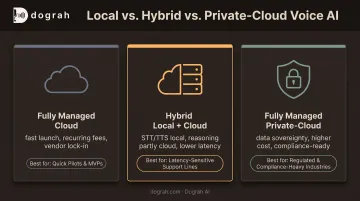
Fully local isn't always the right fit. Scale, compliance requirements, or a lack of in-house DevOps can tip the balance toward something else.
Fully Managed Cloud Voice AI Platforms
When it's better: teams with no infrastructure resources who need to launch fast.
Trade-offs: recurring platform fees, vendor lock-in, and data processed outside your own environment.
Hybrid Local + Cloud Speech-to-Speech Models
When it's better: when a small local LLM can't match the latency or conversational intelligence a use case demands, but full cloud dependency isn't acceptable either.
Trade-offs: partial reliance on an external API for the reasoning or speech layer, while STT and TTS stay local.
Dograh AI's speech-to-speech orchestration, built on models like Gemini Flash Live and GPT-Realtime-2, follows this pattern. It roughly halves end-to-end latency compared to a traditional STT-LLM-TTS chain.
Fully Managed Private-Cloud Deployment
When it's better: regulated industries (healthcare, finance, government) that need full data sovereignty without owning the DevOps overhead.
Trade-offs: higher cost than a purely self-managed open-source setup, offset by less vendor compliance overhead.
Dograh AI, for instance, builds and runs the entire voice-agent stack inside a customer's own cloud environment. That cuts extra vendor hops for HIPAA and GDPR obligations, but access controls, retention policies, and encryption still have to be implemented—not assumed.
Frequently Asked Questions
Which LLM is best for local voice AI agents?
Smaller quantized models in the 3B to 8B range, run through Ollama or vLLM, are a common choice when speed matters. The trade-off is weaker tool-calling reliability compared to larger or cloud-hosted models.
Can you run an LLM locally on a phone?
Yes, small quantized models run on modern phones through on-device inference frameworks like MLC LLM. Latency and capability trail a server setup, and prefill can still take several seconds on some hardware.
Are there open-source local LLM voice agents available?
Yes. Open-source, self-hostable platforms like Dograh AI let builders plug locally hosted STT, LLM, and TTS models into a pre-built voice agent pipeline instead of assembling one from scratch.
What hardware do I need to run a voice pipeline fully locally?
Roughly 8 GB of VRAM is a workable minimum for a small-model setup, though it leaves little headroom. 16 GB or more supports comfortable multi-service sharing across STT, LLM, and TTS.
Is a local voice pipeline as fast as cloud-based voice AI?
With adequate GPU acceleration, latency can approach cloud speeds. Transcription accuracy and LLM tool-calling reliability often still lag behind commercial cloud services.
Do I need a GPU to self-host STT and TTS models?
CPU-only inference works but adds several seconds of latency per turn. GPU acceleration matters if real-time responsiveness is the goal.