Shaving a few hundred milliseconds off response time is often the single biggest driver of call quality and conversion in a voice AI deployment. And latency issues aren't some inherent flaw of voice AI itself.
They usually come down to model choice, network hops, unoptimized turn detection, or pipeline architecture — all of which are fixable without starting from scratch.
This guide covers the most common causes of voice agent latency, a step-by-step framework to diagnose and fix it, and when it's actually time to consider a different architecture.
Key Takeaways
- Most latency complaints trace to slow LLM TTFT, weak turn detection, non-streaming TTS, or network mismatch
- Most problems can be fixed inside your existing cascaded (STT-LLM-TTS) pipeline — no rebuild required
- Diagnose in order: measure per-stage latency, isolate the bottleneck, apply a targeted fix, re-test on P50/P95
- Consider speech-to-speech only after cascaded-pipeline optimizations are exhausted
What Is Voice Agent Latency?
Voice agent latency is the gap between the moment a caller stops talking and the moment they hear the agent start to reply, often called the "mouth-to-ear" gap.
That gap is a chain of steps:
- Audio capture – the caller's voice reaches your system
- Speech-to-text (STT) – audio gets transcribed
- LLM processing – the model reasons about a reply
- Text-to-speech (TTS) – the reply converts back to audio
- Audio playback – the caller actually hears it
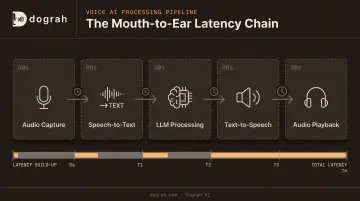
Every step adds delay. So does every network hop between them.
TTFA vs. Raw Model Speed
Vendors love publishing raw inference numbers: "our LLM responds in 200ms." That's true, but it's not what the caller experiences.
Time-to-first-audio (TTFA) is the number that matters: the full delay from the caller's last word to the first sound of the agent's reply. It includes STT finalization, LLM time-to-first-token, TTS time-to-first-byte, network transport, and playback buffering — not just one component's speed.
If you're only benchmarking model inference, you're measuring the wrong thing entirely.
Common Problems Causing High Voice Agent Latency
Most latency complaints trace back to one of four predictable bottlenecks. Figuring out which one is the real culprit is the first step to fixing it.
Slow Time-to-First-Token (TTFT) from the LLM
Symptoms: noticeable dead air right after the caller finishes speaking. The agent feels like it's "thinking."
Likely causes: an oversized or reasoning-heavy model, a bloated conversation context or system prompt, or a non-streaming API call that waits for the full response before returning anything.
Delayed or Misconfigured Turn Detection
Symptoms: the agent waits too long to respond, or repeatedly interrupts callers mid-sentence.
Likely causes: a fixed silence-threshold voice activity detector (VAD) with no semantic understanding of natural pauses. Someone pausing to think gets treated the same as someone finishing a sentence.
Slow Text-to-Speech Time-to-First-Byte (TTFB)
Symptoms: a gap between when the LLM finishes generating text and audio actually starting, or clipped/robotic-sounding delivery.
Likely causes: non-streaming TTS requests, a heavy voice-clone model, or an audio format mismatch forcing transcoding mid-pipeline.
Network, Telephony, and Geography Round-Trip Delays
Symptoms: latency that spikes only for certain regions or call types, inconsistent with published model benchmarks.
Likely causes: agent, model inference, and telephony hosted far apart from each other; legacy PSTN legs instead of WebRTC; or cold-started services.
| Bottleneck | Typical Symptom | Usual Fix Area |
|---|---|---|
| LLM TTFT | Dead air after caller stops talking | Model size, prompt length, streaming |
| Turn detection | Late replies or mid-sentence cutoffs | VAD/endpointing configuration |
| TTS TTFB | Gap before audio starts | Streaming TTS, codec matching |
| Network/geography | Region-specific latency spikes | Co-location, WebRTC |
How to Cut Voice Agent Response Latency (Step-by-Step)
Trying to optimize latency without knowing which stage is slow wastes engineering effort and can make things worse if you "fix" the wrong stage. This framework measures first, isolates the true bottleneck, applies the right fix, and validates it didn't break turn-taking or accuracy.
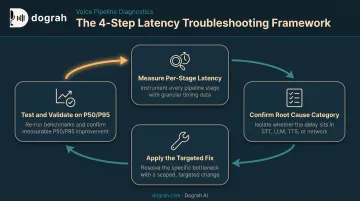
Step 1: Measure Where Latency Actually Comes From
Instrument each stage separately:
- STT finalization time
- LLM time-to-first-token
- TTS time-to-first-byte
- Network round-trip time
Run simulated end-to-end calls over your real telephony or WebRTC path, and record actual caller-side audio. Internal-only benchmarks hide transport and buffering delays that callers still experience.
Report P50 and P95, not averages. AssemblyAI's research shows why: a voice agent can post a 200-millisecond median while roughly 1 in 20 calls sees a delay of 2,000 milliseconds (AssemblyAI, 2025). That tail, not the median, is what determines whether an agent feels reliable.
Step 2: Confirm the Root Cause Category
Once you have per-stage numbers, categorize the dominant bottleneck:
- Model/Compute – slow LLM or TTS inference
- Pipeline Architecture – stages running sequentially instead of overlapping
- Network/Geography – distance between telephony, agent, and models
- Turn Detection/Configuration – VAD thresholds
Don't rebuild your entire voice stack because one stage is slow. Isolate first. Optimize second.
Step 3: Apply the Fix Based on the Bottleneck
The right fix depends entirely on the category you identified. This is where most wasted time and cost occurs: teams tune a stage that was never the actual problem.
If the bottleneck is model or compute:
- Benchmark faster models directly in your own stack. TTFT varies by provider and API configuration, so public leaderboards alone won't tell you much.
- Stream LLM tokens into TTS at sentence boundaries so one sentence synthesizes while the next generates.
- For scripted phrases, mix pre-recorded human clips with TTS fallback in the same cloned voice. Dograh AI uses this on high-volume outbound calls to drop TTS time on common lines and cut per-call cost.
If the bottleneck is pipeline architecture:
- Overlap STT, LLM, and TTS instead of running them strictly turn-based. Stream STT partials into the LLM before the caller finishes speaking.
- Add caching for FAQ-style repeated queries so common questions skip a full LLM/TTS round-trip.
- Prewarm VAD models, keep persistent connections open, and maintain a warm instance pool to eliminate cold-start delay.
If the bottleneck is network, telephony, or geography:
- Co-locate your agent, model inference, and telephony as close to your users' region as possible. Prefer WebRTC over legacy PSTN hops where feasible.
- Match audio codec to the transport (mu-law for telephony, PCM for WebRTC) to avoid hidden transcoding delay.
Geography matters more than most teams assume. Microsoft Azure backbone data shows roughly 40 ms RTT between West US 2 and West US 3 versus about 139 ms between West US 2 and UK South (Microsoft Azure, 2026). That gap shows up as an unexplained latency spike for callers in the "wrong" region.
If the bottleneck is turn detection or configuration:
- Switch from fixed silence-threshold VAD to semantic turn detection. LiveKit cut unintentional interruptions 85% by adding a transformer end-of-turn model on VAD (LiveKit, 2024).
- Use preemptive or speculative generation on stable partial transcripts, so the LLM starts working before the caller finishes talking.
- Tune silence thresholds against real interruption-rate data from production calls, not a "safe" guessed number.
Step 4: Test, Benchmark, and Validate the Fix
- Re-run the same end-to-end simulated-call test per region and compare P50/P95 before and after the change.
- Confirm the fix didn't increase false interruptions or degrade transcript accuracy.
- Set up ongoing monitoring so regressions get caught as models, providers, or call volume shift over time.
When Should You Optimize Your Stack vs. Switch to a Speech-to-Speech Architecture?
Most latency problems are fixable within a cascaded (STT → LLM → TTS) pipeline. But there's a point where the architecture itself becomes the ceiling, not any single stage.
| Scenario | Fix | Replace the Architecture? |
|---|---|---|
| Latency isolated to one stage (such as slow TTS) | Swap or reconfigure that model/provider and re-test | No. A full rebuild is overkill for a single-stage issue. |
| Heavy reliance on tool calls, structured data, or compliance logic | Keep the cascaded pipeline; optimize each stage for visibility and control | No. Pure speech-to-speech is usually weaker on controllable tool-calling and auditability. |
| Every stage already optimized, still can't hit sub-second response for latency-critical use cases | Stop over-tuning stages; further gains are marginal | Yes. Consider speech-to-speech orchestration that collapses STT, reasoning, and TTS into fewer hops. |
| High-volume, cost-sensitive outbound calling with mostly scripted flows | Use hybrid pre-recorded + TTS fallback to cut latency and cost without a rebuild | Only if your provider has no hybrid or streaming voice support. |
Dograh AI's Speech-to-Speech orchestration (Gemini Flash Live, OpenAI Realtime, and similar models) is built for that third scenario. It collapses the cascaded chain into fewer hops and roughly halves end-to-end latency versus a traditional cascaded stack.
One caution: speech-to-speech doesn't automatically win. Some of these models still perform worse on tool-calling reliability and long, multi-turn accuracy compared to a well-tuned cascaded pipeline. Test it in your own stack before committing.
Common Mistakes to Avoid & Preventive Best Practices
A handful of avoidable mistakes account for most failed latency-tuning efforts.
Common Mistakes to Avoid
- Chasing LLM or TTS speed while ignoring endpointing delay, often the largest controllable source of latency in the whole stack
- Measuring only average latency instead of P95, which hides the tail-latency experience that makes an agent feel unreliable
- Rebuilding the entire pipeline before benchmarking which single stage is actually the bottleneck, burning weeks of engineering time on the wrong fix
Preventive Best Practices
- Monitor per-stage latency continuously and set regression alerts when you swap models or providers
- Re-benchmark models and providers every few months; yesterday's "fast" stack may no longer be competitive
- Build prewarming and connection reuse into deployment by default, not as an afterthought
Frequently Asked Questions
Is 40-60ms latency bad for voice agents?
No. That's excellent, but it likely refers to a single component like network round-trip time, not full mouth-to-ear latency, which is usually measured in the hundreds of milliseconds.
What is a good latency for a voice agent?
Most natural-feeling agents target a P50 time-to-first-audio under roughly 800ms to 1s and a P95 under about 1.5 seconds. Measure against your own deployment rather than relying on generic benchmarks.
What causes the most latency in a voice AI pipeline?
LLM time-to-first-token and endpointing/turn-detection delay are typically the two largest contributors, followed by TTS time-to-first-byte and network or geography factors.
What's the difference between TTFA and model inference latency?
TTFA is the full caller-experienced delay across the entire pipeline. Inference latency is just one model's internal processing time and doesn't reflect real-world experience.
Does switching to a speech-to-speech model always reduce latency?
Not always. Speech-to-speech models often reduce latency by removing pipeline hops, but they can trade off tool-calling reliability and control, so test before switching.
How do I measure my voice agent's real-world latency?
Run simulated calls over your real telephony or WebRTC path, record caller-side audio, and report P50 and P95 latency per region, not provider-reported averages.