Introduction
Search "build a voice agent with Claude Code" and you'll find plenty of five-minute demos. What you won't find as often is the truth: Claude Code has no built-in voice mode of its own. That two-way spoken conversation feature lives on Claude's mobile, desktop, and web apps — not in the terminal CLI.
This guide uses Claude Code as the coding agent that scaffolds, wires, and deploys a real voice agent — one that answers live phone calls from real customers.
Anyone can prompt their way to a working demo in a few minutes. A version that survives barge-in, network jitter, telephony edge cases, and a compliance review is a different project.
Below: the build process, demo-vs-production prompting patterns, common failure points, and where MCP-connected platforms change the math.
TL;DR
- Claude Code is the builder, not the runtime — it wires together STT, an LLM, TTS, and business tools
- Context (live docs, real transcripts, phased prompting) matters more than clever prompt wording
- MCP support lets Claude Code configure voice agents directly on platforms like Dograh AI, skipping custom glue code
- Most failed builds mix business logic into the first prompt or skip production hardening
- Choose custom code for bespoke integrations, an MCP-native platform for speed and data control, or a managed platform for zero-code
What You Need Before Building a Voice Agent With Claude Code
Preparation decides whether your first prompt produces something callable or a pile of half-working stubs. Before opening a terminal, sort out your accounts, your stack choice, and an honest read on your own skill level.
Accounts and Access
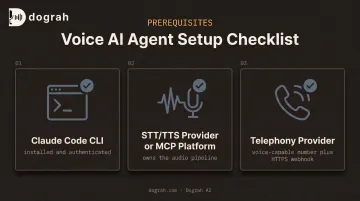
You'll need three things in place before writing a single prompt:
- Claude Code CLI, installed and authenticated via browser login or an Anthropic API key
- STT/TTS provider, or an MCP-connected voice platform (such as Dograh AI) that owns the audio pipeline
- Telephony provider (Twilio or similar) if the agent answers real calls, plus a voice-capable number and public HTTPS webhook endpoint
Skill and Setup Readiness
You don't need an audio engineering background. Comfort with basic terminal commands and reading JSON is enough, especially if you lean on an MCP-connected platform for the audio pipeline instead of hand-rolling WebSocket streaming.
When This Approach Makes Sense
Prompting Claude Code directly works best for developer-led teams that want fast iteration and full control over customization. It gets inefficient fast for:
- Non-technical teams without an engineer to babysit the build
- Anyone needing HIPAA- or GDPR-ready infrastructure without building that layer from scratch
- Teams that need a working agent this week, not after weeks of pipeline debugging
How to Build a Voice Agent Using Claude Code
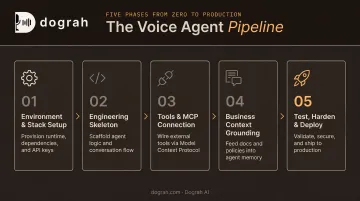
The build breaks into five phases. Skip the order, especially by prompting business logic before the pipeline works, and you'll spend more time debugging than building.
Step 1: Set Up Your Environment and Choose Your Voice Stack
Install Claude Code, configure your Anthropic API key, and make the one decision that shapes everything downstream: assemble your own STT+LLM+TTS stack, or connect Claude Code via MCP to a purpose-built voice agent platform.
An MCP-connected platform like Dograh AI removes the need to hand-wire audio streaming, turn-taking, and telephony bridging before you can test whether your business logic works. You're testing conversations on day one instead of debugging WebSocket audio frames.
Step 2: Prompt the Engineering Skeleton First — No Business Logic Yet
Give Claude Code one complete prompt that specs:
- Transport (WebSocket, WebRTC, or telephony streaming)
- Model choice and target latency
- Barge-in and interruption handling
Explicitly tell it not to add business rules yet. That yields a working STT→LLM→TTS loop you can call and verify: a bare skeleton, but a functioning one, before anything else gets layered on.
Step 3: Connect Claude Code to Tools and, If Available, an MCP Server
Register your function-calling tools (calendar booking, CRM lookup) as JSON schemas Claude can invoke mid-conversation. This is standard Claude tool-use: Claude returns a tool_use block, your app executes it, and you send back a tool_result before Claude continues.
With MCP support, Claude Code goes further. On a platform like Dograh AI, it can configure the agent's name, prompt, voice, and workflow logic directly. You describe a use case in a sentence and let the platform generate the workflow, instead of guessing at API shapes from potentially stale training data.
Step 4: Ground the Agent in Business Context and Real Call Data
Feed Claude Code:
- The system prompt
- A knowledge base of FAQs and website content
- Transcripts of real past calls, if you have them
Real transcripts matter because specs describe how calls should go; transcripts show how customers actually mangle names, numbers, and requests. Keep this phase separate from Step 2. If something breaks now, you know it's a business-logic problem, not a pipeline problem.
Step 5: Test, Harden, and Deploy
Run test conversations covering common requests and edge cases. Check tool-call execution and latency under realistic conditions. Then, before pushing live:
- Add error handling for failed tool calls and dropped connections
- Build fallback responses for anything the agent can't handle
- Add logging for every turn and tool invocation
- Deploy on your own backend, or through your MCP-connected platform's cloud or self-hosted environment
Key Techniques That Determine Whether Your Voice Agent Actually Works
The gap between a demo and a shippable agent comes down to a handful of controllable variables, not which model you picked.
Grounding in Live Documentation
Coding agents confidently write against outdated, renamed, or retired API endpoints when working purely from training data. Connecting an MCP docs server, or an MCP-native platform, keeps generated code current and cuts down on hallucinated-endpoint bugs that otherwise surface only at test time.
Phased Prompting (Engineering Before Business Logic)
Mixing pipeline setup with domain rules in one prompt makes failures nearly impossible to diagnose. A verified skeleton first means later bugs are clearly either plumbing or logic, never both tangled together.
Real Call Transcripts as Context
System prompts and keyterm lists built from real transcripts sound noticeably more human than ones written from imagination. Dograh AI's operational data on outbound calls points to the same pattern: confirm identity and state the purpose in the first exchanges. That opening is often what separates a call that holds attention from one that gets hung up on.
Model and Latency Choices
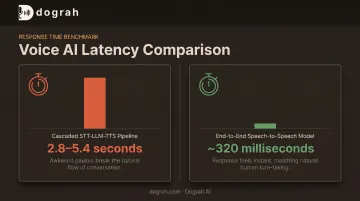
Heavier reasoning models add response latency that feels unnatural in a live conversation. OpenAI reported average voice response times dropping from 2.8–5.4 seconds on its older cascaded STT-LLM-TTS pipeline down to roughly 320 ms with a single end-to-end audio model.
Lighter models or speech-to-speech orchestration often matter more to perceived quality than raw reasoning power. Dograh AI's platform uses S2S orchestration to roughly halve end-to-end latency for that reason.
Confirmation Gates for State-Changing Actions
A voice agent that can book, cancel, or send things unattended needs a safeguard against acting on a misheard word. Instruct it to state the intended action out loud and wait for explicit confirmation before anything irreversible. This adds barely any friction and removes most of the risk.
Common Mistakes and Troubleshooting Tips
Most build issues here are predictable, with known fixes.
- Dumping the full product catalog and refund policy into the first prompt. This tangles architecture with domain logic before either is verified. Split them per Steps 2 and 4 above.
- Skipping current docs or an MCP server. Claude Code will write confidently wrong code against retired endpoints. Ground it in live docs or MCP before you generate.
- Chasing latency with more prompt tuning. A heavier reasoning model or a non-speech-to-speech pipeline is often the real delay. Switch models or move to speech-to-speech orchestration first.
- Leaving the tool loop incomplete. Verify the full
tool_use→ function execution →tool_resultcycle. Claude stalls indefinitely if it sends a tool call and never gets a result back.
Alternatives to Building a Voice Agent With Claude Code From Scratch
Hand-coding everything isn't always the right trade-off. The right alternative depends on how much control versus speed your team actually needs.
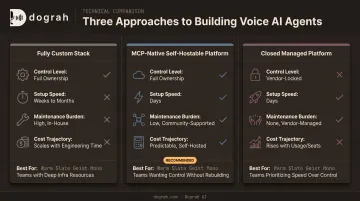
Fully Custom Stack
Claude Code plus a standalone STT/TTS provider and your own proxy server. Best for highly bespoke integrations that don't fit any existing platform's data model.
You get maximum flexibility, but you own the hard parts yourself:
- Latency tuning across the full pipeline
- Telephony bridging and call reliability
- Ongoing maintenance, indefinitely
MCP-Native, Self-Hostable Voice AI Platforms
Platforms like Dograh AI let Claude Code configure and spin up production-ready agents directly, with:
- Full data sovereignty through self-hosting under a BSD 2-Clause license
- Sub-2-minute deployment to a working workflow (production hardening still follows separately)
- Hybrid pre-recorded plus TTS voice, cutting outbound costs up to 3× with 2× better conversions
- Speech-to-speech orchestration via Gemini Flash Live and GPT-Realtime-2 for lower latency
The trade-off is a modest platform learning curve, in exchange for skipping months of infrastructure work and vendor compliance overhead.
Closed, Fully Managed Proprietary Platforms
Best for teams that want a voice agent live with zero code involvement. Fastest path to something working — the costs show up later:
- Vendor lock-in on workflows and tooling
- Data leaving your infrastructure
- Per-seat or per-minute fees that scale with usage
The fastest path to a reliable voice agent is Claude Code plus tight context management — ideally pointed at an MCP-connected platform rather than reinventing the pipeline from zero.
Frequently Asked Questions
Can you build voice agents using Claude Code?
Yes. Claude Code can scaffold the full STT, LLM, and TTS loop and, with MCP support, connect directly to voice agent platforms to configure and deploy them. Quality depends on grounding it in current docs and real call context, not prompt wording alone.
Does Claude Code itself have a voice mode I can talk to?
No. Two-way voice mode exists on Claude's mobile, desktop, and web apps, not Claude Code. Claude Code supports dictation-style input, but this article covers building a separate voice agent, not giving Claude Code a voice.
What is MCP and why does it matter here?
MCP (Model Context Protocol) lets Claude Code connect to external servers for live documentation or direct platform control. An MCP-connected platform like Dograh AI lets Claude Code build and configure agents directly, instead of hand-coding proxy servers and API glue.
Claude or Codex — which is better for building a voice agent?
Both are capable coding agents, and the base model matters less than whether it's grounded in current API docs. Prioritize connecting either one to live documentation or an MCP server over debating model choice.
Is a voice agent built this way production-ready, or just a prototype?
The core pipeline is usually solid quickly, but production readiness needs added error handling, fallback responses, rate limiting, and logging. Platforms with built-in compliance and infrastructure handling can shortcut much of that hardening work.
How do I keep API costs down?
Use a lighter model for real-time turns, reserve heavier reasoning for where it's actually needed, and keep responses short—voice interactions penalize long outputs. Mixing pre-recorded clips with TTS on the same voice also cuts per-call synthesis cost.