Missed intents. Failed transactions. Frustrated customers who hang up mid-sentence. In regulated industries like healthcare and finance, a mistranscribed word can mean real compliance exposure, not just annoyance.
NIST's research on the DARPA Communicator travel-planning systems found user satisfaction dropped in near-linear fashion as word error rates climbed, with the relationship growing especially pronounced once errors passed the 35%-40% range. That's the gap voice recognition testing exists to close.
This guide breaks down what voice recognition testing actually involves, why skipping it is riskier than most teams realize, and a practical six-step process for doing it well.
Key Takeaways
- Validate accuracy, latency, and robustness before go-live and keep testing after launch
- Cover functional, WER accuracy, performance, and robustness checks across accents, dialects, and noise
- Use a six-step process so testing drives ongoing improvement, not a one-time checkbox
- Choose platforms with built-in automated QA and post-call analysis to cut manual review time
What Is Voice Recognition Testing?
Voice recognition testing confirms that a speech recognition or voice AI system correctly captures, interprets, and responds to spoken input. It has to hold up under real-world conditions, not only in a quiet lab with a clear-speaking tester.
Where It's Typically Applied
You'll find voice recognition testing wherever spoken input drives an action:
- Mobile apps and virtual assistants — commands, dictation, search queries
- Contact center IVR and voice agents — call routing, appointment booking, payment capture
- In-car voice control — navigation, calls, media, all against road noise
- Smart home devices — wake words and commands in echo-heavy rooms
- Accessibility tools — screen readers and voice-controlled interfaces for users with disabilities
Main Types of Voice Recognition Testing
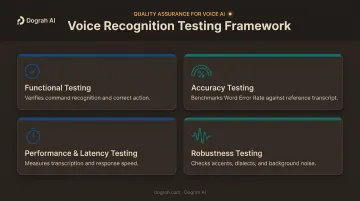
Four categories cover most of what teams need:
- Functional testing — verifies the system recognizes the command and triggers the correct downstream action
- Accuracy testing — benchmarking Word Error Rate (WER) against a human-labeled reference transcript
- Performance and latency testing — measuring how fast the system transcribes and responds, tracked separately from end-of-turn detection
- Robustness testing — checking performance across accents, dialects, background noise, and multi-speaker overlap
Beyond test type, teams pick a method: manual (a human speaks or listens) or automated (audio files injected programmatically at scale). Mature QA programs usually run both, then lean on automation once the system is past prototype.
Why Voice Recognition Testing Is Critical
As voice AI takes on higher-stakes work — banking verification, healthcare intake, legal transcription — the cost of an untested system stops being a minor inconvenience. It becomes a compliance and revenue problem.
An untested or poorly tested voice system creates legal exposure, lost transactions, and brand damage that compounds with every failure.
Here's what rigorous testing delivers:
- Improves customer experience and reduces call abandonment from misunderstood commands
- Reduces compliance and legal risk in regulated industries like healthcare, legal, and finance
- Increases automation reliability so voice agents can be trusted with tier-1 and tier-2 interactions
- Identifies accuracy gaps across accents, dialects, and noise conditions before they hit production
- Supports long-term optimization through continuous regression testing and model retraining
- Enables data-backed decisions on which languages or markets a voice system is actually ready to serve
AWS's own responsible-AI guidance calls periodic retesting "critical" as customer workflows and input data evolve. Teams should revisit Amazon Transcribe performance against their own use case—not treat one accuracy check as permanent proof. Voice systems drift. Testing has to keep pace.
How Voice Recognition Testing Works – Step by Step
Most teams either skip validation entirely or stop after a single accuracy check on clean audio. That leaves three blind spots that show up later, in production, when they're expensive to fix:
- Testing only in quiet environments, never realistic noise conditions
- Ignoring accent and dialect diversity in the test set
- Never closing the loop (finding an error but not retraining or re-testing against it)
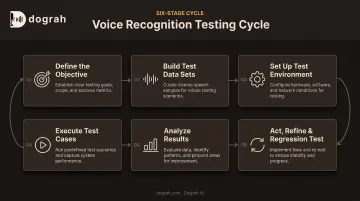
Here's the six-step process that avoids those gaps.
Step 1 – Define the Objective
Before recording a single test file, decide exactly what you're validating: a specific command set, a full conversation flow, or a target word error rate (WER) and latency threshold for a use case like appointment booking. Clear scope keeps QA and product teams measuring the same thing.
Step 2 – Build Test Data Sets
Collect audio spanning accents, dialects, noise levels, and edge-case phrasing. Mix pre-recorded human speech with synthetic TTS-generated audio to scale coverage faster. Synthetic audio helps with volume, but it shouldn't fully replace real recorded speech: it can't reproduce every quirk of natural accent and background noise.
Coverage here decides how much you can trust every result downstream.
Step 3 – Set Up the Test Environment
Choose manual testing, an automation framework with audio injection (BrowserStack's Appium-based approach is one example), or a dedicated voice testing platform. Simulate real acoustic conditions (road noise, overlapping speakers, phone line degradation) that match where the system will actually run.
Consistency here is what makes results repeatable across test cycles.
Step 4 – Execute Test Cases
Run scenarios that inject audio commands and capture both the speech-to-text output and the system's downstream action. This is where you catch single-turn failures (a misheard word) and multi-turn failures (a conversation that derails after one bad transcription).
Step 5 – Analyze Results
Calculate WER, latency, false positive/negative rates, and intent-recognition accuracy. Flag miscommunications and sentiment mismatches for manual review rather than relying on the aggregate score alone : a single WER number can hide exactly where and why the system is failing.
Step 6 – Act, Refine & Regression Test
Retrain or fine-tune the acoustic and language models based on what you found, then run a full regression suite before every release. Skipping this step is how the same accent-specific error keeps reappearing release after release.
Voice Recognition Testing – Example Case Walkthrough
A voice AI agent handles appointment scheduling calls. The bar is simple: capture dates, times, and callback numbers correctly across accents and uneven phone-line quality.
Test setup
Testers run pre-recorded and synthetic audio—including noisy line conditions—through an automated suite covering dozens of accent variations.
Failure found
The agent consistently hears "15th" as "50th" under certain accents. Manual spot-checks missed it entirely because they only used clear, native-accent audio. That gap is exactly what broader accent and channel coverage (Step 2) is meant to catch.
Fix and retest
The team:
- Retrains the acoustic model on the flagged accent samples
- Updates confirmation prompts to read captured dates back to the caller
- Re-runs the full regression suite
WER on the affected cases drops before the next release ships.
How Dograh AI Can Help
Dograh AI was built by founders who ran into exactly this problem while testing a voice agent for the visa industry. Low-code frameworks demanded heavy custom code just to iterate, while closed platforms lacked flexibility and carried real data risk. That frustration became an open-source, self-hostable voice AI platform.
For teams testing voice systems, the platform includes:
- Built-in automated QA: sentiment detection, miscommunication flagging, and adherence checks on live calls, not only pre-launch snapshots
- Looptalk regression testing with simulated callers (angry, elderly, multilingual, urgent) you can rerun after any workflow or knowledge-base change
- 70+ languages and any accent, so you can validate agents for global markets from one place
- Speech-to-Speech orchestration (Gemini Flash Live, GPT-Realtime-2) that roughly halves latency versus a classic STT-LLM-TTS pipeline
- Full data sovereignty via self-hosted OSS or private cloud, so test audio never leaves your infrastructure
- Production-ready agents deployable in minutes, so you iterate and re-test without long QA cycles
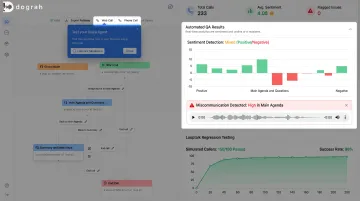
Automated QA plus self-hosted deployment cuts the manual overhead that usually slows voice testing, especially when sensitive test data must stay in-house.
Frequently Asked Questions
What is the best voice recognition software?
Consumer tools like Siri or Google Assistant work for general commands; high-accuracy or regulated use cases need dedicated ASR or voice AI platforms. Compare options on WER, latency, and language coverage for your application.
Can voice recognition identify a person?
Standard voice recognition, meaning speech-to-text, identifies words, not people. Identifying an individual requires voice biometrics or speaker recognition, a related but separate technology built on unique vocal characteristics.
What is Word Error Rate (WER) and why does it matter?
WER is the percentage of incorrectly transcribed words: substitutions plus deletions plus insertions, divided by total reference words. It's the standard accuracy benchmark, though Apple's research on podcast transcripts found a 9.2% WER mapped to only 1.4% major, meaning-changing errors.
What tools are used for automated voice recognition testing?
Common approaches include mobile automation frameworks with audio injection (like BrowserStack's Appium integration), dedicated speech testing platforms (like Botium and Cyara), and voice AI platforms with built-in QA and analytics.
How is voice recognition testing different from regular software testing?
It requires audio-specific test assets and a human-labeled reference transcript, plus acoustic environment simulation and specialized metrics like WER and latency that standard UI or functional testing doesn't cover.
How often should voice recognition systems be retested?
Run regression testing before every model or release update, and keep continuous production monitoring running in between. Language use, accents, and real-world noise conditions shift over time, so a single pre-launch test isn't enough.