AI dialers directly attack this problem. They automate the dialing process, filter non-answers in real time, and keep reps connected to live prospects instead of dead air. But the category has split into two distinct tiers: AI dialers that assist human reps by handling the mechanics, and fully autonomous AI voice agents that conduct entire conversations without a human on the line.
This guide covers both: how each works, the features that drive real volume and efficiency gains, what to watch out for, and how to choose the right platform for your team.
Key Takeaways
- Sales reps spend 60% of their time on non-selling tasks — AI dialers reclaim that time by eliminating manual dialing and idle wait time
- Parallel and predictive dialing modes connect reps only to live-answered calls, cutting dead time on unanswered or dropped calls
- AI voice agents go further: they run full outbound conversations autonomously, 24/7, without a rep on the line
- Choosing the right platform comes down to five criteria: dialing capacity, voicemail detection, CRM integration, analytics depth, and compliance support
- Self-hostable platforms like Dograh AI give data-sensitive teams full infrastructure control, eliminating vendor compliance overhead and keeping call data on-premise
What Is an AI Dialer and How Has It Evolved?
An AI dialer is a calling system that uses machine learning and natural language processing to automate outbound dialing, detect voicemails, route calls intelligently, and improve over time based on call outcomes. That last part is what separates it from a basic auto-dialer, which simply cycles through a list with no learning capability.
Dialing Technology: From Manual to Intelligent
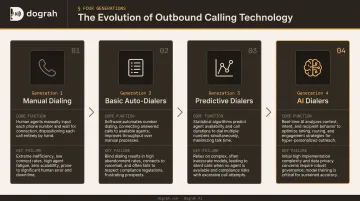
Each generation of outbound calling technology solved the previous one's biggest failure:
| Generation | Core Function | Key Failure |
|---|---|---|
| Manual dialing | Rep dials each number by hand | Massive idle time between calls |
| Basic auto-dialers | Automatically cycles through a list | No intelligence, dead-air calls when no rep is available |
| Predictive dialers | Algorithms predict rep availability, dial multiple numbers | Compliance risk from abandoned calls; no adaptive learning |
| AI dialers | Real-time adaptation, voicemail detection, data-driven prioritization | Still requires human reps for the conversation itself |
That compliance failure had real legal teeth. Under the FTC's Telemarketing Sales Rule, a call is considered abandoned if no live representative connects within 2 seconds of a completed greeting — and abandoned calls must stay below 3% of live-answered calls over any 30-day period. AI dialers were built, in part, to eliminate that exposure.
The Four Dialing Modes
With that context, here's how modern AI dialer platforms translate into practice. Most offer four distinct modes, each suited to a different outreach goal:
- Parallel dialing — simultaneously calls multiple numbers and connects the rep only when a live person answers; best for high-volume prospecting
- Predictive dialing — uses algorithms to anticipate rep availability and dial ahead; optimized for large call center teams
- Power dialing — places the next call immediately after the current one ends, keeping pace consistent without the compliance exposure of predictive dialing
- Preview dialing — lets the rep review prospect information before the call connects; suited for complex, high-value accounts
How AI Dialers Boost Outbound Call Volume
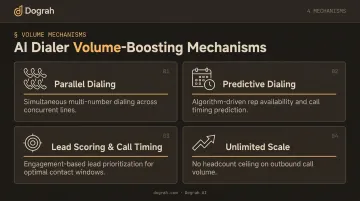
The core volume mechanism is straightforward: instead of one rep dialing one number at a time and waiting through rings and voicemail, parallel and predictive dialing lets the system dial multiple numbers simultaneously and connects the rep only when a real person picks up. The idle time between connections — historically where most of the working day disappears — shrinks dramatically.
That gap is still wide open for most teams. According to the 2024 State of Sales Development report, 43% of teams still use manual dialing, while 40% use power dialers and 31% use parallel dialers. Teams still dialing by hand are giving up a measurable daily volume advantage.
Voicemail Detection and Local Presence
Two specific AI capabilities drive answer rate improvements beyond raw dialing speed:
Voicemail detection uses machine learning models to distinguish live human greetings from voicemail prompts within the first few seconds of a call. The system either drops a pre-recorded message and moves on, or hangs up — cutting the idle time reps waste sitting through voicemail cycles. During high-volume campaigns, that saved time compounds fast across the whole team.
Local presence dialing dynamically assigns caller IDs matching the recipient's area code. Calls from local numbers consistently see higher answer rates than calls from out-of-state lines — a well-documented pattern across outbound sales teams.
Lead Prioritization and Scale
Two additional mechanisms improve both volume and connection quality:
- Lead scoring and optimal call timing — the AI ranks leads by engagement signals, past interactions, and behavioral data, then schedules outreach during the windows when each prospect is statistically most likely to answer. Better timing on more calls means more live conversations per shift.
- Unlimited scale — AI dialing systems handle hundreds or thousands of simultaneous outbound calls without proportional headcount increases. Human call centers hit hard capacity limits at shift boundaries; AI systems don't. Daily call volume is no longer capped by headcount.
Key Features That Drive Efficiency
Volume gains only matter if the team can act on them. These features determine whether call volume translates into pipeline:
Automated CRM Sync and Call Logging
Reps lose nearly a fifth of their day to manual data entry — time that could go toward actual selling. Every call outcome, duration, and key data point is automatically written back to the CRM in real time. Two-way sync means the dialer pulls prospect context before the call and pushes results after, with no manual entry and no notes dropped.
Salesforce's 2026 research found that sales professionals spend 18% of their time on manual data entry alone. Automated logging reclaims that time and keeps CRM data accurate — which directly improves lead scoring and segmentation downstream.
Post-Call Analysis and AI Summaries
After each call, the AI transcribes the conversation and surfaces what matters: key objections, agreed follow-up actions, and sentiment signals. Managers no longer need to re-listen to recordings for QA.
Dograh AI's post-call analysis goes further — variable extraction, miscommunication detection, and Langfuse observability give teams real-time visibility into transcript quality and performance metrics across every call in the queue.
Real-Time Coaching
In-call coaching closes the gap between scheduled sessions and every conversation that happens in between. Platforms surface live objection-handling prompts, script guidance, and competitor mention alerts as the call unfolds.
Salesforce's 2026 data shows 75% of sales reps are more likely to hit targets with a coach or mentor, and high performers are 1.4x more likely to use AI for coaching than underperformers. Bringing that guidance to every call — not just the ones a manager happens to monitor — compounds over thousands of dials.
Integration Ecosystem
Disconnected tools are where pipeline momentum dies. Native integrations with Salesforce, HubSpot, Zendesk, and automation platforms like Zapier, Make, and n8n keep data flowing without manual handoffs.
Dograh AI's workflow builder takes this further: call dispositions automatically trigger follow-up tasks, CRM updates, SMS sequences, or calendar invites without any human intervention. That matters at scale — Salesforce's 2026 research found 51% of sales leaders say fragmented tech silos directly hinder their AI initiatives, making integration depth a hard platform requirement, not a nice-to-have.
AI Voice Agents: The Next Frontier Beyond Traditional Dialers
Traditional AI dialers still require a human rep for the actual conversation — the AI only handles the mechanics. AI voice agents go further: they conduct the entire outbound conversation autonomously, qualifying leads, answering questions, booking appointments, and escalating to a human when warranted.
Business Impact and Scale
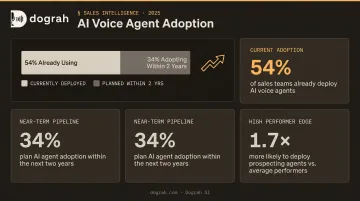
According to Salesforce's 2026 State of Sales report, 54% of sales teams already use AI agents, with another 34% expecting to adopt them within two years. Of teams using agents, 34% are using them for prospecting specifically — and high-performing teams are 1.7x more likely to deploy prospecting agents than underperformers.
The practical implication: AI voice agents run 24/7 at any scale with no staffing constraints. Where human teams hit capacity limits at shift boundaries and headcount budgets, an AI agent fleet can simultaneously run hundreds or thousands of outbound conversations. Dograh AI, for example, scales to 100,000 concurrent agents — a ceiling no human call center can match.
What Separates High-Converting AI Voice Agents
The first 15 seconds of an autonomous outbound call determine whether the prospect stays on the line. Several factors separate agents that convert from those that get immediately hung up on:
- Zero silence at connection — dead air before the agent speaks is an instant hang-up trigger
- Immediate disclosure — the FCC confirmed in 2024 that AI-generated voices are classified as "artificial" voices under the TCPA, meaning disclosure at call start is legally required and also builds trust
- Natural pacing and filler words — stilted, robotic delivery kills legitimacy before the first sentence ends
- Interruption handling — the agent must handle "who is this?" or "I'm busy" gracefully without breaking the conversation flow
Dograh AI's hybrid pre-recorded + TTS approach addresses the quality problem directly. The platform mixes real human pre-recorded voice clips with TTS fallback in the same cloned voice — reducing latency, cutting costs up to 3x compared to pure TTS, and producing more natural-sounding calls. Internal data shows 2x better conversions on outbound campaigns. When a conversation goes in an unpredicted direction, the TTS fallback in the same cloned voice handles it without breaking tone or pacing.
Latency compounds this further. Dograh's Speech-to-Speech orchestration — supporting Gemini Flash Live and OpenAI GPT-Realtime-2 — cuts end-to-end latency in half compared to traditional STT → LLM → TTS pipelines. In the opening seconds of a call, that difference is audible.
Data Sovereignty at Scale
Autonomous AI voice agents process sensitive prospect and customer data at volume. Every call generates transcripts, recordings, and extracted variables — all of which flow through the platform's infrastructure. For regulated industries, this creates compliance exposure when that data sits on a third-party vendor's shared cloud.
Self-hostable platforms like Dograh AI resolve this by keeping all call data within the customer's own infrastructure. Under Dograh's BSD 2-Clause open-source license, organizations can self-host, audit the code, and customize freely, with zero external data transfer.
This architecture supports the compliance frameworks most common in regulated industries:
- HIPAA — healthcare and telemedicine deployments
- GDPR — EU and UK data residency requirements
- FedRAMP / ITAR — government and defense use cases
No vendor BAA is required for the orchestration layer itself, which simplifies procurement and compliance audits considerably.
Best Practices for Maximizing AI Dialer Performance
Platform selection matters less than most teams think. Execution matters more. These three practices determine whether a team compounds results over time or plateaus after the initial setup.
Start With Clean Data
AI dialers are only as effective as the contact lists they work from. Before launching any campaign:
- Validate phone numbers and remove duplicates
- Update stale contacts and flag disengaged segments
- Segment by engagement recency so the dialer prioritizes warm leads first
Bad data fed into an AI dialer produces bad results faster — not better ones. List hygiene is the single highest-leverage step before any campaign goes live.
Set Measurable KPIs Before Launch
Define connection rate targets, live conversation ratios, appointment-set rates, and cost-per-conversation before the first call goes out. Without these benchmarks, it's impossible to distinguish a configuration problem from a list quality issue — and teams end up spending weeks optimizing the wrong variable.
Treat Every Campaign as a Feedback Loop
Review which call times produce the best answer rates, which opening lines generate longer conversations, and which lead segments convert. AI dialers surface this data automatically. The teams that act on it consistently — adjusting timing, scripts, and targeting — are the ones that see compounding improvement across campaigns.
How to Choose the Right AI Dialer Platform
Five Criteria That Actually Matter
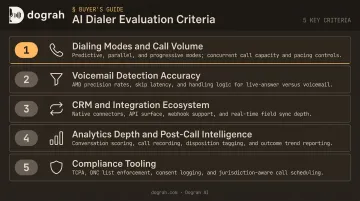
Evaluate platforms on these dimensions, in this order:
- Dialing modes and call volume capacity — supports parallel dialing and handles peak call volume without throttling
- Voicemail detection accuracy and speed — classifies live answers vs. voicemail fast, with a low false-positive rate
- CRM and integration ecosystem — supports two-way CRM sync and connects to your sequencing and automation tools
- Analytics depth and post-call intelligence — extracts objection patterns, sentiment trends, and conversation summaries at scale
- Compliance tooling — handles do-not-call list management, regional call time restrictions, consent recording, and TCPA/GDPR requirements
The Open-Source vs. Closed Platform Decision
Whichever deployment model you choose, test it against real prospect lists for two weeks. Measure connection rates, call quality, and CRM sync accuracy in your actual environment. Platforms that look similar on spec sheets often diverge significantly in production — and you won't see that gap until you run live calls.
Frequently Asked Questions
How can I increase call volume?
AI dialers increase call volume by automating dialing, using parallel or predictive modes to connect reps only to live-answered calls, and filtering voicemails in real time. Lead prioritization ensures reps spend their time on the highest-probability contacts — so time goes to conversations, not waiting.
What is the difference between an AI dialer and a traditional auto-dialer?
Traditional auto-dialers cycle through a list with no intelligence — they don't learn, adapt, or prioritize. AI dialers learn from call outcomes, adapt timing and pacing, and use behavioral data to rank which leads to call first. That continuous learning makes them progressively more effective over time.
How does voicemail detection work in AI dialers?
AI dialers use machine learning models trained to distinguish live human greetings from voicemail prompts within the first few seconds of a call. When voicemail is detected, the system drops a pre-recorded message and immediately moves to the next number — so reps never wait through a full voicemail cycle.
Can AI voice agents make outbound calls without a human on the line?
Yes. AI voice agents go beyond traditional dialers by handling the full conversation autonomously — qualifying leads, responding to questions, booking appointments, and escalating to a human when needed. This enables true 24/7 outbound at any scale, with no shift constraints.
What features should I look for in an AI dialer platform?
Prioritize parallel dialing capacity, voicemail detection accuracy, CRM two-way sync, post-call analytics depth, compliance tooling (TCPA/GDPR), and — for regulated industries — whether the platform supports self-hosted or private-cloud deployment for data sovereignty.
Are AI dialers compliant with GDPR, TCPA, and other regulations?
Most platforms include do-not-call list management, call time restrictions, and consent recording. The FCC confirmed in 2024 that AI-generated voices fall under TCPA's artificial voice restrictions. For stricter data residency requirements, self-hostable platforms keep all call data within your own infrastructure — eliminating vendor compliance dependencies entirely.