The open-source route adds a layer of complexity upfront but pays back in full: no vendor lock-in, no platform fees, complete data sovereignty, and auditable code you can actually trust in regulated environments. According to Linux Foundation Research, 71% of organizations said the open-source nature of a tool positively influenced adoption — with transparency, cost efficiency, and security cited as the top reasons.
This guide covers what you need before you start, the exact build steps, the parameters that determine production success, and the mistakes that sink most agentic projects before they ship.
Key Takeaways
- AI agent workflows pair LLM reasoning with structured automation — agents decide, workflows execute; effective systems use both
- Open-source platforms give you self-hostable infrastructure, auditable code, and zero platform fees — critical for data-sensitive industries
- Build sequence: define goal → map tasks → choose stack → configure LLM/tools/memory → test with real data
- Poor prompt and instruction design causes most workflow failures, not model choice or platform selection
- Latency, memory architecture, and data privacy are the underrated variables that separate production-ready workflows from demos
How to Build Open Source AI Agent Workflows
Step 1: Define Your Workflow Goal and Success Criteria
Before selecting a tool or writing a prompt, write one sentence describing what the workflow must accomplish and how you'll know it succeeded.
Without this, agents operate without a reference point. They'll complete tasks in technically valid ways that don't match what the business actually needed.
Ask yourself:
- What is the specific outcome this workflow must produce?
- How will success be measured — task completion rate, accuracy, time saved, cost per run?
- What does failure look like, and how quickly should it escalate?
Also clarify whether you need a rigid workflow (repeatable, predictable steps with defined branching), an agent (LLM reasoning through open-ended decisions), or an agentic workflow — a combination of both. Most real-world use cases are the third option.
Step 2: Map the Existing Task Sequence and Decision Points
Write out every step a human currently takes to complete the task. Don't skip this. The map reveals which steps are mechanical (automatable with simple rules) and which require judgment (where an agent earns its place).
Mark every branching point — where the path changes based on input, context, or an ambiguous condition. At these nodes, agents handle outcomes that fixed rules can't anticipate. They're also where agents fail most often when instruction design is poor.
A simple way to categorize each step:
| Step Type | Characteristic | Automate With |
|---|---|---|
| Repetitive, rule-based | Same output for same input | Workflow/rule engine |
| Context-dependent | Output varies by situation | LLM agent node |
| Exception-heavy | Rare but high-stakes scenarios | Agent + escalation path |
Step 3: Choose Your Open-Source Stack and Deployment Model
Your deployment requirement shapes every downstream technology decision. Choose before evaluating frameworks.
Three deployment models to consider:
- Self-hosted OSS — You manage the infrastructure on your own servers or private cloud. Full data control, no vendor involvement, maximum flexibility. Requires Docker (v20.10+) and basic infrastructure setup.
- Managed cloud — Provider hosts the platform on shared infrastructure. Faster to start, less to manage operationally, but data leaves your perimeter.
- Fully managed private cloud — Provider deploys and manages the entire infrastructure within your own cloud environment. Data stays on-premise; operational burden shifts to the vendor.
For general automation workflows, n8n (source-available, Sustainable Use License) and LangChain (MIT, 44% enterprise adoption per Linux Foundation) are the most widely deployed options. For LLM-native agent orchestration, LangGraph, CrewAI, and AutoGen (all MIT-licensed) cover multi-agent and stateful workflow needs.
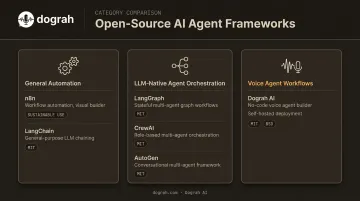
For voice agent workflows specifically, Dograh AI — open-source and self-hostable under BSD 2-Clause license — lets you deploy a working voice agent in under 2 minutes using a visual no-code builder. It supports locally hosted models (Whisper, Kokoro, Llama, and others) and integrates with major telephony providers. Self-hosted deployments require no vendor compliance certifications, which removes procurement friction for regulated industries.
Step 4: Configure Your LLM, Tools, and Memory
Agent behavior comes down to three configuration layers:
1. Language Model Connect your preferred LLM — hosted API or locally running model. For voice workflows, consider API key rotation across providers to manage concurrency limits and avoid per-minute platform markups. Platforms like Dograh AI support bring-your-own-keys (BYOK) across LLM, STT, and TTS providers.
2. Tools Define what the agent can call: CRM lookups, calendar scheduling, SMS/email triggers, webhook steps, database queries. Each tool should have a clear input/output contract. Common integrations include Salesforce, HubSpot, Zendesk, Twilio, and n8n automation workflows.
3. Memory
- Short-term memory keeps the current session coherent — the agent remembers what was said earlier in the conversation
- Long-term memory enables cross-session personalization — the agent recalls user preferences, history, and prior outcomes
- Episodic memory stores specific past interactions for replay or reference
Write detailed system instructions. Specify the agent's role, decision-making logic, output format, what it should never do, and examples of good and bad responses. Vague system prompts are the single most common cause of inconsistent agent behavior.
Step 5: Test, Monitor, and Iterate With Real Inputs
Test with actual data from your use case from day one. Clean, hypothetical inputs don't surface the edge cases that production traffic will.
Set up logging at every workflow node so intermediate outputs are inspectable. Without step-level visibility, debugging becomes guesswork. Dograh AI, for example, captures per-turn logs including ASR transcripts, LLM decisions, tool calls, and latency breakdowns per stage — giving teams a replayable record of exactly what happened on each call.
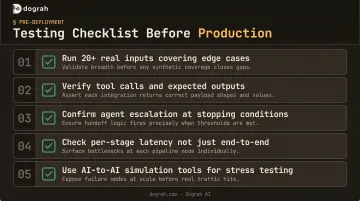
Testing checklist before production:
- Run the workflow against 20+ real inputs covering edge cases
- Verify tool calls fire correctly and return expected outputs
- Confirm the agent escalates appropriately at stopping conditions
- Check latency at each stage — not just end-to-end
- Use AI-to-AI simulation tools (like Dograh's Looptalk) to stress-test before live deployment
When and What You Need to Get Started
Open-source AI agent workflows make sense when you have:
- A defined, repeatable process worth automating
- Data privacy requirements or compliance constraints (GDPR, HIPAA)
- A need to avoid platform fees and vendor lock-in
- At least one technically capable person to manage setup and iteration
They become a poor fit when you need to deploy in hours with zero technical resources. In that case, a managed closed platform will get you moving faster — at the cost of flexibility and data control.
Minimum technical requirements for self-hosting:
- Docker v20.10 or later (for platforms like Dograh AI, first startup takes 2–3 minutes)
- API keys for your chosen LLM, STT, and TTS providers — or locally hosted model endpoints
- Access credentials for business tools you want to integrate (CRM, calendar, telephony)
- Basic understanding of prompt engineering and workflow logic
If compliance is on your requirements list, note that HHS guidance states any cloud service provider handling electronic Protected Health Information (ePHI) is a HIPAA business associate and requires a compliant BAA — even when ePHI is encrypted. Self-hosting eliminates the platform vendor from that equation, reducing the number of vendor compliance agreements you need to manage and simplifying procurement.
Key Parameters That Define Workflow Performance
Most workflow failures trace back to a handful of controllable variables. Getting these right separates production-grade agents from demos that break on real data.
LLM and Model Selection
The model determines reasoning quality, response latency, and cost per run.
Berkeley Function Calling Leaderboard research found that proprietary and open-source models perform comparably on simple function calling, while GPT-series models showed stronger results for multiple and parallel function calls. The practical implication: don't default to the largest, most expensive model. Match model capability to task complexity.
For local inference, vLLM v0.6.0 benchmarks showed 2.7× higher throughput and 5× faster time per output token for Llama 3 8B compared to prior versions — directly relevant for latency-sensitive or high-volume workflows.
Prompt and Instruction Design
System instructions are the agent's operating manual. Ambiguous prompts produce inconsistent outputs regardless of model quality.
Linux Foundation research found that prompt engineering produced significant gains for nearly 80% of organizations using generative AI. Prompt engineering is the highest-leverage configuration step in your workflow — treat it as infrastructure, not afterthought.
A well-structured system prompt should define:
- The agent's role and persona
- Output format (exact structure, not just "respond helpfully")
- What the agent must never do
- How to handle ambiguous or out-of-scope inputs
- 2–3 examples of ideal outputs
Even a well-prompted agent breaks down without deliberate memory design. Lost context between turns or sessions leads to repetitive questions, forgotten user preferences, and broken multi-step workflows.
Memory Architecture
Match memory type to workflow need:
| Memory Type | Scope | Use Case |
|---|---|---|
| Short-term | Current session | Multi-turn conversation coherence |
| Long-term | Cross-session | User preferences, account history |
| Episodic | Specific past events | Recalling a prior claim, appointment, or outcome |
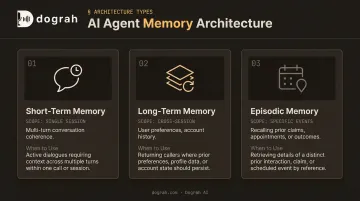
Mismatched memory (for example, relying only on short-term memory in a workflow that requires cross-session continuity) produces agent behavior that feels disjointed and unreliable to users.
Latency and Orchestration Design
In real-time workflows, especially voice agents, end-to-end latency determines usability. The ITU-T G.114 standard provides a useful benchmark here: one-way voice delays above 400 ms are classified as unacceptable for general network planning. OpenAI reported GPT-4o responding to audio input in as little as 232 ms average.
Traditional STT → LLM → TTS pipelines introduce cumulative latency at each processing stage. Each conversion step adds delay that compounds across the full call.
Speech-to-Speech orchestration addresses this directly: a single model processes audio input and generates audio output without intermediate steps. Dograh AI shipped S2S orchestration across the full stack using models including Gemini Flash Live and OpenAI GPT-Realtime, roughly halving end-to-end latency compared to the traditional pipeline architecture.
Data Privacy and Deployment Model
Self-hosted open-source deployments mean sensitive data never leaves your infrastructure. That matters operationally beyond compliance: it removes the platform vendor from your data flow diagram, eliminates one BAA/DPA negotiation, and gives auditors a cleaner answer to "who can access this PII?"
For regulated industries (healthcare, finance, legal, government), the BSD 2-Clause license on platforms like Dograh AI means full code auditability. No black boxes, no vendor secrets, and the ability to verify exactly how data is handled at every step.
Common Mistakes and How to Troubleshoot Them
Most agentic workflow failures are predictable. Knowing them in advance saves weeks of debugging.
Skipping Goal Definition and Task Mapping
What goes wrong: Jumping to tool selection or prompt writing before defining success criteria or mapping the human workflow. Agents built on vague objectives produce vague outputs.
The fix: Write the success criteria in one sentence before opening any platform. Map the workflow on paper first. If you can't describe what "done" looks like, the agent can't either.
Overloading a Single Agent With All Use Cases
What goes wrong: Building one agent to handle every scenario. This inflates the permission surface, makes debugging harder, and causes changes for one use case to degrade performance in others.
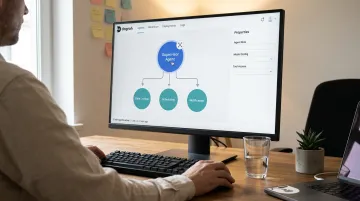
The fix: Decompose into focused agents using a supervisor-worker pattern — a coordinating agent delegates to specialized sub-agents. Each sub-agent is smaller in scope, easier to tune, and faster to test and govern.
Poor Instruction and Prompt Engineering
Of the four mistakes here, this one causes the most silent failures — agents that appear to be working until production reveals otherwise.
Mistake: Writing system prompts like casual chat messages rather than structured operating manuals. Agents given insufficient context about role, output format, and edge cases behave unpredictably.
Fix: Treat system instructions like a detailed brief for a new team member. At minimum, include:
- Role and context (who the agent is and what it's doing)
- Reasoning approach (how it should think through decisions)
- Hard constraints (what it must never do)
- Output format with concrete examples of good and bad responses
Then ask the agent itself to flag missing context — it will often surface gaps faster than manual review.
Skipping Real-Data Testing and Monitoring
Mistake: Testing only with clean inputs and deploying. Production inputs are messier and reveal edge cases that dummy data never surfaces. No step-level logging makes debugging nearly impossible.
Fix: Run the workflow against actual business data from day one. Add logging at every node. Set stopping conditions — max iterations, escalation thresholds — to prevent runaway agent loops. Each prompt should have defined inputs, outputs, and constraints — test it like any other function in your stack.
Conclusion
Effective open-source AI agent workflows come down to design discipline, not platform selection. Clear goal-setting, careful task decomposition, matched deployment model, and structured prompt engineering matter more than which framework you pick.
The open-source route specifically solves for data sovereignty, cost control, and long-term flexibility — at the cost of requiring more upfront setup discipline. Most failures trace back to a short list of avoidable mistakes:
- Vague instructions that leave agents guessing at intent
- Over-engineered single agents doing too many jobs at once
- Untested edge cases that break flows in production
Fix those three, and the right open-source platform — whether that's a self-hosted option like Dograh AI or another framework — will handle the rest without friction.
Frequently Asked Questions
What is the difference between an AI workflow and an AI agent?
Workflows follow predefined if-then logic with a fixed execution path. Agents use LLM reasoning to make decisions dynamically based on context. Agentic workflows combine both: structured steps for repeatable tasks, plus agent-level reasoning at decision points where conditions vary or judgment is required.
Do I need to know how to code to build an open-source AI agent workflow?
Many open-source platforms now offer visual no-code or low-code builders, so coding isn't required to build and deploy basic workflows. That said, prompt engineering and workflow logic matter more than the interface. These skills determine output quality regardless of which tool you choose.
How do I choose between a self-hosted open-source platform and a closed managed platform?
The key factors are data privacy requirements, compliance constraints, budget, and need for customization. Self-hosted open-source is better for regulated industries or teams that need full data control. Managed closed platforms trade flexibility for faster initial setup and lower operational overhead.
What open-source tools are available for building AI agent workflows?
Common options: n8n for general workflow automation, LangChain and LlamaIndex for LLM orchestration, AutoGen and CrewAI for multi-agent coordination, and Dograh AI for voice agent workflows with a visual builder and self-hosted deployment under BSD 2-Clause. Best fit depends on whether the use case is data processing, text-based agents, or real-time voice.
How do I evaluate whether my AI agent workflow is performing well?
Track task completion rate, output accuracy, latency per run, escalation rate, and cost per run — measured against success criteria you defined before building, not abstract benchmarks. Step-level logging is what tells you which node is responsible when metrics slip.
How do open-source AI agent workflows handle data privacy and compliance?
Self-hosted open-source platforms keep all data on-premise within your own infrastructure, which removes the need for vendor compliance certifications like HIPAA BAAs, GDPR DPAs, or SOC 2 reviews. Auditable code under permissive licenses (BSD, MIT) means teams can verify exactly how data is handled at every step.