That said, results vary. A well-configured no-code agent running on the right platform can handle real business volume from day one. A poorly scoped one with vague instructions will frustrate users and undermine trust in the technology. The difference isn't coding skill — it's preparation, platform fit, and knowing what to configure carefully.
This guide walks through the full process: understanding what a true AI agent actually is, choosing your platform, writing effective instructions, connecting your tools, and testing before you go live.
Key Takeaways
- Visual drag-and-drop builders let you configure and deploy AI agents entirely without code
- The build process: define goal → choose platform → write instructions → add knowledge → test → deploy
- Voice agents and chat agents run on different platforms — choose your channel before picking a tool
- Most builds fail due to vague instructions, skipped edge-case testing, or a mismatched platform
What Is a No-Code AI Agent (and Why It's Different from a Chatbot)
A no-code AI agent uses a large language model (LLM) to understand intent, reason over context, and generate responses dynamically. You configure the agent's persona, goals, and constraints — the LLM handles the rest.
That's a meaningful departure from traditional chatbots, which follow fixed decision trees. Rephrase a question slightly and a chatbot breaks. These tools work for narrow, scripted flows — nothing more.
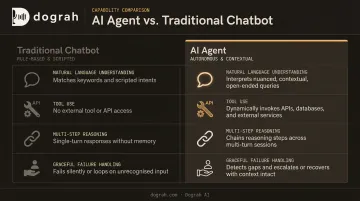
Four capabilities separate a real AI agent from a simple chatbot:
- Natural language understanding: handles varied phrasing, not just keyword matches
- Tool use: queries a CRM, checks a calendar, or triggers an external API mid-conversation
- Multi-step reasoning: maintains context across a full conversation, not just the last message
- Graceful failure handling: knows when to escalate rather than guess
Once you understand what an agent can do, the next decision is how you deploy it. Two categories cover most use cases:
| Type | Deployment | Best For |
|---|---|---|
| Text/chat agents | Websites, messaging apps, WhatsApp | Async support, lead capture, FAQ deflection |
| Voice AI agents | Phone lines (inbound and outbound) | Appointment scheduling, sales calls, intake, tier-1 support |
These serve different use cases and require different platforms. Choosing the wrong type early — say, building a chat agent when your use case requires phone calls — means rebuilding from scratch on a different platform.
How to Build an AI Agent Without Coding: Step-by-Step
Step 1: Define Your Goal and Agent Type
Before touching any platform, write one sentence describing exactly what this agent will do. Not "handle customer inquiries" — that's too broad. Something like: "Qualify inbound real estate leads by asking four questions and booking a callback if they meet criteria."
Specific goals produce specific agents. Vague goals produce agents that attempt everything and do nothing reliably.
Also decide your channel upfront:
- Text/chat: Customer support, FAQ bots, lead forms
- Voice: Inbound call handling, outbound follow-up campaigns, appointment reminders
This decision drives your platform choice in the next step.
Step 2: Choose the Right No-Code Platform
Platform selection matters more than most people expect. Your goal and channel should directly inform which criteria to prioritize:
- Builder type: Visual drag-and-drop vs. form-based configuration
- LLM flexibility: Can you bring your own API keys?
- Channel support: Web chat, WhatsApp, phone, SMS
- Integrations: Native connectors for your CRM, calendar, helpdesk
- Data handling: Cloud-hosted vs. self-hosted — critical for regulated industries
For voice AI agents specifically, purpose-built platforms outperform general-purpose chatbot tools. Dograh AI, for example, provides a visual node-based workflow builder designed specifically for voice agents — inbound and outbound — with support for 70+ languages, integration with telephony providers like Twilio, Vonage, and Telnyx, and three deployment options:
- Cloud — fastest to start, managed infrastructure, no setup required
- Self-hosted OSS — Docker-based (version 20.10+), full data sovereignty, deployable on AWS, Azure, or GCP
- Fully managed private cloud — Dograh manages the infrastructure inside your own cloud environment
The self-hosted option is particularly relevant for healthcare, finance, and legal businesses where conversation data must stay within your own infrastructure.
You can have a working voice agent running in under two minutes using the Create Workflow Dashboard: select inbound or outbound, name the bot, describe the use case in 5–10 words, and the platform generates a working workflow automatically.
Step 3: Write Your Agent Instructions and Configure Behavior
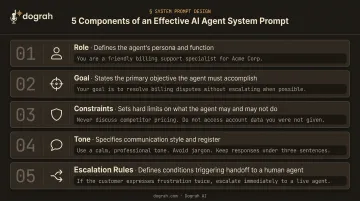
Instructions — often called the system prompt — are the most important configuration step. They define:
- Role: What the agent is (e.g., "You are Maya, an intake assistant for GreenLeaf Dental")
- Goal: What it should accomplish in each conversation
- Constraints: What it should not discuss or do
- Tone: Formal, conversational, empathetic
- Escalation rules: When to transfer to a human or end the conversation
Good instructions also cover edge cases explicitly. What should the agent do if the user asks something off-topic? What if they're upset? What if a required piece of information is missing?
Dograh AI includes built-in escalation logic configurable through the visual builder — transferring calls when a user asks for a human, when strong buying signals appear, or when confusion or distress rises above a threshold.
On transfer, the system passes full call context (what was asked, qualification answers, urgency level) to the human agent — eliminating the frustrating "please explain your issue again."
Step 4: Add a Knowledge Base and Connect Integrations
An agent without domain knowledge will hallucinate. Feed it the information it needs:
- Product/service documentation
- FAQ documents
- Pricing and policies
- Common objections and responses
Dograh AI supports RAG-powered document uploads, allowing agents to pull accurate answers from your actual materials rather than generating them from scratch.
Integrations determine what your agent can do beyond answering questions. Connect your:
- CRM (Salesforce, HubSpot, Zendesk) — for real-time data lookup and automatic call logging
- Calendar (Google Calendar, Calendly) — for live availability and booking
- Automation platforms (Zapier, Make, n8n) — for triggering downstream workflows
- Messaging channels (WhatsApp, SMS, email) — for post-call follow-ups
Dograh integrates with 200+ apps through native connectors and webhooks. A single voice conversation can trigger an SMS confirmation, a CRM update, and a calendar invite — all without manual action.
Step 5: Test, Refine, and Deploy
Never send real users to an untested agent. Run conversations covering:
- Expected inputs — the typical user journey from start to finish
- Edge cases — incomplete information, off-topic questions, angry users
- Failure scenarios — what happens when an integration is down or the agent doesn't understand
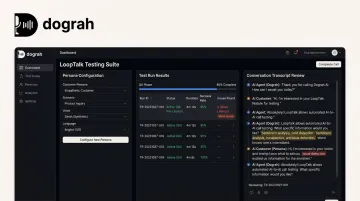
Dograh AI includes LoopTalk, an AI-to-AI testing suite that creates customer personas with specific accents, intents, and objections — then runs automated calls against your voice agent before launch. This catches voice-specific failures (latency issues, barge-in collisions, tool failures) that reviewing transcripts alone would miss.
Post-launch, review conversation logs regularly. Drop-off points and repeated misunderstandings are the most reliable signal for where your instructions need tightening — treat them as a continuous improvement queue, not a one-time fix.
What to Prepare Before You Start Building
Preparation determines how quickly the agent performs after launch. Businesses that skip this spend their first weeks fixing a broken agent.
Platform Requirements
- Account on your chosen no-code platform
- API credentials for your LLM, STT, and TTS providers (Dograh supports bring-your-own keys for OpenAI, Google, Groq, Azure, ElevenLabs, Deepgram, and others)
- Access to the tools you want to integrate (CRM credentials, calendar access, telephony provider details)
Content Readiness
Gather before you build:
- FAQ document covering your most common customer questions
- Product or service descriptions with accurate pricing
- Company policies (returns, cancellations, escalation procedures)
- Objection-handling scripts if the agent will handle sales conversations
- Any compliance language required in your industry
An agent trained on vague or incomplete content will give vague or incomplete answers — so the more specific your inputs, the less time you spend correcting the agent post-launch.
When No-Code AI Agent Building Works Best (and When It Doesn't)
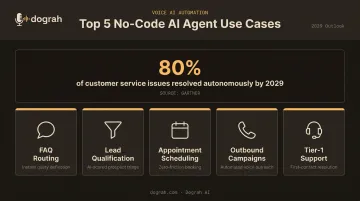
No-code platforms excel at clearly scoped, repeatable use cases:
- Answering FAQs and routing to the right team
- Qualifying inbound leads against defined criteria
- Scheduling and confirming appointments
- Running outbound call campaigns with structured scripts
- Handling tier-1 support before escalating complex issues
Research from Gartner predicts agentic AI will autonomously resolve 80% of common customer service issues without human intervention by 2029 — most of which fit squarely in this repeatable-use-case category.
Where no-code hits limits:
- Deeply custom integrations requiring proprietary APIs with no standard connectors
- Highly complex reasoning chains across multiple data sources simultaneously
- Regulated environments where every conversation flow requires formal audit sign-off
Regulated environments are where a self-hosted or open-source platform earns its place. You can inspect the code, control data residency, and document your compliance posture without waiting on a vendor's SOC 2 paperwork — something closed cloud tools simply can't offer.
Compliance isn't the only constraint worth stress-testing before you commit. Most cloud-based platforms handle moderate traffic well, but if you expect thousands of simultaneous calls — large outbound campaigns, for instance — verify concurrency limits and auto-scaling behavior up front.
Common Mistakes When Building No-Code AI Agents
Vague system prompts — "Be helpful and answer questions" invites hallucination. Effective instructions specify role, goal, constraints, tone, and escalation triggers. Treat the system prompt as seriously as any other configuration step.
Thin or outdated knowledge bases — Agents answer from what they're given. Incomplete or poorly formatted documentation produces inaccurate answers, and in customer-facing deployments, one wrong answer can damage credibility fast.
Testing only the happy path — Real users are imprecise, impatient, and occasionally hostile. Stress-test with adversarial inputs and incomplete information before going live; don't just test the scenario where everything goes right.
Skipping the data handling fine print — A Cisco 2024 study found 27% of organizations had banned generative AI tools over privacy and security concerns. Many businesses discover post-launch that their no-code platform stores conversation transcripts on third-party servers — a compliance problem in healthcare, finance, and legal. Review data residency terms before you sign up.
Frequently Asked Questions
What is the best no-code AI agent builder?
There's no single best platform. The right choice depends on your use case, required integrations, and how sensitive your data is. For voice AI specifically, look for platforms with built-in telephony, multilingual support, and self-hosting options — Dograh AI, for example, covers all three with a no-code visual builder.
Can I really build an AI agent without any coding experience?
Yes. Modern no-code platforms use drag-and-drop workflow builders and plain-language configuration. If you can fill out a form and write clear instructions, you can build and deploy a working agent. Dograh AI's setup flow, for instance, gets a basic voice bot running in under two minutes.
How long does it take to build a no-code AI agent?
A basic agent can be running in under an hour. Agents with custom integrations, large knowledge bases, or complex multi-step conversation flows typically take a few days of configuration and testing before they're production-ready.
What types of AI agents can I build without coding?
Most no-code platforms support a wide range of agent types, including:
- Customer support and FAQ responders
- Lead qualification and outbound calling bots
- Appointment schedulers
- Internal knowledge assistants
These work across both chat and voice channels depending on the platform.
How do no-code AI agents handle integrations with existing tools?
Most platforms offer native connectors or webhook support for common tools like HubSpot, Salesforce, Google Calendar, Zapier, and Make. The agent can read from and write to these systems — logging call outcomes, booking appointments, updating contact records — without any custom code.
What's the difference between a chatbot and a no-code AI agent?
A chatbot follows a fixed script with predefined responses. An AI agent uses an LLM to understand free-text input, reason over context, and take actions — making it capable of handling conversations that don't follow a predictable script.