This is one of the most common complaints teams building voice AI run into after launch. It doesn't mean the AI is "bad." It usually means the turn-taking and latency design underneath it wasn't built for how people actually talk — with pauses, filler words, accents, and the occasional "umm."
This guide breaks down why AI agents talk over callers, how to diagnose the exact cause in your pipeline, the fixes for each root cause, and how to tell when the problem is really a platform limitation rather than a tuning issue.
TL;DR
- Talk-over usually comes from three sources: aggressive endpointing, weak or missing barge-in handling, or high pipeline latency.
- Most cases are fixable with tuning: silence thresholds, transcript-completeness checks, and interruption classification.
- Talk-over that persists across most calls, despite tuning, usually signals an architectural latency problem.
- Diagnose first (acoustic, semantic, or architectural), then fix. Guessing only moves the symptom.
- If weeks of custom tuning fail, evaluate a platform with turn-taking and barge-in built in.
What's Actually Happening When an AI Agent Talks Over a Caller
Every voice agent has to solve one core problem: deciding when the caller is done talking. This is called turn-taking, and it's the logic layer that tells the agent when to stay silent and when to respond.
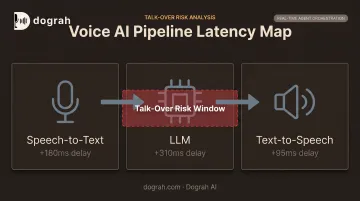
Most production voice agents run a chained pipeline: Speech-to-Text (STT) → LLM → Text-to-Speech (TTS). Each stage passes its output to the next. Talk-over happens when any one of these stages decides "the user is finished" too early, or when the system fails to notice and react to an interruption in progress.
Why This Isn't a One-Time Bug
Voice activity detection (VAD) is the layer that flags whether someone is currently speaking. On its own, VAD only detects sound, not meaning, so it has no way to tell the difference between:
- A caller pausing to recall an address
- A caller who has genuinely finished their sentence
- Background noise being misread as speech
That gap gets worse under real conditions. Background noise, accents, hesitation words, and slow talkers all push a system tuned for "average" speech patterns past its limits. Until you fix the turn-taking logic, the same talk-over pattern keeps showing up on live calls.
Common Problems and Root Causes Behind Talk-Over Issues
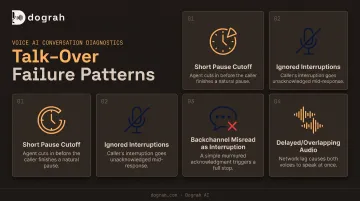
Most talk-over complaints trace back to a small set of repeatable failure patterns. Here's what each one looks like and why it happens.
Problem 1: Agent Cuts In After Short Pauses
Symptoms: The AI responds while the caller is still mid-sentence, especially during pauses for thinking or recalling numbers.
Likely cause: The silence threshold is tuned for speed rather than accuracy — the system treats a half-second gap as "done talking" regardless of context.
Problem 2: Agent Ignores Caller Interruptions
Symptoms: The caller talks over the AI, but the AI keeps going through its entire scripted response.
Likely cause: Barge-in detection either isn't implemented, or its confidence threshold is set so high that normal interruptions never trigger it.
Problem 3: Agent Treats Backchannels as Full Interruptions
Symptoms: The caller says "mm-hmm" or "okay," and the agent stops abruptly or resets the whole conversation.
Likely cause: The interruption logic has no way to tell a backchannel (a simple acknowledgment) apart from a real correction or cancellation.
Problem 4: Delayed or Overlapping Audio from High Pipeline Latency
Symptoms: Stale audio plays after the caller has already changed their answer, or there's a noticeable lag before the AI reacts at all.
Likely cause: High end-to-end latency stacking across STT, LLM, and TTS stages, combined with no cancellation logic for audio that's already streaming.
These four patterns rarely occur in isolation. Noisy phone lines and varied accents make each one worse.
A 2025 Dynata survey commissioned by PolyAI found that 71% of U.S. consumers said they were willing to speak with an AI voice assistant, but only if it could accurately handle their needs. Talk-over is exactly the kind of failure that erodes that willingness call by call.
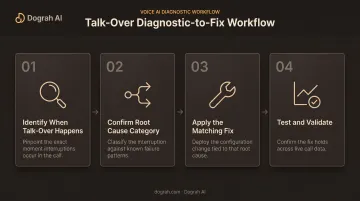
How to Fix an AI Agent That Talks Over the Caller (Step-by-Step)
Jumping straight to a fix without isolating the cause tends to burn tuning cycles and create new problems. Cranking up a silence delay might stop the interruptions, but it can also introduce awkward dead air on every single turn. Work through this in order.
Step 1: Identify Exactly When and How the Talk-Over Happens
- Review call recordings and transcripts to see whether interruptions cluster around specific question types — yes/no answers, open-ended questions, or data capture like addresses and account numbers.
- Check the conditions: does it happen on every call, or only with background noise, accents, or longer pauses?
- Log timestamps for speech-start, speech-end, and agent-response events so you can measure the actual gap, not just guess at it.
Step 2: Confirm the Root Cause Category
Every talk-over issue falls into one of three buckets:
- Acoustic — the VAD or silence threshold is misreading pauses as end-of-speech.
- Semantic — the end-of-turn logic is misreading an incomplete sentence as a finished one.
- Architectural — pipeline latency or missing cancellation logic is the actual problem.
Before touching agent logic, rule out telephony-level issues — poor call quality or carrier-side jitter can mimic talk-over symptoms without any fault in your turn-taking design. Skipping this step is how teams end up retuning the wrong layer and breaking something else.
Step 3: Apply the Fix Based on the Identified Cause
If the issue is acoustic (VAD/endpointing):
- Use adaptive silence thresholds based on question type — shorter delays for yes/no answers, longer delays for data capture like addresses or numbers.
- Raise the speech-confidence threshold so background noise doesn't falsely trigger a "user speaking" flag.
If the issue is semantic (end-of-turn logic):
- Combine silence duration with transcript-completeness checks — trailing words like "and," "or," or "because" are strong signals the caller isn't finished.
- Factor in intent and slot confidence so the agent waits until the required information is actually captured, not just until the caller stops talking.
If the issue is barge-in/interruption handling:
- Classify interruptions into backchannel, correction, and cancellation categories instead of one on/off toggle. A caller saying "yeah" shouldn't reset the conversation the same way "wait, stop" should.
- Add audio ducking — lowering the AI's volume before a full stop — so casual acknowledgments don't blow up the whole turn.
If the issue is architectural (pipeline latency):
- Make every streamed response cancellable, so stale audio never plays after the caller has already moved on.
- Consider a Speech-to-Speech (S2S) architecture instead of a chained STT-LLM-TTS pipeline.
OpenAI's comparison shows the gap clearly: earlier chained Voice Mode averaged 2.8 seconds with GPT-3.5 and 5.4 seconds with GPT-4, while end-to-end GPT-4o responded in as little as 232 ms (about 320 ms average). Platforms like Dograh AI apply the same idea with S2S orchestration, collapsing the chain and roughly halving end-to-end latency so the talk-over window shrinks with it.
Step 4: Test and Validate the Fix
- Re-run test calls that simulate pauses, corrections, background noise, and accents.
- Track false-cutoff rate, ignored-interruption rate, and time-to-first-response before and after the change.
- Monitor live production calls for one to two weeks — issues that don't show up in a controlled test often resurface under real call volume.
When to Fine-Tune vs Switch Your Voice AI Platform
Some talk-over issues are a five-minute config change. Others are a sign the underlying architecture can't support real-time conversational nuance no matter how much you tune it.
| Scenario | Fine-tune | Switch platform |
|---|---|---|
| Occasional interruptions on specific question types | Adjust silence thresholds and end-of-turn logic for that question type | Not needed yet |
| Frequent talk-over across most calls, regardless of tuning | Diminishing returns once latency is the real bottleneck | Move to lower-latency S2S orchestration |
| Barge-in works but feels robotic or abrupt | Refine interruption classification, add audio ducking | Not needed unless the platform blocks custom logic |
| Weeks of custom engineering, no reliable fix | Weigh ongoing dev cost against a packaged solution | Move to a platform with turn-taking and barge-in built in |
That last row is where most teams eventually land. Building adaptive silence thresholds, interruption classification, and cancellable streaming from scratch on frameworks like raw LiveKit or Pipecat is possible, but it's a real engineering commitment.
Dograh AI ships this out of the box: voice activity detection, end-of-turn detection, configurable turn parameters, and native barge-in handling. The platform is open-source and self-hostable, so you don't have to rebuild the same turn-taking pipeline other voice AI teams have already solved.
Common Mistakes and Preventive Best Practices
A handful of missteps show up again and again in production voice agents:
- One global silence threshold for every question type. A five-digit ZIP code and a "yes or no" answer don't need the same pause tolerance. Using one setting for both guarantees the wrong behavior on at least one of them.
- Treating every interruption the same way. A backchannel like "yeah" or "okay" shouldn't trigger a full conversation reset the way a genuine correction should.
- Non-cancellable TTS output. If stale audio can't be stopped mid-stream, it keeps playing after the caller has already interrupted, which is exactly what talk-over sounds like from their end.
Review real call transcripts and recordings on a regular cadence for false cutoffs and ignored interruptions. That is where talk-over patterns show up.
Aggregate latency dashboards can look healthy while individual calls still frustrate callers. Transcripts catch what averages miss.
Frequently Asked Questions
What is a conversational AI agent?
It's software that uses natural language processing, speech recognition, and generative responses to hold two-way, human-like conversations over voice or chat channels. It listens, interprets intent, and responds in real time rather than following a fixed script.
How can you tell if a person is a bot?
Common tells include unnatural pauses, repetitive phrasing, talking over the caller, and failing to react naturally to interruptions or emotional tone. A well-built agent minimizes these, but they're still the fastest giveaways.
What is barge-in in AI voice agents?
Barge-in is a caller's ability to interrupt the AI mid-response instead of waiting for it to finish. Good implementations classify what kind of interruption it is before reacting, rather than treating every interruption identically.
Why does my AI voice agent keep interrupting callers?
It's usually one of three things: an overly aggressive silence threshold, weak end-of-turn detection that misreads incomplete sentences, or high pipeline latency causing stale, delayed responses. Diagnosing which one first saves time.
Can talk-over issues be fixed without switching platforms?
In most cases, yes. Tuning silence thresholds, improving end-of-turn logic, and adding interruption classification solves the majority of talk-over problems. Persistent issues across most calls usually point to latency that tuning alone can't fix.
How much does latency affect AI agent interruptions?
A lot — higher pipeline latency widens the overlap window where stale audio plays after the caller has moved on. A PNAS study across 10 languages found humans target turn-transition gaps of about 0–200 ms, a useful benchmark for how tight your agent’s response window needs to feel natural.