Introduction
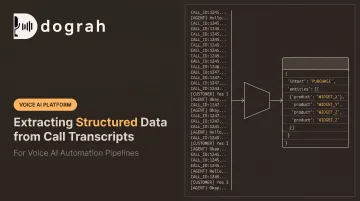
Every call transcript hides a small database inside it. Names, phone numbers, sentiment shifts, promised follow-ups, disposition codes: it's all there, buried in plain text.
Manual review can't keep up. A human reviewer might catch a handful of these details on a good day. At scale, across thousands of calls a week, that approach simply breaks down.
Automated extraction fixes the scale problem, but accuracy still depends on your setup. Transcript and diarization quality, rules-based NLP versus an LLM, schema design, and model choice can change the outcome dramatically.
This guide walks through when structured extraction makes sense, what you need before starting, the exact steps to run it, the parameters that control accuracy, and the mistakes that quietly wreck otherwise solid pipelines.
Key Takeaways
- Structured extraction turns messy call transcripts into JSON or tabular data your CRM and dashboards can actually use.
- LLMs with schema-guided prompting have largely replaced manual notes and rigid rule-based NLP systems.
- Accuracy hinges more on transcript quality and schema clarity than on which model you choose.
- Voice AI platforms with built-in post-call analysis skip the pipeline-building step entirely.
How to Extract Structured Data from Call Transcripts
Getting from raw audio to clean, database-ready fields takes five distinct stages. Skip or rush one, and the errors compound downstream.
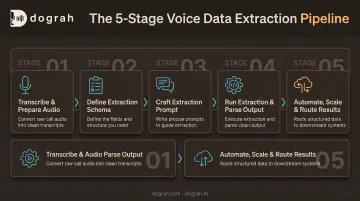
Step 1: Transcribe and Prepare the Call Audio
Start by converting audio to text with a speech-to-text model, and turn on speaker diarization so agent and customer lines are labeled separately.
Before you extract anything, check the transcription confidence scores. Speech-to-text errors don't stay contained. They flow straight into your extracted fields as wrong names, garbled phone numbers, or missing commitments.
- Use word error rate (WER) as your baseline accuracy metric for the transcription engine
- Flag low-confidence segments for manual spot-checks rather than trusting every word blindly
- Confirm diarization actually separated agent and customer speech before moving forward
Step 2: Define Your Extraction Schema
Decide exactly which fields you need (contact details, sentiment, action items, disposition or compliance flags) and specify their data types using a JSON Schema or a Pydantic-style model.
Vague field descriptions are the single biggest driver of inconsistent extraction results. A field labeled simply "notes" invites the model to guess. A field labeled "customer's stated reason for cancellation, verbatim or closely paraphrased" doesn't.
Write descriptions that answer:
- What exact value goes here?
- What format should it take (string, enum, date, boolean)?
- Is it required, or can it be null when the information wasn't mentioned?
Step 3: Craft the Extraction Prompt
Structure your prompt with clear Role, Context, Instruction, and Format sections. List every JSON key you expect in the output explicitly. Don't make the model infer your schema from a description alone.
Pick a capable LLM and instruct it plainly: skip the preamble, return only valid JSON matching the schema. No "Here's the extracted data:" prefix, no explanations tacked onto the end.
Step 4: Run Extraction and Parse the Output
Send the transcript and prompt to your LLM using JSON mode or a structured-output flag to enforce schema compliance. OpenAI's Structured Outputs documentation distinguishes plain JSON mode, which only guarantees syntactically valid JSON, from strict schema enforcement, which guarantees the output actually matches your defined structure.
Once you get output back:
- Validate it against your schema before it touches a database or CRM
- Check for refusals or truncation, which strict-output modes still don't fully prevent
- Route anything that fails validation to a review queue instead of forcing it through
Step 5: Automate, Scale, and Route Results
Single-call testing works while you build the pipeline. Once call volume exceeds what a person could review by hand, move to an async, queue- or webhook-based system.
Automatically push extracted fields into your CRM, data warehouse, or dashboard.
McKinsey's modeling suggests generative AI-driven QA has the potential to cut quality assurance costs by more than 50% versus fully manual review. Treat that as a ceiling; your results will depend on call volume and how much manual QA you replace.
Dograh AI's platform handles a version of this natively for its own voice agent calls, using variable extraction during the conversation to trigger CRM updates and follow-up workflows through webhooks, without a separate pipeline built from scratch.
When Should You Extract Structured Data from Call Transcripts?
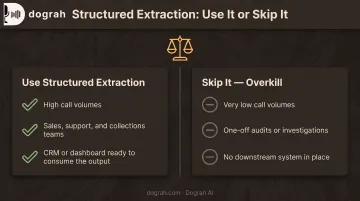
This approach earns its keep in high call-volume environments (sales floors, support desks, collections teams) where manual review only ever touches a fraction of calls.
That fraction is smaller than most people assume. Verint reports that manual QA typically covers just 1-3% of interactions, reviewed periodically rather than in full. At that volume, structured extraction is the only practical way to see what's actually happening across your calls.
It's overkill for:
- Very low call volumes, where a quick human skim beats building and maintaining a pipeline
- One-off audits or investigations covering a handful of calls
- Teams without a downstream system (CRM, dashboard) ready to consume the output anyway
Already on voice AI agents? Skip the separate build. Platforms like Dograh AI ship native post-call analysis with sentiment detection and confidence scoring, miscommunication flags, and activity detection built into the call pipeline. There's no separate extraction layer to stand up.
What You Need Before Extracting Structured Data
Extraction quality is bounded by transcript quality and schema clarity long before model choice ever enters the picture. Get these fundamentals wrong, and no amount of prompt engineering fixes them later.
Data & Tooling Requirements
- A speech-to-text engine with speaker diarization enabled
- LLM or API access that can return structured JSON
- A context-window or chunking strategy for long calls — a 40-minute conversation can exceed a model's usable context
Alternatively, a voice AI platform such as Dograh AI ships structured variable extraction and sentiment detection out of the box, with multilingual STT and mid-call language switching.
Schema & Compliance Readiness
Before you write a single extraction prompt, get sign-off from whoever consumes the output downstream:
- Finalized field list with types and required-versus-optional rules, agreed with the CRM or analytics team
- Data-handling review for PII fields (names, phone numbers) mapped to GDPR or HIPAA before anything is stored
For regulated fields, self-hosted or private-cloud architectures give you direct control over where transcript data lives and who can access it. Encrypted storage, access logging, and configurable retention matter more here than which LLM you pick.
Key Parameters That Affect Extraction Accuracy
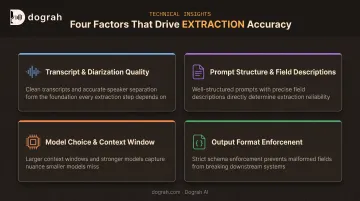
Extraction accuracy isn't a fixed property of any one model. It's the sum of several variables you actually control.
Transcript & Diarization Quality
Speech-to-text errors and mislabeled speakers corrupt extracted fields directly: a misheard digit becomes a wrong phone number, a mislabeled speaker turns a customer complaint into an "agent statement."
Impact: Enabling diarization and choosing a higher-accuracy transcription model measurably improves every field that depends on knowing who said what.
Prompt Structure & Field Descriptions
Generic field descriptions produce generic, inconsistent output. This is where most extraction pipelines fail.
Impact: Explicit Role/Context/Format prompts, paired with a couple of few-shot examples, raise accuracy noticeably on nuanced fields like sentiment or objection reasons.
Model Choice & Context Window
| Factor | Risk | Fix |
|---|---|---|
| Long calls (30-40+ min) | Exceeds context window, truncated extraction | Use larger-context models or chunk the transcript |
| Weak models | Hallucinate under complex instructions | Test on labeled calls before committing |
| Underspecified prompts | Inconsistent output across similar calls | Add explicit format instructions |
Impact: Larger-context, stronger models reduce truncation errors and extraction mistakes on longer calls.
Output Format Enforcement
Free-text LLM responses are unreliable to parse at scale. One extra sentence before the JSON breaks a naive parser.
Impact: JSON mode or schema-constrained output guarantees consistently parseable, database-ready results, cutting down on retry loops and pipeline breakage.
Common Mistakes & Troubleshooting
Most extraction problems trace back to a handful of repeatable errors:
- Skipping speaker diarization: data gets misattributed between agent and customer, corrupting per-speaker fields
- Using vague field descriptions or no formal schema: inconsistent JSON keys and formats that break downstream systems
- Skipping schema validation before CRM push: pipelines break silently when the LLM deviates even slightly
- Feeding a full multi-hour transcript in one call: hits context-window limits and truncates extraction
When accuracy is inconsistent, work through this order before switching models:
- Check transcript quality first. Bad input caps how good output can ever be.
- Tighten field descriptions until there's no room for the model to guess
- Add few-shot examples for the fields still causing trouble
- Only then consider a different model
Frequently Asked Questions
Is it possible to get a transcript from a phone call?
Yes. Call recordings can be transcribed using speech-to-text APIs, and many phone and VoIP systems support recording with transcription add-ons built in.
Can you get transcripts of phone calls on an iPhone?
iPhones don't transcribe calls natively, though iOS 18.1 and later support in-app call recording and transcription for Phone and FaceTime Audio. Third-party apps can also capture and transcribe calls, subject to local consent laws.
What's the difference between structured and unstructured data extraction from a call?
Unstructured extraction produces free-text summaries. Structured extraction produces schema-bound JSON with clearly defined, typed fields like sentiment, disposition_code, or follow_up_date.
Which AI model works best for extracting structured data from call transcripts?
Larger LLMs currently lead on complex, nuanced extraction tasks, while smaller fine-tuned models suit high-volume, cost-sensitive use cases where speed and price matter more than nuance.
Do I need speaker diarization to extract structured data from transcripts?
It's not mandatory, but it improves accuracy for per-speaker fields: agent performance metrics, customer sentiment, or who made a commitment on the call.
Can structured data be extracted from calls in real time, not just after the call ends?
Yes. Streaming transcription paired with low-latency LLM calls enables real-time extraction, trading some accuracy for speed compared with post-call batch processing.