Introduction
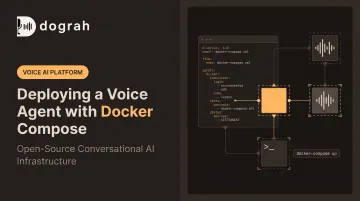
Deploying a voice agent with Docker Compose sits in a specific sweet spot: not plug-and-play, but nowhere near as involved as running a full Kubernetes cluster. Compose lets you define your speech-to-text, LLM reasoning, text-to-speech, and telephony services in one file and bring them up together with shared networking.
Any developer or technical team comfortable with a terminal, environment variables, and basic YAML can handle this. You don't need a dedicated DevOps department.
Get it wrong, though, and the failure modes are ugly:
- Exposed API keys sitting in a compose file
- Crash loops from services starting before their dependencies are ready
- High call latency from misconfigured networking
- Lost conversation history because nobody mounted a volume
This guide walks through a correct, sequenced deployment, from prerequisites through validation, so your voice agent handles real phone calls without embarrassing surprises.
Key Takeaways
- Docker Compose is solo-achievable — skipping steps still causes real production failures
- Prerequisites: Docker Engine/Compose v2, provider API keys or local models, and a reverse proxy with SSL
- Deploy in order: clone → configure → compose up → expose → validate
- Open-source, self-hostable stacks like Dograh AI can produce a working agent in minutes, not hours
Deploying a Voice Agent with Docker Compose
Deploying with Docker Compose means packaging speech-to-text, LLM reasoning, text-to-speech, and orchestration logic as separate containerized services, then defining them in a single docker-compose.yml. One command brings the whole stack up with shared networking already wired in.
How long this takes depends on your starting point. A pre-built open-source repository (Dograh AI's self-hostable stack is one example) can be running with a test call in a couple of minutes.
A fully custom stack, stitched from separate STT, LLM, TTS, and telephony vendors with no existing compose file, can take several hours of configuration and tuning before the stack is stable.
Prerequisites and Compatibility Considerations
Before touching a compose file, confirm the host is ready.
System readiness:
- Docker Engine and Docker Compose v2 installed on a supported 64-bit Linux distribution
- Enough CPU and RAM to run STT, LLM, and TTS concurrently without dropped audio
- Load-test your mix of providers, codecs, and concurrency rather than assuming a generic sizing number
Compatibility checks:
- Confirm container architecture matches your host: an
amd64image won't run natively on ARM64 without emulation, which slows compute-heavy workloads - Decide whether you need GPU passthrough for local models. If so, install the NVIDIA Container Toolkit, run
nvidia-ctk runtime configure --runtime=docker, then restart the Docker daemon
Credentials to gather upfront:
- STT, LLM, and TTS provider API keys (or a locally hosted alternative like Whisper, Kokoro, or Llama for data-sensitive deployments)
- Telephony or WebRTC credentials (Twilio, Vonage, Telnyx, or a SIP trunk are common choices)
- Database connection details for whatever persistence layer your stack uses
Two non-negotiables: Never expose the stack publicly before SSL and a domain are configured, and never hardcode secrets directly into docker-compose.yml.
Tools and Services Required
Beyond Docker itself, a handful of supporting pieces make the deployment work end to end.
| Tool | Purpose | Notes |
|---|---|---|
| Docker + Docker Compose v2 | Runs and orchestrates all containers | Non-negotiable baseline |
| Git client | Pulls the voice agent repository | Needed for pre-built stacks like Dograh AI's |
.env file |
Stores secrets and config | Development only — move to a secrets manager for production |
| Reverse proxy (Nginx/Caddy) | Terminates HTTPS for webhook endpoints | Caddy automates certificate issuance; Nginx requires manual cert config |
Some components are substitutable depending on your needs:
- WebRTC/TURN: Managed options like LiveKit Cloud handle media transport for you. Self-hosting Coturn keeps full control but adds firewall and UDP port work.
- AI providers: Cloud APIs are fastest to wire up. With Dograh AI you can also point the same compose stack at locally hosted STT, LLM, and TTS (Whisper, Kokoro, Voxtral, Llama, and similar) for full data sovereignty.
How to Deploy a Voice Agent with Docker Compose (Step-by-Step)
Deployment follows a fixed sequence. Skip env configuration or dependency ordering, and issues that looked fine in testing show up as soon as real call traffic hits the stack.
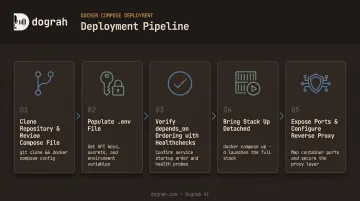
- Clone the repository and review the compose file. Open-source projects like Dograh AI's self-hostable repo ship a ready-made
docker-compose.ymlwith backend, database, and supporting services predefined. Read it before changing anything. - Populate your
.envfile. Add STT, LLM, and TTS provider keys, telephony credentials, and your database connection string. Keep this file out of version control. - Verify
depends_onordering.depends_ononly waits until a dependency is running, not ready. Addcondition: service_healthywith a realhealthcheckso the database is up before the backend connects. - Bring the stack up detached. Run
docker compose up -d, then confirm every container is healthy withdocker compose ps. Investigate any restarting or exited containers before you continue. - Expose ports and configure your reverse proxy. Terminate HTTPS with Nginx or Caddy and a valid certificate so telephony and webhooks can reach the container, then place a test call from the platform UI.
Post-Deployment Checks and Validation
Getting containers running is only the start. Validation comes next.
Check container health first. Run docker compose logs and docker compose ps, watching specifically for restart loops, which almost always signal a crashed service rather than a slow one.
Then place a real end-to-end test call. Check transcript accuracy against what was actually said, and review latency in the logs. According to Daily's 2025 engineering guidance on building voice AI, roughly 800 milliseconds of median voice-to-voice latency is a reasonable target for natural-sounding conversation. Anything noticeably higher will feel sluggish to callers.
Finally, confirm persistence and secrets. Verify that:
- Database and log volumes are properly mounted, so a container restart doesn't wipe conversation history
- No API keys or credentials are leaking into container logs or baked into the image itself
Only after all three checks pass should you route live call traffic to the stack.
Common Deployment Problems and Fixes
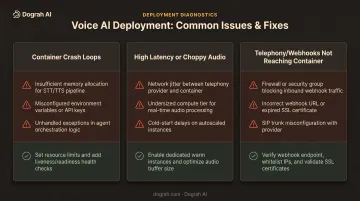
Three issues account for most of the trouble teams hit right after a Docker Compose voice agent deployment.
Issue 1: Container Crash Loops
One or more services (the LLM container, TTS service, or database) repeatedly restart after docker compose up. Common causes:
- Missing or invalid environment variable
- Port conflict with another process on the host
- Docker memory limits set too low
Fix:
- Run
docker compose logs <service>to see the exit reason - Check every
.envvalue against what the service expects - Raise Docker resource limits if memory pressure shows up in the logs
Issue 2: High Latency or Choppy Audio
The agent responds with a noticeable lag, or audio cuts out mid-sentence. This usually traces back to:
- Wrong network mode for real-time media
- WebRTC or TURN port that never got exposed
- AI API region far from your server
Fix:
- Correct port mappings for real-time media (host networking is often best for WebRTC-heavy setups)
- Deploy closer to your telephony provider's infrastructure
- Switch to a lower-latency speech-to-speech model
Issue 3: Telephony or Webhooks Not Reaching the Container
Inbound calls or webhook events never arrive. Usually one of these is wrong:
- Missing reverse proxy or SSL setup
- Blocked firewall port
- Container not reachable on a public IP
Fix:
- Configure Nginx or Caddy with a valid certificate
- Open the required ports on the host and firewall
- Confirm the telephony provider's webhook URL matches your domain
Pro Tips for Deploying Voice Agents with Docker Compose Effectively
A few habits separate a stable deployment from one that breaks on the next redeploy.
- Use separate
.envfiles per environment so dev, staging, and production never share credentials - Keep secrets out of version control; use a secrets manager or vault in production instead of dotenv files
- Pin image versions or digests instead of
latest, and keep a rollback-ready previous compose file - For scale or sensitive data, prefer a managed private-cloud deployment inside your own environment
Dograh AI runs fully managed private-cloud deployments in your cloud, so you keep data sovereignty without owning day-to-day infrastructure.
For production, Docker's guidance on Compose in production treats single-server Compose as the baseline. That matches most voice agent stacks before they need to scale further.
Conclusion
The quality of your deployment shapes how a voice agent behaves on real calls: latency, reliability, and where sensitive call data lives.
Prepare prerequisites, follow the sequence, and validate end-to-end before go-live. With an open-source, self-hostable stack like Dograh AI, teams can be running in minutes and keep full control—no vendor queue, and no black box in the middle of every call.
Frequently Asked Questions
What is Docker Compose and why use it for deploying a voice agent?
Docker Compose lets you define multiple interdependent services (STT, LLM, TTS, database) in one YAML file and start them with a single command—ideal for multi-service voice AI stacks.
Can I deploy a voice agent with Docker Compose without relying on cloud AI APIs?
Yes. Self-hostable platforms like Dograh AI support connecting locally hosted STT, LLM, and TTS models inside the same compose stack, keeping sensitive data on-premises.
How long does it take to deploy a voice agent using Docker Compose?
Pre-built open-source templates can be running within minutes. Fully custom, multi-provider stacks typically take longer due to integration and latency tuning work.
Is Docker Compose suitable for production voice agent deployments, or do I need Kubernetes?
Compose works well for single-server or small-to-mid production deployments. Docker's documentation treats single-server deployment as its standard production path; Kubernetes becomes relevant once you need multi-node scaling and failover.
What are the minimum system requirements for running a voice agent stack via Docker Compose?
API-backed stacks often run on 2–4 CPU cores and 4–8 GB RAM. Local STT/LLM/TTS models usually need a GPU and 16 GB+ RAM—confirm VRAM and CPU needs for your specific models before sizing the host.
How do I keep API keys and secrets secure in a Docker Compose voice agent setup?
Use .env files excluded from version control for development, and move to a secrets manager or Docker secrets for production. Docker explicitly recommends secrets over environment variables for sensitive values, and keys should be rotated regularly.