Introduction
Self-hosting Whisper for batch transcription is a solved problem. Feed it a file, wait a few seconds, get a transcript back. Real-time streaming transcription is a different animal entirely.
Whisper wasn't built for continuous audio. It expects 30-second chunks fed in one shot, not a live microphone feed that never stops. Turning it into a streaming service means bolting on voice activity detection, chunking logic, and a WebSocket layer that OpenAI never shipped.
This isn't a copy-paste weekend project. Teams that pull it off successfully need ML or backend engineers comfortable with GPU infrastructure, real-time protocols, and audio signal processing.
Get it wrong and you'll hit:
- High latency that kills conversational flow
- Hallucinated text during silence
- GPU crashes under concurrent load
- Garbled words at chunk boundaries
This guide covers the architecture, tools, and implementation steps to avoid those failures.
Key Takeaways
- Whisper needs external chunking and VAD layered on top — it has no native streaming mode
- Runtime choice (faster-whisper vs. whisper.cpp vs. WhisperX) affects latency more than model size alone
- Production deployments need a WebSocket serving layer plus GPU autoscaling for concurrent streams
- Silence hallucination, boundary errors, and GPU limits are the three most common failure points
- Dograh AI lets you plug self-hosted Whisper into a ready streaming pipeline instead of building one
The Deployment Roadmap
Deploying Whisper for real-time streaming breaks down into four phases:
- Prepare the audio pipeline — chunking and VAD before anything touches the model
- Select and serve a runtime — load Whisper as a persistent, GPU-resident process
- Wrap it in a streaming interface — WebSocket in, partial text out
- Scale and validate under concurrent load — before real users show up
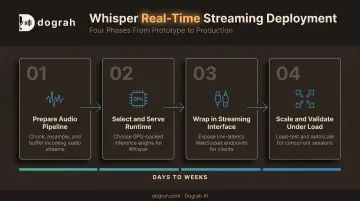
Depending on your target latency and concurrency needs, expect this to take days to weeks of engineering time, not an afternoon.
Prerequisites and Architecture Considerations
Start with hardware. Real-time streaming needs a GPU with enough VRAM for the model plus headroom for concurrent stream buffers. OpenAI's own reference table gives a useful floor:
| Model | Parameters | Approx. VRAM | Relative Speed |
|---|---|---|---|
| tiny | 39M | 1 GB | 10x |
| base | 74M | 1 GB | 7x |
| small | 244M | 2 GB | 4x |
| medium | 769M | 5 GB | 2x |
| large | 1,550M | 10 GB | 1x |
| turbo | 809M | 6 GB | 8x |
These figures come from the OpenAI Whisper repository, measured on an A100 with English speech. Actual numbers on your hardware and language will vary.
A few architectural non-negotiables:
- Never skip VAD. Whisper was trained on 30-second clips, not continuous streams (OpenAI paper). Raw silence or noise makes it hallucinate text.
- Don't run the full multilingual large model on a shared GPU without quantization. You'll hit memory ceilings the moment a second stream connects.
- Match your latency budget to your use case. Sub-1-second response makes sense for voice agents; a few seconds is fine for live captioning. This directly dictates model size and chunk length.
- Check audio compatibility early. Whisper expects 16kHz mono audio. Telephony and WebRTC feeds often need format conversion before they reach the model.
Whisper's code and weights are MIT-licensed, so fully offline, self-hosted streaming stays legally simple compared to closed API alternatives.
Tools and Frameworks Required
You need three core components:
- A Whisper runtime — faster-whisper for NVIDIA GPUs, whisper.cpp for Apple Silicon, CPU, or embedded devices
- A VAD library — Silero VAD is the usual pick; it processes a 30ms chunk in under 1ms on one CPU thread (Silero VAD)
- A WebSocket server framework to handle bidirectional audio-in, text-out streaming
Once you're past a handful of concurrent streams, add a model-serving layer like Ray Serve or Kubernetes-based orchestration to handle autoscaling.
Here's a quick runtime comparison:
| Runtime | Best for | Trade-off |
|---|---|---|
| faster-whisper | NVIDIA GPU throughput, batched inference | Throughput benchmarks don't capture first-token latency |
| whisper.cpp | CPU, Apple Silicon, edge devices | Official streaming example is explicitly labeled "naive," not production-grade |
| WhisperX | Long-form transcripts needing timestamps or diarization | Handles overlapping speech and diarization imperfectly |
If you want a working voice agent rather than a standalone transcription endpoint, wiring these pieces yourself is a lot of overhead. Open-source platforms like Dograh AI let you connect a self-hosted Whisper model into a pre-built low-latency streaming pipeline, so you plug in the model instead of building the full stack.
How to Deploy Whisper for Real-Time Streaming (Step-by-Step)
Skip VAD or use naive fixed-length chunking here, and the damage doesn't show up immediately. It shows up weeks later as latency spikes and garbled transcripts that are painful to debug retroactively.
Build the pipeline in this order:
- Set up audio ingestion. Establish a WebSocket connection that receives continuous audio and buffers it into short, overlapping windows rather than one long stream.
- Integrate VAD. Detect speech boundaries and forward only actual speech segments to the model. This avoids wasting GPU compute transcribing silence.
- Load the runtime persistently. Serve
faster-whisper(or your chosen runtime) as a GPU-resident process. Reloading the model per request will destroy your latency budget. - Add sliding-window context carryover. Pass tokens or context from the prior chunk into the next inference call so words aren't cut off or duplicated at boundaries.
- Stream partial results back. Wrap the transcription call so interim text reaches the client as speech is processed, instead of waiting for a full utterance to complete.
- Enable autoscaling. Tie replica scaling to concurrent connection count once you need to support multiple simultaneous streams in production.
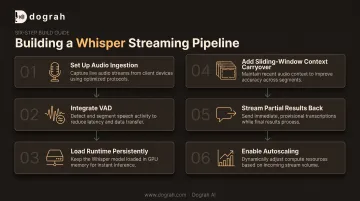
Each step builds on the last. Skip VAD, and step 4's context carryover becomes unreliable, because you're feeding it noise alongside speech.
Testing and Validating Your Streaming Deployment
Before go-live, confirm the deployment actually behaves in real conditions, not just in a demo.
- Measure single-stream latency first. Track end-to-end time from audio-in to text-out before adding concurrency.
- Run concurrent load tests. Use Locust or k6 to simulate simultaneous streams and confirm autoscaling triggers and GPU memory stay within limits.
- Check transcript quality at the edges. Review chunk boundaries and silence/noise segments. Hallucinations and dropped words hide there and rarely show up in a quick spot-check.
A single-stream test that looks clean can still fall apart at 10 concurrent connections. Load testing before launch catches this while it's still cheap to fix.
Common Streaming Deployment Problems and Fixes
Most real-time Whisper issues trace back to two places: the audio pipeline feeding the model, or GPU behavior under concurrent load after go-live. Rarely is the model itself the problem.
Hallucinated Text During Silence or Noise
Problem: Transcripts contain phrases that were never spoken.
Likely cause: Raw audio (silence, background noise, music) is reaching the model without VAD filtering it out first.
Fix: Enforce VAD gating before every transcription call, and tune sensitivity thresholds specifically for your target environment. A call center floor and a quiet home office need different settings.
Garbled or Duplicated Words at Chunk Boundaries
Problem: Words get cut off or repeated exactly where audio chunks split.
Likely cause: Fixed-length, non-overlapping chunking with no context passed between chunks.
Fix: Use overlapping sliding windows and carry prior-chunk context or tokens into the next inference call.
GPU Out-of-Memory or Latency Spikes Under Load
Problem: Transcription slows dramatically or crashes when multiple streams connect at once.
Likely cause: Too many concurrent streams sharing one GPU without batching or quantization.
Fix: Apply int8 quantization, cap concurrent streams per GPU, and add autoscaling to spin up additional GPU replicas as load increases.
Pro Tips for Deploying Whisper in Production
A few things that consistently save teams time and headaches:
- Start with a smaller or distilled model. Distil-large-v3 runs roughly 6.3x faster than large-v3, with WER around 9.7% vs. 8.4% on short-form audio (Hugging Face docs). Small accuracy trade, large latency gain.
- Benchmark on your own audio, not just leaderboards. Published WER numbers rarely reflect your accents, background noise, or domain vocabulary. Run your own test set before committing to a model.
- Document latency and error-rate baselines at launch. Future runtime or model upgrades are only measurable if you know where you started.
If your end goal is a full voice agent, not just a transcription endpoint, building from scratch adds weeks most teams underestimate.
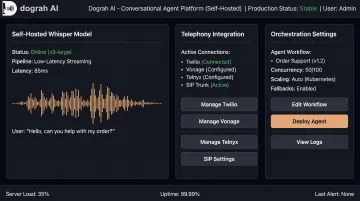
Platforms like Dograh AI support self-hosted Whisper alongside orchestration, telephony integrations (Twilio, Vonage, Telnyx, or your own SIP trunk), and low-latency conversational handling, while keeping data on your own infrastructure. That matters most for healthcare, fintech, and legal teams that can't send audio to a third-party API.
Conclusion
Self-hosting Whisper for real-time streaming is achievable, and it can be genuinely cost-effective at scale. Success hinges on getting the VAD, chunking, and scaling architecture right. The model choice is almost secondary.
Benchmark on your own real audio, load test before you launch, and be honest about whether a ready-made self-hostable platform fits your use case better than building the full pipeline yourself. Make that call before you commit engineering months to either path.
Frequently Asked Questions
Is Whisper available for Windows?
Yes. Whisper runs on Windows through Python and PyTorch, or through community runtimes like whisper.cpp. whisper.cpp supports Windows via MSVC or MinGW. GPU acceleration through CUDA is strongly recommended for real-time performance.
Is Whisper AI open source?
Yes. OpenAI released Whisper's code and model weights under the MIT license, allowing free download, offline use, and modification with no per-minute fees.
Can Whisper do real-time transcription out of the box?
No. Whisper's native design processes fixed 30-second audio chunks. It isn't a streaming model by default, so you need VAD and chunking logic for real-time use.
What GPU do I need to self-host Whisper for real-time streaming?
It depends on model size: about 1 GB VRAM for tiny/base up to 10 GB for large. Concurrent streams multiply memory needs, so quantized or smaller models are the safer streaming choice.
Which Whisper runtime is best for low-latency streaming?
faster-whisper is generally preferred on NVIDIA GPUs for speed. whisper.cpp suits Apple Silicon, CPU, or embedded deployments. WhisperX-style wrappers add diarization when speaker separation matters.
Is self-hosting Whisper for streaming cheaper than a cloud speech-to-text API?
Self-hosting has zero marginal per-minute cost but requires upfront GPU and engineering investment. One AWS case study estimated roughly $3,600/month for a production setup. It pays off mainly at high, consistent audio volumes.