Introduction
Before any voice AI deployment goes live, one question decides whether it succeeds or falls over on day one: how many concurrent calls can one instance actually handle?
Get the answer wrong and the fallout is predictable. Either calls get dropped during your busiest hour, or you're paying for infrastructure that sits idle most of the time. Many teams assume there's a single magic number that applies across the board. There isn't.
Concurrency capacity depends on compute resources, third-party API rate limits, telephony provisioning, and the architecture you've chosen. A self-hosted GPU box and a cloud API-based setup can land on wildly different numbers for the exact same use case.
Below: what concurrent calls mean in a voice AI system, the factors that set your real ceiling, benchmark ranges to start from, and how to scale when one instance isn't enough.
Key Takeaways
- Concurrency is point-in-time: simultaneous active calls, not daily volume or minutes
- STT, LLM, and TTS API ceilings often cap you before your own compute does
- Match SIP trunk capacity to backend compute so neither becomes a silent bottleneck
- Scale out across instances once a single box hits its limit—not up to a bigger one
What Does "Concurrent Calls" Really Mean for a Voice AI Instance?
Concurrent calls are the live, active conversations your system is processing at one exact moment. That count has nothing to do with how many calls you handled today or how many minutes your team logged this month.
Peak concurrency and daily volume rarely line up. A business running 10,000 calls a day with short, spread-out durations might peak at just 15 concurrent calls. Another business running half that volume, but compressed into a two-hour outbound campaign window, might peak at 80.
Concurrency vs. Call Volume
Telephony and voice AI providers size and price their plans around concurrency, not total usage, because concurrency is what actually strains their infrastructure. Twilio, for example, defines call concurrency as the total number of active simultaneous incoming and outgoing calls on an account: a live count, not a usage total.
Why AI Voice Agents Are Heavier Than a Phone Line
A traditional PBX line just routes audio. An AI voice agent's "concurrent call" is a real-time audio stream running continuously through:
- Speech-to-text (STT): transcribing the caller in real time
- LLM: generating a response, often with tool calls or lookups mid-turn
- Text-to-speech (TTS): or a unified speech-to-speech model
Each active call holds compute, memory, and API slots for its entire duration. That's a heavier resource commitment than a phone system just passing audio through.
The Core Factors That Determine Concurrency Capacity Per Instance
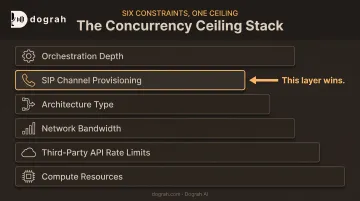
No single spec sheet tells you your concurrency number. It's the product of several constraints stacked on top of each other, and the tightest one wins.
Compute Resources: CPU, GPU, and RAM
Every active call reserves dedicated processing threads and memory. Vertical scaling (throwing a bigger instance at the problem) helps, but it hits hard physical limits fast.
- Self-hosted local models (Whisper for STT, Kokoro for TTS, Llama for the LLM): compute-bound, so concurrency scales directly with your hardware
- API-based models: offload that compute to the vendor's infrastructure, which shifts where your real bottleneck sits
Third-Party API Rate Limits
This is where most builders get surprised. STT, LLM, and TTS providers each impose their own concurrency caps, and these often bite before your own compute does. OpenAI's Realtime API launch, for instance, supported roughly 100 simultaneous sessions on Tier 5 accounts, with lower ceilings on lower tiers.
A common workaround is API key rotation across multiple provider accounts: distribute calls across several keys or providers so no single rate limit becomes the hard stop. Dograh AI is built around bring-your-own-keys, so teams can route STT, LLM, and TTS traffic across the providers and accounts they already use.
Other Constraints That Stack On Top
- Network bandwidth: bidirectional audio streaming multiplies per call, capping density on smaller or shared instances
- Architecture type: cascaded STT→LLM→TTS stacks cost more latency and overhead than speech-to-speech, which can roughly halve end-to-end latency and free concurrency headroom
- SIP channel provisioning: even with unlimited compute, you can't exceed your provisioned telephony legs
- Orchestration depth: tool calls, RAG lookups, and CRM or calendar integrations per turn add latency and resource use, reducing effective concurrency
Realistic Concurrency Benchmarks: What to Expect From Different Setups
There's no universal number here. Ranges span from single digits to roughly 50+ concurrent calls per instance depending on the stack. What follows are documented figures from actual provider setups, useful as reference points, not guarantees.
Self-hosted, CPU/GPU-based setups. LiveKit recommends 4 CPU cores and 8 GB of RAM per agent server as a starting point, with one server typically handling 10 to 25 concurrent jobs depending on which components (noise cancellation, turn detection) are active. Pure CPU setups running local Whisper or Kokoro models tend to land toward the lower end of that range or below it.
Cloud/API-based setups. You offload heavy compute to the vendor, so a single instance can often support more sessions, but you're still bounded by whatever the vendor allows. Vapi ships with 10 concurrent call slots by default; Retell's pay-as-you-go tier defaults to 20, expandable for a per-slot fee. Both illustrate that "cloud" doesn't mean unlimited: the ceiling just moves to the vendor's dashboard.
Dedicated-GPU-per-call architectures. NVIDIA's own infrastructure testing on a speech pipeline (ASR, LLM, TTS across dedicated GPUs) handled 5 concurrent users comfortably under light load and scaled to 50 under heavy load using GPU-sharing techniques. This setup trades elasticity for consistency — latency stays predictable, but scaling under sudden traffic spikes is harder.
| Setup type | Typical concurrency per instance | Main constraint |
|---|---|---|
| Self-hosted, CPU-only | Single digits to ~10 | CPU cores, RAM, model size |
| Self-hosted, GPU-backed | ~10-25 jobs | VRAM, batch size |
| Cloud/API-based | 10-50+, plan-dependent | Vendor rate limits |
| Dedicated GPU-per-call | 5-50 per GPU cluster | Hardware allocation, elasticity |
Concurrent Calls and SIP Trunk/Telephony Limits
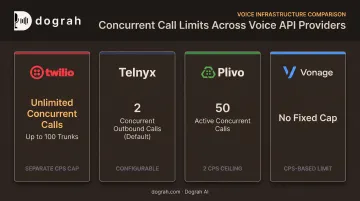
Backend compute can only carry calls that telephony actually delivers. SIP trunk concurrency is a separate ceiling, set by whatever plan you've purchased, and it caps how many inbound and outbound legs can exist at the same moment — regardless of how much processing power sits behind it.
Provider policies vary more than you'd expect:
- Twilio Elastic SIP Trunking: unlimited concurrent calls, up to 100 SIP trunks per account, plus a separate CPS cap
- Telnyx defaults new accounts to just 2 concurrent outbound calls globally, configurable on request
- Plivo defaults to 50 active concurrent calls with a 2 CPS ceiling
- Vonage publishes no fixed concurrency cap and constrains via calls-per-second instead
The takeaway: trunk capacity has to match backend instance capacity. An undersized trunk quietly throttles a capable backend; an oversized trunk wastes budget on unused channels.
Dograh AI's dedicated telephony integrations help keep SIP capacity aligned with backend concurrency so one layer doesn't bottleneck the other across regions.
Scaling Beyond One Instance: From a Handful of Calls to Thousands of Agents
Once you've maxed out what a single instance can reasonably carry, scale out with more instances instead of chasing a bigger box.
Horizontal Scaling as the Default
Adding instances behind a load balancer is the standard approach in voice AI infrastructure, the same pattern used across most distributed systems. It avoids the diminishing returns of endlessly over-provisioning one server.
Auto-Scaling for Real Traffic Patterns
Call traffic isn't flat. Outbound campaigns burst, inbound support lines spike around business hours, and demand can double within minutes.
Auto-scaling spins instances up and down to match those peaks in real time, which cuts dropped calls during surges and idle spend during quiet hours. Dograh AI's cloud platform auto-scales on real-time demand and can reach 100,000 agents without manual worst-case provisioning.
At multi-instance scale, API key rotation across provider accounts matters even more. It is often the difference between stalling around 50 concurrent sessions and moving past 500 smoothly.
Graceful Degradation Instead of Dropped Calls
When concurrency limits are hit anyway, the right response isn't silence. Options include:
- Queuing: hold callers briefly rather than disconnecting
- Overflow routing: redirect to another instance or a human queue
- Busy messaging: inform callers clearly instead of a dead line
Enterprises that need dedicated, predictable concurrency can run fully managed private-cloud deployments. Dograh AI offers this alongside its cloud and self-hosted OSS options, so capacity stays guaranteed without sharing resources across tenants.
How to Calculate the Right Concurrency Capacity for Your Use Case
Sizing concurrency correctly comes down to a straightforward framework, then verifying it under real conditions.
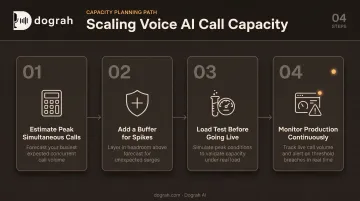
Step 1: Estimate peak simultaneous calls. Multiply your expected call arrival rate by average call duration to estimate how many calls overlap at your busiest moment. A campaign dialing 200 calls an hour with 3-minute average duration will run roughly 10 concurrent calls at steady state, and more during bursts.
Step 2: Add a buffer for spikes. Real traffic doesn't arrive evenly. Many teams build in extra headroom above their calculated peak, though there's no single universal figure. The right buffer depends on how spiky your traffic actually is. A support line with predictable hours needs less padding than an outbound campaign launching to a fresh list.
Step 3: Load test before going live. Simulate concurrent call load and watch latency and error rates climb until something breaks. That breaking point, not the vendor's marketing number, is your real ceiling. Dograh AI's Looptalk testing engine lets voice bots call other voice bots to simulate interruptions, tool timeouts, and edge-case personas before a single real caller is involved.
Step 4: Monitor production continuously. Track concurrency usage against your limits with alerting set below the hard ceiling, and revisit headroom whenever traffic patterns shift.
Frequently Asked Questions
What does "concurrent calls" mean?
Concurrent calls are the number of conversations a system is actively handling at the exact same moment: a live, point-in-time count. It's separate from total daily call volume or minutes consumed.
How many concurrent calls can a SIP trunk handle?
It depends on the provider plan or channel count you purchase. Some providers cap at a fixed number; others advertise unlimited concurrency with a separate calls-per-second limit. Trunk capacity must match backend processing capacity to avoid a bottleneck.
What happens when concurrent call limits are exceeded?
Outcomes vary by provider: calls may be queued, routed to a busy message, or rejected outright. Plan capacity before launch so you aren't learning those limits in production.
Does more RAM or CPU always mean more concurrent calls?
Not necessarily. Compute helps with self-hosted setups, but third-party API rate limits, network bandwidth, and telephony provisioning frequently become the real bottleneck first.
Can I increase concurrency without adding more instances?
Yes. API key rotation across providers, speech-to-speech orchestration to cut per-call resource use, and tighter orchestration logic (parallel tool calls, caching, shorter prompts) all raise effective concurrency per instance.
How do I know if I need more concurrency capacity?
Monitor peak usage against your current limits and watch for calls queuing or failing during busy periods. Load testing before scaling decisions gives you a data-backed answer instead of a guess.