This is especially disruptive for teams running SIP trunks, PBXs, contact centers, or voice AI and automated calling platforms, where a single silent leg can mean a lost customer, a failed transaction, or a voice agent talking to nobody.
The frustrating part is that signaling looks completely healthy. INVITE goes out, 200 OK comes back, the call is "up." The failure lives one layer deeper, in the media path itself. This guide walks through how SIP and RTP negotiation actually work, the most common root causes, a step-by-step debugging process, and when it's time to stop troubleshooting and escalate.
Key Takeaways
- One-way audio is almost always an SDP-to-reachability mismatch, not a SIP signaling failure
- NAT/private IP leakage, SIP ALG interference, firewall port blocking, and SBC misconfiguration cause most cases
- Diagnosis requires reading SDP in the INVITE/200 OK, then confirming with packet captures on both legs
- Most fixes are configuration changes; escalate only when the fault is outside your infrastructure
What Is One-Way Audio on a SIP Call?
One-way audio happens when SIP signaling completes normally, meaning ringing, answer, and the 200 OK all go through, but RTP audio packets only flow in one direction. One party hears the other perfectly. The other hears nothing.
SIP and RTP are separate protocols with different jobs:
- SIP handles call setup: INVITE, ringing, answer, hangup
- RTP carries the actual voice packets once the call is connected
Under RFC 3261, a 2xx response establishes the dialog and the caller sends an ACK. That's the entire job of SIP signaling. It says nothing about whether audio packets can actually travel between the two endpoints. One-way audio is a media-layer problem hiding behind a perfectly successful signaling-layer handshake.
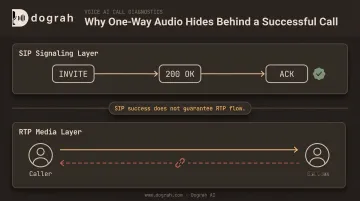
How SDP Negotiation Determines RTP Flow
Every SIP call carries a Session Description Protocol (SDP) body that tells each side where to send audio. The caller's SDP, inside the INVITE, specifies the IP and port it wants to receive RTP on. The callee's SDP, inside the 200 OK, specifies the same thing in return.
Here's the part that trips people up: each direction is negotiated independently. The caller-to-callee path and the callee-to-caller path are set by two separate SDP statements. That means it's entirely possible for one path to work perfectly while the other silently fails.
When you pull a raw SDP body, check these fields:
c=line — the IP address media should be sent tom=line — the port and protocol for the media stream- Direction attributes —
a=sendonly,a=recvonly, ora=inactive(RFC 3264)
One-way audio can be introduced at any point along the path where a device fails to keep its advertised address reachable: the endpoint itself, a NAT gateway, a firewall, or a session border controller relaying media in the middle.
Common Causes of One-Way Audio on SIP Calls
Most one-way audio failures trace back to a small set of predictable issues, not random network flakiness. Use this table to match symptoms quickly:
| Cause | Typical Symptom | Root Issue |
|---|---|---|
| NAT/private IP leakage | No audio from call start; SDP shows 10.x/192.168.x address | Endpoint advertises private IP with no STUN/TURN |
| SIP ALG interference | Inconsistent failures across router models | Router rewrites SIP/SDP headers incorrectly |
| Firewall/port blocking | Signaling fine, RTP never arrives on one leg | Negotiated UDP port range not open both ways |
| Codec/SRTP/DTLS mismatch | Audio garbled or one-directional right after answer | No shared codec or misaligned security profile |
| SBC/media relay misconfig | Drops mid-call, only on specific trunk | Media anchoring off, or asymmetric routing |
NAT or Private IP Leakage in SDP
This is the single most common cause. A device sitting behind a NAT router advertises its private address, like 192.168.1.45, in the SDP c= line instead of a public, routable IP. The remote party tries to send RTP to that private address and can't reach it.
Fortinet's own troubleshooting documentation confirms this pattern directly: one-way audio occurs when NAT translates RTP incorrectly, or when an already-public SDP address gets translated a second time by an ALG. Without STUN, TURN, or COMEDIA-style correction, the private IP just sits there in the SDP, unreachable.
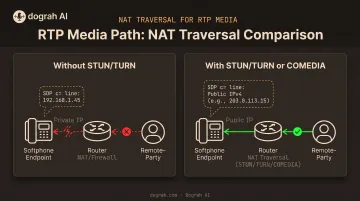
SIP ALG Interference
Application Layer Gateway (ALG) features on consumer and small-business routers try to "help" with SIP NAT traversal by rewriting SIP and SDP headers on the fly. The problem is they often get it wrong, especially when the endpoint has already correctly inserted its public IP.
Symptoms are inconsistent by design: one router model breaks calls, another doesn't. Guidance here is genuinely mixed. Some SIP providers recommend disabling SIP ALG entirely, while Fortinet's own documentation cautions against blanket disablement. In practice, if you're seeing erratic one-way or two-way audio failures tied to a specific router, ALG is worth testing first.
Firewall or Port Blocking
Signaling connects fine because SIP typically rides on a single, well-known port. RTP is different: it uses a dynamically negotiated UDP port for every call, and the firewall has to permit that exact negotiated range in both directions. If it doesn't, RTP packets get silently dropped on one leg while SIP looks perfectly healthy.
Codec or SRTP/DTLS Mismatch
If the two sides can't agree on a shared codec, RFC 3264 requires the answering side to set that media stream's port to zero, so no media flows either way for that stream. That shows up often in SIP-to-WebRTC bridging when one leg offers G.711 and the other expects Opus.
SRTP/DTLS mismatches are different: signaling can succeed while media fails or only works in one direction because key exchange or crypto lines don't align.
SBC/Media Relay Misconfiguration or Asymmetric Routing
Session border controllers often relay media so both call legs pass through a stable, controlled address. If media anchoring is disabled, or a mid-call re-INVITE exposes a private endpoint address that was previously hidden, audio can drop mid-call rather than at setup.
Asymmetric routing produces the same symptom on specific trunks: the return path takes a different, lossier route than the outbound path, so only one leg's RTP survives.
How to Debug One-Way Audio Step-by-Step
Guessing at fixes wastes time and often masks the real problem. A structured process narrows down whether the fault sits in signaling, NAT, a firewall, or an intermediary device.
Identify which direction is missing audio. Ask whether the caller, the callee, or both hear silence so you know which SDP leg to inspect first. Note if it fails at setup (initial SDP) or mid-call (re-INVITE).
Inspect the SDP in the INVITE and 200 OK. Pull a SIP trace and check the
c=andm=lines in both messages for valid, routable IPs and ports. Watch for0.0.0.0addresses orsendonly/recvonly/inactiveattributes, which indicate a device deliberately disabled a media direction.Confirm the root cause category. Rule out NAT, firewall, codec, and SBC/relay issues one at a time. Do not change trunk settings or swap hardware until you know where RTP stops flowing.
Apply the fix based on the confirmed cause:
- NAT-related: enable STUN/TURN or COMEDIA, or set the correct public IP on the endpoint or PBX
- Firewall/ALG-related: open the full negotiated RTP UDP port range both ways, and disable SIP ALG on every router in the path
- SBC/relay-related: enable media anchoring so RTP uses a stable, routable address; disable direct media while testing
- Codec/SRTP-related: force both legs onto a shared codec (Opus or G.711) and align SRTP/DTLS profiles end-to-end
Validate the fix with packet captures. Capture both call legs at once. In Wireshark's RTP Streams window, confirm each stream's address/port pair shows packets in both directions. Re-test on office, remote, and mobile networks—a fix in one path can still fail in another.
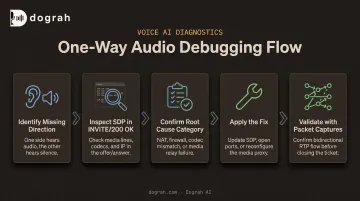
That re-test loop is why teams automating voice on SIP try not to solve media path issues network by network. Dograh AI connects existing SIP trunks—Twilio, Vonage, Telnyx, and others—so RTP runs on infrastructure built for consistent low-latency handling instead of one-off router and firewall configs.
When to Escalate: Fix It Yourself vs. Call In Network or Carrier Support
Most one-way audio is fixable at the endpoint, firewall, or SBC level. But some causes genuinely sit outside your control, and knowing the difference saves hours of wasted effort.
Fix it yourself when:
- NAT, firewall, or ALG settings on your own router or PBX are at fault
- SDP shows a private IP leaking through, and STUN/TURN or a static public IP fixes it
Escalate to your carrier or SIP trunk provider when:
- Packet captures show loss or asymmetric routing on the public internet or carrier network (send the captures as evidence)
- The issue only hits calls through one SBC or trunk after local config changes are already done
Consider a platform-level fix when:
- The same issue keeps recurring across geographies on production voice agents
- Patching networks one at a time no longer scales
- Your team spends more time on NAT traversal, media relays, and TURN than on the agent itself
Rolling your own SIP/WebRTC media path puts that full burden on engineering. A voice AI platform that already handles media relays and telephony integration, whether cloud or self-hosted, pulls one-way audio out of your recurring ops load.
Common Mistakes to Avoid & Preventive Best Practices
Teams that fix one-way audio once isolate changes and validate RTP. Teams that keep fighting it guess and move on.
Mistakes to avoid
- Assuming SIP signaling success means media is fine — always verify RTP flow, not just call setup
- Changing firewall, codec, and NAT settings all at once, making it impossible to tell which change actually worked
- Skipping packet capture after a fix, so the issue can recur under different network conditions
Preventive practices to standardize
- Enable STUN/TURN or media anchoring by default for all remote or NAT'd endpoints
- Disable SIP ALG on deployed routers as a baseline setting, not a reactive fix
- Run test calls across office, remote, and mobile networks before scaling SIP calling
- Document known-good SDP and firewall baselines so future failures are faster to diagnose
Frequently Asked Questions
What does one-way audio mean?
One-way audio means SIP signaling succeeds, but RTP audio flows in only one direction. One party hears the other clearly; the other hears silence.
How does a SIP call work?
SIP handles signaling through the INVITE and 200 OK exchange to set up, manage, and end a call. A separate SDP negotiation inside those messages establishes where RTP media should flow.
Do you need SIP for VoIP?
SIP is the most widely used signaling protocol for VoIP, but it isn't the only option. Alternatives like H.323 and MGCP exist, and WebRTC applications can use entirely custom signaling.
Is one-way audio caused by NAT?
Private IP leakage in SDP behind NAT is the most common cause. A device advertises an unreachable private address, and STUN or TURN typically fixes it by exposing the public-facing address.
Can SIP ALG cause one-way audio problems?
Yes. SIP ALG rewrites SIP and SDP headers for NAT traversal, but often does so incorrectly when the endpoint already has the correct public IP. Disabling it resolves many inconsistent cases.
How can I test for one-way audio issues using packet captures?
Capture traffic simultaneously on both call legs, then check whether RTP packets appear flowing in both directions between the correct source and destination address/port pairs.