Introduction
Every voice AI team hits the same fork in the road. Do you write one massive system prompt and hope the model handles every branch a caller might throw at it? Or do you architect the conversation as an explicit state machine, where code, not the model, decides what happens next?
This isn't a small technical preference. It shapes whether your agent behaves the same way on call one and call ten thousand, whether a compliance officer will sign off on it, and how fast you can debug a broken flow at 2 a.m.
LiveKit's own engineering documentation puts it plainly: while a few narrow agents can run on one instruction set, most voice use cases need smaller components and explicit handoffs to behave consistently in real-world interactions. This article breaks down when one prompt is enough, when you need a state machine, and why most production agents land somewhere in between.
Key Takeaways
- One big prompt ships fast but gets unpredictable once conversations branch.
- State machines trade setup time for deterministic, testable behavior.
- Regulated or transactional flows need state logic; open-ended support favors prompt flexibility.
- Most production voice agents today run a hybrid: thin prompt for tone, explicit states for business rules.
- Visual workflow builders now let teams design state machines without hand-coding an FSM.
One Big Prompt vs State Machine: Quick Comparison
Before going deep on either approach, here's how they stack up across the dimensions that actually matter in production.
| Dimension | One Big Prompt | State Machine |
|---|---|---|
| Reliability & Determinism | Model interprets everything; behavior can drift between calls | Code enforces the same path every time |
| Development Speed | Fastest to a working demo — one prompt, one iteration cycle | Slower start — requires mapping states and transitions upfront |
| Debugging & Observability | Hard to isolate why a call went wrong inside one long instruction block | Each state is testable and traceable in isolation |
| Scalability Across Flows | Gets harder to manage as more logic gets crammed in | Scales cleanly — new states plug into the existing graph |
| Conversational Naturalness | Feels fluid, since the model has full creative range | Can feel scripted unless NLG within each state is written well |
Neither column wins outright. A five-minute FAQ bot and a 20-step loan qualification call have completely different needs, which is exactly why the next two sections dig into where each approach actually shines.
What is the "One Big Prompt" Approach?
A one-big-prompt agent uses a single, large system prompt that tries to encode everything: role, tone, business rules, compliance language, and every conversational branch, all written in natural language and handed to the LLM.
The core benefit is speed. You write one prompt, test it, and you have a working demo: no flow diagrams, no explicit transition logic, no state graph to maintain. For a first pass or a proof of concept, that's hard to beat.
But there's a ceiling. Retell AI's own documentation states a default maximum prompt length of 32,768 tokens on its LLM framework. Beyond that, longer prompts get rejected outright.
Even within that limit, stuffing more logic into one prompt creates context pressure: the model has more competing instructions to weigh, and consistency drops.
The Pink Elephant Problem
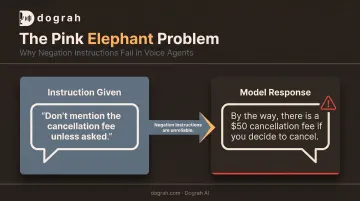
Tell a model "don't mention the cancellation fee unless asked" and there's a real chance it brings up the cancellation fee anyway. A prompt is a suggestion, not a hard constraint — the model is generating a plausible continuation, not executing a rule.
Negation-handling research on LLMs backs this up: models struggle with negative instructions more than positive ones. Prohibitions buried in a giant prompt are less reliable than they look.
Use Cases of One Big Prompt
One big prompt earns its keep when flexibility matters more than strict adherence:
- General FAQ bots and e-commerce inquiry lines
- Casual support triage before handoff to a human
- Exploratory sales conversations, where a rigid script feels robotic
- Early-stage prototypes where you're validating the concept, not the compliance posture
Once these prompts grow, a familiar failure pattern shows up. Monolithic instructions holding many tools tend to produce hallucinated tool calls, out-of-order function execution, and inconsistent behavior from one call to the next — the opposite of what a business needs at scale.
What is a State Machine Architecture?
A state machine can be in exactly one defined state at a time, with explicit conditions governing every transition. The agent isn't improvising its way through the call: code decides what state comes next, and the model's job is narrowed to generating language within that state.
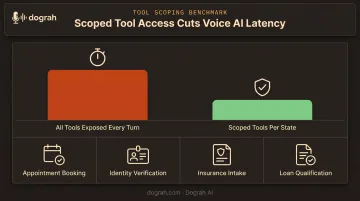
The operational payoff is concrete. Behavior is deterministic on every call. Tools and functions are scoped only to what's valid in the current state, so a "book appointment" function simply isn't callable during identity verification. Because each state is isolated, you can test it on its own instead of re-running an entire conversation to catch one bug.
Variations Worth Knowing
- Finite-state machines (FSM): the classic model — states, a start state, and a transition function.
- Hierarchical state machines (HSM): states nested inside states, useful for grouping related sub-flows.
- Prompt-as-FSM hybrids: each state carries its own mini-prompt, typed data fields, and validators.
Platforms like Dograh AI use this pattern in practice: each node pairs a short agent prompt with a condition prompt that governs the transition out. That setup supports validated session state and tightly scoped tool calls. Data is checked against real system state (via webhook or API) before it reaches a downstream system, instead of trusting whatever the model claims it heard.
Where State Machines Fit
State machines are the right call wherever the business needs the same outcome every time:
- Appointment booking and rescheduling
- Identity verification, KYC, and collections calls
- Insurance intake and claims status
- Loan qualification and fintech onboarding
Regulated industries (healthcare, lending, insurance, legal) depend on this consistency. "Close enough" isn't good enough when a compliance auditor is reviewing call logs.
Latency is another reason to keep tools scoped. Daily's 2025 voice engineering guidance notes that a tool call can roughly double LLM response latency on a given turn, so only expose functions that are valid in the current state rather than every tool on every turn.
One Big Prompt vs State Machine: Which Should You Choose?
The real decision comes down to a handful of factors:
- Compliance requirements: does a regulator or legal team need to review call behavior?
- Call volume: will this run ten times a day or ten thousand?
- Conversation tree complexity: is this a two-branch FAQ or a twelve-step intake?
- Tolerance for unpredictability: can an occasional odd response slide, or does it break the workflow?
- Engineering bandwidth: do you have time to map states, or do you need something live this week?
Choose one big prompt if you're prototyping, compliance risk is low, and you need to launch within days.
Choose a state machine if the call involves multi-step data collection, sits in a regulated industry, or needs to scale across dozens of concurrent flows without drifting between them.
Most production systems, though, land on a third option: a hybrid. Keep a thin prompt for tone and natural language understanding, and let an explicit state graph own transitions and business rules. The same principle shows up in every major voice framework's guidance: code drives the call, the model handles the language.
Real-World Example: Why Dograh AI Was Built Around State Logic
This split isn't theoretical for us. Dograh AI's founders originally set out to build a voice agent for the visa industry: a workflow loaded with verification steps, disclosures, and multi-step data collection where "close enough" wasn't an option.
They ran into a wall fast:
- Low-code frameworks (LiveKit, Pipecat): real-time pipelines, but no state layer—every transition and session variable was hand-coded.
- Closed, prompt-only platforms: easier at first, but brittle on interruptions, retries, and tool-call races, with sensitive data leaving systems they couldn't audit.
Neither option was acceptable for a compliance-heavy flow. So they built the thing they needed: a visual, drag-and-drop workflow builder where teams design state-machine logic (nodes, transitions, conditions) without writing an FSM by hand. Think of it as n8n, but for voice agents.
In practice, you connect a Start Call node to an Agent Node, and the builder auto-inserts a Set Condition node between them. You write a short condition prompt for when that path should fire (for example, routing a real estate caller based on whether the property is still available). The graph enforces that logic on every call.
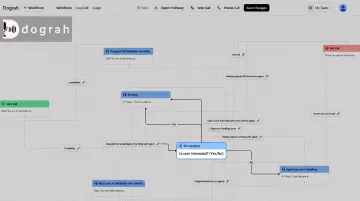
That approach now underpins Dograh AI's open-source, self-hostable platform. Teams can spin up a stateful voice agent from a plain-English use case in about two minutes. They can inspect every node and condition, export the workflow as JSON, and keep sensitive data on their own infrastructure.
You don't have to choose between hand-coding every transition and hoping a prompt holds under pressure. Visual state-machine builders sit in the middle: developer-level control, without the long build cycle.
Curious what your call flow looks like as a state graph? Dograh AI's open-source platform is free to self-host, and you can build a working stateful voice flow visually in under two minutes.
Conclusion
This was never really a "which one wins" question. It's a "which one fits your call" question.
- Prompt-first for flexible, low-stakes conversations where creativity beats rigidity.
- State-machine-first for regulated, repeatable flows where the business needs the same result every time.
- Hybrid for most production systems — a thin prompt handling language, explicit states handling logic.
Match the pattern to the call's risk and variability, not to a default stack preference. Get that fit right and you get consistent behavior, faster debugging, cleaner compliance reviews, and a smoother experience for the person on the other end of the line.
Frequently Asked Questions
Which AI model is best for voice agents?
Model choice matters less than architecture for reliability. Focus on latency and function-calling accuracy when picking a model, then let your prompt-versus-state-machine design handle consistency.
Are FSM and DFA the same?
No. A deterministic finite automaton (DFA) is a formal computer-science subtype of finite-state machine (FSM): every DFA is an FSM, but FSM is the broader term used in practice for voice and conversation design.
What are the key differences between single-agent and multi-agent systems?
A single agent handles an entire conversation with one instruction and tool boundary. Multi-agent systems split roles across specialized agents or states that hand off tasks, often coordinated by underlying state-machine logic.
Can I combine one big prompt and a state machine?
Yes. This is how most production systems work today. A thin prompt handles tone and language per state, while code-driven transitions handle the business logic and required steps.
Does a state machine make my voice agent sound robotic?
Not inherently. Naturalness depends on how the language is written within each state, not on the state machine itself. Well-designed states can paraphrase naturally while still staying on-script for compliance.
How do I decide when my voice agent needs a state machine?
Build a state machine if you need multi-step data collection, compliance-sensitive wording, multiple tools or functions, or identical behavior at high call volume. If any of those apply, don’t rely on one big prompt alone.