But connecting an AI voice agent to Asterisk isn't a single "install and go" step. Your results depend heavily on which integration method you pick (AudioSocket, ARI, or legacy AGI), which AI backend you're running, and how carefully your dialplan is configured. Get any of those wrong, and you'll spend hours debugging silent audio instead of testing conversations.
This guide walks through the exact steps to connect an AI voice agent to Asterisk, how to pick the right integration method for your team, what you need before you start, the parameters that actually affect call quality, and the mistakes that trip up most first attempts.
Key Takeaways
- Asterisk offers three paths: AudioSocket, ARI + ExternalMedia, and legacy AGI/EAGI
- A working setup needs a SIP trunk, dialplan routing, and an AI backend (STT+LLM+TTS or speech-to-speech)
- Audio format mismatches and NAT errors cause most "no audio" setup failures
- Self-hostable voice AI platforms remove the need to build a custom AudioSocket or ARI server
How to Connect an AI Voice Agent to Asterisk
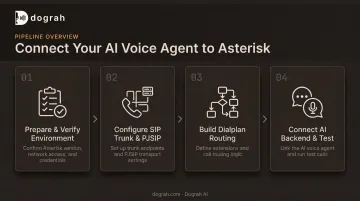
Step 1: Prepare and Verify Your Asterisk Environment
Before touching configuration files, confirm your Asterisk instance can actually support the integration you're planning.
- Check your version.
AudioSocket()needs Asterisk 18.0.0+ (AudioSocket docs). ARI ships since 12 and ExternalMedia since 16.6, but 18+ covers both integration paths. - Verify modules are loaded. Run
module show like audiosocketormodule show like res_arifrom the Asterisk CLI to confirm the right components are active. - Open the required ports. SIP signaling, your RTP range, and whatever port your AI server listens on all need to be reachable between the Asterisk box and the AI backend.
- Set up a runtime (Python or Node, typically) if you're building a custom AI server rather than using a pre-built one.
Skipping this step is the single most common reason teams hit "module not found" errors on their first test call.
Step 2: Configure the SIP Trunk and PJSIP Transport
With the environment verified, set up the actual telephony path.
- Set NAT-aware transport parameters. In
pjsip.conf, setexternal_media_addressandexternal_signaling_addressso audio and signaling traverse NAT (required for anything outside a private network). - Configure the trunk endpoint. Set the address of record and authentication credentials matching what your telephony provider issued you.
- Restrict codecs. Set
allow=ulaw,alaw(withdisallow=allfirst) so the trunk negotiates formats your AI backend already expects. This avoids unnecessary transcoding overhead that adds latency and CPU load.
Getting codec negotiation wrong here is a quiet killer: calls connect fine, but audio arrives garbled or not at all.
Step 3: Build the Dialplan to Route Calls to the AI Agent
This is where the call actually gets handed off to your AI backend.
- Create an inbound context that answers the call and routes it into
AudioSocket()orStasis(), depending on your chosen method. - Add an outbound context with a subroutine bridging the answered call to the AI backend, if you're running outbound campaigns too.
- Pass channel variables into the session. Feed
${CALLERID(num)}and${CALLERID(name)}so the agent has caller context from the first second, not after an awkward pause.
A dialplan pattern for AudioSocket might look like:
exten => _X.,1,Answer()
same => n,AudioSocket(${UUID},127.0.0.1:8080)
Step 4: Connect the AI Backend and Test End-to-End
Now bring the AI side online and prove the whole chain works.
- Start your AI voice agent service (custom STT/LLM/TTS pipeline or speech-to-speech model) on the port and protocol your dialplan expects.
- Reload PJSIP and dialplan configuration. Changes to
local_netorexternal_media_addressmay need a full restart, not just a reload. Check your release notes before assuming zero downtime. - Originate a test call from the CLI:
channel originate PJSIP/1000 extension s@ai-inbound. - Watch both log streams at once (Asterisk CLI and AI server logs) to confirm bidirectional audio and natural turn-taking before you route real traffic.
Choosing Your Integration Method
AudioSocket, ARI, AGI, and self-hosted platforms differ significantly in complexity and control. The right pick depends on what your team already knows and how much infrastructure you want to own.
| Method | Best for | Main trade-off |
|---|---|---|
| AudioSocket | Simple, low-latency TCP audio streaming without SIP/RTP knowledge | You still build and maintain the STT/LLM/TTS orchestration server yourself |
| ARI + ExternalMedia | Granular channel/bridge control, RTP-comfortable teams, speech-to-speech setups | More setup complexity around RTP framing, NAT handling, and WebSocket event management |
| AGI/EAGI | Simple blocking scripts, legacy compatibility | Blocking execution model limits real-time, interrupt-driven conversation flow |
| Self-hosted platforms | Teams wanting a visual workflow builder with orchestration already wired for telephony | Slightly less low-level protocol control (offset by open, auditable code) |
AudioSocket
AudioSocket is the simplest entry point. It's a raw TCP protocol (no SIP or RTP expertise required) that streams 16-bit PCM audio directly to a listening server.
It's a good fit if your team wants to move fast without learning Asterisk's media stack in depth. The catch: AudioSocket only sends audio and DTMF frames, so you still build the orchestration server that turns that audio into a conversation.
ARI + ExternalMedia
ARI gives you REST-based, event-driven control over channels and bridges, with ExternalMedia routing audio over RTP to your own endpoint. This suits teams already comfortable with RTP or WebRTC, especially speech-to-speech setups that need fine control over the media path.
The trade-off is real: RTP framing, NAT traversal, and managing the ARI WebSocket event stream all add setup time that AudioSocket avoids.
AGI/EAGI (Legacy)
AGI and EAGI predate AudioSocket and ARI. They launch an external process that communicates over stdin/stdout (or a dedicated file descriptor for EAGI's incoming audio).
They're still viable for older Asterisk deployments or simple blocking scripts. The blocking execution model, though, makes natural, interrupt-driven conversation flow hard to build well.
Self-Hosted / Managed Voice AI Platforms
Rather than building an AudioSocket or ARI server from scratch, some teams connect Asterisk to a platform that already has orchestration wired for telephony.
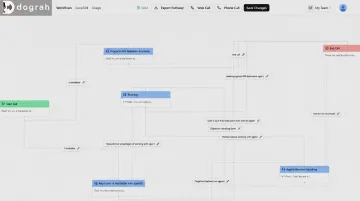
Dograh AI is one example: an open-source, BSD 2-Clause voice AI platform with a visual workflow builder (like n8n, but for voice agents). It connects to existing telephony through SIP trunking instead of a hand-built media server.
The appeal for Asterisk-based teams specifically:
- Self-hostable via Docker, so calls and transcripts never leave your own infrastructure
- Fully auditable codebase — no black-box orchestration logic
- Bring-your-own STT, LLM, and TTS providers, including locally hosted models like Whisper, Llama, and Kokoro
- Speech-to-speech orchestration already built, cutting the custom-integration work down to configuration
The trade-off is somewhat less low-level protocol control than a from-scratch ARI build. With fully open source and no vendor lock-in, that gap is easy to close if you need to go deeper later.
What You Need Before Connecting an AI Voice Agent to Asterisk
Preparation determines whether your first test call succeeds or turns into hours of silent-audio debugging.
Equipment and systems:
- An Asterisk 18+ server (or FreePBX) with enough CPU and network headroom for your expected concurrent call volume
- An active SIP trunk from a carrier or local provider
Skills and access:
- Working knowledge of dialplan and PJSIP configuration
- A runtime environment for your AI server (if self-building)
- Valid API keys for your chosen STT/LLM/TTS or speech-to-speech providers
Compliance readiness:
- A call-recording consent policy appropriate to your jurisdiction
- A DTMF or intent-based fallback path to a human agent
- Data-handling rules for regulated calls (healthcare, finance): encryption in transit and at rest, role-based access control, and audit trails for recordings and transcripts
Teams in regulated industries frequently choose self-hosted or private-cloud deployments specifically to keep this data off third-party servers entirely.
Key Parameters That Affect Call Quality and Latency
A correctly wired integration can still sound broken if these variables aren't tuned properly.
Audio Format and Frame Size
Asterisk integrations expect specific sample rates and encodings. AudioSocket, for instance, transmits signed 16-bit PCM at either 8kHz or 16kHz mono, little-endian, wrapped in a 3-byte header.
If your AI server assumes a different sample rate or byte order, you'll get distortion, garbled audio, or outright protocol errors. Mismatched audio format is one of the most frequent causes of failed first calls.
Network and NAT Configuration
external_media_address and external_signaling_address settings determine whether RTP audio and SIP signaling correctly traverse NAT. Get these wrong on a remote or cloud-hosted deployment, and you'll get one-way audio, or none at all. This is consistently the first thing to check when a call connects but sounds empty.
AI Backend Architecture: Chained Pipeline vs. Speech-to-Speech
Backend architecture drives how natural the call feels. A chained STT → LLM → TTS pipeline adds latency at each handoff.
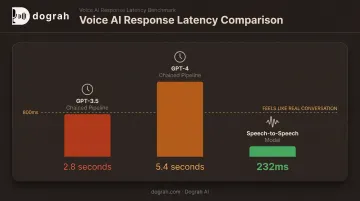
OpenAI reported latency for its earlier three-model voice pipeline versus a unified speech-to-speech model:
- 2.8 seconds average with GPT-3.5 (chained)
- 5.4 seconds average with GPT-4 (chained)
- 232 milliseconds at the low end with speech-to-speech
Those multi-second gaps read as dead air on a live call. Dograh AI's move to full-stack speech-to-speech orchestration (Gemini Flash Live, OpenAI realtime models, and similar) roughly halved end-to-end latency versus its earlier chained pipeline. For most use cases, anything under 800ms starts to feel like a real conversation rather than a robot on hold.
Common Mistakes and Troubleshooting
Most integration failures trace back to a short list of repeat offenders:
- Skipping version/module verification: leads to "module not found" errors on outdated installs. Run
module show like <keyword>before you build anything else. - Misconfigured codecs: failing to restrict to ulaw/alaw causes transcoding failures with the carrier and adds unnecessary latency.
- Ignoring NAT and firewall rules: the top cause of one-way or completely absent audio on remote deployments.
- No barge-in handling: without interrupt detection, the AI talks over callers and conversations feel scripted rather than natural.
Quick troubleshooting reference:
| Symptom | Likely Cause | Fix |
|---|---|---|
| No audio at all | Codec mismatch or AI server not listening | Check codec negotiation; confirm the AI server's port is reachable |
| Connection refused | AI backend not running or port blocked | Verify the process is live; check firewall rules on that port |
| Authentication failures | SIP trunk credential mismatch | Re-verify credentials, or switch to IP-based ACL authentication |
Frequently Asked Questions
What is an Asterisk AI voice agent integration?
It combines Asterisk's open-source telephony engine with an AI backend (either an STT/LLM/TTS pipeline or a speech-to-speech model) so calls get handled conversationally instead of through rigid IVR menus.
What's the difference between AudioSocket and ARI for connecting AI to Asterisk?
AudioSocket is a simple TCP-based raw audio protocol that needs no SIP/RTP knowledge. ARI with ExternalMedia gives finer channel and bridge control, but requires more RTP and NAT expertise to set up correctly.
Do I need coding skills to connect an AI voice agent to Asterisk?
Building a custom AudioSocket or ARI server requires programming and Asterisk configuration skills. Self-hosted platforms with visual workflow builders reduce this to configuration rather than code.
Can I use a self-hosted, open-source AI voice platform instead of building one from scratch?
Yes. Dograh AI is open-source and self-hostable, so teams can connect to Asterisk over SIP trunking without building a custom AudioSocket or ARI server, and keep call data on their own infrastructure.
What causes "no audio" issues when connecting AI to Asterisk?
Most often it's NAT or firewall misconfiguration, codec mismatches between Asterisk and your trunk, or the AI server simply not listening on the expected port.
Which AI providers work best for real-time voice agents on Asterisk?
It depends on your latency and accuracy needs. Speech-to-speech models generally cut round-trip latency compared to chained STT/LLM/TTS pipelines, so compare providers using their documented latency benchmarks for your specific use case.