It sounds like a simple plumbing exercise: grab the audio, forward it, get text back. In practice, results vary a lot based on how you handle audio encoding, buffering, network drops, and which STT engine sits on the receiving end. Get any of those wrong and you end up with empty or garbled transcripts.
This guide walks through whether the DIY route makes sense for your team, what you need before you start, the exact Python implementation steps, the tuning parameters that actually move the needle, and the mistakes that trip up most first attempts.
Key Takeaways
- Twilio forks raw mulaw/8000Hz call audio over a WebSocket to any server you control: no dependency on Twilio's native transcription.
- Requires a public wss:// endpoint, a Python async WebSocket server, and an STT engine that accepts streaming audio.
- Accuracy hinges on correct transcoding, track selection, and non-blocking audio handling.
- This path suits teams who need model flexibility or strict data control, at the cost of ongoing maintenance.
How to Stream Twilio Call Audio Into Your Own STT Using Python
Here's the full path from a ringing phone to text on your screen, broken into four steps.
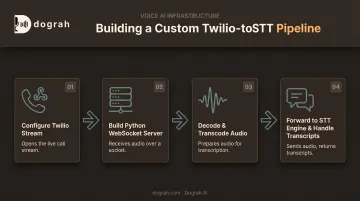
Step 1: Configure Twilio to Stream Call Audio to Your Server
You have two TwiML options, and picking the wrong one adds complexity you don't need.
<Start><Stream>: unidirectional — audio flows out to your server only. All you need for pure transcription.<Connect><Stream>: bidirectional. Use only if you also send audio back into the call (voice bot, not transcription).
For STT-only use cases, <Start><Stream> is the simpler, correct choice:
<Response>
  <Start>
    <Stream url="wss://your-domain.com/media-stream" track="inbound_track">
      <Parameter name="callerId" value="12345"/>
    </Stream>
  </Start>
  <Say>Connecting your call now.</Say>
</Response>
A few details matter here:
wss://is required. Twilio won't connect over plainws://.- Query strings on the
urlattribute aren't supported, so pass metadata using nested<Parameter>tags instead. Twilio delivers these inside thestart.customParameterspayload. - Your endpoint needs to be publicly reachable and TLS-secured. Use ngrok for local development, and a hosted domain with a valid TLS certificate in production.
Step 2: Build a Python WebSocket Server to Receive the Stream
Next, stand up an async endpoint that can accept Twilio's connection and process messages without blocking. FastAPI with native WebSocket support works well here:
from fastapi import FastAPI, WebSocket

app = FastAPI()

@app.websocket("/media-stream")
async def media_stream(websocket: WebSocket):
    await websocket.accept()
    async for message in websocket.iter_json():
        event = message.get("event")
        if event == "start":
            stream_sid = message["start"]["streamSid"]
            media_format = message["start"]["mediaFormat"]
        elif event == "media":
            await handle_media(message)
        elif event == "stop":
            await cleanup()
Twilio sends a predictable sequence of events: connected, then start, then a stream of media events, then stop. The start payload carries the streamSid, callSid, and mediaFormat (always mulaw, 8000Hz, mono). Capture these early since your STT session will need them.
Before processing any audio, validate the X-Twilio-Signature header using Twilio's SDK helper. Skipping this step leaves your endpoint open to anyone who discovers the URL and starts sending fake payloads.
Step 3: Decode and Prepare the Audio Payload for Your STT Engine
Each media event contains a base64-encoded chunk of mulaw audio in media.payload. First, decode it:
import base64

raw_mulaw = base64.b64decode(message["media"]["payload"])
Most STT engines (cloud or self-hosted) expect PCM16/LINEAR16 input, not mulaw. You need to transcode. Python's built-in audioop handled this, but it's deprecated as of Python 3.11 and removed entirely in 3.13. On a current Python version, install the maintained fork instead:
import audioop  # or: import audioop_lts as audioop

pcm16 = audioop.ulaw2lin(raw_mulaw, 2)
Deepgram's documentation on encoding and sample rate is a useful reference. Raw, headerless audio streams require you to declare both encoding and sample rate on the API call, since there's no container header for the engine to read.
A couple of other things to watch:
- If you enabled
both_tracks, checkmedia.trackon every event and process inbound and outbound separately to avoid garbled transcripts. - Start around 100–250ms chunks. Instant forwarding cuts latency but raises overhead; batching too hard adds lag.
Step 4: Forward Decoded Audio to Your STT Engine and Handle Transcripts
With clean PCM16 in hand, open a persistent streaming session with your STT engine in parallel with the Twilio connection, and push each chunk through as it arrives:
async def handle_media(message):
    raw_mulaw = base64.b64decode(message["media"]["payload"])
    pcm16 = audioop.ulaw2lin(raw_mulaw, 2)
    await stt_session.send(pcm16)

async def on_transcript(result):
    if result.is_final:
        save_transcript(result.text)
    else:
        update_interim_display(result.text)
Most STT engines return both interim and final results. Interim results are provisional and may change; treat them as live-caption feedback only. Act on finalized text for anything that matters downstream, such as triggering a workflow or logging a transcript.
Finally, tear things down cleanly. When Twilio sends the stop event, or the call simply ends, close both the STT session and the WebSocket. Leaving an STT session open after the call ends racks up unnecessary API costs.
What You Need Before Streaming Twilio Audio to Your Own STT
Most DIY Twilio-to-STT integrations that fail in testing or production are missing one of these pieces, not fighting some exotic bug.
Twilio and Infrastructure Requirements
- A voice-enabled Twilio number
- Account permissions to configure TwiML and webhooks
- A publicly reachable, TLS-secured
wss://endpoint
STT Engine and Runtime Requirements
- An STT engine that accepts streaming or chunked audio (cloud API or self-hosted model such as Whisper)
- Python async libraries (
websockets,asyncio) - An audio transcoding library (
audioop-lts,pydub, or similar)
Security and Compliance Readiness
- A working plan for validating incoming Twilio requests
- A documented policy for how call audio is handled and stored if you operate in healthcare, finance, or other regulated industries
Twilio lists Media Streams as HIPAA-eligible, but that only counts if you've signed Twilio's Business Associate Addendum and you handle downstream storage, encryption, and STT vendor agreements correctly on your end.
Eligibility on the telephony leg does not automatically cover the rest of your pipeline.
Key Parameters That Affect STT Accuracy and Latency
Outcomes here depend on a handful of specific configuration choices — not just the fact that audio is streaming at all.
Audio Encoding and Sample Rate
Twilio always sends audio/x-mulaw at 8000Hz, mono. Most STT engines are tuned around PCM16, frequently at 16kHz. Skip or botch the transcoding step, and you get one of two failure modes: an empty transcript, or a transcript full of nonsense words.
| Parameter | Twilio's output | Typical STT expectation |
|---|---|---|
| Encoding | mulaw | PCM16/LINEAR16 |
| Sample rate | 8000Hz | 16000Hz (varies by engine) |
| Channels | 1 (mono) | 1 (mono) |
Track Selection (Inbound/Outbound/Both)
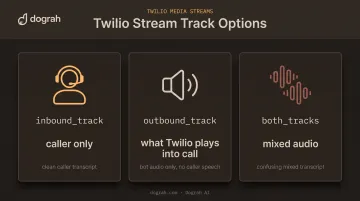
The track parameter decides whose voice you're capturing:
inbound_track: caller onlyoutbound_track: what Twilio plays into the callboth_tracks: everything mixed
Pick the wrong one and you either mix agent and caller speech into a confusing transcript, or you capture no caller audio at all.
Chunking and Buffering Strategy
Every buffering decision is a latency vs. overhead trade-off:
- Forward audio too eagerly, and you overwhelm your STT engine's rate limits with tiny requests.
- Buffer too long, and transcripts lag behind the live conversation.
- Hold too much in memory, and long calls drop audio when buffers overflow.
Start with small (100–250ms) chunks and adjust based on your specific STT engine's documented throughput.
Common Mistakes and Troubleshooting Tips
These failure patterns show up constantly in DIY Twilio-to-STT setups:
- Sending raw mulaw to a PCM16-expecting engine. You get garbled or empty transcripts. Confirm the STT input format before you wire anything up.
- Skipping
X-Twilio-Signaturevalidation. Your WebSocket endpoint accepts spoofed connections from anyone with the URL. Validate every request—no exceptions. - Blocking, synchronous STT calls inside the audio-receive loop. Chunks back up and drop under load. Use an async client or a queue so receive and process stay decoupled.
- Not closing the STT session on the
stopevent. Connections leak and the API bill climbs. Tear the session down as soon as the stream ends.
Alternatives to Building Your Own Twilio-to-STT Pipeline
A fully custom pipeline gives you maximum control over every byte of audio. It also means you own reconnection handling, scaling, and maintenance for as long as call volume keeps growing.
Open-Source, Self-Hostable Voice AI Platforms
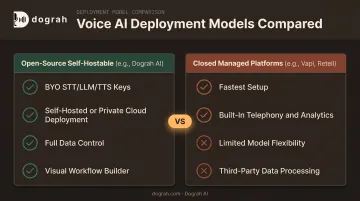
If you want to plug in your own STT, LLM, or TTS (including local models like Whisper) without hand-building the Twilio WebSocket server, audio decoding, and orchestration layer, open-source platforms cover that middle ground.
Dograh AI is one example: a self-hostable voice AI platform under a BSD 2-Clause license, with built-in Twilio telephony for inbound and outbound calling.
- Bring your own STT/LLM/TTS keys, or connect local models such as Whisper for air-gapped deployments
- Deploy self-hosted, on managed cloud, or as a fully managed private cloud inside your own infrastructure
- Configure conversation logic through a visual, drag-and-drop workflow builder instead of writing orchestration code from scratch
- Keep call audio and transcripts within your own environment when self-hosting, with control over retention and deletion policies
Trade-off: you adopt the platform's workflow model and integration points instead of writing every line of orchestration yourself. STT provider swapping stays flexible because it's BYO-key throughout.
Closed, Fully-Managed Voice AI Platforms
Platforms like Vapi and Retell are the fastest route to a working voice bot, with telephony, prompts, and analytics handled for you. Retell offers configurable data retention modes, and Vapi documents options ranging from customer-controlled storage to zero data retention.
Trade-off: you work inside a closed ecosystem with limited STT/model flexibility. Depending on configuration, call data is processed on a third party's infrastructure rather than your own.
Frequently Asked Questions
Can I stream Twilio call audio to any STT engine, or only Twilio's built-in transcription?
Media Streams sends raw audio to any WebSocket endpoint you control. You can forward it to any STT engine, cloud-based or self-hosted, not just Twilio's native transcription.
Do I need a bidirectional stream if I only want to transcribe calls?
No. A unidirectional <Start><Stream> is sufficient for pure transcription. Bidirectional <Connect><Stream> is only needed if you plan to send audio back into the call.
What audio format does Twilio send, and do I need to convert it?
Twilio sends base64-encoded mulaw audio at 8000Hz mono. This usually needs transcoding to PCM16 before most STT engines can process it accurately.
How do I keep the WebSocket connection stable during long calls?
Use async, non-blocking message handling and track Twilio's sequenceNumber field. Add reconnect logic so dropped connections don't create audio or transcript gaps.
Can I use a self-hosted STT model like Whisper instead of a cloud API?
Yes. Once audio is decoded and transcoded correctly, it can stream to any local or self-hosted STT model the same way it would to a cloud API.
Is there a faster way to get this working without building the entire pipeline from scratch?
Yes. Open-source platforms like Dograh AI already handle the Twilio WebSocket connection and voice-agent orchestration, so you can plug in your own STT without building that plumbing yourself.