
An AI receptionist answers your business phone, handling common questions, bookings, messages and transfers to a person. Self-hosted Dograh is open source with no per-minute platform fee, though you still pay for your servers, AI models and phone lines. With locally hosted open-weight models, no AI vendor receives the call audio. Your phone carrier still carries the call.
Key Takeaways
- Self-hosted Dograh has no per-minute platform fee. Servers, models and phone lines still cost money.
- Judge an AI receptionist by how cleanly it hands a caller to a person.
- Hosted prices come in different units, so compare them at your own call volume.
We build Dograh, an open-source, self-hostable voice agent platform, and this guide explains AI receptionists from the ground up for anyone meeting the idea for the first time.
What an AI receptionist does
An AI receptionist is software that picks up your business phone and holds a real conversation with the caller. Callers speak in their own words, and it replies in full sentences instead of reading out a menu.
Its job is narrow. On most calls it does one of four things. It answers a question from information you gave it, books or changes an appointment, takes a message, or transfers the call to a person. A good one works out which of those the caller needs within the first few turns.
That makes it different from the tools most small businesses use today. A phone tree ("press 1 for opening hours") only routes calls, and callers have to squeeze their problem into its options. Voicemail only records. An AI receptionist can finish the job on the call, so the caller usually hangs up with what they called for.
You will also hear it called an AI phone receptionist or a virtual receptionist. The second name causes confusion, because many human answering services use "virtual receptionist" for remote people who answer your line. In this guide, "AI receptionist" always means software, and "answering service" always means people.
Renting an AI receptionist vs owning one
The biggest decision is who runs the receptionist, and it matters more than which AI model sits inside it. You can rent a finished product from a vendor, or you can run the agent on a platform you control.
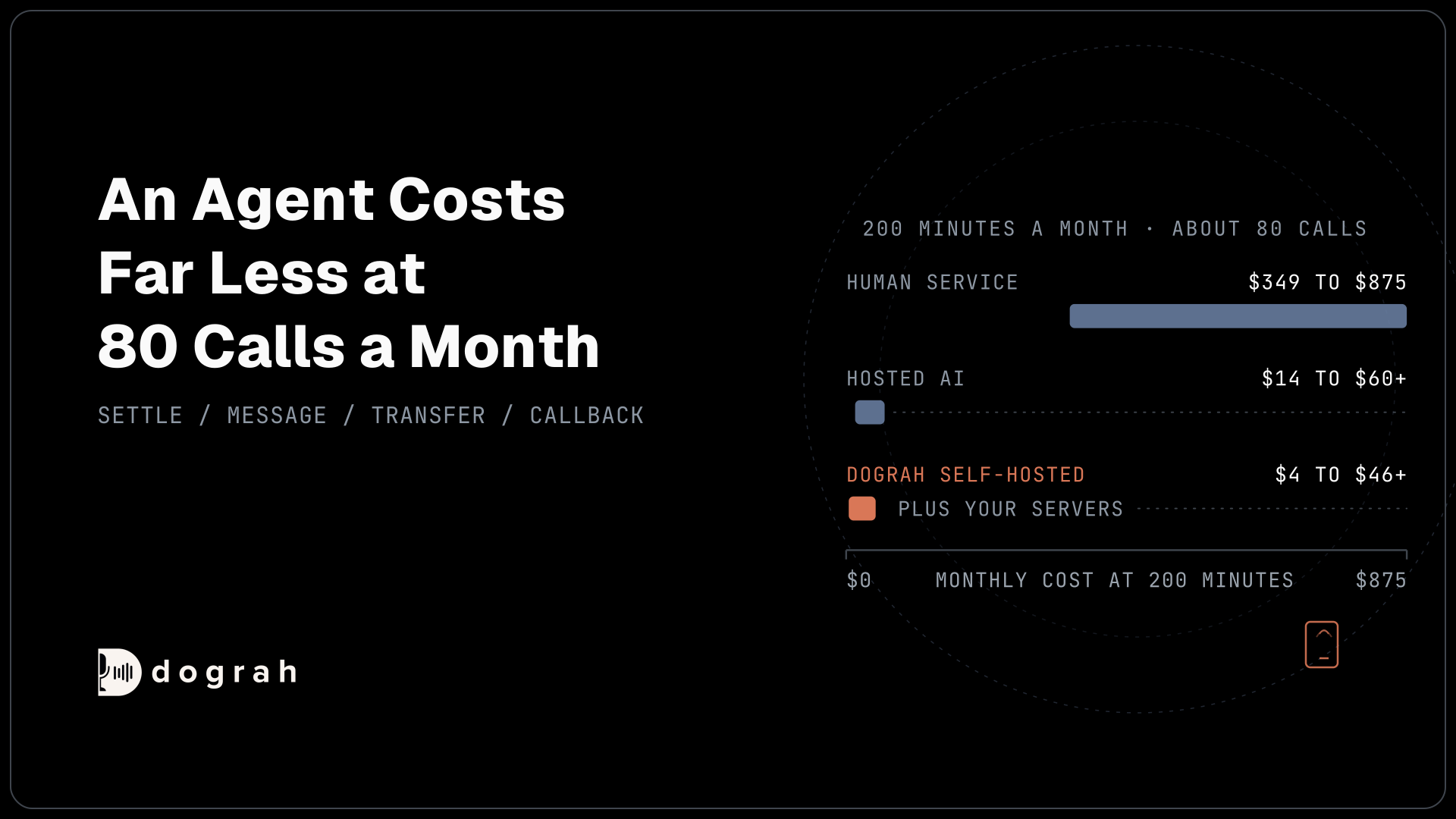
Hosted AI receptionist products charge for as long as you use them, and each vendor picks its own unit. Smith.ai's AI Receptionist Pro plan is $150 a month for 75 calls ($2.00 a call), and Rosie's Professional plan is $49 a month for 250 minutes. Other products charge per unique caller. Every extra call or minute adds to the bill, and the recordings of your calls sit on the vendor's servers.
Owning works differently. Dograh is open source under the BSD-2-Clause licence, and you can run it on your own servers. The open-source platform has no per-minute platform fee. You still pay for hosting and for the phone line. The AI models cost money too, unless you run open-weight models on your own hardware.
If you would rather not run servers, Dograh Cloud is the managed version, with a 1¢/min platform fee. Model and phone costs apply there as well. The code for both lives in the same place, Dograh on GitHub.
In our experience, the platform choice decides most of the long-run cost and nearly all of the data question. You can swap the AI model next month. The billing model and the place your recordings live are much harder to change once customers depend on the line. Owning also lets you change the voice or the call flow without asking a vendor first.

Open Source Alternative to Vapi / Retell
Self-hosted voice agent platform — no per-minute fees
dograh-hq/dograh
Star on GitHub
How an AI receptionist works
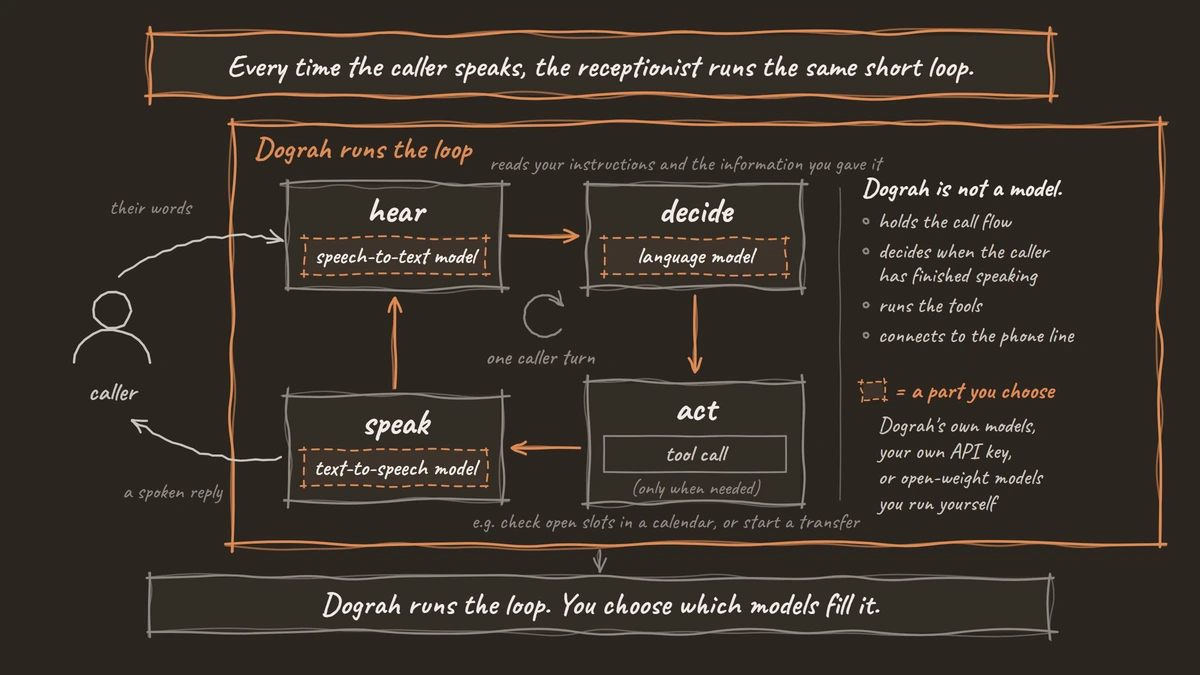
Every time the caller speaks, the receptionist runs the same short loop. It hears the words, decides what to do, takes an action if one is needed, and speaks a reply.
Each part of the loop is a separate piece of software. A speech-to-text model turns the caller's audio into text. A language model reads that text alongside your instructions and the information you gave it, then decides what to say or do. If the caller wants something done, the agent makes a tool call during the conversation, for example to check open slots in a calendar or to start a transfer. A text-to-speech model then turns the reply into a voice. Some setups replace the speech models and the language model with a single speech-to-speech model that listens and talks directly.
Dograh is the layer that runs this loop. It holds the call flow, decides when the caller has finished speaking, runs the tools and connects to the phone line. It is not a model. You choose which models fill the loop. They can be Dograh's own or a supported provider you connect with your own API key. You can also run open-weight models yourself.
Behind the scenes, a receptionist is a call flow drawn as steps joined by pathways. A greeting starts the call and a main step handles questions. Other steps cover booking or the handover to a person.
The answers come from documents you attach, such as a price list or a page of common questions. In Dograh, the agent searches only the documents attached to the step it is on, so a booking step stays focused on booking.
Booking works through a tool. Dograh has no built-in calendar connector, so the agent books through an HTTP API tool (or MCP, the Model Context Protocol) that talks to your calendar or booking system. Calendly is a common example: its booking API needs a paid plan and caps hosts below Enterprise at 100 bookings a day. Our guide to booking meetings mid-call with Calendly covers that setup in full.
One detail surprises first-time builders. Inside a step, the AI writes its own words on every call, guided by your instructions. Exact wording only comes from fixed text, such as the Start Call greeting or a pre-recorded clip. Anything that must be said word for word, like "this call is recorded", belongs there.
This guide stays at the level of how the parts fit together. Our tutorial, How to Build an AI Receptionist, goes through the whole setup in Dograh, from the greeting to a test call over a real phone line.
AI receptionist vs human receptionist vs answering service
A staff receptionist covers the desk and the phone during opening hours. An answering service and an AI receptionist cover only the phone, and they differ in who picks up.
A staff receptionist is the most capable option and the most limited in hours. The median pay for US receptionists was $38,010 a year, or $18.27 an hour, in May 2025, according to the Bureau of Labor Statistics. That figure is pay only. It leaves out benefits, and one person can take only one call at a time. BLS counted 947,500 receptionist jobs in 2025 and expects that number to fall 2% by 2035.
An answering service puts remote people on your line. They handle judgement calls better than software, but you pay for every minute or call they take. Ruby's 200-minute plan is $720 a month, and Smith.ai's live (human) receptionists start at $300 a month for 30 calls, then $11.50 a call.
An AI receptionist answers many calls at once, at any hour. It also gives the same answer to the same question every time. It is weakest where a person is strongest, with upset callers and anything that needs judgement.
| Option | Who answers | How it is billed | What it costs |
|---|---|---|---|
| Staff receptionist | Your employee, at the desk and on the phone | Wages | US median pay $38,010 a year, $18.27 an hour (BLS, May 2025) |
| Answering service | Remote people | Bundles of minutes or calls | Ruby: $720 a month for 200 minutes. Smith.ai live receptionists: $300 a month for 30 calls, then $11.50 a call |
| Hosted AI receptionist | Software run by a vendor | Per call or per bundle of minutes, set by the vendor | Smith.ai AI Receptionist Pro: $150 a month for 75 calls ($2.00 a call). Rosie Professional: $49 a month for 250 minutes |
| Open-source AI receptionist (Dograh, self-hosted) | Software you run | No per-minute platform fee | Free platform. Hosting and phone costs apply. Model costs apply too, or become server costs if you run open-weight models yourself |
These prices use different units, so work each one out at your own monthly call volume before you compare them.
For most businesses the answer is a mix. The AI takes the first ring on every call and handles the routine ones. People take the calls that need judgement, and the handover between the two is the part worth designing carefully.
When a call needs a person
A good AI receptionist is judged by its handover, so decide which calls go to a person before you write anything else.
Some calls should never stay with the AI. Medical or legal judgement, emergencies, upset callers, billing disputes and large sales all belong with a person. So does any caller who asks for one. The agent's instructions should treat "can I speak to someone" as a request to transfer, at any point in the call.
Start with the greeting. Name the business and tell callers they can ask for a person at any time. Put that in the Start Call greeting text, which plays exactly as written, so the model cannot drop it or reword it.
Callers have a strong view on this. In a OnePoll survey of 6,000 consumers in the US, UK and Canada, commissioned by AnswerConnect, a company that sells human answering, 31% said in April 2026 that they would hang up if connected to AI, and 85% said they prefer a real person. The survey asked about AI customer service in general, and its sponsor has a reason to publish it. Even so, it makes the case for a quick route to a person.
In Dograh, the handover is a call transfer. It runs on supported phone providers such as Twilio, Telnyx and Asterisk ARI. Browser web calls cannot transfer a caller to a phone number, so test every transfer over a real phone call before launch.
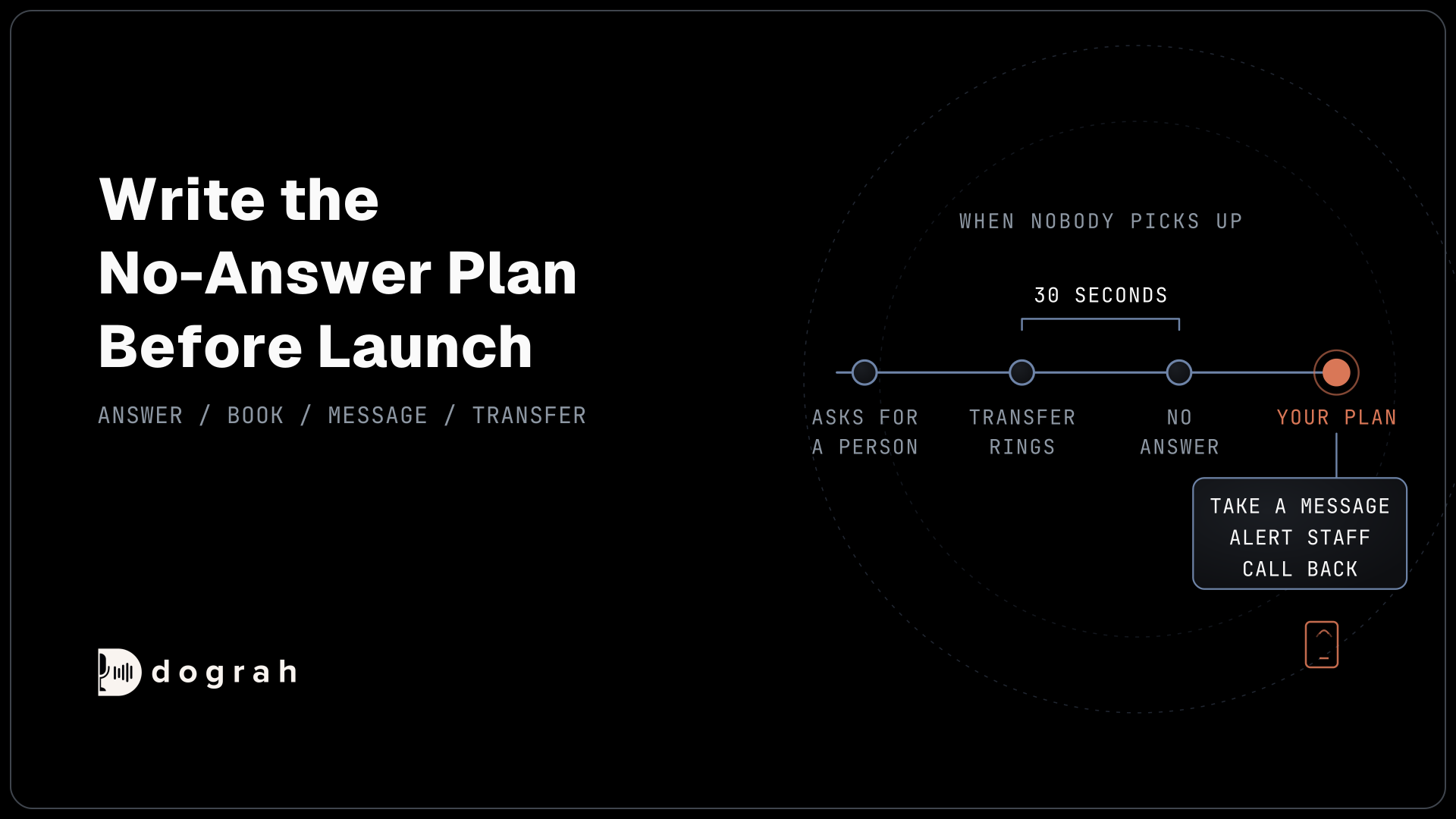
The transfer timeout is 30 seconds by default, and you can set it anywhere from 5 to 120 seconds. If nobody answers in time, the transfer fails and the caller comes back to the agent. You decide what happens next. The agent can resume the conversation and take a message or promise a callback, and it can page someone during the call. It can also end the call, or play a voicemail screening message. On Twilio, you can turn on a short spoken introduction to both sides of the transfer. It is off by default.
Write the no-answer plan down before launch. A caller who asks for a person and gets the same AI back with no plan is the worst call your receptionist can produce.
After-hours calls
After hours is where an AI receptionist helps most, because the usual alternative is voicemail.
A night call should end with an answer, a booking, a clear message for the morning, or a person on the line. Routine calls are easy. The hard part is the urgent call, and the rule there is simple: a call about someone's safety never ends with "we'll call you back". It goes to the on-call person, and if they do not pick up, the agent pages someone else while the call continues.
Callbacks need care too. They should come from the business's own number, inside a time window the agent states on the call, so the caller knows to pick up. In Dograh, an HTTP API tool can page the on-call person during the call. After the call, a webhook can send the message and its details into the queue your team reads first in the morning.
Our post on AI Voice Agents for After-Hours Coverage covers the escalation list, the fallback when nobody answers and the cost of a human night service.
How to choose AI receptionist software
Choose software by what it does on the hard calls first, and compare prices second.
Ask how it transfers a call and what happens when nobody answers. Some products in this category cannot transfer a call at all. Ask where recordings and transcripts are stored and whether you can export or delete them. Ask how it bills, then work out the monthly cost at your real call volume, because per-call and per-minute prices look very different at 50 calls and at 2,000.
Then ask how much you can change yourself. With a hosted product you usually get the vendor's models and call flow. With an open-source platform you can change any of them. If you handle health information, ask whether the vendor signs a business associate agreement, and remember that signing one does not move your own responsibility.
Our roundup of the Best AI Receptionist Software compares ready-made products with platforms you build on, using dated list prices for each.
Join the Dograh Community
Dograh is an OSS alternative to Vapi. Join our Slack community for queries, releases, best practices & community interactions.
AI receptionists by industry
The job changes by industry, mostly in which calls stay with the AI and which go to a person.
Dental offices
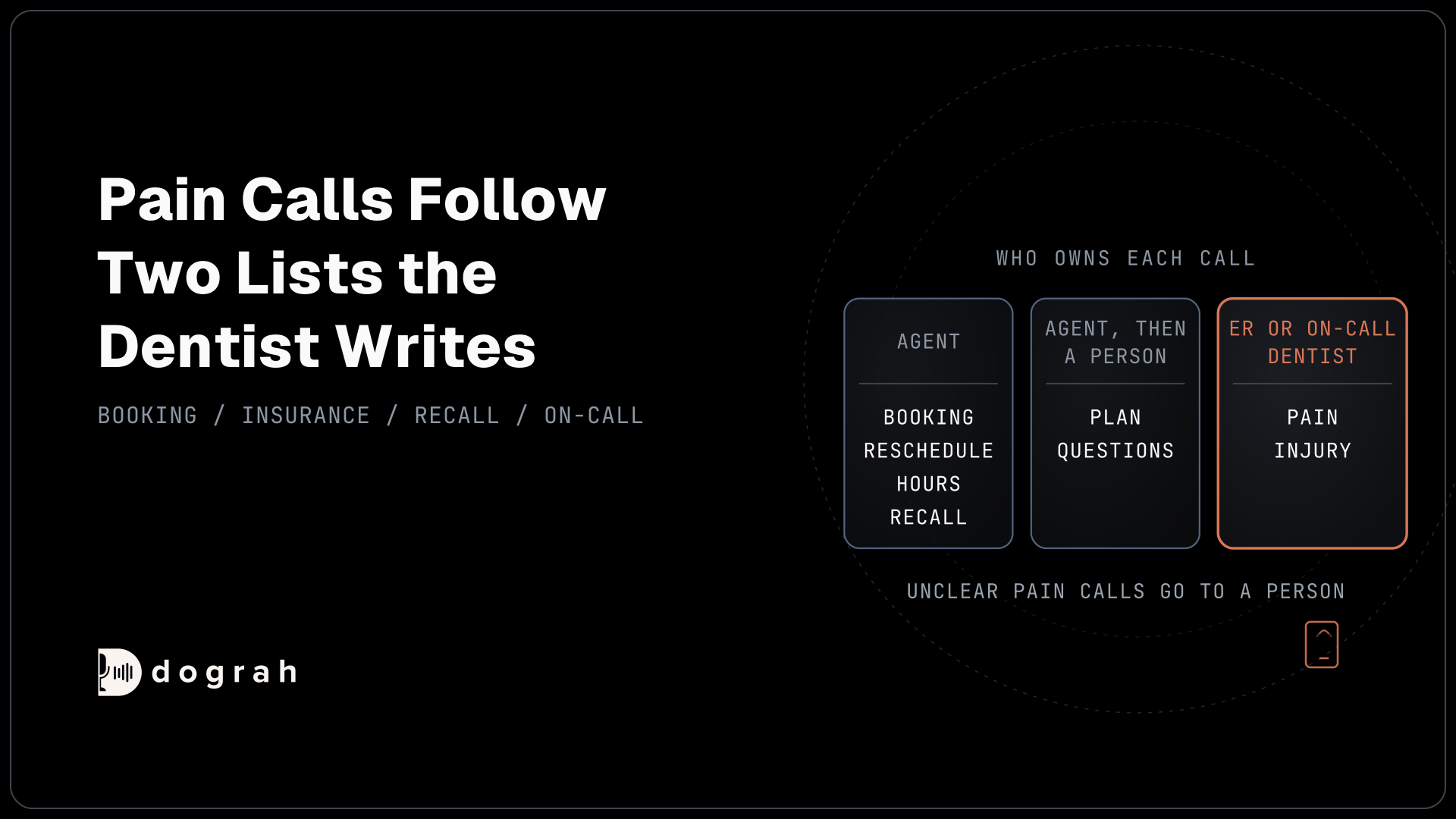
A dental front desk takes a lot of booking calls, and an AI receptionist can own those. It can also answer "do you take my insurance" from the practice's own list of accepted plans, while a person still checks the patient's actual benefits. Calls about pain go by fixed lists the dentist writes in advance, one for "go to the emergency room now" and one for "call the on-call dentist now". The AI follows the list. It never makes a clinical call itself.
Dental calls also carry health information, so where the recordings live matters (more on that below). Our guide to AI Voice Agents for Dental Reception and Call Answering walks through the calls a dental office takes and how each one is handled.
Restaurants
Restaurant phones ring hardest when staff are busiest, during service. Most calls are short and repetitive: opening hours, a table for tonight, a takeout order, where to park. An AI receptionist handles those well, and it books tables through a tool connected to the restaurant's reservation system. Large parties and allergy questions that need a firm answer from the kitchen go to a person.
Our post on restaurants and home services looks at what callers to these businesses ask for.
Hotels
Hotels are short of staff. In a survey of 246 hoteliers by the American Hotel & Lodging Association, taken in February 2026, more than half said their properties were somewhat or severely understaffed, and 70% were offering higher wages to recruit and keep people.
An AI receptionist can take the routine guest calls, such as booking or changing a stay and questions about check-in times or parking. A guest with a problem in their room, or anyone who asks, goes straight to the front desk through a transfer.
Where your call recordings live
Most AI receptionists record and transcribe every call, so decide where that data lives before you choose a product.
With a hosted product, recordings and transcripts sit on the vendor's servers. With Dograh self-hosted, they sit on yours, and the platform vendor is out of the data path. Full control needs one more step: open-weight models running on your own hardware. If you connect a commercial model provider with your own API key, the audio still goes to that provider. Your own key moves the contract, not the data. The phone carrier also still carries the audio, whichever way you run the agent.
Healthcare needs extra care. HIPAA (the Health Insurance Portability and Accountability Act) allows a practice to use a hosted vendor that signs a business associate agreement (BAA). A BAA hands some duties to the vendor, but it does not move the practice's liability. Self-hosting is a choice here. It takes one vendor out of the data path, though the phone carrier still carries the call, and the practice still owns its compliance either way. Our post on why voice data needs to stay local explains the risks, and our post on healthcare call centers shows how this plays out on patient calls.
Before you pick any product, sort a week of your real calls into the four outcomes and decide who takes the handovers. The platform choice gets much easier after that, and an open-source one keeps both the cost and the recordings in your hands.
Each part of an AI receptionist above has its own deep dive:
- How to Build an AI Receptionist
- Best AI Receptionist Software
- AI Voice Agents for Dental Reception and Call Answering
- AI Voice Agents for After-Hours Coverage
Glossary
- Pathway
- A route between two steps in a voice agent's call flow, chosen by the AI from a written condition. The handover to a person is a pathway, so it can be drawn and tested like any other step.
- Transfer timeout
- How long the agent tries to reach a person before the transfer counts as failed. In Dograh it is 30 seconds by default, adjustable from 5 to 120, and the caller then comes back to the agent.
- Open-weight model
- An AI model whose weights you can download and run on your own hardware. Running open-weight models next to a self-hosted platform is what keeps call audio entirely inside your own servers.
- Business associate agreement (BAA)
- The HIPAA contract a healthcare provider signs with a vendor that handles patient information. It hands certain duties to the vendor but does not move the provider's own liability.