
A voice agent books a Calendly meeting mid-call through two HTTP requests made while the caller is still on the line. The first reads open times from Calendly's available-times endpoint. The second creates the booking with POST /invitees, which needs a paid Calendly plan plus the caller's email and timezone. In Dograh, both are generic HTTP API tools.
Key Takeaways
- Calendly books by API on Standard plans and above, never on Free.
- Collect the caller's email early and spell it back; Calendly won't book without it.
- A slot can vanish before booking, so re-check and keep a fallback.
This post is part of our guide to Integrating Voice Agents With Your Stack: The Complete Guide, and it shows how to book meetings with a voice agent while the caller is still talking.
How a mid-call booking works in Dograh
A mid-call booking is two requests the agent makes during the conversation: one to find open times and one to book the time the caller picks.
Dograh reaches Calendly through its generic HTTP API tool, with no Calendly connector to install. An HTTP API tool lets a voice agent call any internal or external system during a live conversation, and the model decides when to use it based on your prompts. The same setup can point at Cal.com or your own scheduling service.
The language model decides when to call each tool and what to send. It works that out from your node prompt, the tool name, the tool description and the parameter definitions. A tool can only be called from a node it is attached to, so the booking tools belong on the agent node where scheduling happens.
Booking on the call matters because callers still reach for the phone. A 2025 YouGov survey of how Americans prefer to contact businesses found that nearly 70% tend to use phone support, and phone was still the single most preferred channel at 35%. A caller who rang to book expects to hang up with the meeting already in the calendar.
What Calendly needs before it will book
Booking through Calendly takes two requests, and each one needs a few details.
Step 1: find open times. The agent asks Calendly which slots are free in a date range, up to 31 days ahead, using the Calendly available times API. Calendly sends back a list of open times. In the request below, start_time and end_time set the window to search, in UTC:
curl --get https://api.calendly.com/event_type_available_times \
  -H "Authorization: Bearer YOUR_CALENDLY_TOKEN" \
  --data-urlencode "event_type=https://api.calendly.com/event_types/YOUR_EVENT_TYPE_ID" \
  --data-urlencode "start_time=2026-10-06T13:00:00Z" \
  --data-urlencode "end_time=2026-10-07T01:00:00Z"
What this does: It returns every open slot of one meeting type between 1 pm on 6 October and 1 am the next day, UTC. The agent picks its two options from that list.
Step 2: book the chosen time. Once the caller picks a slot, the agent sends Calendly that time plus the caller's name, email and time zone, through the Create Event Invitee endpoint. Calendly creates the meeting and emails the invite. In the request below, start_time is the chosen slot in UTC, and invitee holds the caller's name, email and time zone:
curl -X POST https://api.calendly.com/invitees \
  -H "Authorization: Bearer YOUR_CALENDLY_TOKEN" \
  -H "Content-Type: application/json" \
  -d '{
    "event_type": "https://api.calendly.com/event_types/YOUR_EVENT_TYPE_ID",
    "start_time": "2026-10-06T15:00:00Z",
    "invitee": {
      "name": "Jane Doe",
      "email": "jane@example.com",
      "timezone": "America/New_York"
    }
  }'
What this does: It books 3 pm UTC on 6 October for Jane Doe, which is 11 am in New York, her time zone. If Calendly accepts it, the meeting is created and Jane gets the invite by email.
You do not need to run these by hand. They show exactly what the agent sends, which helps when you test or fix a booking.
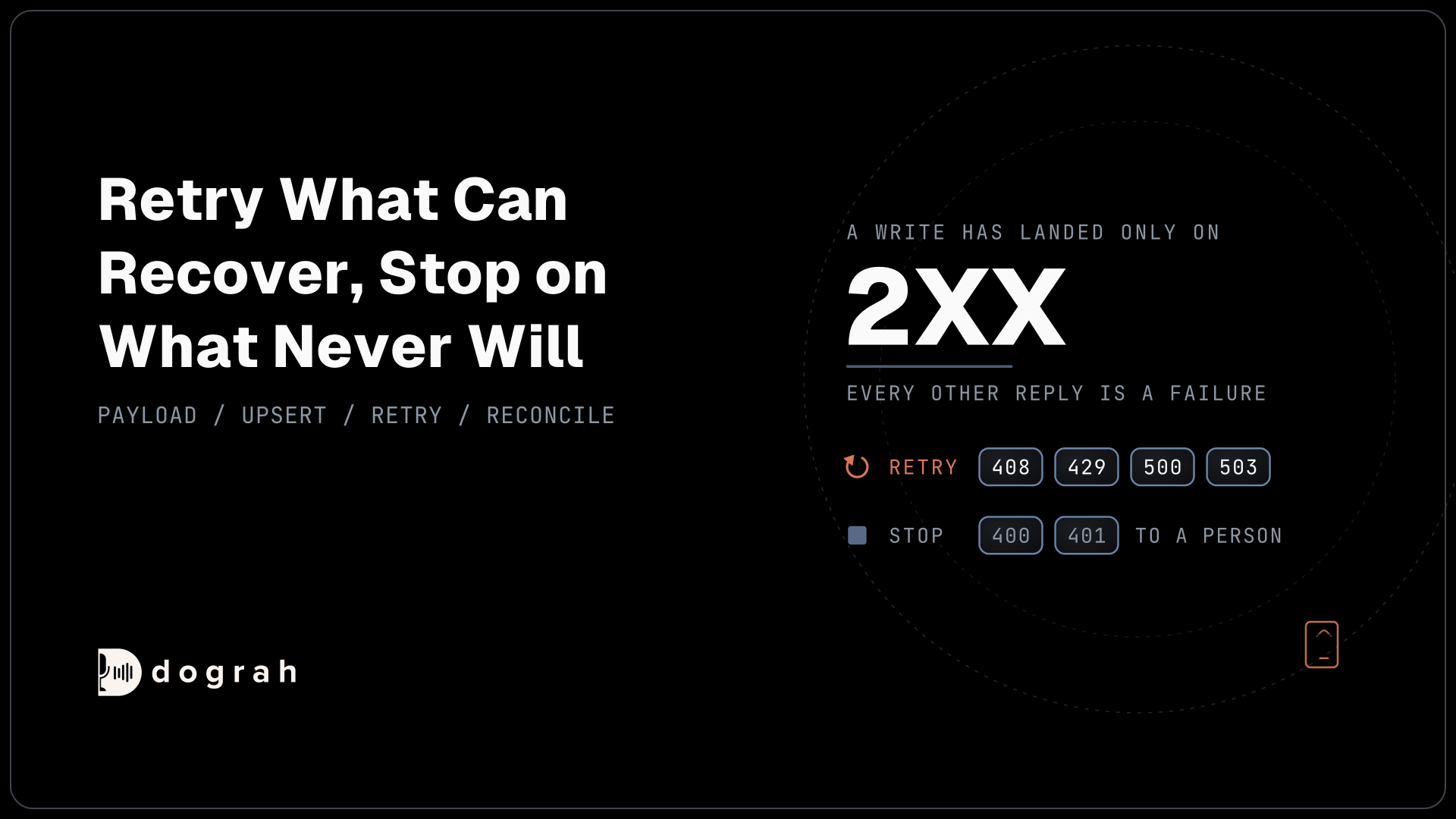
Two rules apply to both steps. Booking through the API needs a paid Calendly plan, Standard or above: a Free account gets a 403 and cannot book at all, while an account on a trial can book, but only 5 times per user per day. And Calendly works in UTC, one worldwide clock, so times are converted from the caller's local time before they are sent. Each request also carries your Calendly access token in its Authorization header.
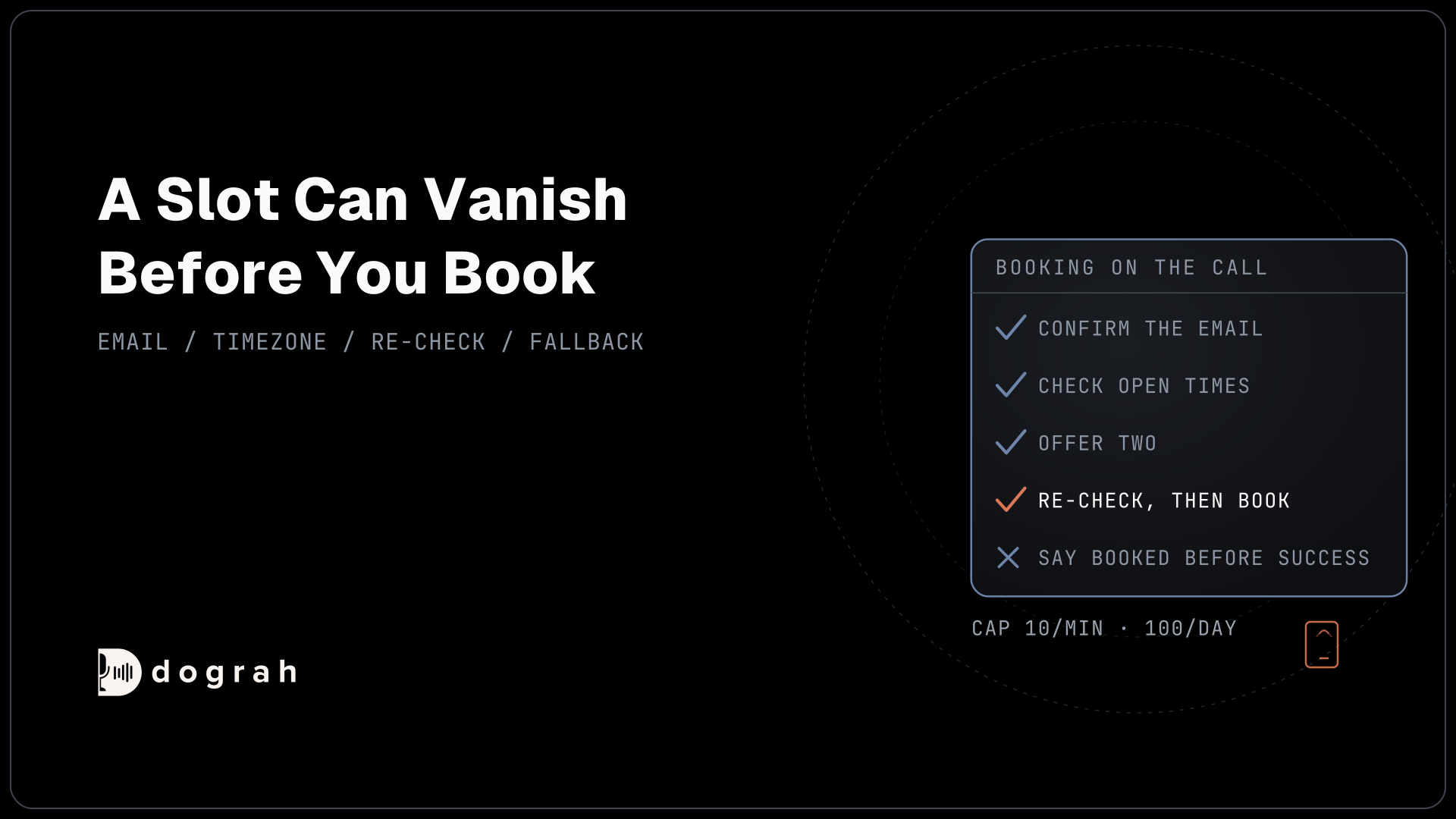
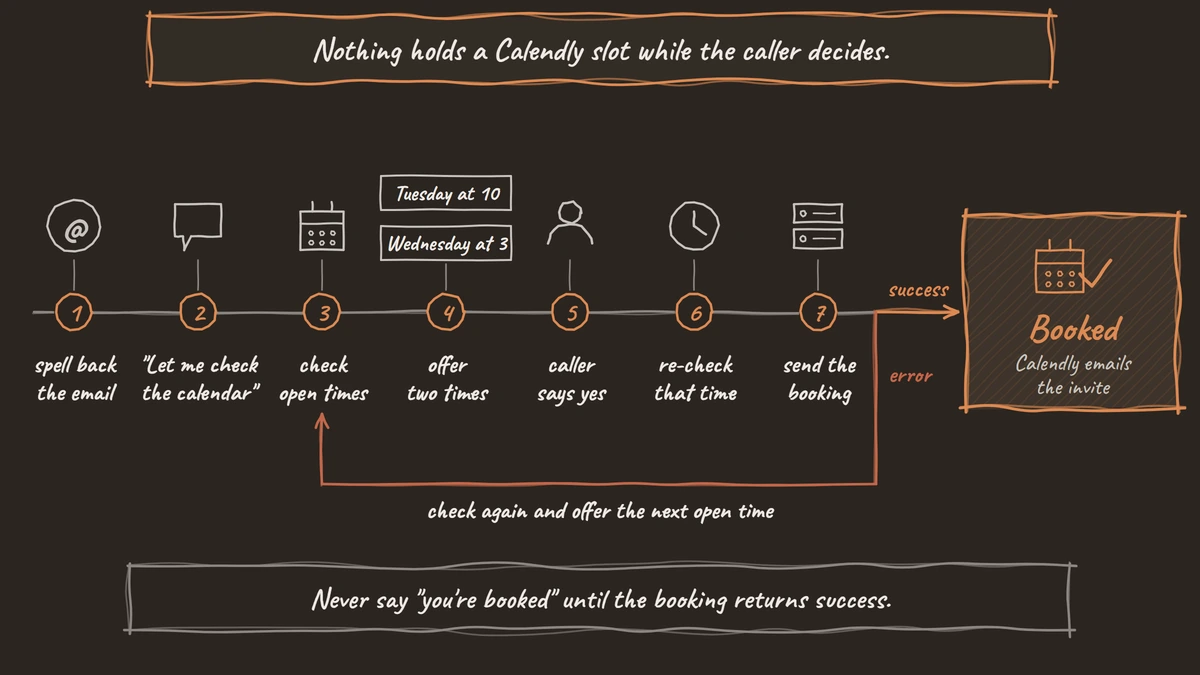
Calendly will not book without the caller's email and time zone, and on a phone call these are the easiest details to get wrong. So collect the email early, and have the agent spell it back letter by letter before checking any times. On outbound calls you usually know it already: pass it in when the call starts and use it in the prompt as {{email}}, so the agent only has to confirm it. For the time zone, ask for the caller's city if you do not have it. The agent says times in the caller's local time and converts them to UTC before booking.
Setting up the two HTTP API tools
In Dograh, each of the two requests becomes one HTTP API tool. A tool is a saved request the agent can make during the call. You give it a name, a web address, your Calendly token and the details the agent must fill in. This Calendly API voice agent tutorial uses two tools:
| Field | check_calendly_availability | book_calendly_meeting |
|---|---|---|
| Method and endpoint | GET https://api.calendly.com/event_type_available_times | POST https://api.calendly.com/invitees |
| Header | Authorization: Bearer with your token | Authorization: Bearer with your token |
| Details the agent fills in | start_time, end_time | start_time, name, email, timezone |
| Fixed value | event_type, in the web address | event_type, in a custom body template |
The description is the most important field, because the agent reads it to decide when to use the tool. Write it as a plain instruction. For the booking tool: "Use this tool only after the caller has agreed to one specific time. Pass a start_time returned by check_calendly_availability." Describe the format of each detail too, for example that start_time looks like 2026-10-06T15:00:00Z.
The booking tool needs one extra step. Calendly expects the caller's details grouped together under invitee, so give this tool a custom body template, with the event type written in as a fixed value.
After each request, the agent learns whether it worked. Anything Calendly rejects, and any timeout, comes back as an error, so the agent never mistakes a failed booking for a success.

Open Source Alternative to Vapi / Retell
Self-hosted voice agent platform — no per-minute fees
dograh-hq/dograh
Star on GitHub
Keeping the conversation natural during the booking
Two moments decide whether booking feels like a natural conversation: the pause while the calendar is checked, and the way times are offered.
First, the pause. Checking Calendly takes longer than a normal reply, as our sub-800ms latency playbook explains. So have the agent say a short line as it starts the check, such as "Let me check the calendar for you." Put that line in the node prompt, and keep each check small, one day or one morning, so it comes back quickly.
Then, the offer. Calendly may return many open times, but a caller cannot hold six options in their head. Have the agent pick two, spaced apart, and say them in the caller's local time: "I have Tuesday at 10 or Wednesday at 3. Which works better?" If neither suits, it asks about another day.
Finally, plan for the check failing. APIs do go down: Uptrends measured an average of 55 minutes of API downtime a week in Q1 2025, in its State of API Reliability 2025. If the calendar cannot be reached, the agent should say so honestly, note the caller's preferred time and save it in the call outcome so your team can confirm the meeting.
When the slot is gone before you book
Nothing reserves a Calendly slot between the moment your agent offers it and the moment it books, so the booking can fail.
Calendly's guide to scheduling with AI agents says the start_time "must correspond to a valid open slot at booking time", and its advice when a booking fails is to "Re-query availability and propose alternatives". In a busy calendar, a slot offered before the email read-back can belong to someone else by the end of it.
Two habits handle this. Re-check the chosen time right before booking, once the caller has said yes and the email is confirmed. Then treat an error from the booking tool as a failed booking. Call the availability tool again and offer the next open time. The agent should never say "you're booked" until the booking tool returns success.
Watch the limits too. Calendly's rate limits page caps Create Event Invitee on paid plans below Enterprise at "10 requests per user per minute", "50 requests per user per hour" and "100 requests per user per day". Every attempt counts, retries included. An outbound campaign booking into one host will reach the daily cap, so spread bookings across hosts or move to Enterprise, which allows 500 requests per user per minute.
Two other answers to the slot race are common. A scheduler built into the voice product closes the gap by moving your calendar into the voice vendor's database. A one-click connector generates booking functions for you, so the request logic is whatever the vendor wrote.
Dograh takes a plainer route to self-hosted voice agent appointment booking. The tools are HTTP requests you define on an open-source platform, and full call traces show every request and response the agent made. If you want the re-check and booking in one step, point one tool at your own backend or an n8n workflow that does both.
Join the Dograh Community
Dograh is an OSS alternative to Vapi. Join our Slack community for queries, releases, best practices & community interactions.
Recording the booking in your own systems
Once the booking succeeds, Calendly sends its usual confirmation and calendar invite. Record the outcome on your side too. Set a call disposition such as appointment_booked and extract the booked time as a variable. A Webhook node then sends both to your CRM when the call ends. By default, Dograh does not resend a failed webhook delivery. You can turn on retries with its retry_config setting, and your receiving system should still catch a missed result, for example by checking Calendly for the meeting. Our post on healthcare no-show reduction covers the reminder calls that follow a booking.
Glossary
- Event type
- One bookable meeting type in Calendly, such as a 30-minute demo. The booking tool sends it as a fixed value, so every booking lands on the right meeting.
- Slot race
- The gap between reading a free slot and booking it, during which another person can take the same time. Calendly's API does not hold a slot, so a voice agent re-checks before booking and needs a fallback when the booking fails.
- Available times
- Calendly's list of free slots for one event type over a date range, up to 31 days ahead. The agent reads it before offering the caller a time.
- Custom body template
- A Dograh HTTP API tool setting that shapes the JSON sent to an endpoint. It is how a flat set of parameters becomes the nested invitee object that Calendly's booking endpoint expects.