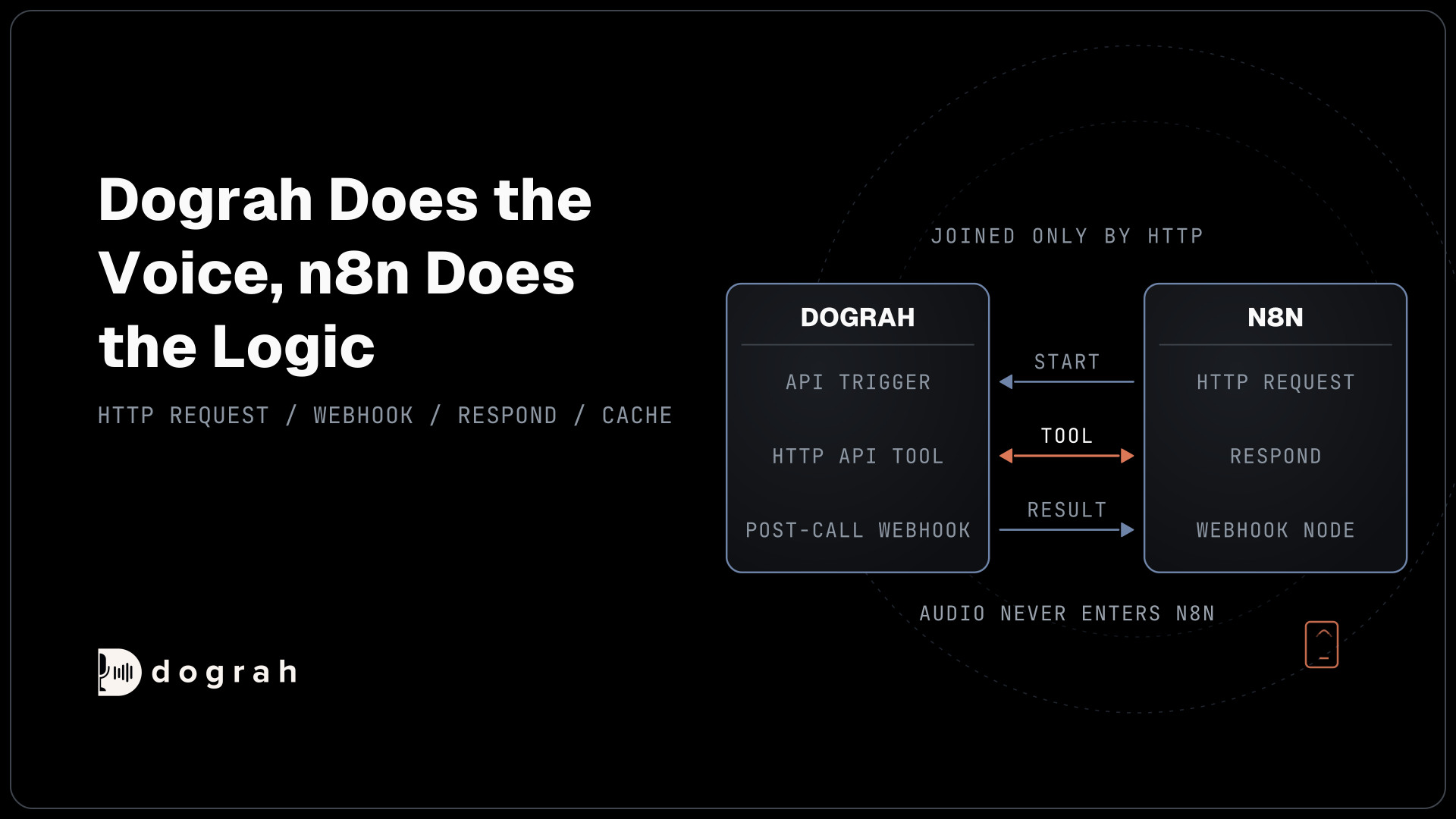

An n8n voice agent setup keeps the voice agent and n8n in separate loops. n8n's HTTP Request node starts a call through Dograh's API Trigger. An n8n Webhook node receives the result after the call. During the call, the agent can also ask an n8n workflow for live data. Dograh and n8n can both run on your own servers.
Key Takeaways
- n8n runs the business logic, and the live audio never passes through it.
- Post-call webhooks should answer fast and survive a missed delivery.
- Mid-call n8n tools must stay lean, because the caller hears every delay.
This post is part of our guide to Integrating Voice Agents With Your Stack: The Complete Guide. Here, n8n is the glue for every way a Dograh agent talks to the rest of your systems.
Why n8n and a voice agent stay in separate loops
Dograh does the voice and n8n does the business logic, and neither one sits inside the other's loop.
A phone call runs on a tight turn budget. The whole speech pipeline has to finish a turn before the caller notices a pause. n8n is a workflow engine built for steps that can take seconds, like updating a CRM row or posting an alert. Putting it inside the audio path would add network hops to every turn. So the audio stays in Dograh, and n8n only sees events.
Integration is where agent projects tend to stall. In Anthropic's 2026 State of AI Agents Report, 46% of the more than 500 technical leaders surveyed in late 2025 named integration with existing systems as a primary obstacle. n8n already connects to most business tools, and n8n's own June 2026 figures put its community at 1.8 million monthly active developers and builders.
Nothing here is a named n8n connector. Dograh exposes generic HTTP mechanisms, and n8n is simply a system that speaks HTTP well. n8n's HTTP Request node calls Dograh's API Trigger to start a call. An n8n Webhook node receives the post-call result. A lean Webhook plus Respond to Webhook serves as a mid-call tool. The same wiring works with Zapier or your own backend.
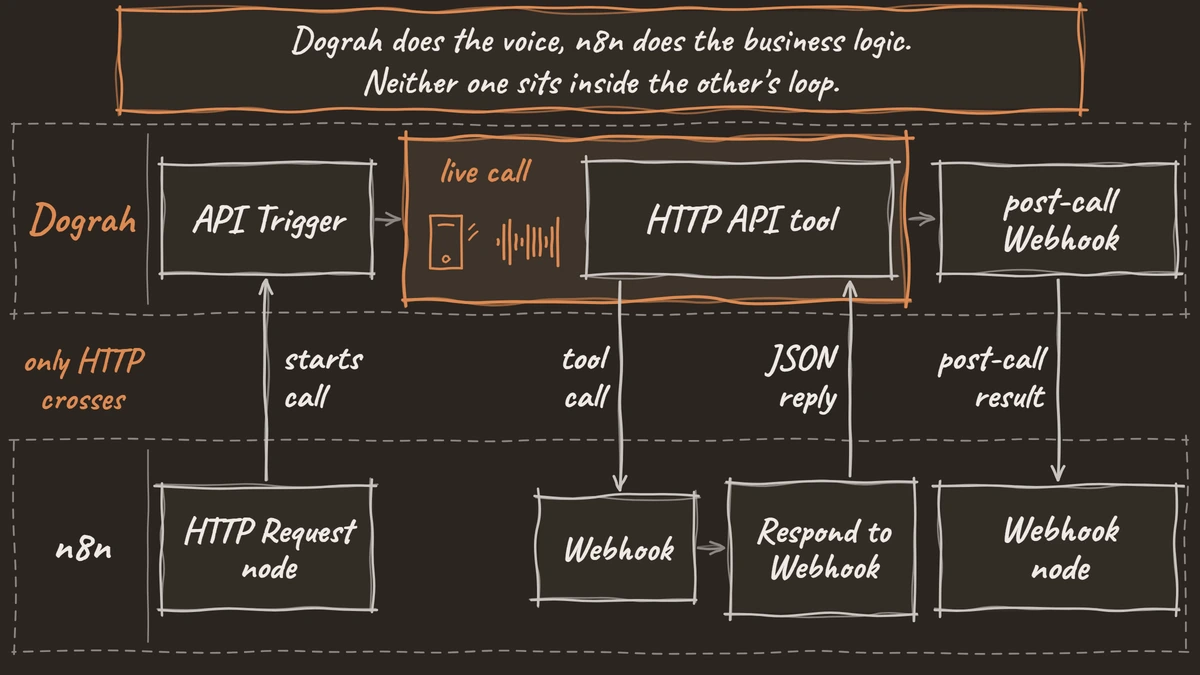
Both sides are self-hostable, so the whole chain can stay on your own servers. Dograh is open source under the BSD-2 licence. n8n calls itself fair-code: the source is available and you can self-host it under its Sustainable Use License, which allows use "only for your own internal business purposes or for non-commercial or personal use." Read those terms before you build a product on top of it. If call data has to stay in-house, our guide to running voice AI on local, self-hosted models covers the model side.
Start a call from n8n with one HTTP Request node
The API Trigger turns any n8n event, such as a new form entry or a CRM stage change, into an outbound call.
In Dograh, add an API Trigger node to your agent. Dograh gives it a unique UUID and shows a test URL and a production URL in the node's settings. The production URL only runs a published workflow, so publish before you point n8n at it. Then create an API key. Copy it straight away, because the full key is shown only once.
Replace your-dograh-instance with the address where your Dograh runs: your own server if you self-host, or your Dograh Cloud address. In the request n8n sends below, phone_number says who to call and initial_context says what the agent should know:
curl -X POST https://your-dograh-instance/api/v1/public/agent/{uuid} \
  -H "Content-Type: application/json" \
  -H "X-API-Key: dg_your_api_key" \
  -d '{
    "phone_number": "+1415555XXXX",
    "initial_context": {
      "customer_name": "Jane",
      "appointment_date": "March 15"
    }
  }'
What this does: It starts the call. In n8n, those values usually come from the step before, such as a new form entry or CRM record.
In n8n, open the HTTP Request node's Parameters tab, select Import cURL and paste the request in. It fills in the URL and the JSON body for you. Then move the key into a Header auth credential named X-API-Key, so it lives in n8n's credential store instead of the node. Map fields from earlier nodes into the body, such as a phone number from a form.
Everything in initial_context becomes a template variable in the agent's prompts, so {{customer_name}} lets the agent greet Jane by name. A successful call returns "status": "initiated" with a workflow_run_id. Store that ID in n8n, because it joins the post-call result back to the right record later. A 401 means a missing or invalid key, and a 404 means the trigger was not found or is not active. For what makes the call itself land, read our guide to AI outbound calling that converts.

Open Source Alternative to Vapi / Retell
Self-hosted voice agent platform — no per-minute fees
dograh-hq/dograh
Star on GitHub
Catch the post-call result with an n8n Webhook node
Dograh's Webhook node fires after the call ends and posts a payload you design to any URL, including an n8n Webhook node.
Start in n8n. Add a Webhook node, set the HTTP Method to POST and set Respond to Immediately. Dograh expects a success reply within 30 seconds. With Respond set to Immediately, n8n sends that reply the moment the data arrives, and slower steps, like updating your CRM, run afterwards without holding Dograh up.
Next, add a Webhook node in Dograh, paste the n8n Production URL and write the payload template. In the example below, each line becomes one field n8n receives when the call ends:
{
  "call_id": "{{workflow_run_id}}",
  "first_name": "{{initial_context.first_name}}",
  "rsvp": "{{gathered_context.rsvp}}",
  "disposition": "{{gathered_context.call_disposition}}",
  "duration": "{{cost_info.call_duration_seconds}}",
  "recording_url": "{{recording_url}}",
  "transcript_url": "{{transcript_url}}"
}
What this does: It sends n8n the call's ID, the caller's name and answer, the outcome, the call length, and the recording and transcript links. Later n8n steps can use each one, for example to update a CRM row.
Variable names must match your context fields exactly, or they arrive as empty strings. gathered_context holds what the agent extracted during the call, and this webhook is how that data reaches your systems. For a shared secret, pick API key auth with a custom header in Dograh and match it with Header auth on the n8n Webhook node.
Two n8n details catch almost everyone. The Test URL listens for only 120 seconds after you select Listen for Test Event, and it shows the data in the editor. The Production URL registers only when you publish the workflow, and its data shows up in the Executions list instead. Since n8n 2.0, Save and Publish are separate buttons, so saving alone leaves the live webhook unchanged.
Plan for the delivery that never arrives. By default, Dograh logs a non-200 response and does not send it again, so a result sent while your n8n instance is down is lost. You can switch on automatic retries with the retry_config setting, but test how they behave before you rely on them. Either way, keep the workflow_run_id from each trigger response, and flag any run that never reported back. The same payload can also arrive more than once, so dedupe on workflow_run_id before you write to your CRM.
Use n8n as a mid-call tool, but keep it fast
A mid-call tool lets the agent ask n8n a question during the conversation, so every millisecond n8n spends is a pause on the line.
In Dograh, create an HTTP API tool, point its endpoint at an n8n production webhook URL and describe when the agent should use it. The description matters most, because the LLM uses it to decide when to call the tool. A preset workflow_run_id parameter tells n8n which call is asking. In n8n, set the Webhook node's Respond option to Using 'Respond to Webhook' Node, and end the branch with a Respond to Webhook node that returns JSON.
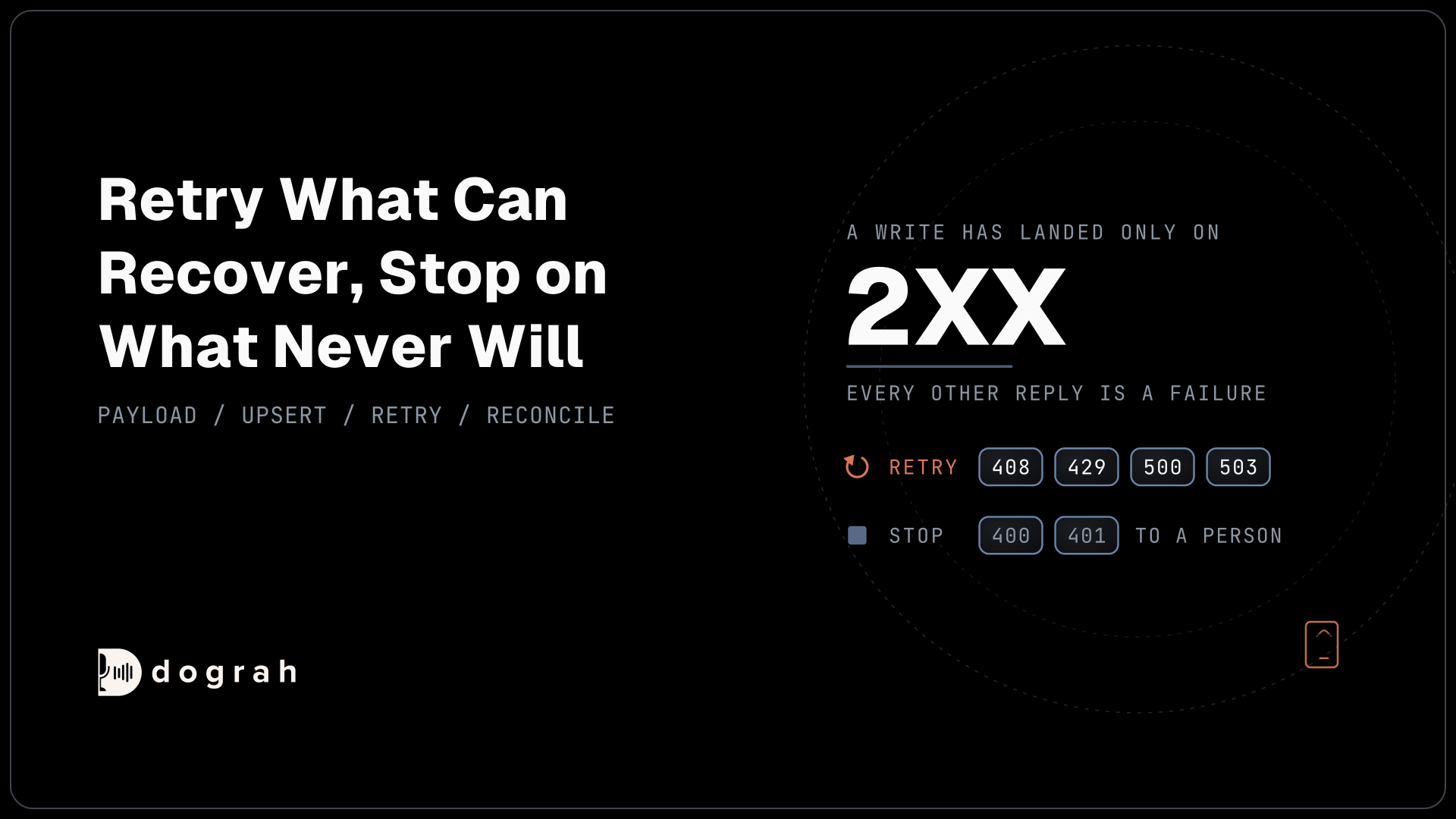
The agent receives n8n's reply: its status code and the data it sent back. If n8n replies with an error code, meaning any number from 400 up, such as 404 (not found) or 500 (a server problem), or it does not reply in time, the agent is told the request failed. So it never mistakes a failed lookup for a real answer.
One team running two live phone agents measured an n8n-backed Google Calendar lookup at 1,272ms for every availability check. After they cached results in n8n's own staticData object for five minutes, a cache hit cost under 50ms. That is a single team's 2026 measurement, so treat it as a field report. The lesson still holds: a third-party API call rarely fits inside a conversational turn.
So keep the tool branch to one fast lookup between the Webhook node and Respond to Webhook. Push slow work, like writing notes or sending emails, to the post-call webhook. Cache anything that repeats. A lookup that still runs long needs a short filler line so the caller is not left in dead air. For a full walkthrough of one such tool, see booking meetings mid-call with Calendly.
Join the Dograh Community
Dograh is an OSS alternative to Vapi. Join our Slack community for queries, releases, best practices & community interactions.
Why a generic webhook beats a named n8n connector
A vendor-specific n8n connector ties your workflows to one voice platform's event format and API.
With plain HTTP in both directions, the n8n side only knows about URLs and JSON. In Dograh, you decide what the webhook sends. In the Webhook node, you type a short JSON template, like the one above, choosing each field's name and which call detail fills it. So n8n receives the exact field names your CRM already uses. You skip the Code node that would otherwise reshape a vendor's fixed event. If you ever change the voice side, you change a URL and a template, and the rest of the workflow stays as it is.
The cost model matters too. Closed voice platforms usually charge around 5 to 7 cents a minute for the platform alone, before any model usage. Self-hosted Dograh has no per-minute platform fee, and n8n's free, self-hosted Community edition does not charge per execution. Your workflows and your call data stay in systems you control.
Wire the post-call webhook first, because it is the lowest-risk connection and it shows you real call data straight away. Add the API Trigger next. Build the mid-call tool last, and time it on a real call, because it is the only one of the three a caller can hear.
Glossary
- Production webhook URL
- The n8n webhook address that only goes live when you publish the workflow. Its data appears in the Executions list, unlike the Test URL, which listens for 120 seconds and shows data in the editor.
- initial_context and gathered_context
- Dograh's two data buckets for a call. initial_context is what you send in before the call, for example through the API Trigger. gathered_context is what the agent extracts during the call, and it reaches your systems through the post-call webhook.
- workflow_run_id
- The call's unique number, returned when n8n starts the call. Store it in n8n so the post-call result joins back to the right record.
- Fair-code
- n8n's own term for its licensing model. The source is available and self-hostable under the Sustainable Use License, which limits use to internal business purposes or non-commercial and personal use. It is not an OSI open source licence.