
Open-source IVR runs on a PBX such as Asterisk, FreePBX, FreeSWITCH or FusionPBX, where a keypad menu routes each caller. An AI voice agent takes over one menu option or extension at a time. Dograh, the open-source AI voice agent platform, connects to Asterisk through ARI and to FreeSWITCH over a SIP trunk.
Key Takeaways
- Keep the PBX and its menu. Move one option to the agent at a time.
- Asterisk and FreePBX connect through ARI. FreeSWITCH connects over a SIP trunk.
- Card payments and short two-option menus stay on the keypad.
This guide maps the open-source systems behind press-1 menus, where an AI agent fits and how Asterisk and FreeSWITCH connect. It also shows how each part works in Dograh, our open-source AI voice agent platform, which runs on your own servers or as a hosted cloud service.
What an open-source phone system does
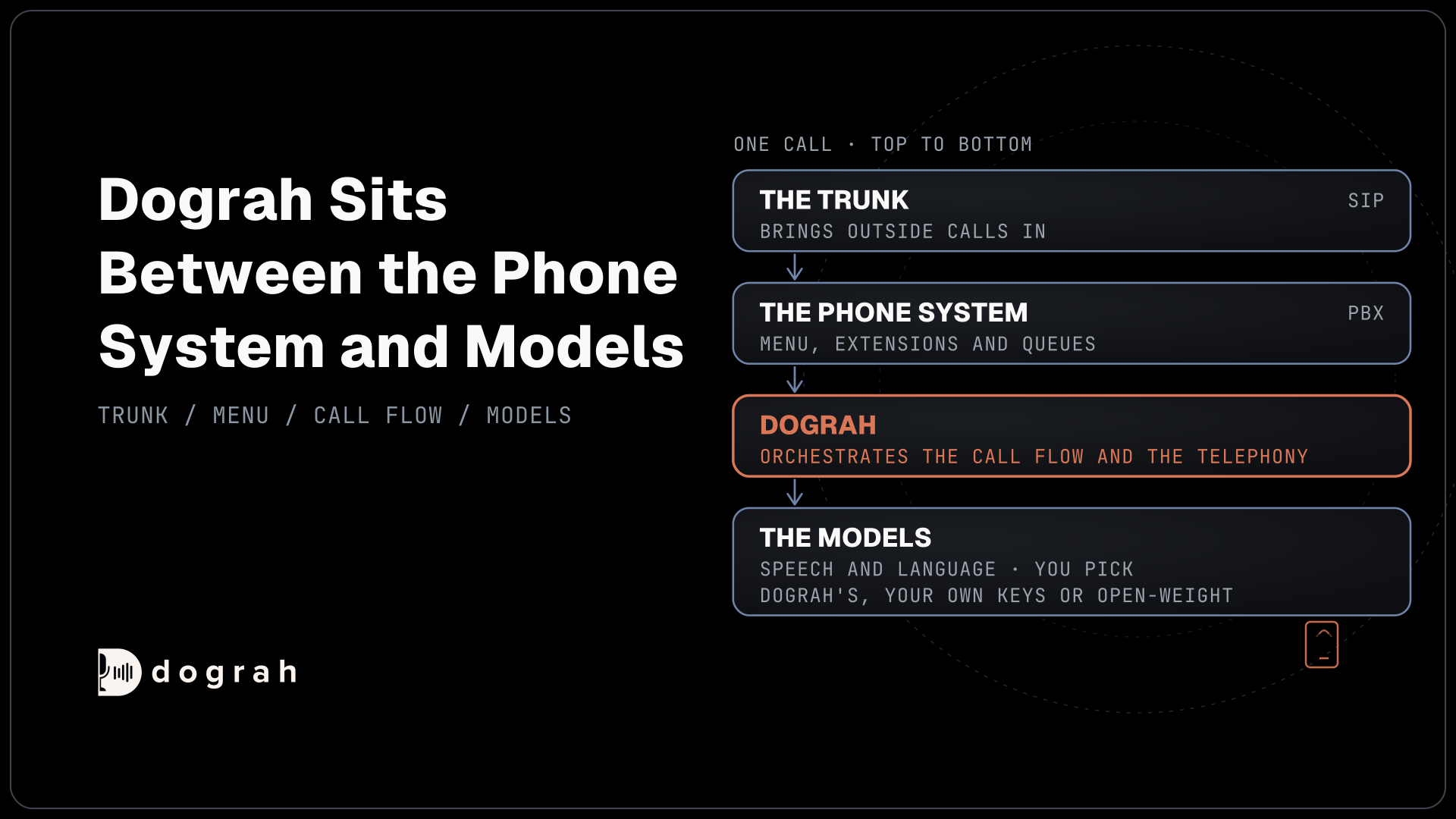
Most open-source phone setups are a PBX with a menu on top and a trunk underneath. The PBX is the software switch that rings extensions, queues and voicemail boxes. The menu, the IVR, is a set of rules inside the PBX that plays a prompt and sends the caller somewhere for each keypress. The trunk is the SIP connection to a carrier that brings outside calls in and carries the PBX's own calls out.
Asterisk is the engine many of these setups run on, and FreePBX puts a web admin on top of it so an office admin can edit menus in a browser. FreeSWITCH is a separate switch with its own codebase. FusionPBX is a multi-tenant web admin built on FreeSWITCH and released under MPL 1.1. VICIdial, the call center dialer, also runs on Asterisk.
Licenses, setup effort and who each project suits are covered in our list of the best open-source IVR software, so this guide does not repeat them. For an AI agent, the question is narrower: how a call gets out of the PBX and into the agent, and how it comes back.
Where an AI agent replaces the press-1 menu
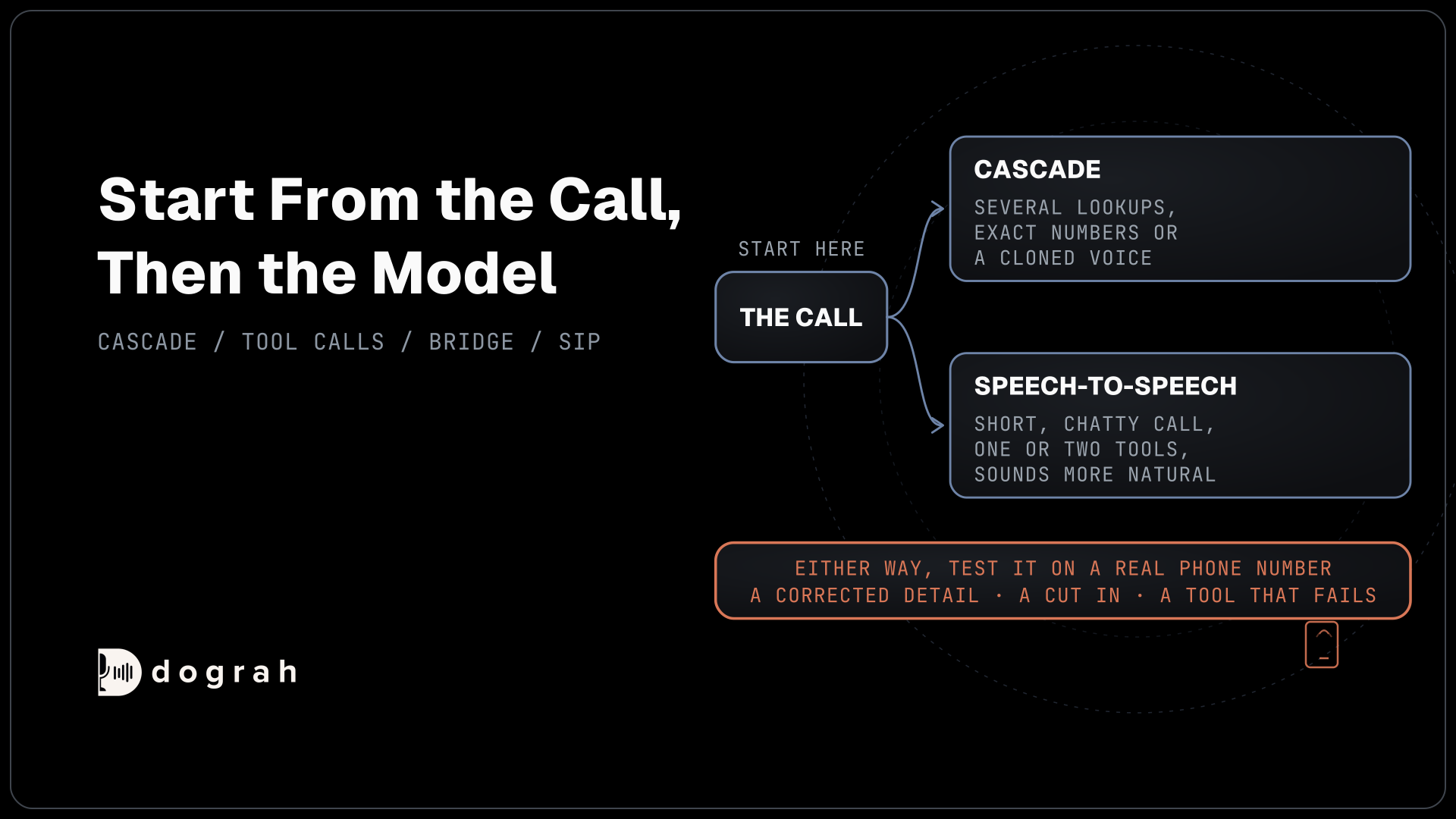
An AI agent takes over one branch of the menu while the PBX keeps running everything else. The caller dials the same number and the PBX answers as before. The difference is what happens after "press 2 for appointments". Instead of a queue, option 2 or a dedicated extension leads to the agent, which asks what the caller needs in plain speech and acts on it through tool calls.
A menu only catches the problems someone thought to list in advance, so callers who fit no option guess or press 0. A voice agent hears the sentence as spoken, and a language model works out the request, so a caller can give an order number and a new delivery date in one breath. Our post on AI voice agent vs IVR explains where that understanding now happens and which fixed parts of the call move into the orchestration layer.
Start with one call type that is common and low-risk, such as order status or rescheduling. Point one menu option or one extension at the agent and leave the rest of the menu as it is. If the agent struggles, you send that option back to its old queue in the PBX and nothing else changes. Our open-source IVR alternative page shows this setup for an inbound line, from the first call type to the checks before real callers reach the agent.
Calls that should stay on the menu
Some menus are worth keeping. A line with two options that route cleanly and a handful of calls a day gains little from an agent, because nobody gets lost in a two-option menu. Lines where almost every caller needs a person, such as a crisis line or a complex negotiation, are better served by getting the caller to that person faster.
Card payments are the clearest case for the keypad. A card number typed on the keypad never enters the spoken conversation, while a spoken one ends up in the recording and the transcript. Callers answer Dograh agents by voice, so keep "press 1 to pay" in Asterisk, FreePBX or FreeSWITCH and send only the spoken call types to the agent.
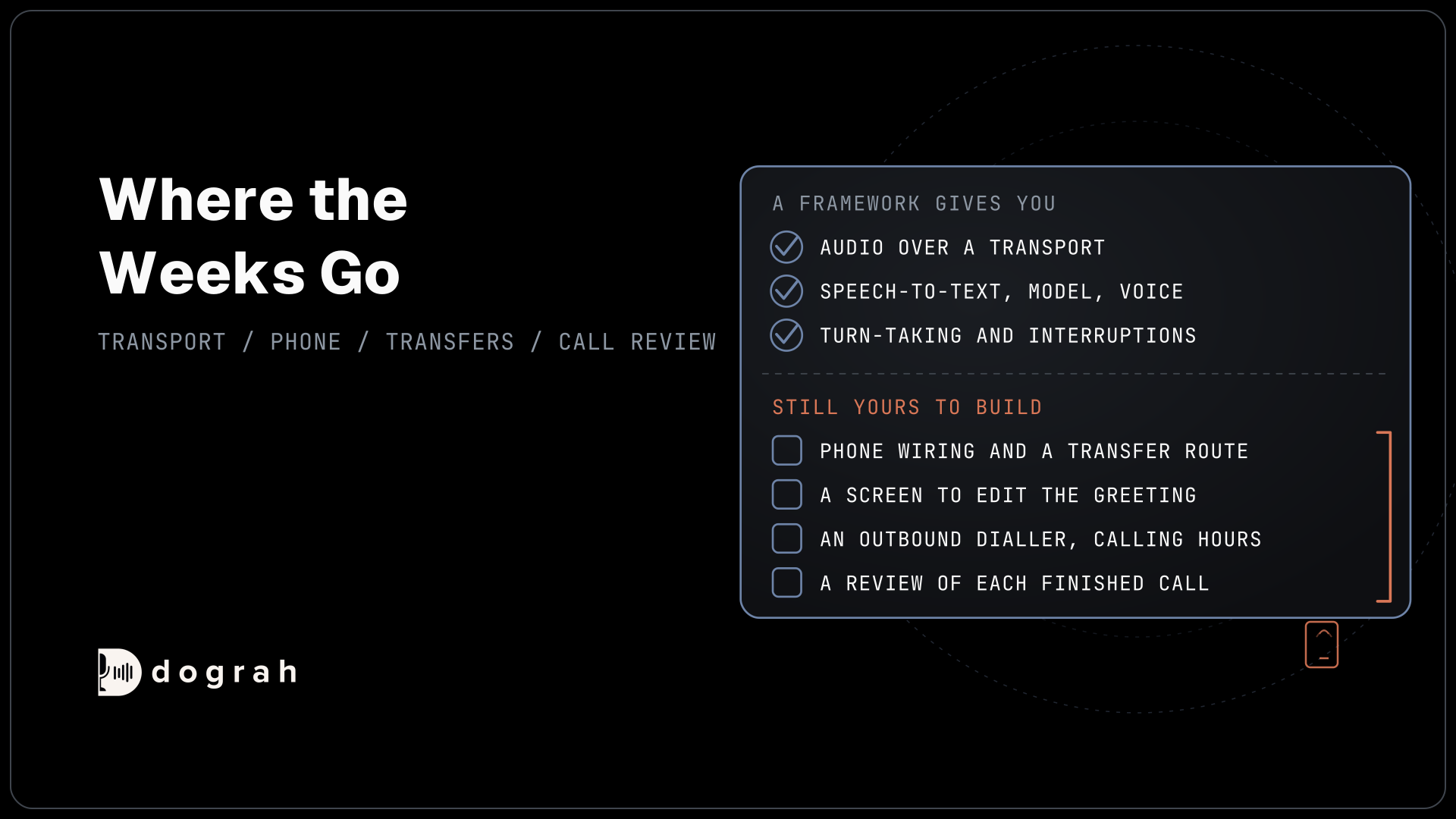
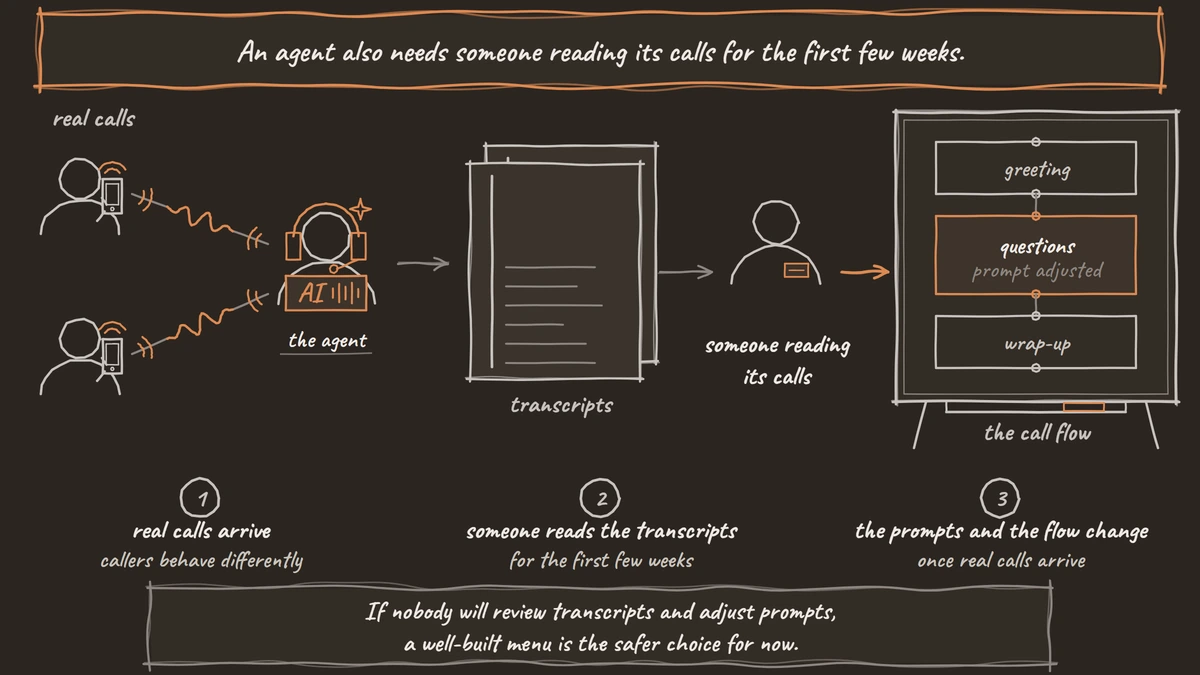
An agent also needs someone reading its calls for the first few weeks. Callers behave differently with an agent than with a person, and in our experience the flow usually changes once real calls arrive. If nobody will review transcripts and adjust prompts, a well-built menu is the safer choice for now.

Open Source Alternative to Vapi / Retell
Self-hosted voice agent platform — no per-minute fees
dograh-hq/dograh
Star on GitHub
Asterisk and FreePBX: connecting through ARI
Asterisk hands calls to Dograh through the Asterisk REST Interface (ARI), so the PBX keeps its trunks, extensions and menus. The dialplan sends chosen calls into a Stasis application, the name Asterisk gives an outside program that takes control of a call. Dograh then answers the call and streams its audio over a WebSocket.
The Asterisk ARI setup runs in a fixed order. You create an ARI user, turn on Asterisk's HTTP server and add a WebSocket client that points at Dograh. Then you enter those values under Telephony and save, and Dograh generates the Stasis application name, something like dograh_a1b2c3d4e5f6. That name goes into the dialplan as Stasis(<name>), and each extension that should reach an agent is added as a phone number.
You choose which calls go to Stasis. A dialplan line can send one extension, such as 8000, or a pattern that catches every extension you register. Each registered extension gets its own agent, so extension 8000 can run a booking agent and 8001 an after-hours agent on the same Asterisk.
Check the version before anything else. The audio travels through Asterisk's WebSocket channel driver, and Asterisk's channel driver page lists it from releases 22.6.0, 23.0.0, 21.11.0 and 20.16.0. On Asterisk's release lines, 22 is a fully supported long-term line and 24 is the newest one, while 20 now gets security fixes only. A new AI setup should start on 22 or 24.
The WebSocket client points at Dograh Cloud's address, wss://api.dograh.com/api/v1/telephony/ws/ari with TLS turned on, or at your own server when you self-host. A self-hosted install on the same network as the PBX keeps the audio path short. Call audio runs as G.711 u-law, so any PJSIP endpoint or trunk that carries these calls must allow ulaw.
FreePBX uses the same setup, since Asterisk runs underneath. For calls the agent places, the Dial String Template Local/{number}@from-internal sends them through FreePBX's own outbound routes, so your trunk rules still apply. Our FreePBX and AI voice agent tutorial walks through it from the ARI user to the inbound route.
Other open-source projects connect Asterisk to an AI over AudioSocket, a TCP protocol that streams 8 kHz audio, or through external media over RTP. Both work, but the bridge between Asterisk and your models is then yours to run and debug. With ARI and the WebSocket channel, that bridge sits inside Dograh, next to the call flow, the tools and the call traces.
FreeSWITCH and FusionPBX over a SIP trunk
FreeSWITCH reaches Dograh the same way a carrier does, as a SIP trunk. A telephony configuration called Dograh Cloudonix SIP, a Managed SIP domain connected to your agents, is normally set up at signup. FreeSWITCH sends calls to its inbound hostname, and the agent's outbound calls come back to FreeSWITCH from a fixed origin IP address.
On the FreeSWITCH side that means a gateway with registration turned off, pointed at the inbound hostname, and a dialplan entry that bridges the chosen DIDs to it. Calls coming back from Dograh land on FreeSWITCH's external profile, which does not ask inbound calls to authenticate, so you limit them to Dograh's origin IP. Our tutorial on how to connect FreeSWITCH to an AI voice agent gives the gateway, the dialplan and the test calls in order.
Because the calls travel as an ordinary SIP trunk, nothing FreeSWITCH-specific is set in Dograh. Each number you send is added in E.164 form, with the agent that answers it, exactly as it would be for a carrier's trunk. That also means a FreeSWITCH upgrade or a move to new hardware touches only the gateway and the hostname.
FusionPBX follows the same path, because it runs on FreeSWITCH. Its web admin creates the gateway and the dialplan entries that you would otherwise write in XML, so the steps match with forms instead of files. FreeSWITCH's repository shows the 1.11 line as current, which is where a new build should start.
FreeSWITCH or Asterisk for a new build
If you already run one of them, keep it. Both carry an AI agent well at the scale of a business phone line, and moving a working PBX to save one setup step is rarely worth the risk.
For a new build, the team and the path decide it. Asterisk, alone or under FreePBX, suits an office or IT admin and has the larger community. Through ARI it hands each call over with its extension known, so transfers ring PJSIP extensions and queues directly. FreeSWITCH suits a developer team building telephony into a product or running many tenants. It reaches the agent as a SIP trunk, and transfers go back out over that trunk for FreeSWITCH to route.
Treat published speed comparisons with care. Concurrency figures for either switch rarely name the hardware or the codec behind them, so load-test your own server with your own call pattern. Our comparison of FreeSWITCH vs Asterisk for AI voice agents goes through the audio path, the SIP details and transfers on each.
Join the Dograh Community
Dograh is an OSS alternative to Vapi. Join our Slack community for queries, releases, best practices & community interactions.
Handing callers back to your staff
Both PBX paths can hand a caller to a person. Twilio, Telnyx, Plivo, Cloudonix and Asterisk ARI all support Transfer Call, and because Managed SIP runs on Cloudonix, the FreeSWITCH path has it too.
On Asterisk, the destination is an endpoint on the PBX itself, such as PJSIP/1001 or PJSIP/sales-queue. Dograh rings that extension or queue first, the caller listens to hold music, and the two are put through when a person picks up. No answer, a busy line, a failed call or a timeout all return to the agent as a failed transfer, and the conversation goes on from there. Write the prompt so the agent knows what to offer next.
On the FreeSWITCH path, the transfer goes out on the trunk tied to the caller ID and arrives at FreeSWITCH like any outbound call from the agent. FreeSWITCH's dialplan then decides where it rings. Test that route on a real phone call, because a transfer needs a live phone line.
If staff need the caller's details when they pick up, an HTTP API tool writes them to your helpdesk or CRM before the transfer, so they are on screen when the extension rings.
Outbound calls through your PBX
The agent can also place calls through the PBX, so reminders and callbacks use the trunks and caller IDs you already have. On Asterisk, the Dial String Template decides how a number reaches a trunk. The default, PJSIP/{number}, dials an endpoint named after the number. PJSIP/{number}@my-trunk sends every call out over one trunk, and Local/{number}@from-internal hands it to FreePBX's outbound routes.
Campaigns follow the same template. A campaign row on an Asterisk configuration can hold an extension, a SIP URI or a full dial string alongside ordinary phone numbers. You set the retries per campaign, from 0 to 10, and the calling hours.
On the FreeSWITCH path, you add an outbound trunk in Dograh with FreeSWITCH's public hostname as the SIP domain, and FreeSWITCH bridges the call to its carrier. Every number also needs a default caller ID, because Cloudonix rejects an outbound call without one. Set it even if the line only takes inbound calls for now.
Models, data and cost beside the PBX
Dograh sits between the PBX and the models. It orchestrates the call flow and the telephony, and you pick the speech and language models it uses, whether Dograh's own, a provider on your own keys or open-weight models on your own hardware.
Self-hosting matters most when call data has to stay in the building. A self-hosted install with open-weight speech and language models on servers next to the PBX keeps recordings and transcripts inside your network. With your own keys for a hosted model, the contract becomes yours, but the audio still reaches that provider.
Pre-recorded clips can play the lines the agent says most often, with text-to-speech for the rest, so the agent can sound like the menu recordings callers already know. The visual workflow builder covers the agent's side of the call, so a new question is a step edit in the browser, with no dialplan reload.
The PBX software carries no license fee, so its cost is the server and the trunk. Self-hosted Dograh has no per-minute platform fee, but servers, model keys and phone minutes still cost money. Dograh Cloud charges a 1¢-a-minute platform fee. Your carrier keeps billing the trunk as before.
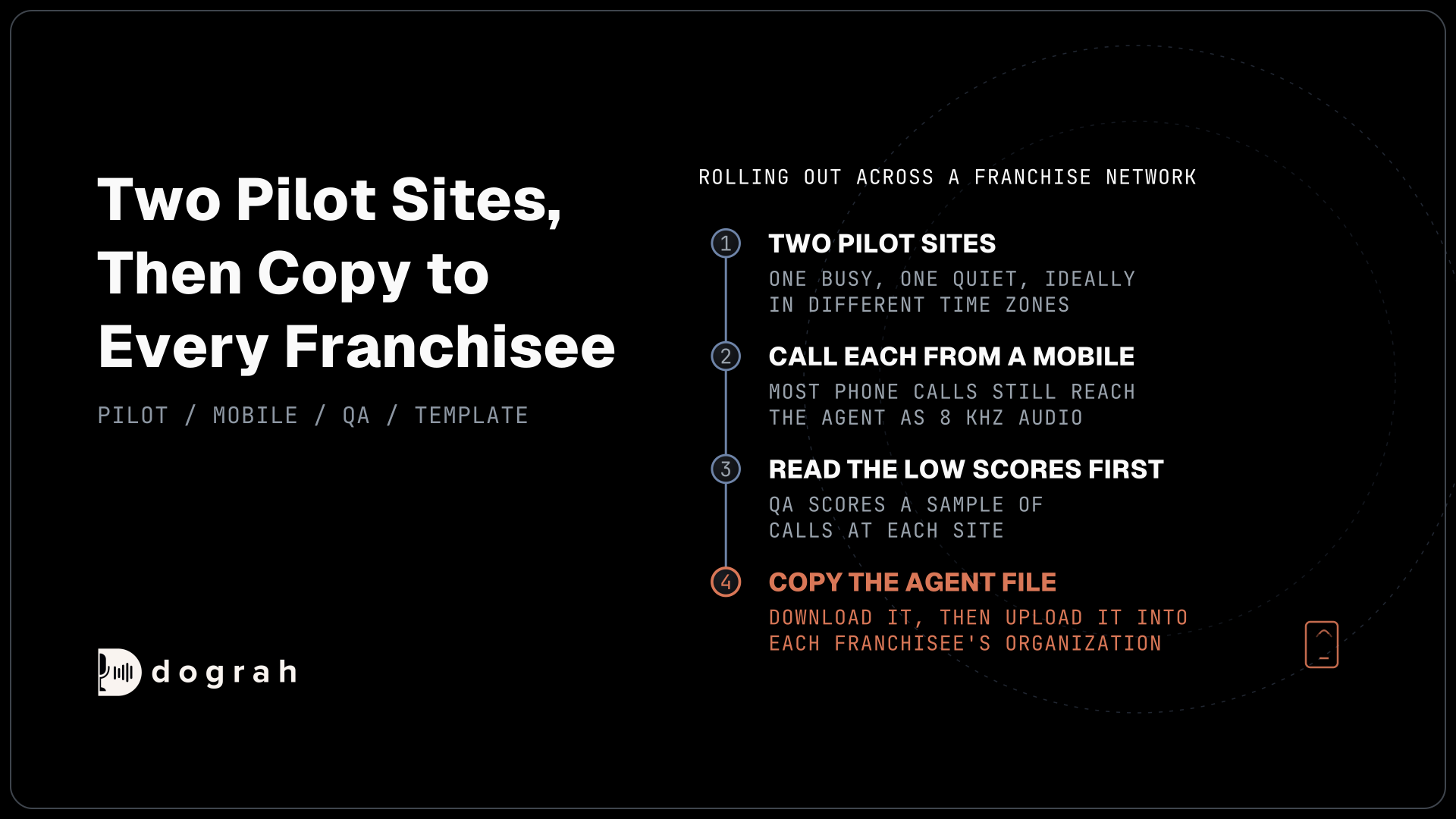
Rolling it out one option at a time
Launch with one option, tested over the phone line callers will use. Phone networks still carry most calls at 8 kHz, half the 16 kHz a browser demo gets, so an agent that sounds sharp on your laptop can mishear names and numbers once real callers ring in. Call the option from a mobile and a landline before any customer does.
Then watch real calls. Every call keeps a trace of what speech-to-text heard and the time each turn took. Dograh's QA scores each step of a call separately, on the share of calls you choose to sample. In our experience, a random 5 to 10% sample of live calls catches what a dashboard hides.
Move the next option over only when the first one is solving callers' problems, and keep the menu as the front door until then. The PBX, the trunk and the numbers stay where they are the whole time, which is what makes the change easy to reverse.
Each part of connecting an open-source PBX to an AI agent above has its own deep dive:
- FreeSWITCH vs Asterisk for AI Voice Agents: SIP and Setup Paths
- How to Connect FreeSWITCH to an AI Voice Agent Over a SIP Trunk
Glossary
- Stasis application
- Asterisk's name for an outside program that takes control of a call through ARI. The dialplan sends a call into it with Stasis(<name>), and Dograh generates a unique name for each Asterisk configuration so two setups never claim the same calls.
- WebSocket channel driver
- The Asterisk module, chan_websocket, that streams call audio to an outside service over a WebSocket. Dograh's ARI path needs it, and Asterisk ships it from 22.6.0, 23.0.0, 21.11.0 and 20.16.0.
- Managed SIP
- The SIP domain that is normally set up at signup, named Dograh Cloudonix SIP in the app. A carrier trunk or a PBX such as FreeSWITCH sends calls to its inbound hostname, and the agent's calls come back from a fixed origin IP.
- Dial String Template
- The setting on an Asterisk ARI configuration that turns a number into something Asterisk can dial, such as PJSIP/{number}@my-trunk or Local/{number}@from-internal for FreePBX outbound routes.