
AI voice agents for franchises and multi-location businesses work best as one shared agent answering every location's own number. The dialed number tells the agent which site the caller rang, a lookup loads that site's hours, services and staff, and each existing line forwards to its own agent number, so calls never get mixed up.
Key Takeaways
- One agent can answer every location, because the dialed number names the site.
- Forward each existing line to its own agent number, never to a shared one.
- Settle who holds numbers, keys and recordings before the first site goes live.
This guide covers running one voice agent across many sites, from local numbers and forwarding to shared prompts, branch routing, data ownership and rollout. Each part comes with its Dograh setup, using the open-source platform we build, which you can host yourself or use as a managed service.
What one agent handles for many locations
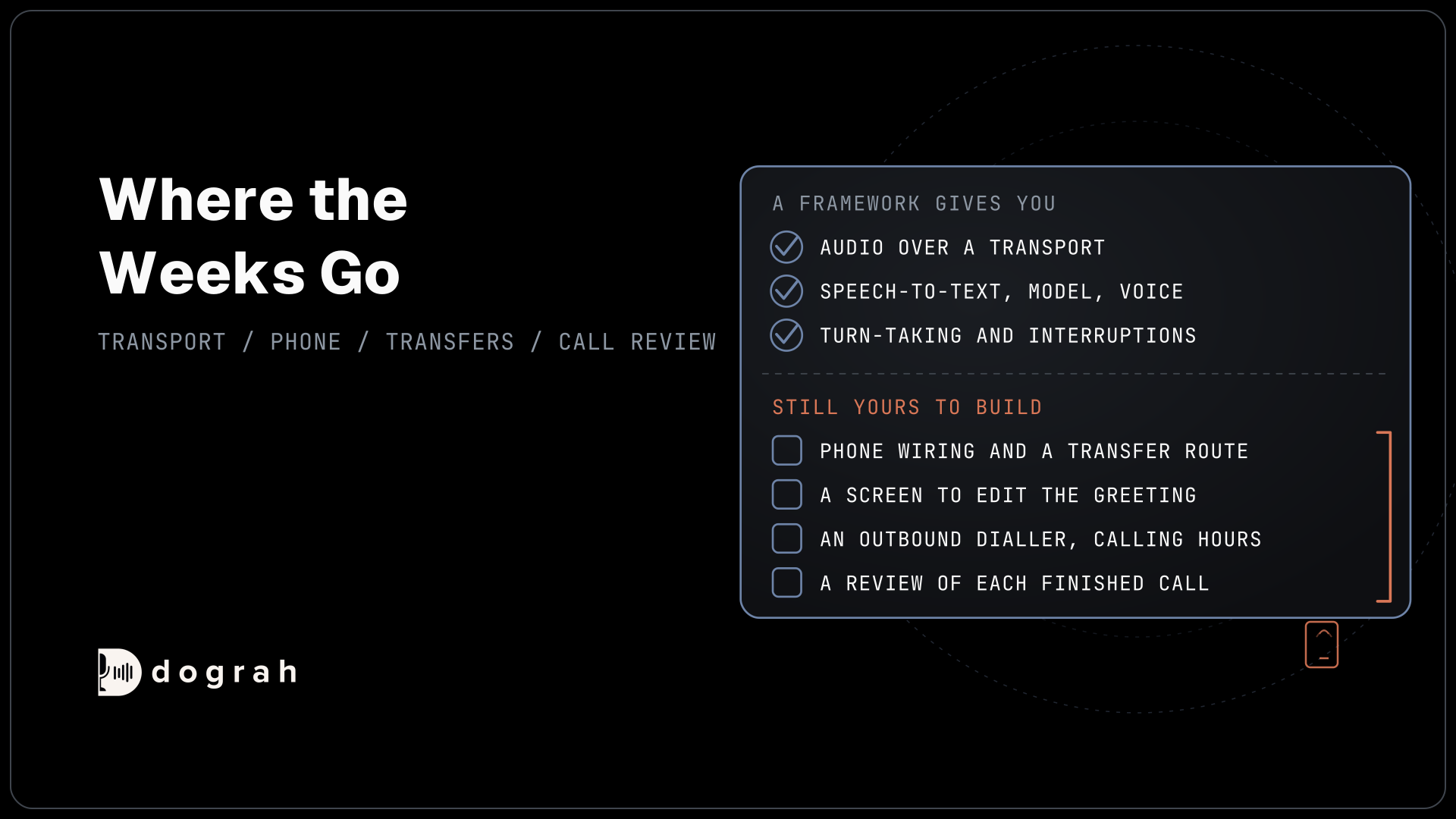
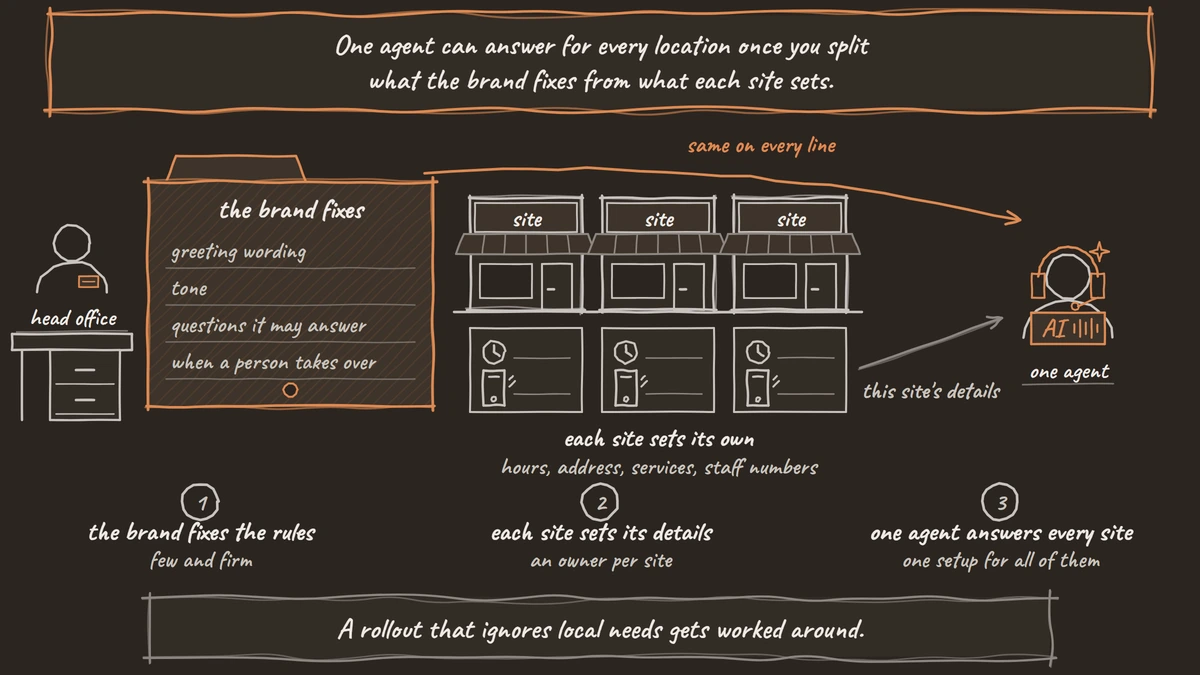
One agent can answer for every location once you split what the brand fixes from what each site sets. The brand fixes the greeting wording, the tone, the questions the agent may answer and the rules for when a person takes over. Each site sets its hours, address, services, prices and the staff numbers its calls go to.
This is the normal shape of a franchise network. The International Franchise Association's 2026 outlook projects 845,000 franchise establishments in 2026, up from 832,521. FRANdata counts 19.3% of franchisees running more than one unit, and together they control 58.8% of all franchised locations. Most locations sit with an operator who already runs several sites and wants one setup for all of them.
A rollout that ignores local needs gets worked around. If the agent quotes the wrong closing time for one town, that franchisee will forward its line somewhere else, and the brand loses the call along with the data. Give each site an owner for its own details and an easy way to correct them, and keep the brand rules few and firm.
Some rules belong to the brand on every line. A caller who says they are in danger hears the same instruction at every site: get to safety and call 911 (999 in the UK, 000 in Australia, 112 in the EU). If you want callers told they are speaking with an automated assistant, or a location's state law requires it, put that line in the Greeting Text next to the business name. Because Allow Greeting Interruption starts switched on, turn it off on the Start Call node so callers hear the whole notice before they speak.
One local number for every location
Every location should keep a local number of its own, even when one agent answers all of them. Google's Business Profile guidelines ask for "a phone number that connects to your individual business location" and prefer a local number over "a central call center helpline number". The number must also be "under the direct control of the business", which matters later when you decide who opens the carrier account.
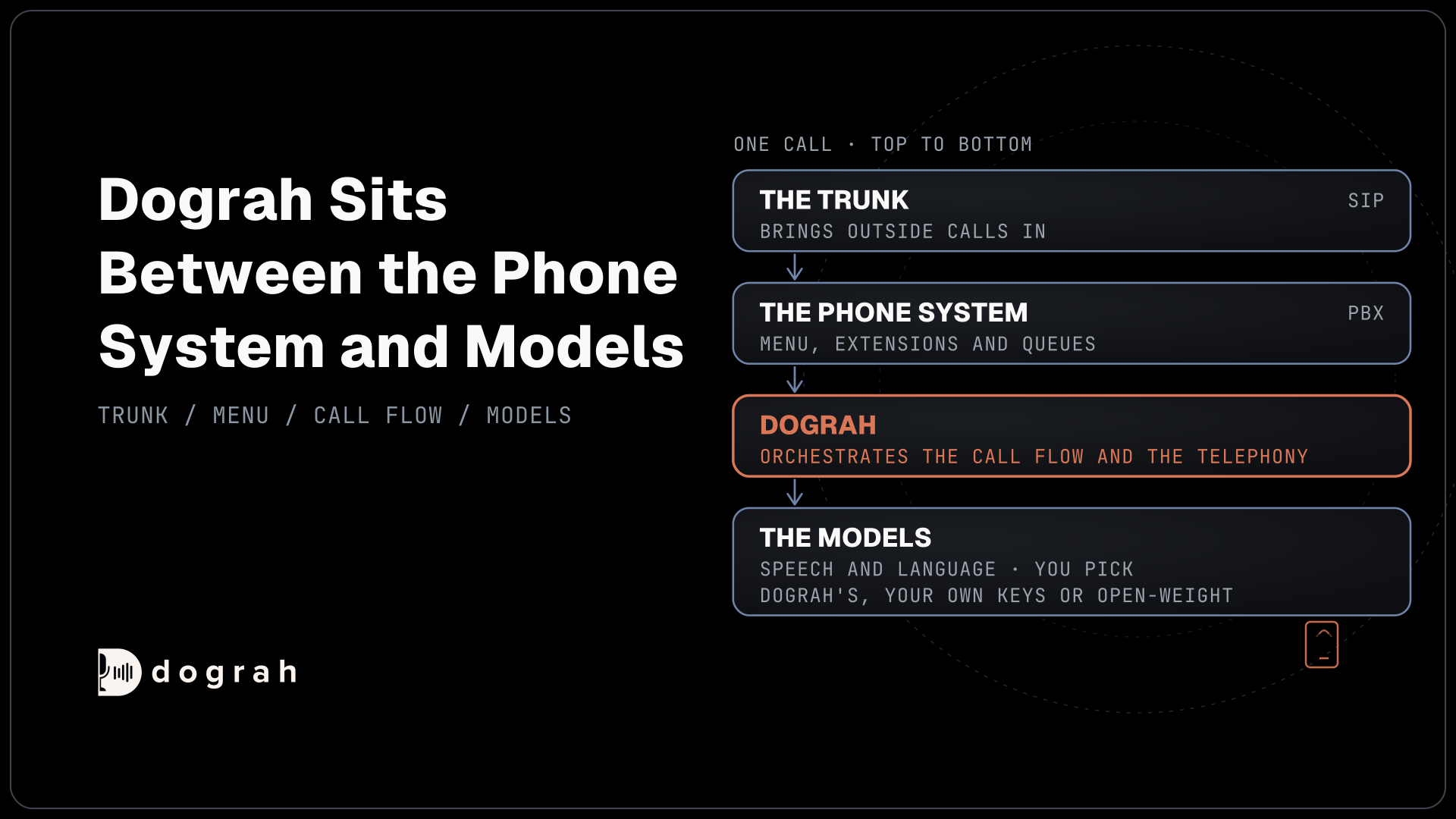
In Dograh, each number is added under Telephony with Add phone number, and each one has its own Inbound workflow setting that picks the agent. Fifty location numbers can point at one shared agent, or a few can point at a separate agent for a site that works differently. The inbound calling setup walks through the screens. Dograh sells no phone numbers, so they come from your own carrier account at Twilio, Telnyx, Plivo or another provider, or from a trunk you already have.
The number that rang is how the agent knows the location. Our post on international SIP trunks uses the same signal to tell one country's line from another, and here it tells the Dallas shop from the Denver one. Choosing a number by city or area code, and the caller ID and 911 address rules for each one, are covered in local phone numbers for every franchise location.
Keep existing numbers: one forward per line
Most sites already have a number on their signs, vans and Google listing, and the simplest move is to forward it. Call forwarding is a carrier setting, so you switch it on with the carrier. On a Verizon mobile line, Verizon's forwarding guide uses *72 plus the 10-digit number to forward all calls, *71 for unanswered calls only and *73 to switch forwarding off. Business lines and office phone systems have their own menus, so ask your carrier how yours works.
Forward each location's line to its own agent number, never to one shared number. Dograh routes on the number that rang it and does not read the forwarded-from details a carrier may attach to the call. If all 50 sites forward to one number, every call arrives looking the same, and the agent has no way to tell which town the caller meant to reach.
Forwarding also has two modes worth choosing site by site. Forward all calls and the agent answers everything. Forward unanswered calls only and staff pick up first, with the agent taking overflow and evenings, which is how after-hours coverage usually starts.
Each forwarded call uses two call legs, one on the old carrier and one on the new. Our guide to porting a business number without downtime covers how those legs are billed and how to move a number for good later, when a site is ready to drop its old carrier.

Open Source Alternative to Vapi / Retell
Self-hosted voice agent platform — no per-minute fees
dograh-hq/dograh
Star on GitHub
One prompt with local details per site
Write the prompt once and leave blanks for everything that changes by site. A line such as "You answer calls for {{location_name | our team}}. Today's hours are {{hours_today | not available, so offer a callback}}." works for every location. The part after the bar is the fallback, spoken when a value is missing, so a gap never comes out as silence.
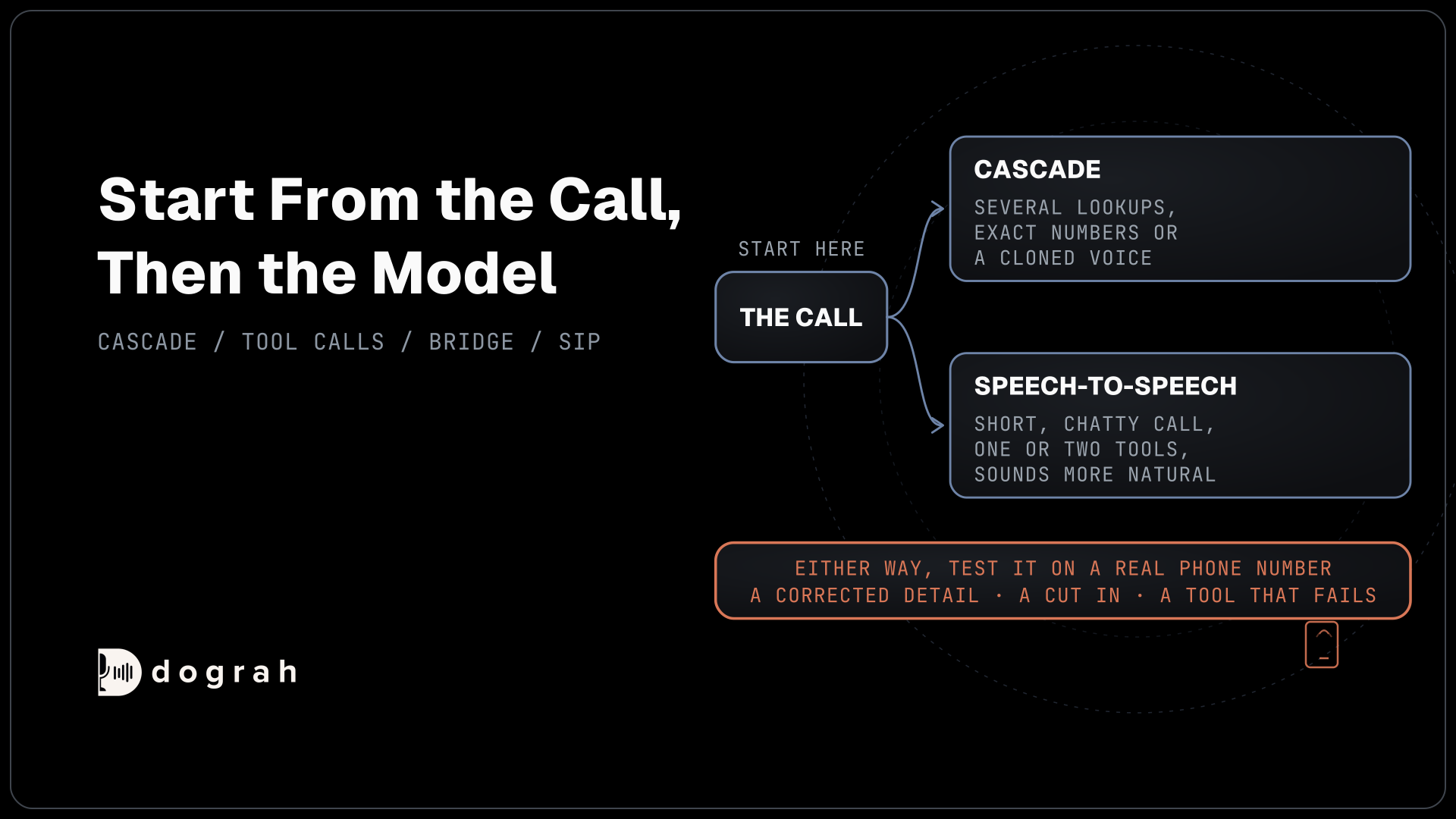
The values come from Pre-Call Data Fetch at the bottom of the Start Call node. Set it to Inbound calls only and give it your Endpoint URL. When a call connects, Dograh posts the caller's number and the dialed number, sent as to_number, and your endpoint answers with that site's name, hours, address, services and staff numbers. The caller hears ringing while this happens, and the greeting waits for the answer for up to 10 seconds.
Brand-wide answers go in a Knowledge Base that is the same for every site, such as service descriptions, policies and what a warranty covers. Upload PDF, DOCX, DOC, TXT or JSON files there, each no larger than 5 MB. Keep anything that differs by site out of it, or the agent may quote one town's prices in another.
Time zones need care. There are built-in time variables such as {{current_time_America/Chicago}}, but the zone is written into the prompt itself, so one prompt cannot switch zones per site. For a network across several zones, have the lookup return each site's local time and an open-now flag, and let the prompt read those instead.
The same lookup can change the voice or the language model for one call, for example a regional voice for sites in Quebec. A pre-recorded clip of the brand greeting, with a generated voice as the fallback for everything else, keeps fifty sites sounding like one brand.
Sending callers to the right branch
Most calls need no routing at all, because the caller dialed a location's own number. Routing matters on a brand-wide number, such as a toll-free line on the website, and when a site is closed or every line there is busy. On a brand-wide line, the agent asks for a ZIP code or town and looks up the nearest branch through an HTTP API tool. The caller's area code is only a weak hint, since mobile numbers move with their owners.
Handing a caller to staff uses Transfer Call, and its destination can be chosen in a few ways. The simplest is a template that fills in the staff number your lookup returned for that site. For more control, Context Mapping picks a number from rules on a value such as the location ID, with a fallback when nothing matches, or a Dynamic HTTP Resolver asks your own system which branch is open now. The Transfer Call settings show each option.
During a transfer, Dograh rings the site's staff number before connecting anyone, the caller hears hold music meanwhile, and a person answering connects the two. A transfer that times out, meets a busy line or fails comes back to the agent as failed, and the conversation goes on. Transfer Call works on Twilio, Telnyx, Plivo, Cloudonix and Asterisk ARI. Sites on Exotel numbers get a callback request booked by the agent whenever a caller asks for a person.
The full setup, with the lookup, the rules and the JSON your endpoint returns, is in routing callers to the right franchise location.
Who owns the agent and the call data
Decide who runs the agent before the first site goes live, because that choice decides who holds the recordings. The franchisor can run one organization for the whole network, or host a separate organization for each franchisee, or each franchisee can run its own copy, self-hosted or on Dograh Cloud. One option on Cloud is a team per franchisee, with the franchisor's support staff added to each team by agreement.
The organization is the line that keeps calls apart. Everyone in an organization can open its calls in the app, with no per-member roles inside it, so a franchisee who should never hear a neighbor's recordings needs its own organization. Model keys, phone numbers and storage follow the same split, and whoever holds each account holds what sits in it.
The franchise paperwork already touches this. Under the FTC Franchise Rule, the Franchise Disclosure Document (FDD) must say whether the franchisor will have independent access to the data generated or stored in the franchisee's computer systems, and any limits on that access. Who owns customer data and recordings is set by the franchise agreement, so write the voice agent into it and confirm the wording with your franchise counsel.
Our post on who owns the voice agent and call data walks through each setup and what leaves with a franchisee who exits the network.
Join the Dograh Community
Dograh is an OSS alternative to Vapi. Join our Slack community for queries, releases, best practices & community interactions.
Rolling out from two pilot sites
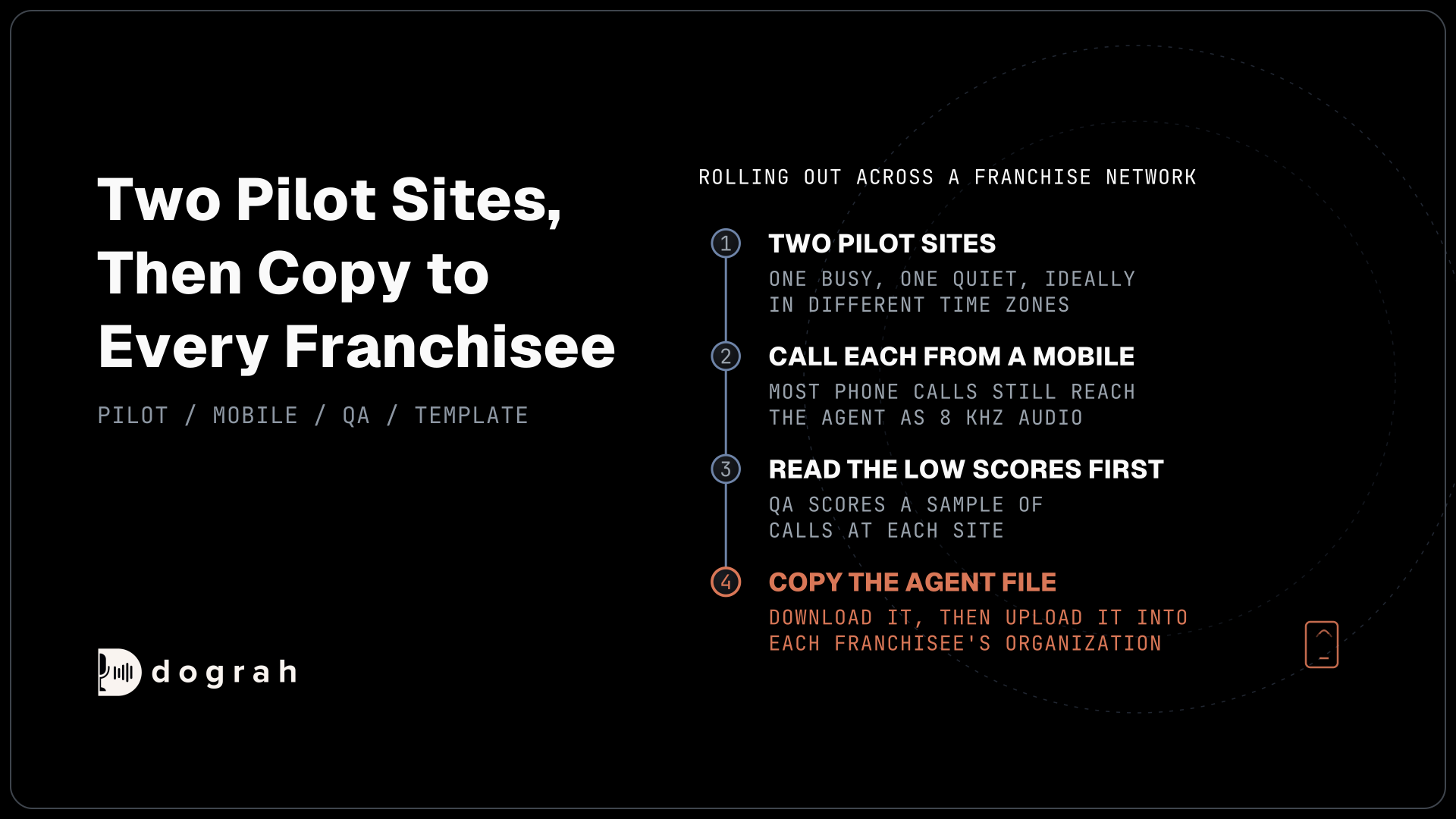
Start with two or three sites that want the agent, run them for a few weeks, then copy. Pick one busy site and one quiet one, ideally in different time zones, so the lookup and the hours logic get tested early. Call each pilot number from a mobile phone, because most phone calls still reach the agent as 8 kHz audio while a browser test runs at 16 kHz.
Copying an agent is a file. Download Workflow saves the agent's definition, and Upload Agent Definition loads it into another organization, so a franchisor can hand a template agent to each franchisee. Built-in QA scores each step of a call, and its Sample Rate setting picks a share of calls at random, so set a sample per site and read the low scores first. Each call's full trace shows what the agent heard and which site details it loaded.
Calls at once are counted per organization. By default a self-hosted install handles 10 simultaneous calls, which one environment setting changes, while Dograh Cloud's pay-as-you-go plan includes 10 and more on request. Fifty sites on one shared agent share that limit at the Monday-morning peak, while separate organizations per franchisee each get their own.
Outbound calls need one more decision. A campaign rotates across every number on its telephony configuration and runs its calling hours in one time zone, so run a campaign per location or per time zone. For one-off calls, the API Trigger can name the configuration and the exact number to call from, so a reminder for the Tampa site shows the Tampa number.
What a 50-location setup costs
Self-hosted Dograh has no per-minute platform fee, but servers, model keys and phone minutes still cost money. Dograh Cloud charges a 1¢-a-minute platform fee. Number rent is the one line left to plan for, and it scales with the number of sites.
Take 50 locations as an example, each with a new local number on Twilio at $1.15 a month. That is 50 x $1.15 = $57.50 a month in number rent before any minutes. Telnyx lists US local numbers from $1 a month and Plivo at $0.50, which would make the same 50 numbers $50 or $25. A site that forwards its old line also pays its old carrier for the forwarded leg, under whatever plan it has there.
If you would rather keep every site's number with the carrier it already uses, see our page on an AI receptionist on your own phone lines.
Each part of a multi-location setup above has its own deep dive:
- Local Phone Numbers for Every Franchise Location: Setup by Site
- Franchisor vs Franchisee: Who Owns the Voice Agent and Call Data?
- One Voice Agent for 50 Locations: Route Callers to Each Branch
Glossary
- Dialed number
- The number the caller rang, which reaches the agent as to_number. With one number per site, it tells a shared agent which location the call is for.
- Call forwarding
- A carrier setting that sends calls from one number to another, for all calls or only unanswered ones. The agent sees the number the call was forwarded to, so each site needs its own.
- Pre-Call Data Fetch
- A Start Call setting that posts the caller's and dialed numbers to your endpoint as the call connects and loads the reply into the call, such as a site's hours and staff numbers. It waits up to 10 seconds.
- Franchise Disclosure Document (FDD)
- The document a US franchisor must give prospective franchisees under the FTC Franchise Rule. It must say whether the franchisor can independently access data in the franchisee's computer systems.