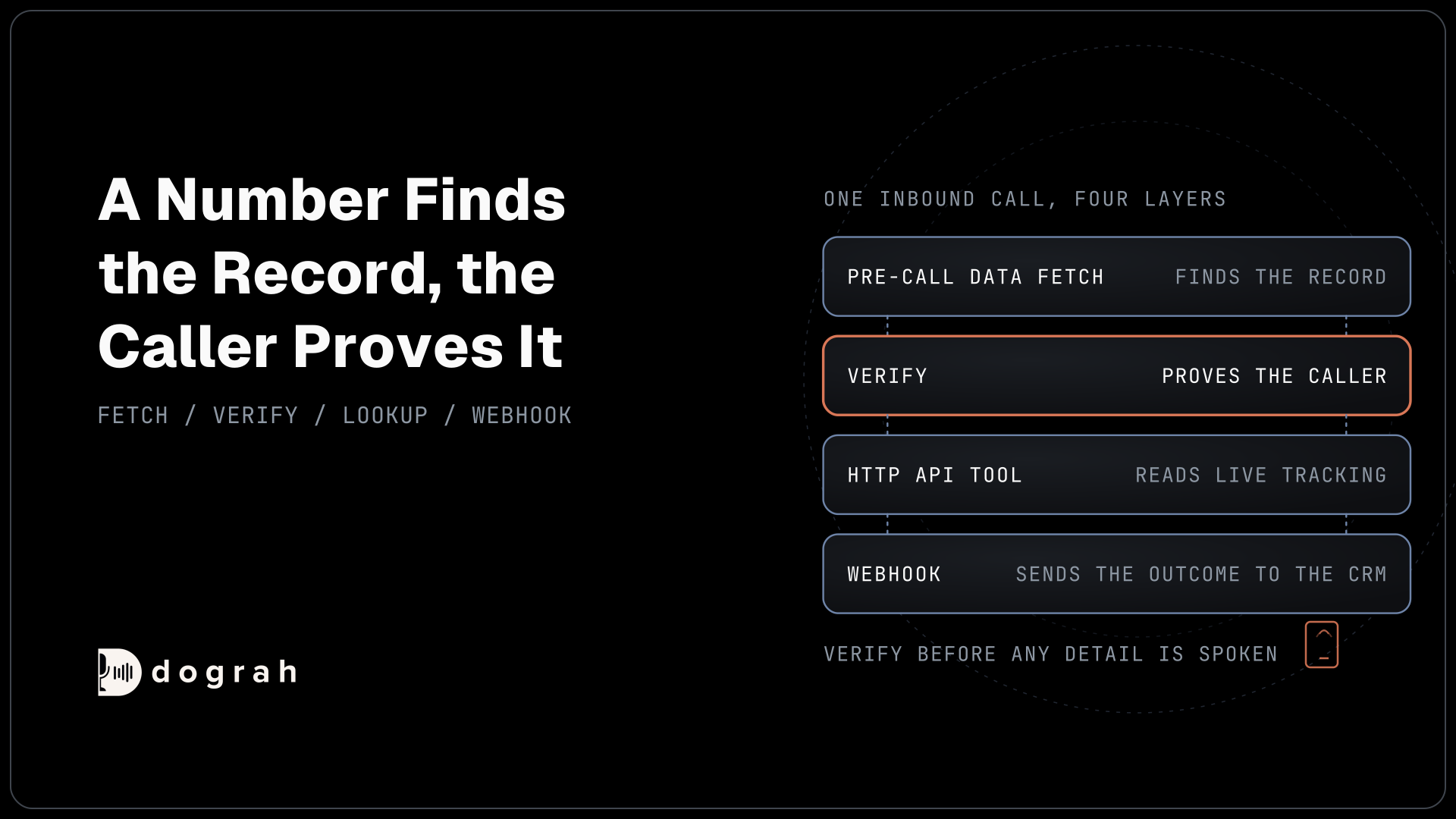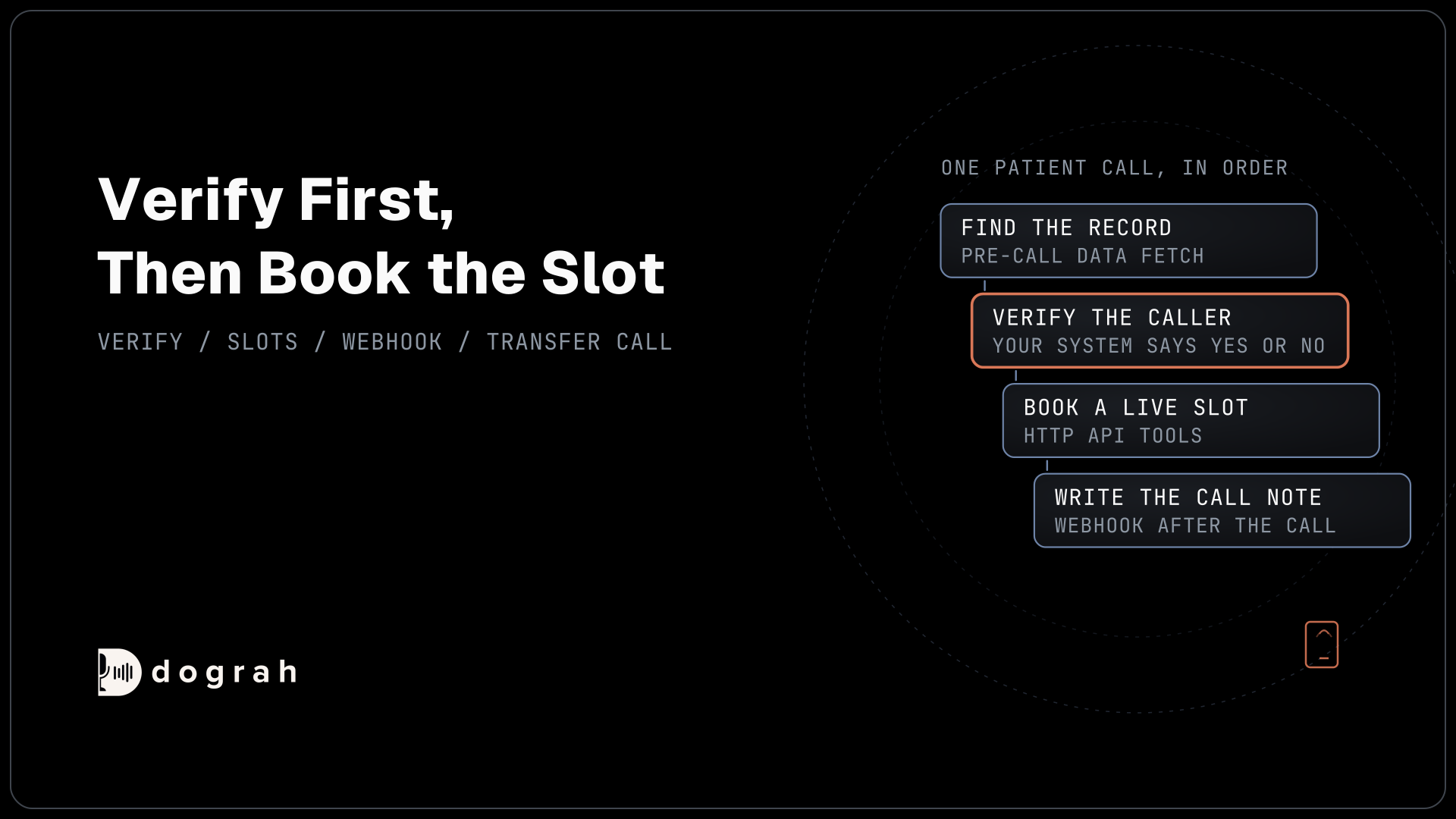

To build a voice agent for healthcare in Dograh, create an inbound agent, let Pre-Call Data Fetch find the patient's record, verify the caller through a tool before any health detail is spoken, book live slots with HTTP API tools, send clinical questions to a person, and write the call record back by webhook.
Key Takeaways
- The phone number finds the record. Your own system decides if the caller matches.
- Keep the expected date of birth out of the agent entirely.
- Test on a web call, then on a real phone line, before you publish.
This post is part of our guide to AI voice agents for hospitals and health systems. The guide's section on building it yourself or choosing a platform points here for the build. This tutorial builds an inbound patient booking agent in Dograh, an open-source, self-hostable voice agent platform, one screen at a time.
What you need before you start
You need a Dograh account, three small endpoints on your side and a phone number. An endpoint is a web address your own system answers at. The first finds a patient by phone number. The second checks a date of birth and a reference against the record and answers yes or no. The third reads and books slots in your scheduling system, either directly or through your electronic health record (EHR) scheduling API.
What you'll build:
- Pre-Call Data Fetch finds the caller's record when the call connects.
- A verification tool checks the caller before any health detail is spoken.
- HTTP API tools read open slots and book one, with tool Messages over the pause.
- A webhook writes the call record back to your system after the call.
The design rules are in AI voice agents for patient appointment scheduling. This post is the build.
A patient call carries protected health information (PHI) from the first sentence. Under the Health Insurance Portability and Accountability Act (HIPAA), self-hosting Dograh means no business associate agreement (BAA) with Dograh is needed, because the platform runs on your servers. A speech or language model you use through an API key still receives the audio or the transcript, so each needs its own BAA unless the models run on your servers too. The phone carrier may need one as well, depending on what it stores. Our post on HIPAA-compliant voice AI for hospitals works through each layer. Self-hosted Dograh has no per-minute platform fee, though servers, paid model keys and phone minutes still cost money. Dograh Cloud has a 1¢-a-minute platform fee.
Step 1: Create the agent and write the greeting
Start with the Create Voice Agent form. Set Call Type to Inbound, enter Appointment Booking as the Use Case, and describe the agent in Activity Description: "Book, move and cancel appointments for verified patients using live slots, and send clinical questions to the nurse line." Dograh generates a prompt from that description for you to edit.
Put the hard rules in the global prompt in plain words. The agent handles appointments only, says nothing about one until the caller has passed verification, and never gives medical advice or interprets a symptom.
Now write the Greeting Text in the Start Call node, optional fixed text that Dograh speaks word for word. Name the clinic and say it is an automated assistant: "Thanks for calling Riverside Family Clinic. You're speaking with the clinic's automated assistant. I can help with appointments."
Leave the patient's name out. Greeting Text can carry variables with a fallback, such as {{patient_first_name | there}}, but it plays before verification, and a name spoken to whoever holds the phone tells them this person is a patient here.
Check: on a web call, the greeting names the clinic, says it is automated and names nobody.
Step 2: Find the patient with Pre-Call Data Fetch
Pre-Call Data Fetch asks your system who is calling. Open the Start Call node and scroll to Pre-Call Data Fetch at the bottom. Set it to Inbound calls only, enter the Endpoint URL of your lookup endpoint and, if it needs one, an Authentication credential. The fetch runs once the call is connected and times out after 10 seconds. If it fails, the call simply continues without the extra context.
The request below is what Dograh sends; the caller's number arrives in from_number, and workflow_run_id identifies this call:
{
  "event": "call_inbound",
  "call_inbound": {
    "agent_id": 789,
    "workflow_run_id": 2048,
    "from_number": "+1415555XXXX",
    "to_number": "+1415555XXXX"
  }
}
What this does: It gives your endpoint the caller's number and a run ID once per call, with an
Idempotency-Keyheader. Your endpoint looks the number up in the patient index.
Your endpoint answers under initial_context. Return an opaque patient_ref and a record_found flag, and nothing a stranger could use:
{
  "call_inbound": {
    "initial_context": {
      "patient_ref": "PT-20931",
      "record_found": "true"
    }
  }
}
What this does: Everything in
initial_contextbecomes a variable the agent and its tools can use. The agent now knows a record exists, but it holds no name, date of birth or appointment it could read out too early.
Web test calls have no phone numbers. To test the fetch from the browser, open the Variables tab at the top of the agent editor, add caller_number and called_number, and save.
Check: your endpoint logs one request per test call. A number your index doesn't know returns record_found false, and the agent offers the front desk instead of booking. The full field list is in the Pre-Call Data Fetch reference.

Open Source Alternative to Vapi / Retell
Self-hosted voice agent platform — no per-minute fees
dograh-hq/dograh
Star on GitHub
Step 3: Verify the caller before any health detail
A phone number finds a record. It does not prove who is holding the phone. The HIPAA Privacy Rule at 45 CFR 164.514(h) requires a covered entity to "verify the identity of a person requesting protected health information" when that person is not known to it. So the agent checks first and books second.
Build verification as its own node, with its own tool. Create an HTTP API tool named verify_patient that posts to your verification endpoint. Give it a preset parameter patient_ref with the value {{initial_context.patient_ref}}, so the model never handles the reference itself. Add two parameters the agent fills from the conversation: date_of_birth and reference, where the reference is the date of the patient's last visit or the street number of their address. Never ask for a Social Security number.
Your endpoint compares the answers with the record and returns verified true or false, plus the patient's first name only on true. The expected date of birth never enters the agent, so no prompt mistake can read it out.
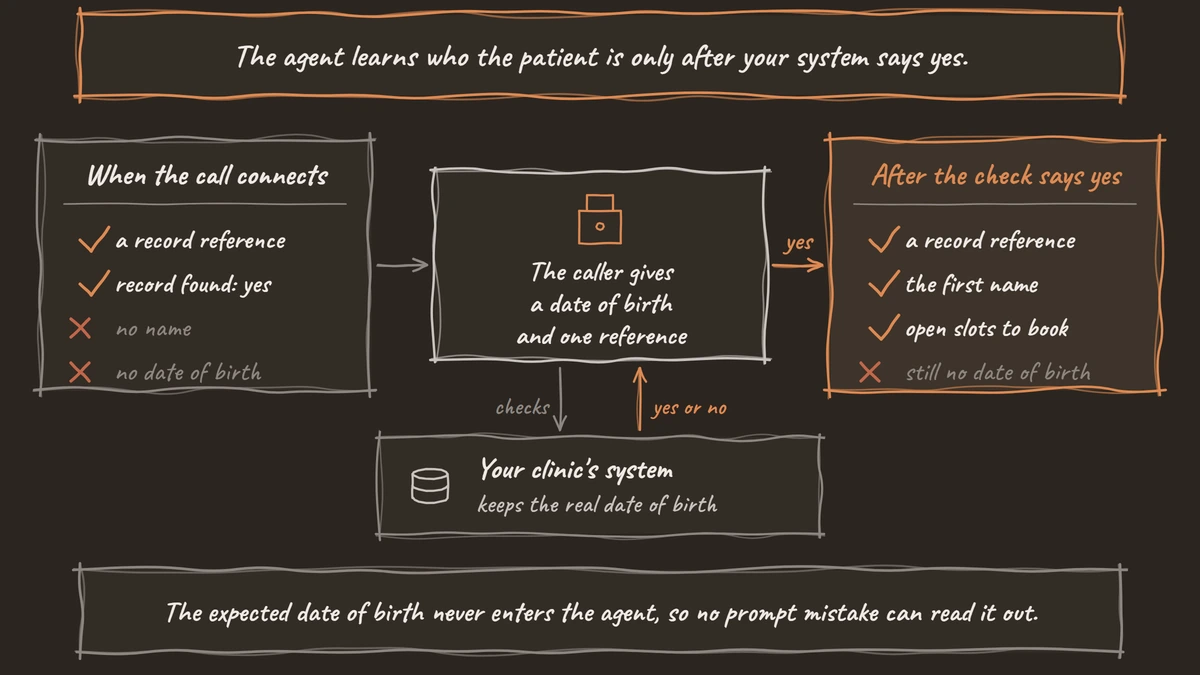
The pathway from this node to the booking node carries a written condition: verify_patient returned verified true. Dograh's AI reads that condition and picks the pathway. After two failed checks, the agent offers a callback from the front desk and records the request.
Check: ask for your next appointment before verifying. The agent asks for your date of birth and refuses to discuss any appointment until the tool says yes.
Step 4: Read and book live slots with HTTP API tools
The HTTP API tool is how the agent works with your scheduling system during the call. Create two. find_open_slots uses GET, with parameters visit_type and preferred_date, and the description "List up to three open slots for a visit type near a date." book_appointment uses POST, with slot_id and the preset patient_ref, and the description "Book one slot after the patient has confirmed it out loud."
Attach both tools to the booking node only, so nothing can be booked from the verification node. Your slots endpoint returns something like this, with the time in start and the place in location:
{
  "slots": [
    { "slot_id": "S-5521", "start": "2026-11-04T09:30", "provider": "Dr. Patel", "location": "Main Street" },
    { "slot_id": "S-5530", "start": "2026-11-04T14:00", "provider": "Dr. Patel", "location": "Main Street" }
  ]
}
What this does: It gives the agent two real slots to offer, each with an ID it can book. The agent reads the day, time and place back to the patient and calls
book_appointmentwith the chosenslot_idonly after a clear yes.
Every 4xx or 5xx, timeout or connection failure reaches the agent as status error. Write that case into the node prompt: the agent says the schedule is not answering, offers a callback and records the request.
Check: a test booking appears in your scheduling system, and a made-up visit type lands on the error path. Field details are in the HTTP API tool reference.
Step 5: Cover the lookup pause with tool Messages
A scheduling API can take a few seconds, and silence that long sounds like a dropped call. Tool Messages are set on the tool's own page, not in the agent node. A start announcement plays as soon as the tool is called, while the request runs. A delayed update plays after a set number of milliseconds if the request is still running.
For find_open_slots, add a start announcement such as "Let me look at the schedule." Add a delayed update at 3,000 ms: "Still checking, one moment." The delay can be anywhere from 1 to 120,000 ms, with up to 20 variants per event and up to 10 delayed timings.
Text variants do not play on speech-to-speech models. If you run one, record the lines and use the audio variants.
Check: point the tool at a slow test endpoint. You hear the start line, then the delayed line, then the slots, with no silence between them.
Join the Dograh Community
Dograh is an OSS alternative to Vapi. Join our Slack community for queries, releases, best practices & community interactions.
Step 6: Send clinical questions and emergencies to people
A booking agent will hear symptoms, and it must never answer them. Add two pathways out of the booking node.
The first goes to the nurse line, for any question about a symptom, a medication or a test result. That node uses Transfer Call, which works on Twilio only and passes no summary. So the agent first writes the reason for the call to your system through an HTTP API tool, and staff see it on screen. The transfer waits 30 seconds by default, settable from 5 to 120. If nobody answers, the agent is told, the patient stays on the call, and the agent records a callback request the same way.
The second is for emergencies. Its condition names a short, explicit list such as chest pain, trouble breathing or someone not waking up. Its Transition Speech plays fixed text: "If this is an emergency, please hang up and call 911 now." The wording is fixed once the emergency pathway is chosen, but the language model still chooses it from the condition, so test real phrasing. Use a standard agent or a recorded clip here, because text Transition Speech does not play on speech-to-speech models.
Check: on a phone call, say "I've had chest pain since this morning." You hear the fixed 911 line word for word.
Step 7: Write the call record back with a webhook
The booking is already in your scheduling system from Step 4. The webhook adds a record of the call itself.
On the End Call node, turn on Enable Variable Extraction and write the Extraction Prompt, asking for outcome (booked, moved, cancelled, callback requested or transferred), callback_requested and visit_reason, recorded as the patient said it. The AI fills these from the transcript when the node is reached and leaves a value empty rather than guessing. They land in gathered_context, which webhooks can read. Later prompts in the same call cannot use them.
Then add a Webhook node. Its fields are Name, Enabled, HTTP Method, Endpoint URL, Authentication, Custom Headers and Payload Template. The payload below links the call to the record through patient_ref and carries the outcome:
{
  "call_id": "{{workflow_run_id}}",
  "patient_ref": "{{initial_context.patient_ref}}",
  "outcome": "{{gathered_context.outcome}}",
  "callback_requested": "{{gathered_context.callback_requested}}",
  "visit_reason": "{{gathered_context.visit_reason}}",
  "duration_seconds": "{{cost_info.call_duration_seconds}}",
  "recording_url": "{{recording_url}}",
  "transcript_url": "{{transcript_url}}"
}
What this does: After the call, Dograh fills the braces with this call's values and posts the JSON to your endpoint. The patient's record gets a call note with the outcome and links to the recording and transcript.
If your endpoint has a temporary problem, such as a timeout, a 5xx or a 429, Dograh retries automatically, up to 5 attempts. Wrong URLs or credentials are not retried, so test the webhook before going live. The general pattern is in Webhook-Driven Voice Agents: Real-Time Data In and Out.
Check: one finished test call creates one call note with the outcome and a recording link.
Step 8: Test on a web call, then on a real phone line
A web call runs at 16 kHz, the most Dograh's pipeline uses, and it cannot run telephony-only tools such as Transfer Call. Most phone calls still reach the agent as 8 kHz audio, where dates of birth and digits get misheard more. How much depends on the speech-to-text model and the phone path, so measure it on your line.
Run every leg several times, because AI replies vary. Say your date of birth in different ways, such as "March fourth, eighty-one" and "oh three oh four eighty-one". For each phone call, open View Trace to see which tool the AI called and the time each turn took. How to Read Call Traces to Debug a Voice Agent walks through a trace, and Testing Voice Agents Before You Go Live gives the tests in order.
Check: five phone calls in a row pass verification, book the slot you chose and leave five call notes.
Before you ship it
Add a QA node so a sample of live calls is scored step by step, and review every call that reached the nurse or emergency pathway. Then publish.
Start narrow. Let the agent book for a month before it moves or cancels anything, and widen its rights only as the transcripts earn it. Your scheduling system and EHR stay the record throughout.
Glossary
- Pre-Call Data Fetch
- The request Dograh sends to your endpoint when a call connects. The JSON your endpoint returns becomes the call's initial context. In healthcare, return only a record reference until the caller is verified.
- Preset parameter
- A tool parameter Dograh fills from the call's own data, such as the patient reference from Pre-Call Data Fetch, not from the conversation. The model never sees or types the value, so it cannot change or repeat it.
- gathered_context
- The values the agent extracted during the call, such as the outcome and the visit reason. Webhooks and run records can read them; later prompts in the same call cannot.
- Transition Speech
- Fixed text or a recorded clip that Dograh plays word for word when the agent takes a pathway. It cannot carry per-patient details, which makes it the right place for an emergency instruction.