
A voice agent webhook sends each call's results to your own systems once the call ends. In Dograh, data goes into a call through initial_context on the API Trigger, and comes out through a Webhook node that sends a JSON payload you design. On your side, reply quickly, save each call only once, and retry any write that fails.
Key Takeaways
- Retry writes that failed for a temporary reason; stop on ones that never will.
- Save each call under its own ID, so a repeat delivery creates no duplicate.
- Failed deliveries aren't resent unless you enable retries; check for missing runs.
This post is part of our guide to Integrating Voice Agents With Your Stack: The Complete Guide. Here we follow one call's data from the trigger that starts it to the record it leaves behind.
Data in rides on the trigger, data out on the webhook
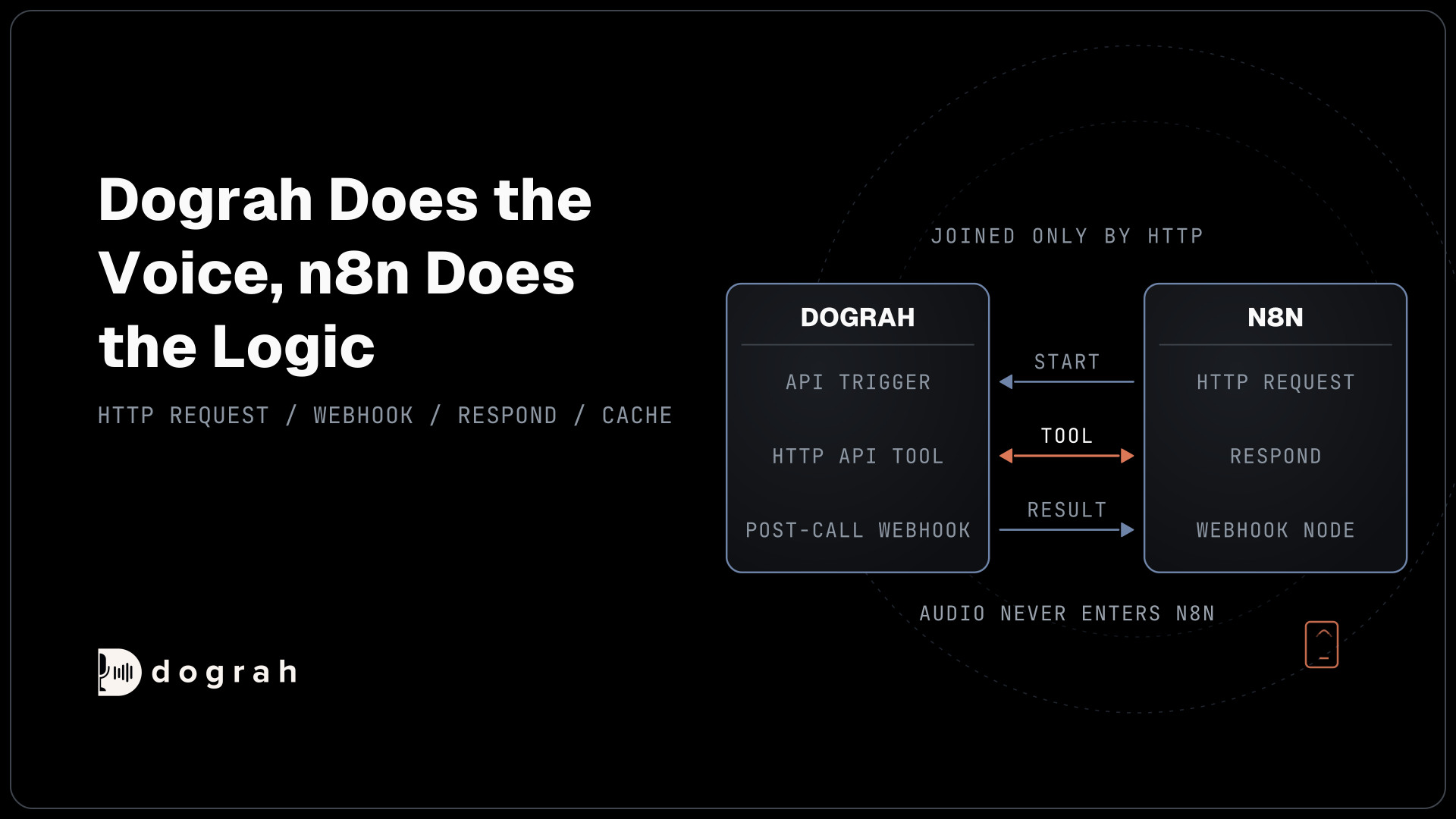
A Dograh call has one door for data coming in and a separate door for data going out, and the two are easy to mix up.
Data in is initial_context. When your system starts a call through the API Trigger, it sends a phone number plus any fields the agent should know. Those fields become template variables, so {{customer_name}} in a prompt reads whatever value you passed. Our walkthrough of how the API Trigger starts a call from any system covers keys and error codes. Replace your-dograh-instance with the address where your Dograh runs: your own server if you self-host, or your Dograh Cloud address. In the request below, everything inside initial_context is the data going in:
curl -X POST https://your-dograh-instance/api/v1/public/agent/{uuid} \
  -H "Content-Type: application/json" \
  -H "X-API-Key: dg_your_api_key" \
  -d '{
    "phone_number": "+1415555XXXX",
    "initial_context": {
      "customer_name": "Jane",
      "appointment_date": "March 15"
    }
  }'
What this does: It starts the call and carries the customer's name and appointment date into it. The agent can use them from its first sentence, and your webhook template can send them back out after the call.
The response returns a workflow_run_id. Keep it. That number ties every later write back to this one call.
Data out is the Webhook node. During the call, the agent fills gathered_context with the variables you ask it to extract, which you switch on in an Agent or End Call node under Enable Variable Extraction. Those values are not available to your prompts. Extracted data reaches your systems through a Webhook node, and nowhere else.
A third mechanism sits between the two. An HTTP API tool lets the agent call an external API live, in the middle of the conversation, when it needs to look something up or take an action. The webhook is for the record once the call is over.
What Dograh sends when the call ends
A Webhook node renders a JSON payload you design and POSTs it after the run completes.
Before webhooks, someone on your team did this job by hand. After each call, an agent typed the outcome, notes and next step into the CRM, a task known as after-call work. It is still common: Verint's State of Agent Experience 2026, a survey of 1,000 contact-center agents run in November and December 2025, found that 54% of calls still need it. A post-call webhook does that job automatically, sending the call's results to your systems the moment the call ends.
Webhook nodes run in the background once a call is over. Dograh fills your payload template with the call's data and sends it as a JSON POST. In the template below, each name on the left is a field your system will receive, and each {{variable}} on the right is filled in by Dograh after the call:
{
  "call_id": "{{workflow_run_id}}",
  "first_name": "{{initial_context.first_name}}",
  "rsvp": "{{gathered_context.rsvp}}",
  "disposition": "{{gathered_context.call_disposition}}",
  "duration": "{{cost_info.call_duration_seconds}}",
  "recording_url": "{{recording_url}}",
  "transcript_url": "{{transcript_url}}"
}
What this does: This is the data coming out: who was called, what they answered, how the call ended, and links to the recording and transcript.
The fields you can use include workflow_run_id, call_time, initial_context, gathered_context, cost_info.call_duration_seconds, recording_url and transcript_url. Inside gathered_context, call_status records why the call ended and call_disposition records the business outcome. If your template leaves out call_disposition, Dograh adds it at the top level anyway.
Match variable names to your context fields exactly, or they come back as empty strings. One agent can carry several Webhook nodes when the result has to land in more than one place. For auth, the node supports an API key header, a bearer token, basic auth or a custom header. On your first test call, point the node at a request inspector such as webhook.site and read the real payload before you write any parsing code.

Open Source Alternative to Vapi / Retell
Self-hosted voice agent platform — no per-minute fees
dograh-hq/dograh
Star on GitHub
Judge each write by the destination's reply
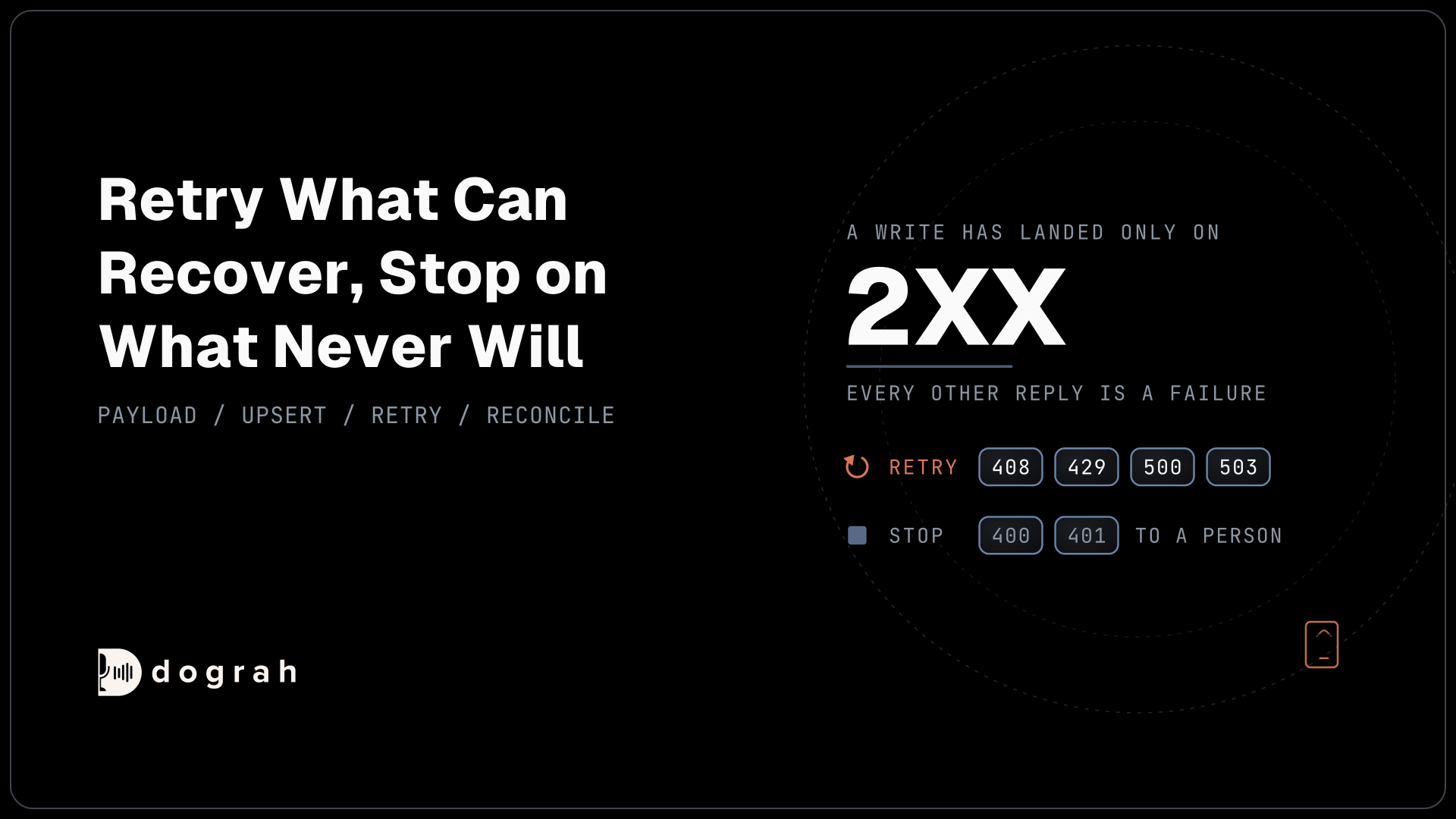
A write has landed only when the destination says so, and every other reply is a failure you have to sort.
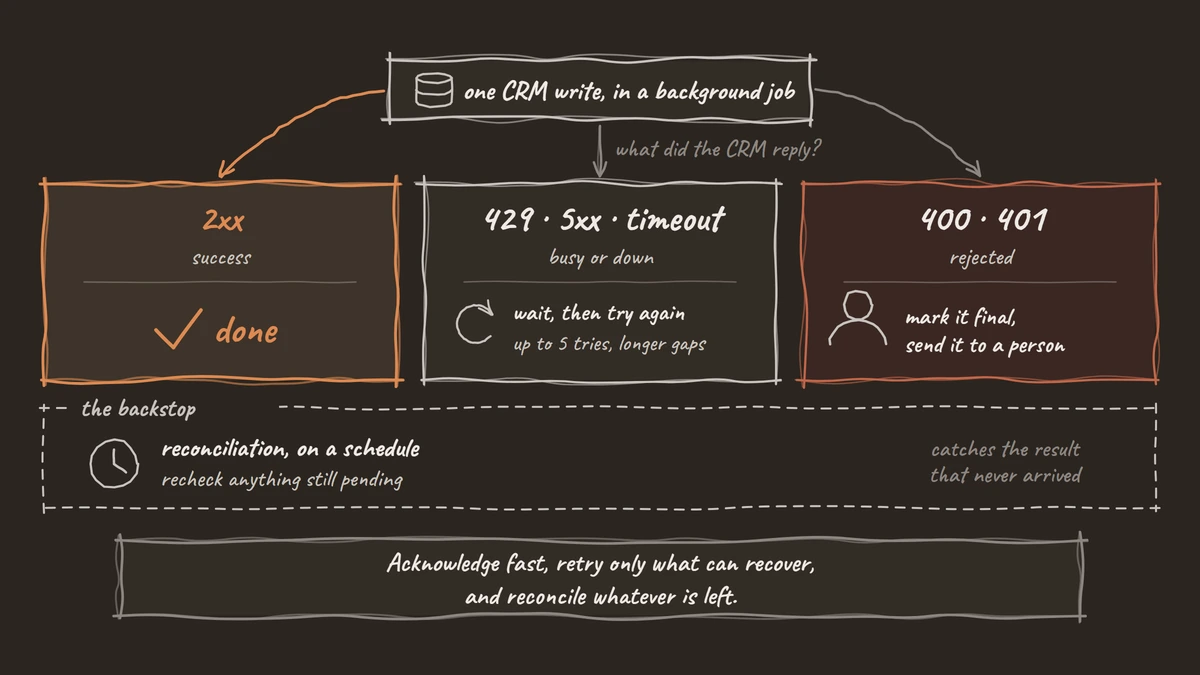
Start with your own receiver. Dograh asks it to answer with a 2xx promptly, within 30 seconds. So do the minimum on arrival. Store the payload and return 2xx. The CRM write happens afterwards, in a background job. A slow CRM should never hold up the acknowledgement.
The background job is where our rule applies. A success reply from the CRM means the data was written. Any failure reply means something went wrong, and you retry a set number of times. The Standard Webhooks specification, written by engineers from companies including Zapier and Twilio, uses the same test: a delivery succeeds on a 2xx and fails in any other case.
Then split the failures worth retrying from the final ones. Every reply carries a status code, a three-digit number that says what happened. Codes starting with 2 mean success. A 429 means "too many requests, slow down". HubSpot, for example, sends one when an app goes over its rate limit. Codes starting with 5, such as 500 or 503, mean the other system had a problem on its side. Both are usually temporary, like a timeout (408), so waiting and trying again often works. A 400 means the data you sent was wrong, and a 401 means your key was refused. Those fail the same way every time, so retrying only fills your logs. Mark them final and send them to a person. Here is a short Python sketch of a receiver for the Dograh payload template shown above. The first function takes in each delivery, and the second one writes it to your CRM:
RETRYABLE = {408, 429, 500, 502, 503, 504}

@app.post("/webhook/dograh")
async def dograh_webhook(payload: dict, background: BackgroundTasks):
    # Fields from the Dograh payload template above
    run_id = payload["call_id"]            # Dograh's workflow_run_id
    disposition = payload["disposition"]   # the call outcome
    is_new = await store.insert_if_absent(run_id, payload)  # unique key
    if is_new:
        background.add_task(write_to_crm, run_id, disposition)
    return {"received": True}  # 2xx well inside 30 seconds

async def write_to_crm(run_id, disposition, max_attempts=5):
    for attempt in range(1, max_attempts + 1):
        status = await crm_upsert(run_id, disposition)  # timeouts return 504 here
        await log_attempt(run_id, attempt, status)
        if 200 <= status < 300:
            return await mark_done(run_id)
        if status not in RETRYABLE:
            return await mark_final(run_id, status)  # needs a person
        await asyncio.sleep(2 ** attempt)
    await mark_final(run_id, "gave up")
What this does: The first function reads
call_id, which carries Dograh'sworkflow_run_id, and the call outcome, saves the result once and replies straight away, so Dograh never waits on your CRM. The second tries the CRM write up to five times, waiting longer each time, and stops early on errors that will not fix themselves.
Build those retries in from the first day. Uptrends measured an average of 55 minutes of API downtime a week in Q1 2025 across more than 2 billion monitoring checks. Some destination you write to will be down while a call ends. Log every attempt with its status code, so you can see later what happened to each run.
Make a repeated delivery harmless
Every write should be safe to run twice, because sooner or later it will run twice.
Your receiver should treat a repeated delivery as harmless, because the same payload can arrive more than once. Your own retries to the CRM repeat writes too. Stripe gives the same advice for its own events and adds that delivery order is not guaranteed.
The fix is one key. Use workflow_run_id, sent as call_id in the template above, as the unique key for everything the call produces. Put a unique constraint on it in your own store. Write to the CRM as an upsert on the same ID, so a second attempt finds the record and changes nothing. An in-memory set of seen IDs is too weak, since a restart wipes it.
Duplicates are a real cost. In Salesforce's State of Sales report, a survey of 4,050 sales professionals run in August and September 2025, teams using AI agents named manual errors and duplicate data as their top two data problems. And 46% of sales pros with agents said poor data quality hurt their sales. A webhook fixes the first problem, because nobody retypes call results by hand. Saving each call under its own ID fixes the second, because a repeat delivery cannot create a second record.
Guard the side effects as well as the rows. A delivery rescheduling agent that books the new slot twice, or sends the confirmation text twice, confuses a customer even when the CRM record is clean. Check the key before any action that reaches a person.
Join the Dograh Community
Dograh is an OSS alternative to Vapi. Join our Slack community for queries, releases, best practices & community interactions.
Plan for the delivery that never arrives
Assume some results will never reach you, and build the check that finds them.
By default, a non-200 response is logged and the delivery is not sent again. You can switch on automatic retries with Dograh's retry_config setting, but test how they behave on your own setup before you rely on them. Until you have, plan as if a payload sent while your receiver is down is gone, and let the receiving side cover the gap.
The data-in side hands you the tool. Every API Trigger response returns a workflow_run_id. Save each one as pending when you start the call, and mark it received when its webhook lands. On a schedule, list the runs still pending after a window you choose, and follow each one up. That reconciliation job is yours to build, and it is the backstop for anything the webhook never delivered.
Test one more case before you rely on it. Place a few unanswered and failed calls on your own setup, and see which runs your check flags.
A webhook is a fast channel with no delivery promise of its own. When the receiving application is down, events can go unaccounted for, which is why polling still has defenders. On a closed hosted platform, the sender's behaviour is whatever the vendor writes down, and you cannot inspect it. Dograh is open source, so you can read the code that sends the webhook. Self-host it, and the receiver and the backstop can run on the same network you control. For a booking line in restaurants and home services, one lost payload is one booking nobody confirmed.
Build it in order. Pass what the agent needs in initial_context, template the payload around workflow_run_id, acknowledge fast, retry only what can recover, and reconcile whatever is left.
Glossary
- workflow_run_id
- The call's unique number, returned when a call starts. Using it as the key for every write means a repeated delivery updates the same record instead of creating a new one.
- gathered_context
- The per-run object holding the variables an agent extracts during a call, such as an RSVP or a disposition. It cannot be read by prompts and leaves Dograh through a Webhook node.
- Retries
- Trying a failed write again later. Retry a 429 rate limit or a 5xx server error; a 400 or 401 is a final answer and should go to a person.
- Reconciliation job
- A scheduled check that compares the runs you started against the webhooks you received, and flags any run whose result never arrived so it can be looked up and written.