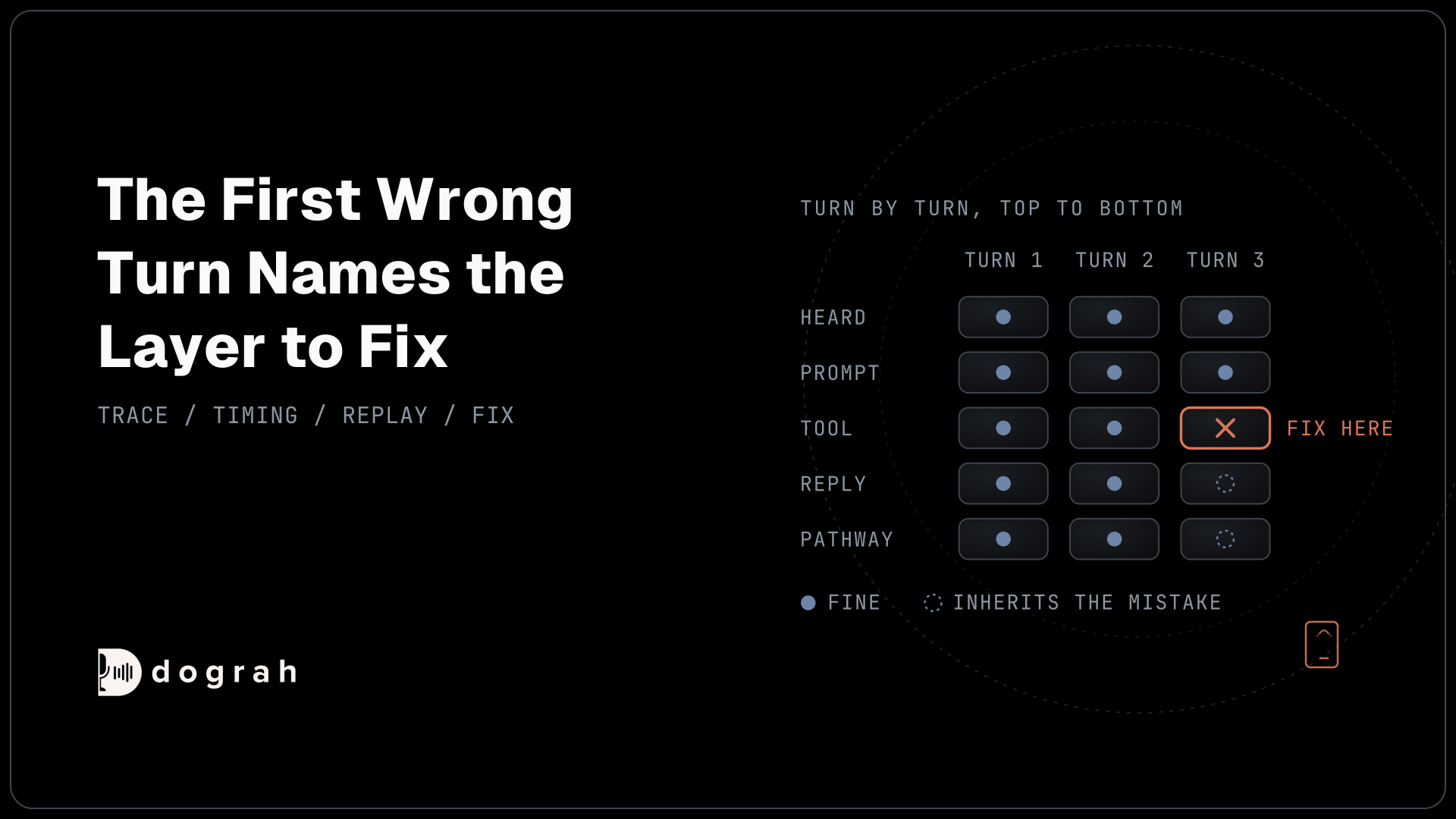

To read a voice agent's call trace, open one failed call and go through the call one turn at a time, in the order the agent handles it: heard, prompt, tool, reply, next step. The first wrong layer is the one to fix. Replay that step several times before you change the prompt.
This post is part of our guide to testing, monitoring and scaling AI voice agents. The guide covers the whole loop, from testing before launch to scaling after it. This one takes a single bad call and traces it to the layer that caused it.
Key Takeaways
- The first wrong turn in the trace names the layer to fix.
- One clean replay proves nothing, because the model can answer differently each run.
- Phone calls mishear more than web calls, so reproduce mishears over a real call.
A transcript tells you what went wrong on a call. The trace tells you which layer did it. We build Dograh, an open-source voice agent platform, and this is the routine we follow for one bad call.
What you need before you start
Every step here works on a single call, so start by picking one.
You need a finished call that went wrong, either a test call or a live one, and the Dograh workflow that ran it. Tracing covers both kinds. A caller complaint, a quality assurance (QA) flag or your own test call can point you to it. If you only know that something is off across many calls, use automated QA first to find which calls to open.
For the replay step, connect a Langfuse account. In Dograh, go to Platform Settings and enter your Langfuse host, public key and secret key. Traces then arrive for every completed call, on hosted and self-hosted Dograh alike. Without Langfuse you can still do steps 1 to 3, but the replay in step 4 needs it.
Check: you can name the call, what went wrong in a sentence, and the turn where the caller noticed.
Step 1: Open the call's trace next to its transcript
Open the run for the bad call and keep two views side by side.
After a call ends, Dograh shows a call summary screen, and View Trace opens the trace log for that call. The run's Call Transcript shows the same conversation turn by turn, with a "Reasoning Delay" in milliseconds on every agent turn.
The two most important sections are these. The STT section shows what speech-to-text made of the caller's words, so this is where mishearings show up. Each LLM section (the AI model's step) shows the full prompt the AI received (the global prompt plus the node's own prompt), the conversation history up to that point, the tools it could use and its response. Tool calls show the request the AI sent and the response that came back.
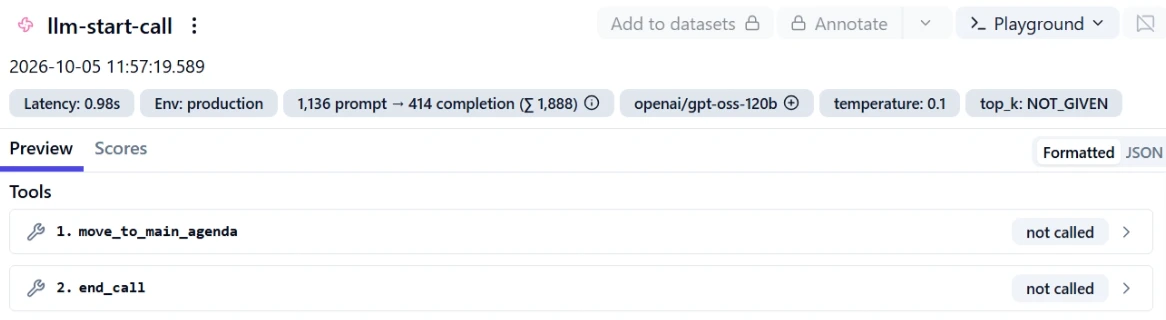
One detail matters later. The tools list includes pathway tools, one for each pathway leaving the current node. When the agent moves to another step of the flow, it does so by calling one of them. So a wrong step change shows up as a tool call in the call's transcript.
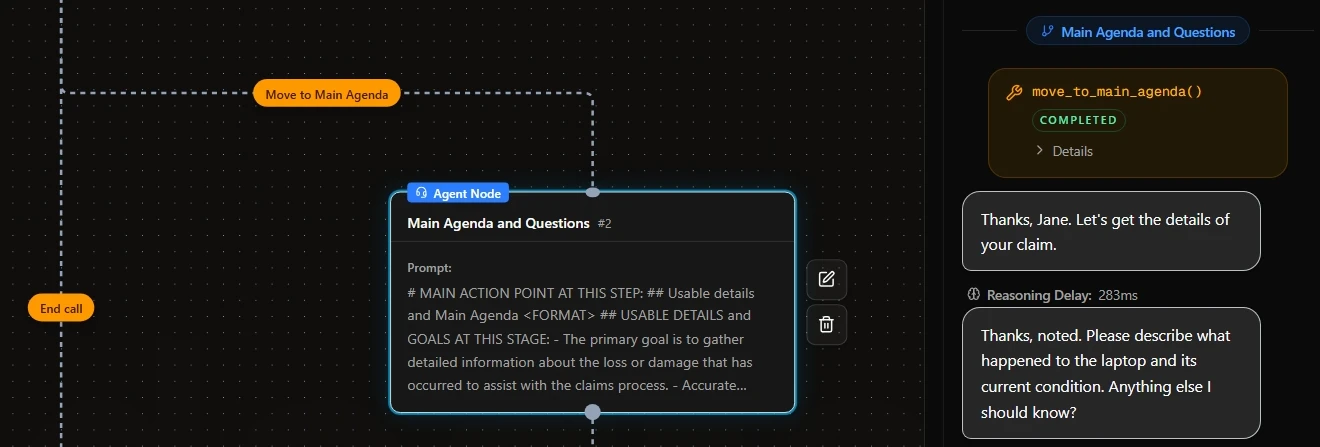
Other tracing tools label things differently, but every trace has the same shape: one call, its turns, and what was heard, sent, called and said on each.
Check: each caller turn in the transcript matches an STT entry and an LLM entry in the trace.
Step 2: Find the first turn where the call went wrong
Walk the call in the order the pipeline runs it, and stop at the first layer that is wrong.
That order is what the agent heard, the prompt it received, any tool request and response, its reply, and then the step it moved to. Later layers usually inherit the first mistake. If speech-to-text heard "fifteen" as "fifty", an AI that answers about fifty is behaving correctly for the input it got. Editing its prompt would change nothing.
| What the caller experienced | What the trace shows | Layer to fix |
|---|---|---|
| The agent answered something the caller never said | The STT entry differs from the recording, and the reply fits the wrong text | Speech-to-text |
| The agent misread a clear request | The STT entry is right, and the AI's response is wrong for that input | The AI step (prompt or node) |
| The agent confirmed a booking or status that is not real | The tool response holds an error or timeout, or no tool was called, and the reply goes ahead anyway | Tool or API |
| The right words came late, or over the caller | The words are right, but the reasoning delay on that turn is long or the recording shows overlap | Timing or voice |
| The agent jumped to the wrong part of the flow | The reply is fine, but it called the wrong pathway tool | Pathway condition |
Symptoms can mislead. In a demo by AssemblyAI's team, a jump in missed phone numbers looked like the agent failing to capture them. The cause was a turn-detection setting: the minimum silence before a speaker counted as finished "had been set too low, cutting people off mid-sentence", as their write-up on silent voice agent failures explains. The prompt never needed to change. In a Dograh trace, that pattern shows up as STT entries that stop halfway through a number.
Mishears are also more common on the phone. Twilio, Plivo and Vobiz deliver 8 kHz audio into Dograh, and phone networks often add compression on top, while a web call runs at 16 kHz, the most Dograh's pipeline uses. In our experience, speech-to-text can make up to 3x more errors over a phone call than over a web call. The gap depends heavily on the speech model and the phone path, so test your own setup over a real call. If the bad call came in by phone, reproduce it by phone.
Check: you can point to one turn and one layer, and say why the layers before it were fine.

Open Source Alternative to Vapi / Retell
Self-hosted voice agent platform — no per-minute fees
dograh-hq/dograh
Star on GitHub
Step 3: Check the timing before you blame the words
If the words were right and the call still went badly, look at time.
The reasoning delay on each agent turn in the Call Transcript is the quickest check. Scan for the turn that stands far above the rest. A caller who hears a long pause often speaks again, and the agent then answers two things at once, which reads like a confused AI in the transcript.
The reasoning delay is one number per turn. View Trace shows how long speech-to-text, the AI and the voice took on each turn; for analysis across many calls, export to Noveum or BigQuery. Dograh's Noveum integration sends per-turn timings for each service, and the BigQuery call events export records stage latencies with the turn number and node name. Both send data after the call finishes, so neither slows the live call. Our speech latency playbook covers what to do once you know which stage is slow.
Check: you know whether a slow or overlapping turn caused the problem, and roughly which stage it came from.
Step 4: Replay the failing step several times
Before you edit anything, rerun the exact step that failed and count how often it fails.
The same prompt and the same conversation can produce a different reply on the next run, and temperature 0, the setting meant to make the AI answer the same way every time, does not stop it. In a March 2026 test, a company ran the same 103 questions through Gemini 3 Flash five times with every setting fixed, and 29 of them got a different answer at least once. On Gemini 2.5 Flash-Lite, only 3 did. That was a small company's test on a classification task, not a voice agent, but it shows how much the flip rate depends on the model. Thinking Machines Lab traced much of this behaviour to load on the provider's servers, so the same agent can behave differently at busy times.
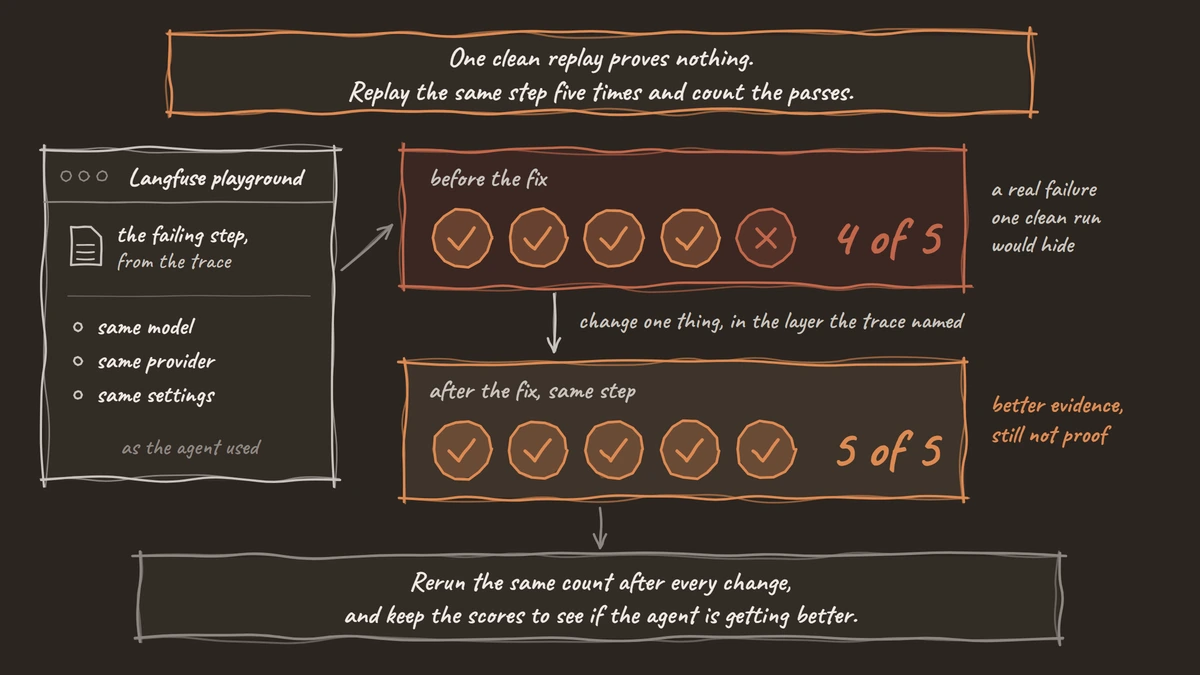
Replay it in Langfuse. Open the AI call from the trace and use the Open in Playground button. It loads the exact prompt and conversation, so you rerun the step itself. Set the playground to the same model, provider and settings the agent used (the trace shows them), or the pass count measures a different model. A replay starts from the transcript, so it cannot reproduce a mishear; for speech problems, call again over the same path. For whole calls, teams also use testing tools such as Roark, or Tuner, which plugs into Dograh.
Run the step several times. We use five in this post's examples. Write down the score each time. A step that passes 4 of 5 has a real failure rate that one clean run would have hidden. If it passes 5 of 5, either the failure is rare, so run more replays, or it depended on something earlier, so go back to step 2.
Check: you have a pass count for the failing step, such as 4 of 5, written down before any change.
Step 5: Fix the layer the trace named, then replay again
Change one thing, in the layer the trace pointed to, and rerun the same replay.
Each layer has its own kind of fix. For a mishear, work on the speech side: the speech-to-text model, its options for domain words, or the phone path. A prompt line on handling likely transcription errors helps the AI recover, though it cannot stop the mishear itself.
For a wrong AI reply, tighten that node's prompt or split the job into separate nodes. Our post on prompt and flow design patterns covers how. For a tool error, fix the API or its timeout, and decide what the agent should say when the tool fails. For a wrong step change, make that pathway's condition more specific, which is the usual fix when an agent keeps taking the wrong edge.
Then rerun the replay from step 4, the same number of times. Going from 4 of 5 to 5 of 5 is better evidence than one good run, though still not proof. Change one thing at a time, or you will not know which change worked.
Expect to come back here often. Callers ask things nobody planned for, and in our experience teams commonly rework the flow after go-live, because people talk to an agent differently than they talk to a person.
Check: the same replay passes more often than before, and the turns around the fixed step still behave.
Join the Dograh Community
Dograh is an OSS alternative to Vapi. Join our Slack community for queries, releases, best practices & community interactions.
Before you ship it
Run through this once more before the fix reaches live callers.
| Step | What you look at | Done when |
|---|---|---|
| 1. Open the trace | View Trace and Call Transcript | Every caller turn matches an STT and an LLM entry |
| 2. Find the first wrong turn | Heard, prompt, tool, reply, pathway, in that order | You can name one turn and one layer |
| 3. Check timing | Reasoning delay, then each step's time in View Trace | You know whether timing caused it |
| 4. Replay | Langfuse playground | You have a pass count, such as 4 of 5 |
| 5. Fix and replay | The named layer only | The same replay passes more often |
Publish the change. Edits are saved as a draft, and the published agent keeps serving calls until you publish that draft. Keep the conversation that broke, too, so you can rerun it after the next change to the flow.
Then decide who can see your traces. Traces in your own Langfuse project are private by default. Platform Settings has a "Make traces publicly viewable" toggle, and a public trace exposes the full call transcript, prompts and tool payloads. If your calls carry personal data, keep traces private, or run Dograh and Langfuse on your own servers next to your own models, so the traces never leave your infrastructure.
A trace explains one call. Read the next bad call the same way, and keep the replay counts, since they show whether the agent is actually getting better.
Glossary
- Call trace
- A per-call record of what speech-to-text heard on each turn and what the AI received, called and replied. In Dograh it opens from View Trace after a call ends.
- Pathway tool
- How a pathway between two nodes appears to the AI: as a tool it can call. Calling it moves the conversation to the next node, so a wrong step change shows up as a tool call in the trace.
- Reasoning delay
- The time in milliseconds Dograh shows on each agent turn in a run's Call Transcript. A turn far above the rest is where to look for a pause the caller noticed.
- Turn detection
- Deciding when a caller has finished speaking, usually from a stretch of silence. Set too short, it cuts callers off mid-sentence and can look like the agent mishearing them.