
Automated quality assurance (QA) for voice agents is an AI review of each call's transcript after the call ends. It flags calls where the agent left its script or misunderstood the caller, and it gives each step of the call a score and a sentiment label. Once live, review a 5-10% sample and read the flagged calls yourself.
This post is part of our guide to testing, monitoring and scaling AI voice agents. The guide covers the whole loop, from testing before launch to scaling after it. This one is about the review that runs after each call: what it checks, and how many calls it needs to see once you are live.
Key Takeaways
- QA grades the agent's conduct. Its sentiment label is never the customer's verdict.
- A 5-10% sample finds common failures within days. Go to 100% after big changes.
- Most QA findings end up as changes to the call flow.
Once a voice agent takes real calls, nobody on the team can listen to all of them. We build Dograh, an open-source voice agent platform, and this is how we use its QA node to decide which calls a person should read.
What automated QA checks on each call
Dograh's QA node reads the transcript of a finished call and returns a structured review of how the agent did.
It has no link to the live flow, so it measures the call without changing it. The default review scores each step (node) of the call separately. Each step gets its own tags, a 1-10 score, a sentiment (positive, neutral or negative) and a short summary, and all the tags are also listed together for the call. There is no single score for the whole call. The default tags, and where we look first when one shows up:
| Tag | What it flags | Check first |
|---|---|---|
DEAD_AIR | Long silences | The reasoning delay on that turn |
HEARING_ISSUES | Trouble hearing each other | Speech-to-text and the phone audio |
UNCLEAR_CONVERSATION | A muddled call | The transcript, turn by turn |
ASSISTANT_IN_LOOP | The agent repeating itself | A pathway condition that never fires |
ASSISTANT_REPLY_IMPROPER | A reply that doesn't fit the moment | The node prompt and any tool response |
ASSISTANT_LACKS_EMPATHY | A cold reply to an upset caller | The tone rules in the global prompt |
USER_FRUSTRATED | The caller getting annoyed | The turns just before it |
USER_NOT_UNDERSTANDING | The caller not following the agent | The wording of the agent's question |
USER_REQUESTING_FEATURE | The caller asking for something the agent can't do | A missing flow or tool, a backlog item |
USER_DETECTS_AI | The caller realising it is an AI | Long pauses and the voice choice |
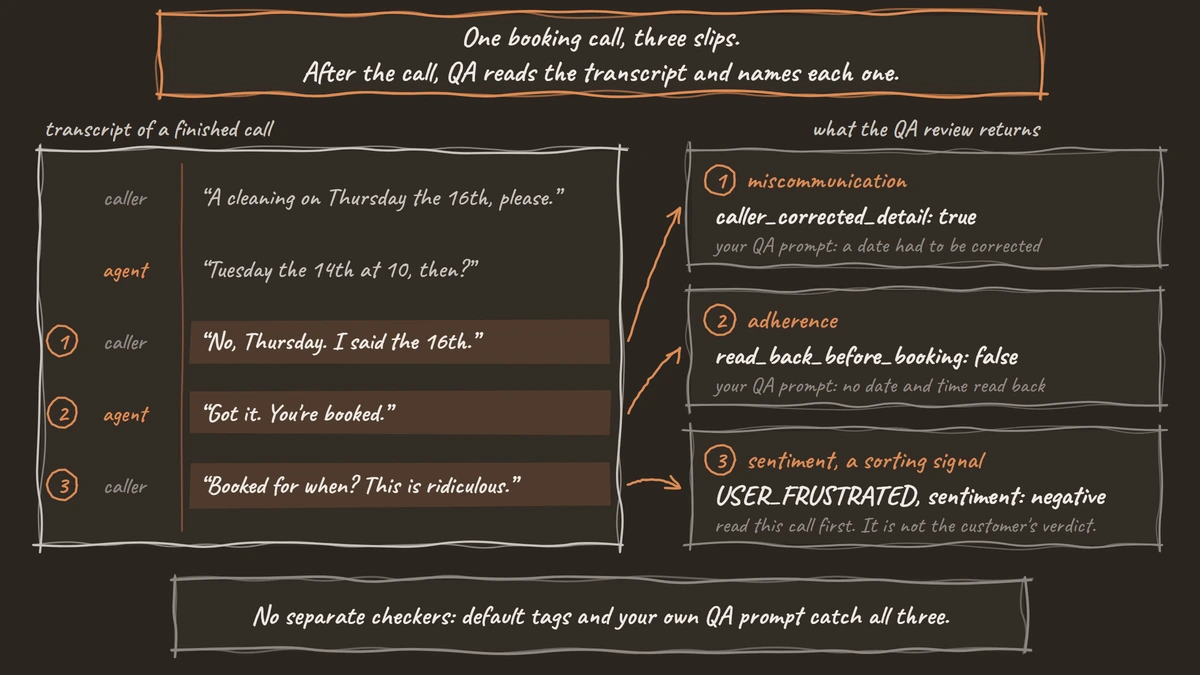
There is no separate adherence checker or miscommunication checker. Both come from these tags or from your own QA prompt. Adherence asks whether the agent stayed on the flow and said what it had to. ASSISTANT_REPLY_IMPROPER and ASSISTANT_IN_LOOP catch the obvious slips, and a custom prompt can check rules only your business has, such as reading a booking back before confirming it.
Miscommunication is the agent and the caller talking past each other. USER_NOT_UNDERSTANDING and UNCLEAR_CONVERSATION cover it, and so does a caller who has to correct the same detail twice. QA reads only the transcript, so a bad phone line shows up only through what it causes, such as a caller asking the agent to repeat itself.
Some questions should never go to the QA review. Whether a booking landed is a fact your CRM or the tool's reply already holds, and a model reading the transcript can only guess at it. We treat a successful CRM response as proof the data was written.
Sentiment tells you about the call, not the customer
The sentiment label is the QA review's reading of how a step of the call went, and it should never be reported as how the customer felt.
Tone and satisfaction come apart more often than people expect. A June 2026 preprint on 70,450 support conversations found that tone and customers' own 1-to-5 ratings lined up only weakly (a 0.36 correlation). Read it with care. It studies text chats on a fundraising platform rather than calls, and its author's company sells AI conversation analysis. The paper goes on to propose an AI estimate of satisfaction. We use only its finding that the two line up weakly.
A common view in support analytics treats sentiment as what the customer felt and ties QA scores to CSAT (customer satisfaction). For a voice agent, that mixes up two jobs. The QA review exists to grade the agent. If you want to know how customers felt, ask them and record the answer, as we describe in our post on claims CSAT surveys.
Sentiment still earns its place as a sorting signal. A call with a negative step tagged USER_FRUSTRATED goes to the top of the reading pile. A neutral step with a 9 out of 10 score can wait.

Open Source Alternative to Vapi / Retell
Self-hosted voice agent platform — no per-minute fees
dograh-hq/dograh
Star on GitHub
Why a 5-10% sample is enough once you are live
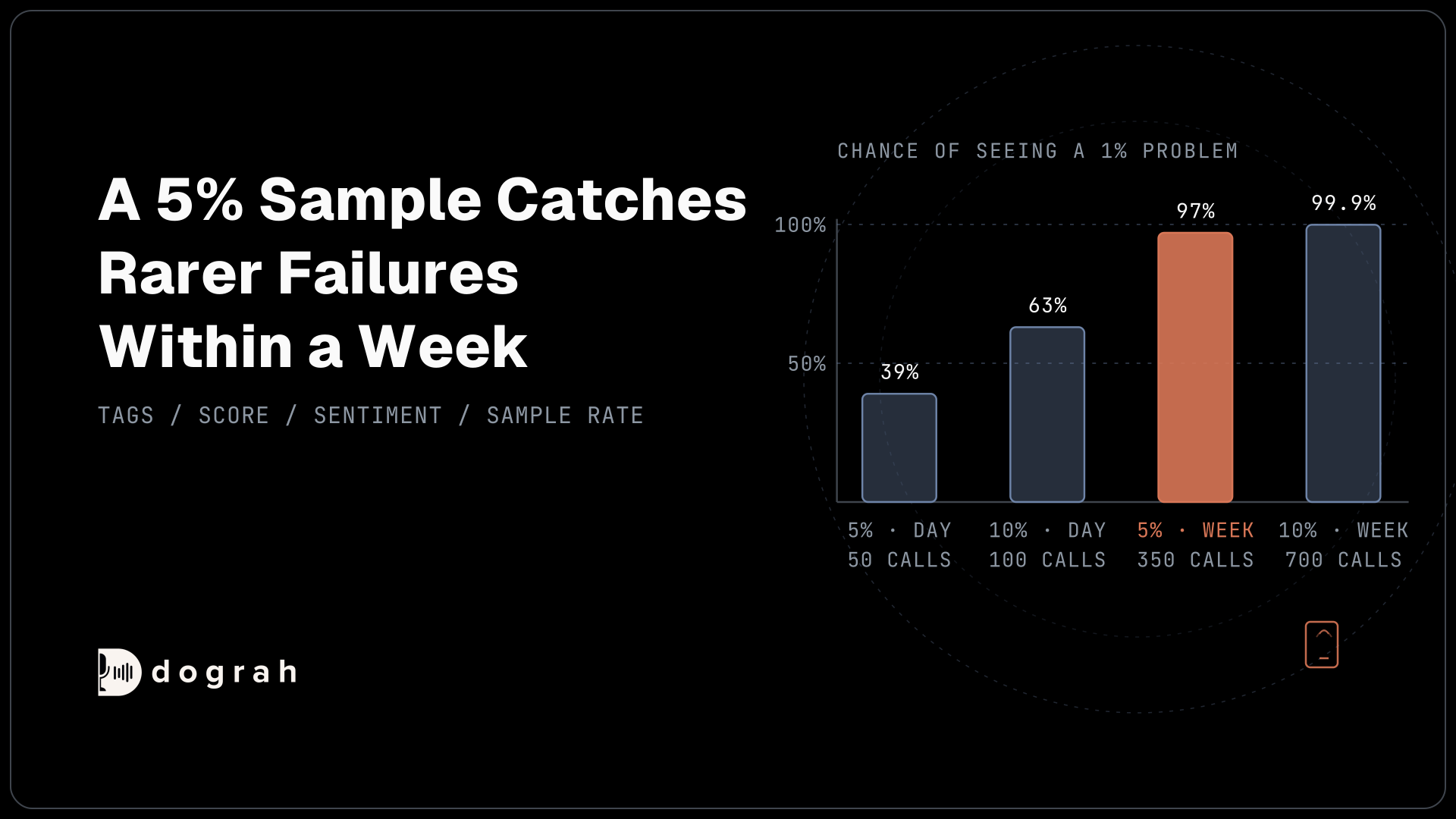
In production we set the QA node's Sample Rate to 5-10%, and at 1,000 calls a day the maths shows it finds common problems in a day and rarer ones within a week.
The case for scoring every call is easy to make, because any call you skip might hide a problem. Every QA review is a large language model (LLM) call you pay for, though, and the real limit is people. Someone has to read each flagged call and decide what to change, and a team that gets hundreds of flags a day reads few of them closely.
Here is the maths for an illustration: an agent taking 1,000 calls a day. These are probabilities, not Dograh figures.
| Sample | Calls reviewed | Chance of seeing a problem that hits 1% of calls | If you see none, the true rate is likely below |
|---|---|---|---|
| 5%, one day | 50 | 39% | 6% |
| 10%, one day | 100 | 63% | 3% |
| 5%, one week | 350 | 97% | 0.9% |
| 10%, one week | 700 | 99.9% | 0.4% |
A problem on one call in a hundred has only a 39% chance of showing up in a single day at 5%. Over a week at the same 5%, it rises to 97%. A failure on one call in ten almost certainly shows up on day one at any of these rates. The last column uses the rule of three: if a problem never appears in n calls, its true rate is very likely below 3 divided by n.
These numbers also assume the QA review flags the problem whenever it sees one. It won't always, which is why you check its grades against your own.
That maths assumes the sampled calls are a fair mix. Dograh picks the sampled calls at random, which is what this maths assumes. Still check that the reviewed runs spread across the hours and call types you care about.
Human support teams review far less. In a survey of 500 support agents by Solidroad, a company that sells QA software, 81% said most of their conversations are never reviewed for quality. The report does not say when the survey ran. A steady 5-10% of your voice agent's calls, graded against the same rules each time, already beats that.
Some periods still call for 100%. Keep the Sample Rate at 100% for the first weeks after launch and for a week after any flow change, while you still expect new failures. Calls that must include a required disclosure stay at 100% for as long as the script runs.
Setting up the QA node in Dograh
The QA node sits in the workflow with no edges, and it runs for every eligible call, test calls from the editor included.
Add it to the workflow, leave it unconnected and publish. Its settings decide which calls get reviewed:
| Setting | Default | What we set |
|---|---|---|
| Enabled | On | On |
| Use Workflow's LLM | On | On grades with your agent's own model; turn it off to use Dograh's default QA model. |
| Minimum Call Duration (seconds) | 15 | 15, so hang-ups and wrong numbers are skipped |
| Include Voicemail Calls | Off | Off |
| Sample Rate (%) | 100 | 100 for the first weeks, then 5-10 |
QA results show on each run's Run Detail page, under QA Analysis, and in the annotations field of the after-call webhook, so you can send them to any dashboard you already use.
QA also runs on test calls from the editor, so you can see its review before launch. For many scenarios at once, let a testing tool such as Tuner call your agent with generated scenarios. Our guide to testing voice agents before you go live covers that order.
The default prompt is a fair start, and the checks that matter most are the ones only you can write. The prompt below, written for a clinic booking agent, keeps the default tags and adds rules for adherence in read_back_before_booking and transfer_offered_when_asked, a miscommunication check in caller_corrected_detail, and a list of unplanned requests in unplanned_request:
You review transcripts of calls handled by a dental clinic's booking agent.
Grade the agent, never the caller. Return JSON with these fields:

tags: any that apply from DEAD_AIR, USER_FRUSTRATED, ASSISTANT_IN_LOOP,
  ASSISTANT_REPLY_IMPROPER, USER_NOT_UNDERSTANDING, HEARING_ISSUES,
  UNCLEAR_CONVERSATION, USER_REQUESTING_FEATURE, ASSISTANT_LACKS_EMPATHY,
  USER_DETECTS_AI
read_back_before_booking: true if the agent repeated the date and time
  and the caller agreed before the agent confirmed the booking
transfer_offered_when_asked: true, false or "not_asked"
caller_corrected_detail: true if the caller had to correct a name, date
  or number the agent got wrong
unplanned_request: what the caller asked for in a few words, if the flow
  had no answer for it, otherwise null
score: 1-10 for how the agent handled this step
sentiment: positive, neutral or negative, for this step
summary: one or two sentences
What this does: Each run now says whether the agent read the booking back and offered a transfer when asked, and
caller_corrected_detailmarks calls where agent and caller talked past each other.unplanned_requestbuilds a running list of things callers wanted that the flow never planned for.
Before you trust the scores, label a few dozen calls yourself and compare. LLM graders are uneven. In the Judge's Verdict study (2025), only half of 54 AI graders agreed with human graders as well as humans agree with each other, on a factual-answer task, not calls. A study of 242 retail and telecom voice-agent calls by Sprinklr, a customer experience (CX) software vendor, found an LLM judge's reliability depends on what it is judging. Safety and recovery checks were the least reliable, and the authors say human review still matters there. Rewrite the prompt until your labels and the grader mostly agree, and check again after every prompt change.
Join the Dograh Community
Dograh is an OSS alternative to Vapi. Join our Slack community for queries, releases, best practices & community interactions.
From flagged calls to flow changes
QA earns its keep after go-live, when real callers do things nobody planned for.
We see it on almost every launch. Callers ask questions the team never thought of, and they talk to an agent differently than they would to a person. A 2026 study from City University of Hong Kong in the International Journal of Human-Computer Interaction found people speak to conversational agents in a more task-focused way, with shorter sentences, than they do with other people. A flow written from experience with human calls misses a lot of that.
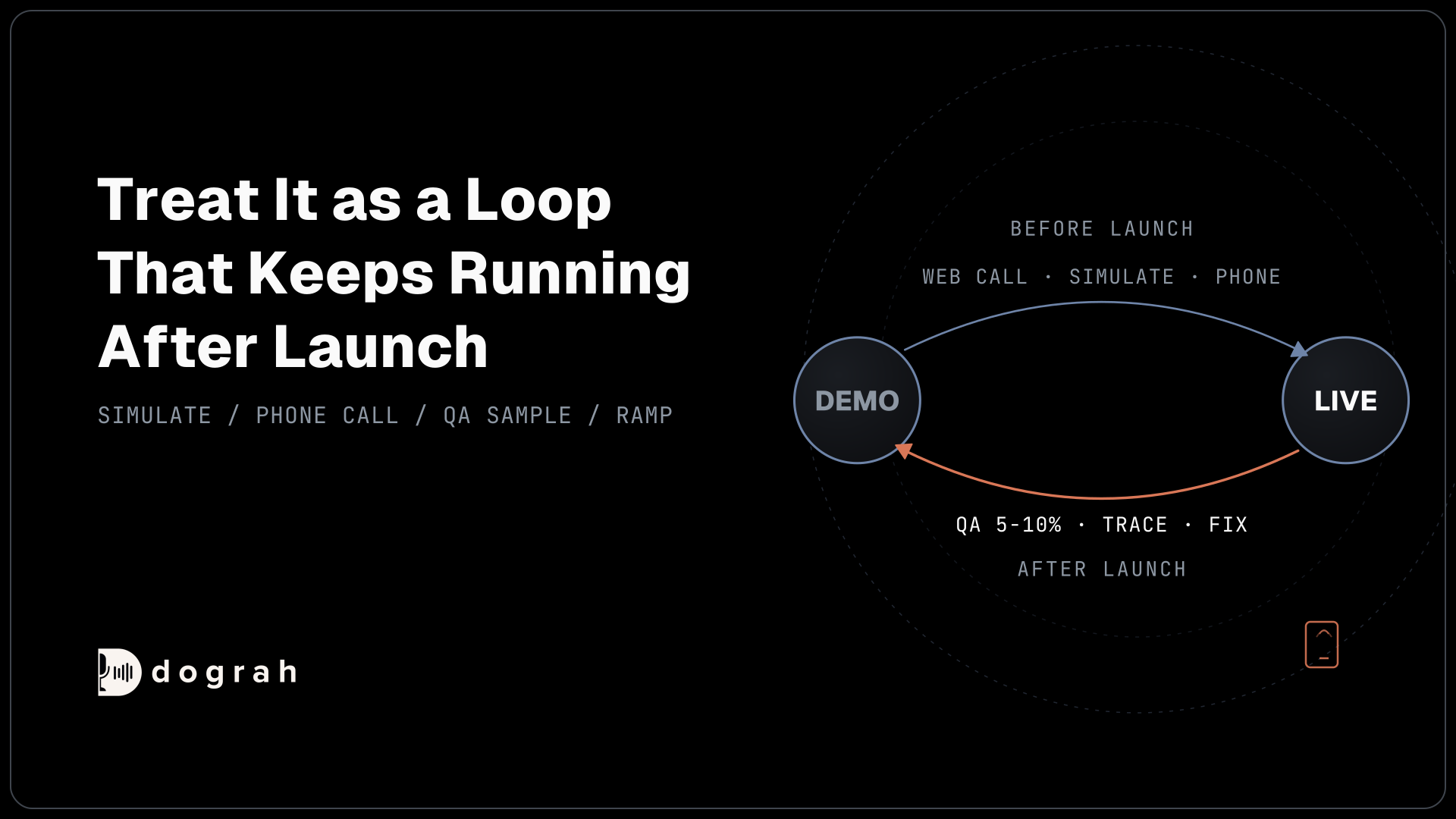
Read the flagged calls in the sample, starting with the lowest step scores. For any call where the reason isn't obvious from the transcript, open its trace to see which layer failed, as we walk through in reading call traces. Then change the flow, and put the Sample Rate back to 100% for a week to see whether the fix held.
The tags often point straight at the change. Repeated ASSISTANT_IN_LOOP flags often mean a pathway condition is too vague, so the agent can't tell when to move on. A growing unplanned_request list, or a run of USER_REQUESTING_FEATURE tags, tells you which new branch to build next. This is the same loop we describe in our post on restaurants and home services: QA flags the off-script calls, a person reads them and the agent gets fixed.
If you are setting this up now, start with the default prompt at 100% for your first weeks. Add the checks only your business needs, then drop the Sample Rate to 5-10% once the flags settle down.
Glossary
- Sample Rate (%)
- The share of eligible calls the QA node reviews. It defaults to 100, and we drop it to 5-10 once an agent is stable.
- LLM judge
- A language model asked to grade a transcript against written rules. Its grades need checking against human labels before anyone acts on them.
- Rule of three
- If a problem never appears in n reviewed calls, its true rate is very likely below 3 divided by n, so 350 clean calls put it under about 0.9%.
- Default tags
- Labels such as DEAD_AIR or USER_NOT_UNDERSTANDING that the QA review attaches to each run, so flagged calls can be found and read later.