
To test, monitor and scale an AI voice agent in production, talk to it yourself, then simulate many callers and run every leg several times. Test over a real phone call, since browser audio is cleaner. Once live, run automated quality assurance (QA) on a 5-10% sample and read the trace behind each flagged call. Add traffic in small steps.
Key Takeaways
- A browser test hears cleaner audio than most phone lines deliver.
- The same prompt can answer differently, so run each leg several times.
- Once live, QA a 5-10% sample and expect the flow to change.
A voice agent can pass every demo and still stumble in its first week of real calls. We build Dograh, an open-source voice agent platform, and this guide is the order we test, monitor and scale agents in.
Why a voice agent that works in the demo breaks in production
A demo is one clean call, and production is thousands of messy ones.
Four things stay hidden in a demo. The language model can give a different answer to the same input on the next call. The phone line delivers worse audio than a laptop microphone, so the agent mishears more and sounds flatter. Load adds delay and provider errors that a single call never triggers. And real callers ask things nobody wrote a node for, in ways they would never talk to a person.
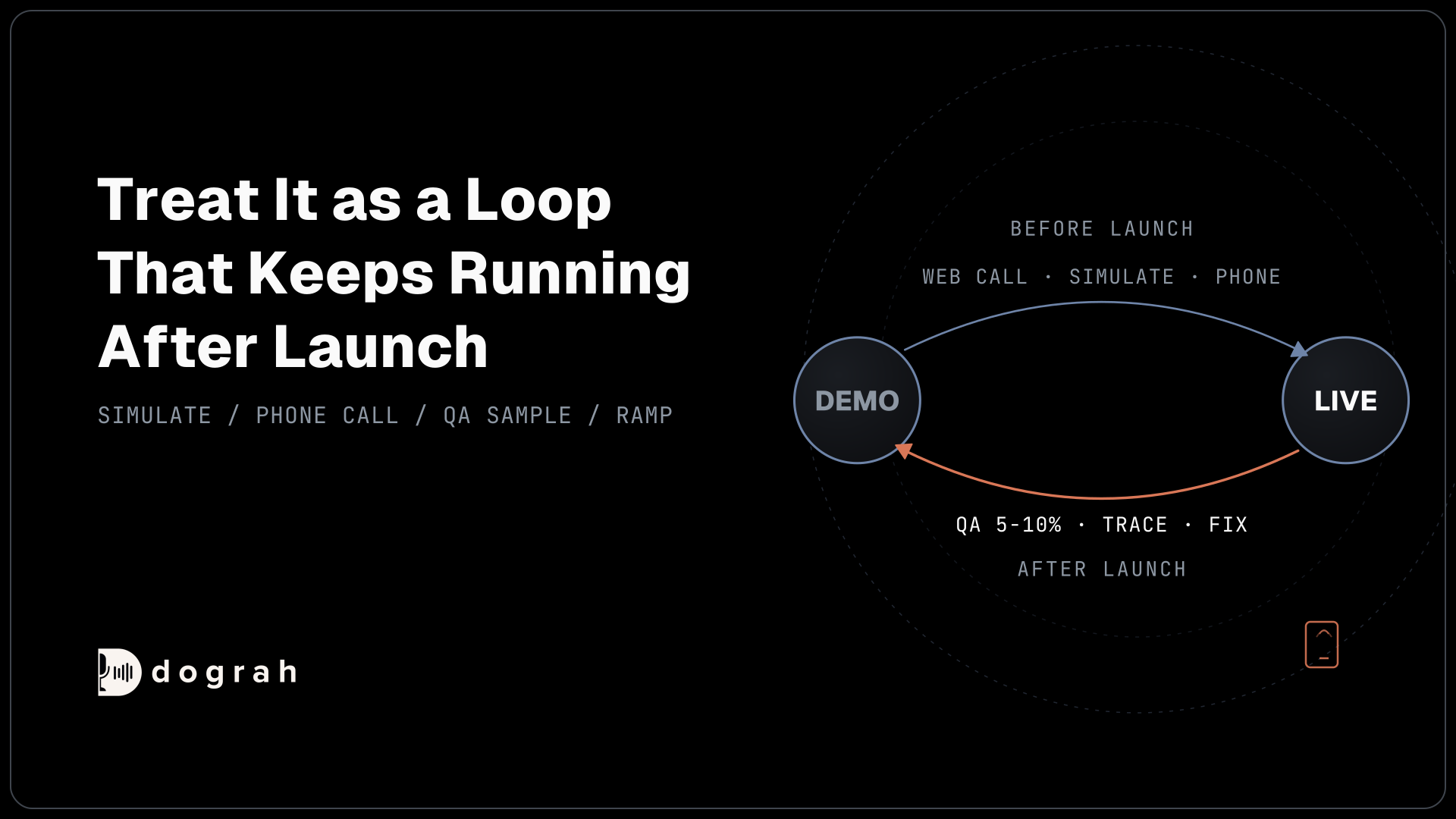
Each check in this guide catches something the one before it misses. You start in the browser and with simulated callers, then move to a real phone line. Once live, you review a sample of calls and read the trace behind any call that went wrong. Traffic grows in steps, and every flow change sends you back to testing.
Treat it as a loop that keeps running after launch. In our experience the flow you go live with is rarely the flow you run three months later.
Start by talking to the agent yourself
The first pass is you, in the browser, looking for big mistakes.
In Dograh, start a Web Call from the agent editor. It runs the same speech-to-text, language model and text-to-speech pipeline from your browser microphone, and while you talk it shows the live transcript, each move between nodes and every tool call. Try to pull the agent off-script. Ask something it was never built for, or give it a wrong date and see whether it notices. Interrupt it halfway through a sentence.
For faster loops, Test Chat lets you have the same conversation in text, which makes it quick to try several phrasings of an awkward question without redialling.
Set up test data before you start. Template Variables you add under Settings are included in test calls from the editor, so you can fake the caller's name or order number. Browser tests count as inbound by default, and setting the direction variable to outbound tests the outbound opening instead. Check every variable the greeting uses. If one is missing, the agent reads the raw placeholder out loud.
This pass finds the blunders, such as a wrong greeting or a tool that never fires. It cannot find much else. You know the script, and you ran each path once on a good microphone.
Simulate many callers, and repeat every leg
Simulations cover the callers who do not behave like you, and repeat runs cover the model's habit of answering differently.
A testing tool such as Tuner, which plugs into Dograh, can play the caller for you. Tuner places a call into your agent over SIP, follows a generated scenario as the caller and scores how the agent handled it, with the transcript and latency for each call. Roark is another tool built for this kind of testing. Once you are live, Noveum, which also connects to Dograh, can build test sets out of your real calls, which are better scenarios than anyone can invent.
One detail matters here. Tuner's calls arrive on the inbound path, and inbound calls always run the published version of a workflow. To simulate a change before real callers hear it, run it on a separate test agent first.
Repeat runs matter because the model's output is not fixed. In a September 2025 test by Thinking Machines Lab, 1,000 identical requests at temperature 0 produced 80 different answers. The cause was load on the provider's servers, so the same agent can behave differently at a busy hour than in a quiet test run.
So test each leg of the conversation several times. A leg is one step, like the agent asking for a date, checking a slot with a tool, or deciding which pathway to take. Langfuse, which you can connect to Dograh for each organisation, lets you replay one AI step with the exact prompt it received, as many times as you like. One clean run proves very little, and a leg that passes four times out of five has a problem you will meet in production.
The full pre-launch order, from the browser to a small load test, with a checklist you can copy, is in testing voice agents before you go live.
Test over a real phone call, not only the browser
Skipping a real phone test is one of the biggest mistakes we see teams make, and the reason is the audio.
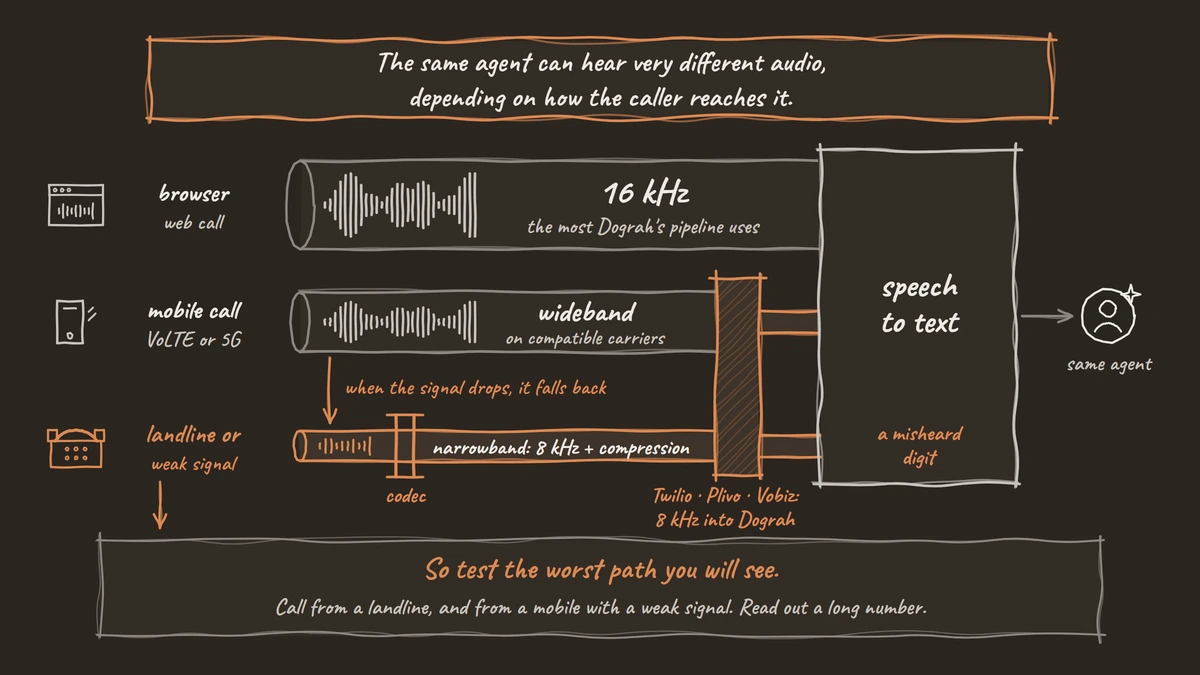
A web call runs at 16 kHz, the most Dograh's pipeline uses. A traditional phone call is narrowband, sampled at 8 kHz and then compressed by the phone network's codec. The provider matters too: Twilio, Plivo, Vobiz and Asterisk send 8 kHz audio into Dograh, while Vonage sends 16 kHz. The same agent can hear very different audio depending on how the caller reaches it.
What phone audio does to speech recognition
The damage comes from the compression as much as from the sample rate. A June 2026 study from the Indian Institute of Science found that narrowband audio on its own kept accuracy close to the original, while older compressed codecs such as GSM consistently hurt it.
How much it hurts depends on the speech model. In WildASR's March 2026 telephony tests, six of seven modern models barely moved on English read speech. Whisper Large V3 went from 4.2% to 4.8% word error rate on a standard phone codec. One model, Qwen2-Audio, went from 5.8% to 48.3%.
Real phone paths can be worse than a single codec. Caller Digital's September 2026 benchmark, a vendor test across five Indian languages, measured 7.4% word error rate on 16 kHz audio, 11.8% on a normal 8 kHz phone line, and 19.7% when a landline call ended on a mobile. Long digit strings, like phone and account numbers, came out fully right 92.8% of the time on 16 kHz audio and 81.4% of the time on the phone line.
In our experience, speech-to-text errors can be up to 3x higher over a phone call than over a web call. It depends on the speech model and the phone path, so test your own setup over a real call. The words that break first are the ones your flow depends on, such as account numbers and dates. A misheard digit sends the agent off to look up the wrong customer, and it will read that record back with full confidence.
What it does to the agent's voice
The agent also sounds worse on a phone line. Narrowband audio strips the high frequencies that make a synthetic voice sound natural, so the voice comes across flatter and more robotic. In the same Caller Digital benchmark, a Hindi listening panel scored a premium neural voice 4.4 out of 5 on wideband audio and 3.6 on a standard phone line, and the gap between premium and mid-tier voices shrank.
Pick the voice by listening on a real handset. A voice that sounds warm through headphones in the browser can sound tired over a phone line.
Mobile calls sound clearer, until the signal drops
Many mobile calls today are better than the old 8 kHz standard. On VoLTE or 5G calling, with both callers on compatible carriers, a call often runs at 16 kHz or higher. But the codec behind VoLTE is built to fall back. Fraunhofer, which co-developed it, describes EVS switching between VoLTE and older networks when network conditions call for it. When the signal drops or the caller is on a landline, the call falls back to narrowband.
So test the worst path you will see. Call from a landline, and from a mobile with a weak signal. Read out a long number, and listen to the agent's voice on the handset.

Open Source Alternative to Vapi / Retell
Self-hosted voice agent platform — no per-minute fees
dograh-hq/dograh
Star on GitHub
Run automated QA on a sample of live calls
Once real calls start, an automated review of each call's transcript tells you which calls went wrong without anyone listening to all of them.
Dograh's QA node runs an AI review of the transcript after each call ends. It never changes what the agent does during the call. It runs on every eligible call, test calls from the editor included, and by default skips calls under 15 seconds and voicemail. You can replace the default prompt with your own checks, such as whether a required disclosure was read.
The default review returns tags such as DEAD_AIR (long silences), USER_FRUSTRATED (the caller getting annoyed), ASSISTANT_IN_LOOP (the agent repeating itself) and USER_NOT_UNDERSTANDING (the caller not following the agent). It scores each step of the call separately: every step gets its own tags, a 1-10 score, a sentiment and a short summary, and all the tags are also listed together for the call. Results appear in the QA Analysis section of each run's Run Detail page and in your webhooks.
QA also runs on test calls, so you can check its review before launch.
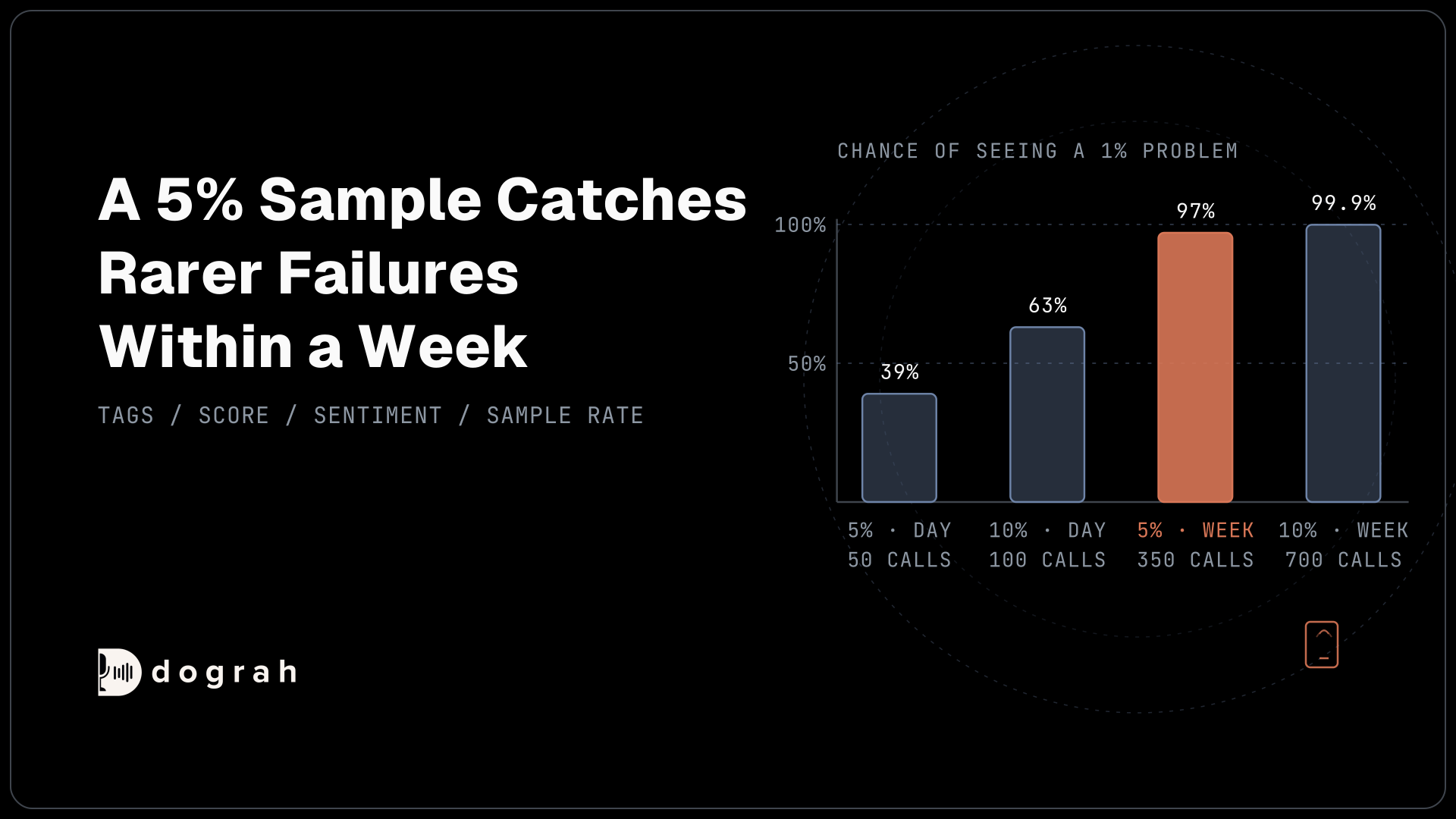
The QA node has a "Sample Rate (%)" setting, and it starts at 100. Once you are live and the agent is stable, set it to 5-10%. Every review is an AI call, so reviewing every call costs money at volume. People also have to read what gets flagged, and a team can only read so many calls a day. Langfuse's docs also recommend reviewing only a share of calls to keep AI review costs down. You still see basic details for every call, like how it ended and what it cost.
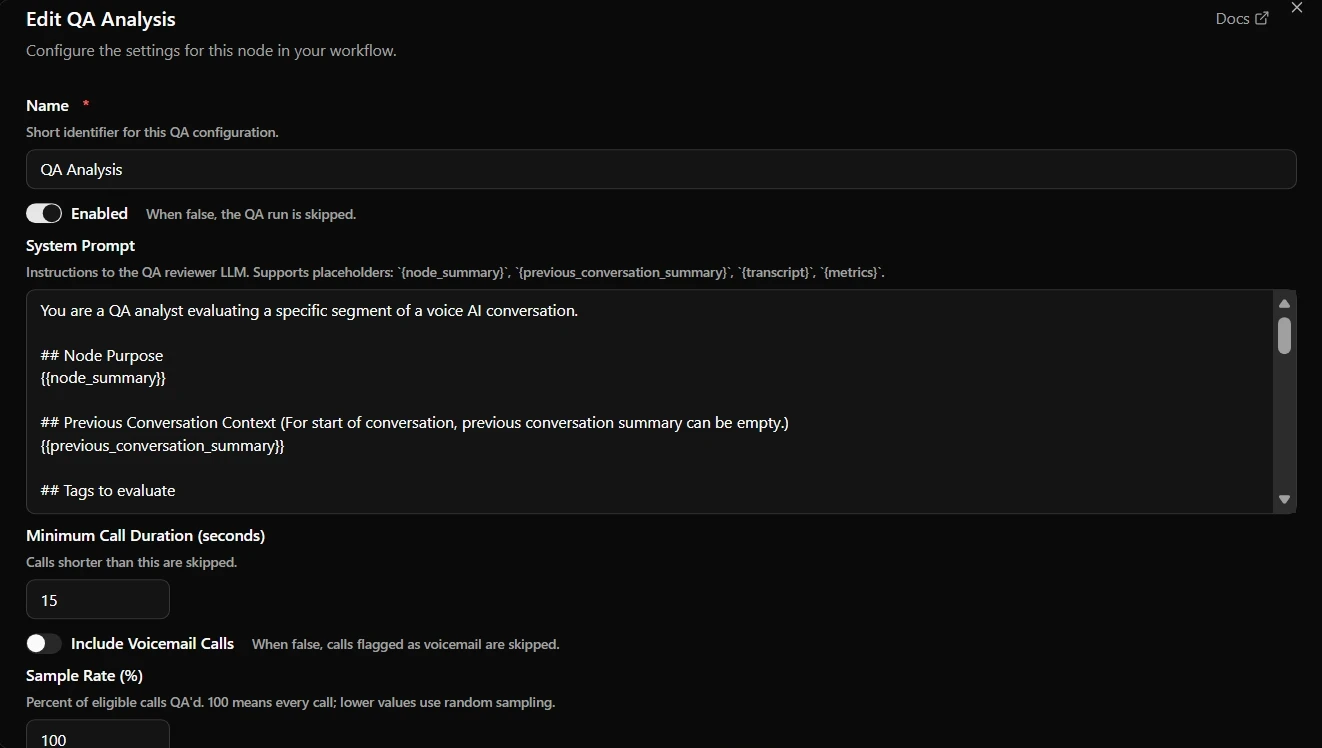
Some teams argue for reviewing every call, and at certain times we agree. Keep the rate at 100% for the first weeks after launch and for a week after any flow change, then drop back to 5-10%. Regulated scripts, where a missed disclosure is a legal problem, can stay at 100% for good.
The sample earns its keep through the fixes it leads to. We wrote about this loop in our post on restaurants and home services: sample the transcripts, find the calls that went off script, and fix the agent based on what they show.
What each tag and score catches, and how to write your own checks, is covered in automated QA for voice agents.
When QA flags a call, read the trace
QA tells you which call went wrong, and the trace tells you which part of the agent caused it.
After a call ends, click View Trace on its call summary. It shows what speech-to-text heard, the full prompt the model received (the global prompt plus the node's prompt), the conversation so far, and the tools the model could use. Those tools include the pathway tools that move it from one node to the next. It also shows the model's reply and each tool request with its response. A wrong answer after a correct transcript points at the model or the prompt. A wrong transcript is a speech problem, and no prompt change will fix it.
The run's Call Transcript also shows a reasoning delay on every agent turn, which is a quick way to spot slow turns. It covers only part of the 800 ms budget for a natural turn, so check View Trace for how long speech-to-text, the model and text-to-speech took on each turn, and export calls to Noveum or BigQuery to analyse many calls at once.
Before you change the prompt, replay that leg several times in Langfuse. If the failure shows up once in five runs, you have found a real problem. A prompt that fixes one replay may not fix the other four.
We walk through a trace layer by layer in how to read call traces to debug your voice agent.
Scale up slowly, and keep watching
Move traffic onto the agent in steps, and watch each step before you take the next.
We ramp slowly for two reasons. The phone path behaves differently from the browser, and you have not yet seen it under load. Real callers will also do things your tests never tried, which is the subject of the next section.
Start with a small load test
Run a small load test over real telephony before you send full traffic. Start with a handful of calls at once and raise the number in steps. At each step, watch the reasoning delay per turn and look for errors from your model and speech providers, since each provider has its own limits on concurrent requests. Dograh's BigQuery call events include stage latencies and pipeline errors for every call, which makes those numbers easy to chart.
When you go live, start with one call type or a small share of traffic. Move the rest over once the QA sample and the traces look clean.
Set the limits before a campaign grows
Dograh gives you limits you can set before volume arrives. On self-hosted Dograh, the organisation-wide cap on concurrent calls defaults to 10 and is set with DEFAULT_ORG_CONCURRENCY_LIMIT. A campaign has its own concurrency setting, capped by your telephony plan, so start it low. Through the API, a campaign also takes a calls-per-second rate, which defaults to 1. A callback campaign that dials hundreds of numbers at once is a burst of new calls, so the rate matters as much as the concurrency.
Turn on the campaign circuit breaker before a campaign scales. Once it is on, it pauses the campaign when failures pass a threshold, by default 50% of calls within 120 seconds, counted only after at least 5 calls. Calls already in progress finish normally, and someone has to resume the campaign by hand after checking what went wrong. That stops a bad contact list or a broken agent from burning through a whole list.
If you self-host, Dograh's API container runs one worker by default. For many concurrent calls, run several workers behind nginx, roughly one per vCPU up to 8, with 300-500 MB of RAM for each.
Model costs grow with volume too, and running the models on your own hardware turns that cost into a flat one. We cover the trade-offs in running voice AI on local, self-hosted models.
Join the Dograh Community
Dograh is an OSS alternative to Vapi. Join our Slack community for queries, releases, best practices & community interactions.
Expect the flow to change once real callers arrive
The biggest change after go-live is usually to the flow itself.
We see it very often. Callers ask questions and give answers the team never thought of during the build. People also behave differently with a voice agent than with a person. They cut answers short, or say things they would never say to a human. That change in behaviour is very hard to predict before launch, and it often leads teams to rebuild large parts of the flow, and sometimes to change the use case itself.
So build the agent to be easy to change. Edit the draft and try it through the test trigger URL, which runs the latest draft, while the production URL keeps serving the published version. Dograh also keeps earlier versions of a workflow on record. After every change, run your simulations again and set QA back to 100% for a week.
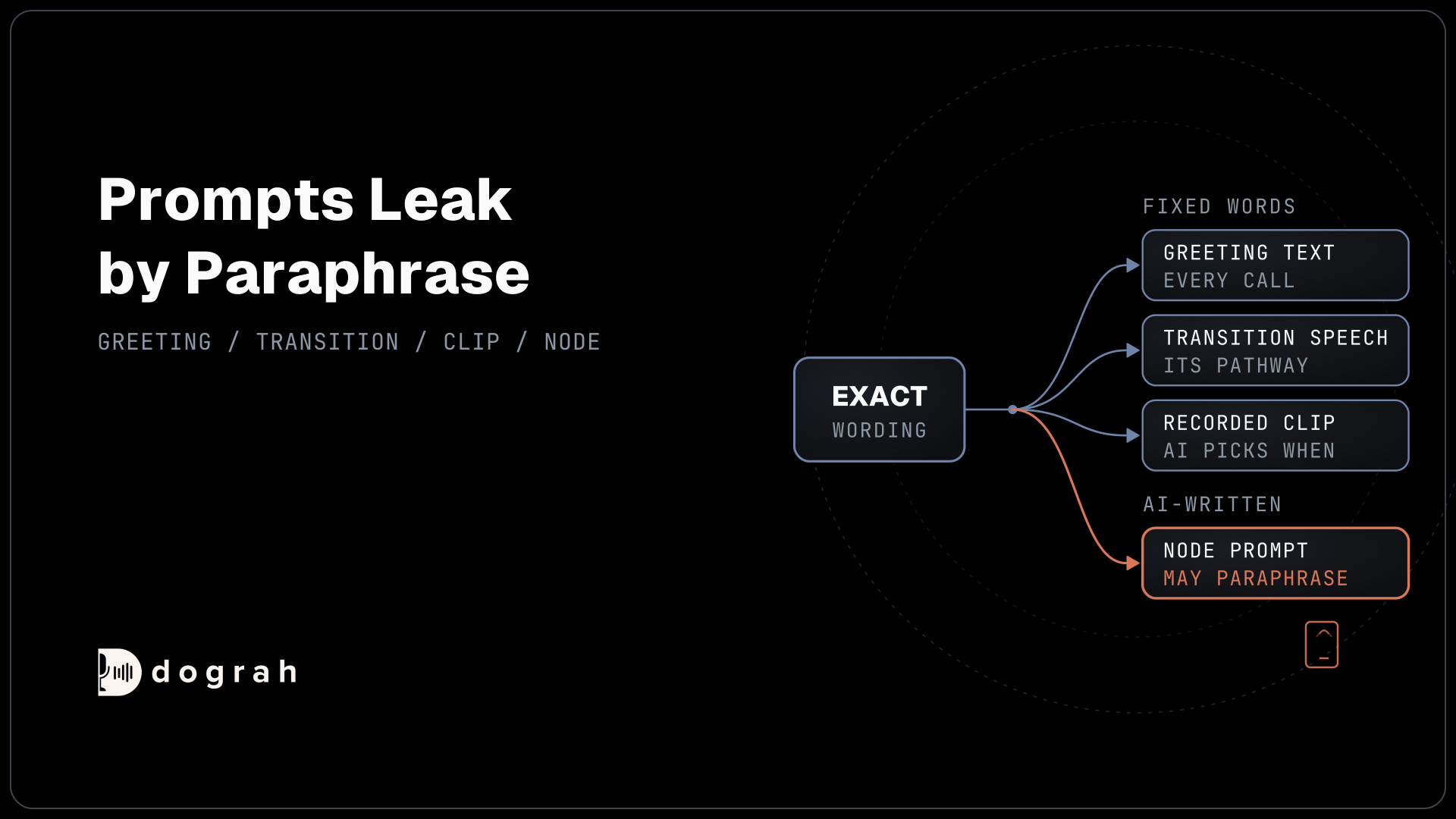
Some lines have to be said exactly as written, such as a legal disclosure. In Dograh, exact wording holds only in the Start Call greeting text, a pathway's transition speech or a pre-recorded clip. Inside a node, the AI writes its own words, so a node prompt cannot guarantee them.
Where to split a flow into nodes, and how to keep it easy to change, is the subject of prompt and flow design patterns for reliable voice agents.
What to ask of a voice platform before you scale
At scale, what you can see and control in the platform matters more than how good the demo sounded.
Before you commit, ask a few plain questions. Can you open the full trace of any call, including the exact prompt and every tool response? Is post-call QA built in, with a setting for how many calls it reviews? Can you test a draft without touching live calls? Can you set concurrency and a safety stop that pauses a failing campaign? And where do the transcripts and recordings live?
With Dograh, the answers sit in code you can read, because it is open source under the BSD-2 licence and runs entirely on your own servers if you want it to. It is the orchestration layer: it runs the call flow, the tools, the telephony and every check in this guide, while the speech and language models are a separate layer you choose. Run open-weight models next to it and the audio and transcripts never leave your infrastructure. Bringing your own keys to a hosted model provider is a different arrangement, since it moves the contract but the audio still reaches that provider. For how traces, QA results and recordings stay on your own servers, see self-hosted voice agent monitoring and QA.
If you are starting now, set up the real phone test first. It is the cheapest check here, and the one teams skip most.
Each stage of this guide has its own deep dive:
- Testing voice agents before you go live
- Automated QA for voice agents
- How to read call traces to debug a voice agent
- Prompt and flow design patterns for reliable voice agents
Glossary
- Narrowband
- The compression a traditional phone network applies to 8 kHz call audio. It removes most sound above about 3.4 kHz, and it hurts speech recognition more than the low sample rate alone.
- Leg
- One step of a voice agent's flow, such as asking for a date, calling a tool or choosing the next node. Each leg should be tested several times because the model can answer differently each run.
- Sample Rate (%)
- The share of calls an automated post-call review checks. In Dograh it is the QA node's Sample Rate (%) setting, which starts at 100 and is usually lowered to 5-10% once an agent is stable.
- Circuit breaker
- A campaign safety stop that pauses outbound dialling when the failure rate in a short window passes a threshold. In Dograh it has to be enabled, and a paused campaign is resumed by hand.