
A multilingual voice agent understands and answers callers in more than one language, and can switch when the caller does. Its speech-to-text must detect each language, and its voice must speak it. Dograh, an open-source voice agent platform you can self-host or run on Dograh Cloud, serves 70+ languages, depending on the speech-to-text and voice providers you choose.
Key Takeaways
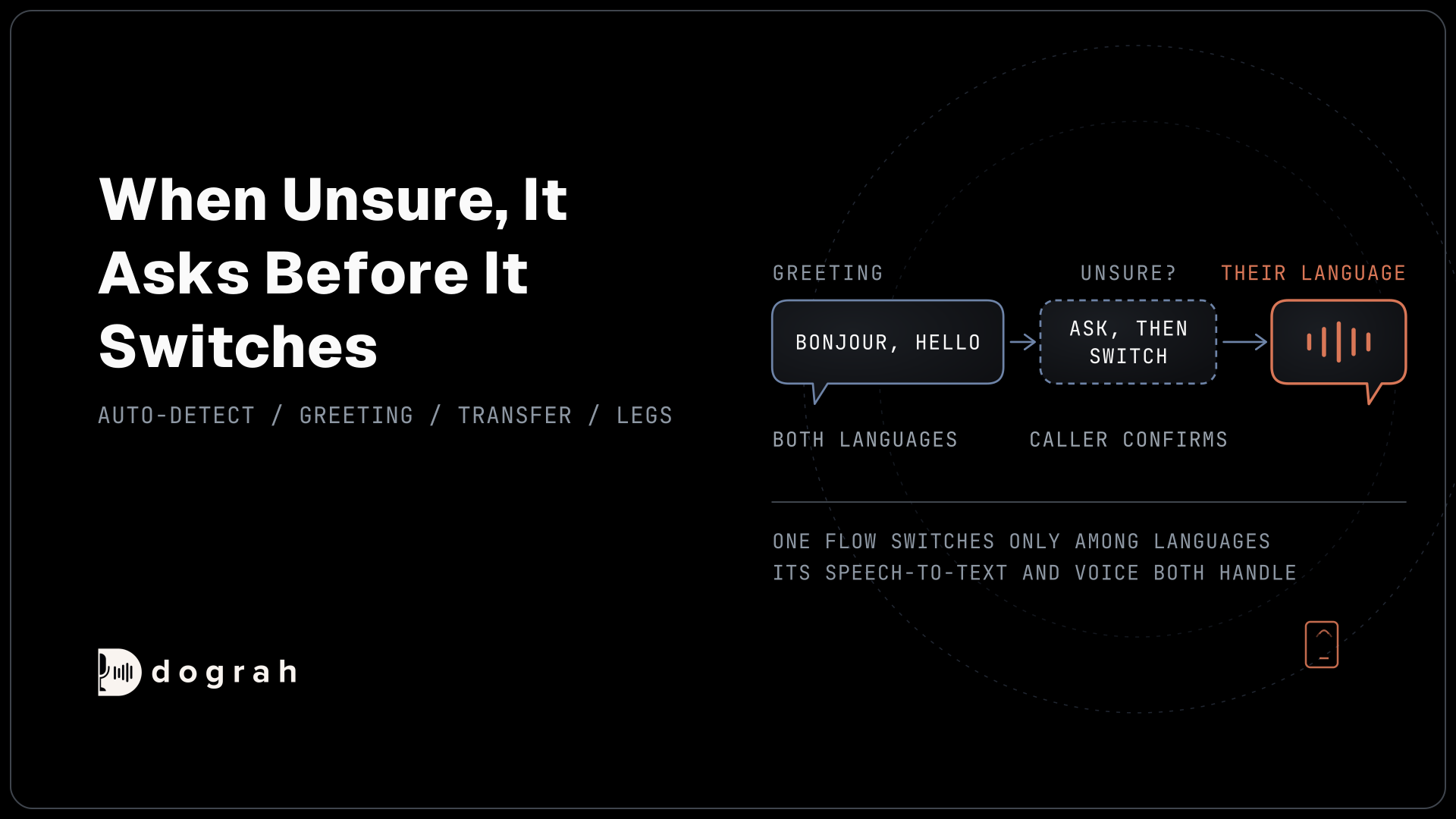
- One flow switches only among languages its speech-to-text and voice both handle.
- When unsure of the language, the agent asks before it switches.
- Test every language you serve as its own leg, with native speakers.
This post is part of our guide to testing, monitoring and scaling AI voice agents, where each leg of a conversation gets tested several times. Here we build one flow in Dograh that switches language mid-call, and treat each language your callers speak as its own leg to test.
What a multilingual agent needs
A voice agent hears the caller through speech-to-text and speaks its reply with a voice, while a language model writes the reply in between. For a second language, the weak points are the two ends. The speech-to-text model must recognise which language the caller is speaking, and the voice must say the reply in it. Most current language models can reply in the caller's language if the prompt tells them to.
Dograh is the orchestration layer that runs the call flow, tools and telephony, and the speech and language models are a separate layer you choose. So the languages one agent can serve are set by the models you pick for it. That is why Dograh serves 70+ languages, depending on the speech-to-text and voice providers you choose, while any single flow covers fewer.
Pick the models first, then build the flow. Our post on AI voice agents for multilingual support lines in BPOs makes the same case for contact centres.
Which speech-to-text models switch mid-call
Some speech-to-text models follow a caller who switches language, known as code-switching, and others are set to one language for the whole call. This language detection setting matters most.
Dograh's own speech-to-text has a "Multilingual (Auto-detect)" option. It covers 10 languages: English, Spanish, French, German, Hindi, Russian, Portuguese, Japanese, Italian and Dutch. It is built on Deepgram Flux, which handles a switch even in the middle of a sentence, according to Deepgram's Flux language guide. Language hints, a set of checkboxes, let you tell it which of those languages to expect. They appear only with Dograh's models or Deepgram Flux.
If you pick one fixed language instead, Dograh's own speech-to-text lists 49. For a wider mix that still switches, bring your own key for a provider that auto-detects. Deepgram Nova-3 in its multilingual mode, Soniox, ElevenLabs Scribe and Sarvam all detect the language as the call goes. Soniox runs one model across the 60+ languages on its supported languages list. Gladia, by contrast, is set to one language per call in Dograh.
Each provider's options are in the speech-to-text settings.

Open Source Alternative to Vapi / Retell
Self-hosted voice agent platform — no per-minute fees
dograh-hq/dograh
Star on GitHub
One voice for every language
A Dograh model configuration has one voice, and the agent uses it for every reply. So that one voice must speak every language the agent may switch into. Check your voice provider's language list for each language, then listen to the voice in each one, since quality varies by language.
The greeting needs its own thought. Greeting Text plays before Dograh can hear the caller's language, so write it in both, for example "Bonjour, hello". You set it on the Start Call node.
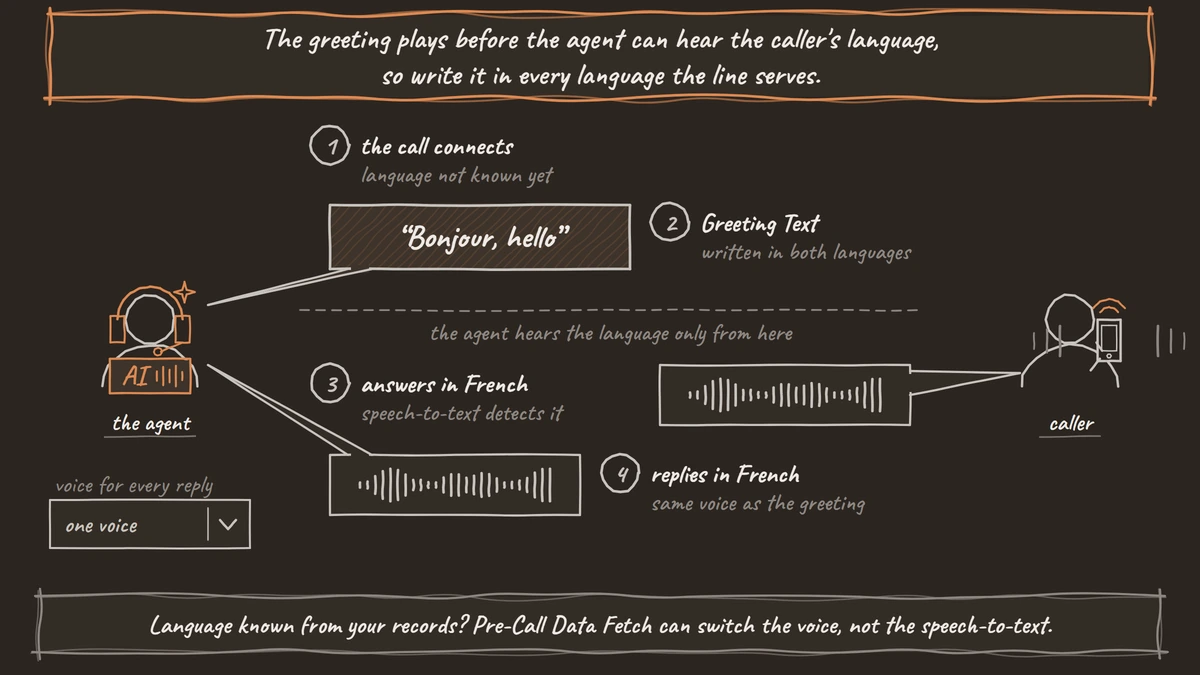
If your records show a caller's language before the call, Pre-Call Data Fetch or the API can switch the language model and the voice for that call. It cannot change the speech-to-text model, so pick one that covers every language on the line.
Custom terms need a check per language too. Whether a Dictionary helps in, say, Hindi depends on the speech-to-text provider. Using a custom dictionary for industry jargon and names lists the providers that take one.
When the agent is unsure of the language
The worst outcome is an agent that carries on confidently in the wrong language. Handle it with a prompt instruction. Tell the agent that when it is unsure of the caller's language, it asks a short question offering the likely languages and switches only after the caller confirms.
Some callers will speak a language the flow does not cover. One option is Transfer to Agent, which hands the call to another Dograh agent set up for that language and passes the conversation so far. It works on agents with separate speech and language models only.
The other is a person. Transfer Call works on Twilio, Telnyx, Plivo, Cloudonix and Asterisk ARI. Dograh calls the destination first and connects the caller only when someone answers. If no one who speaks the language is free, the agent takes only a name and number and arranges a callback in the caller's language.
Outbound calls need one more setting. The quick phrase check covers English and Italian. In other languages the AI classifier decides, and you can tune it in "Classifier instructions". What is voicemail detection explains that setting.
Join the Dograh Community
Dograh is an OSS alternative to Vapi. Join our Slack community for queries, releases, best practices & community interactions.
Test each language as its own leg
No public benchmark covers multilingual voice agents end to end. Sierra's tau-voice benchmark, for example, tests voice agents in English only. So the only evidence that your agent works in Hindi or Spanish is your own calls.
Test each language you serve as its own leg, with native speakers on real phone calls. Phone audio is harder on some languages than others, so a language that works in the browser can fail on a phone line. Repeat each leg several times, and include at least one call that switches language mid-sentence. Handling accents, background noise, and real-world audio covers the accent side of the same test.
After launch, review live calls per language. QA summaries are written in English by default, so a reviewer can read them across languages, but listen to the recordings for the replies themselves.
Dograh is self-hostable, so call audio in every language can stay on your own servers. Self-hosted Dograh has no per-minute platform fee (servers, model keys and phone minutes still cost). Dograh Cloud has a 1¢-a-minute platform fee.
Start with two languages your callers actually use, prove both legs, then add the next.
Glossary
- Code-switching
- When a speaker moves between two languages in one conversation, or within one sentence. Many bilingual callers do it without noticing, so a single-language speech model mishears them.
- Language detection
- The speech-to-text model working out which language the caller is speaking as the call goes. In Dograh it comes from the auto-detect option on Dograh's own speech-to-text or from a provider that supports it.
- Language hint
- A setting that tells the speech-to-text model which languages to expect, so it detects them faster and more reliably. In Dograh it appears only with Dograh's models or Deepgram Flux.