
A custom dictionary is a short list of names and industry terms you give a voice agent's speech-to-text model so it expects them, such as brand names or acronyms like KYC. When the audio is unclear, the model leans toward your spellings. It only works if your speech-to-text provider accepts the list.
Key Takeaways
- Add only the terms a mishearing would break, and keep the list short.
- Dograh sends the Dictionary to five speech-to-text providers, and others ignore it.
- Test each term on real phone calls, then read the transcripts.
This post is part of our guide to Voice AI Explained, whose phone-audio section tells you to give speech-to-text a custom dictionary. Here we cover what belongs in the list and how to test it, using the Dictionary setting in Dograh, the open-source AI voice agent platform we build.
Why speech-to-text misses names and jargon
Speech-to-text models learn from huge amounts of everyday speech, so they favour common words. A rare product name or acronym loses to whatever ordinary word sounds closest. "AUM" turns into "um", and a surname turns into a place.
Names fail first, and noise makes it worse. In AssemblyAI's tests of its own model in noisy environments, the overall word error rate was 6.99%, but the entity error rate, for names and numbers, was 15.31%, and names alone were wrong 16.92% of the time. That is a vendor measuring its own model, but the pattern matches what we see on calls. The words your flow depends on are the ones it hears worst.
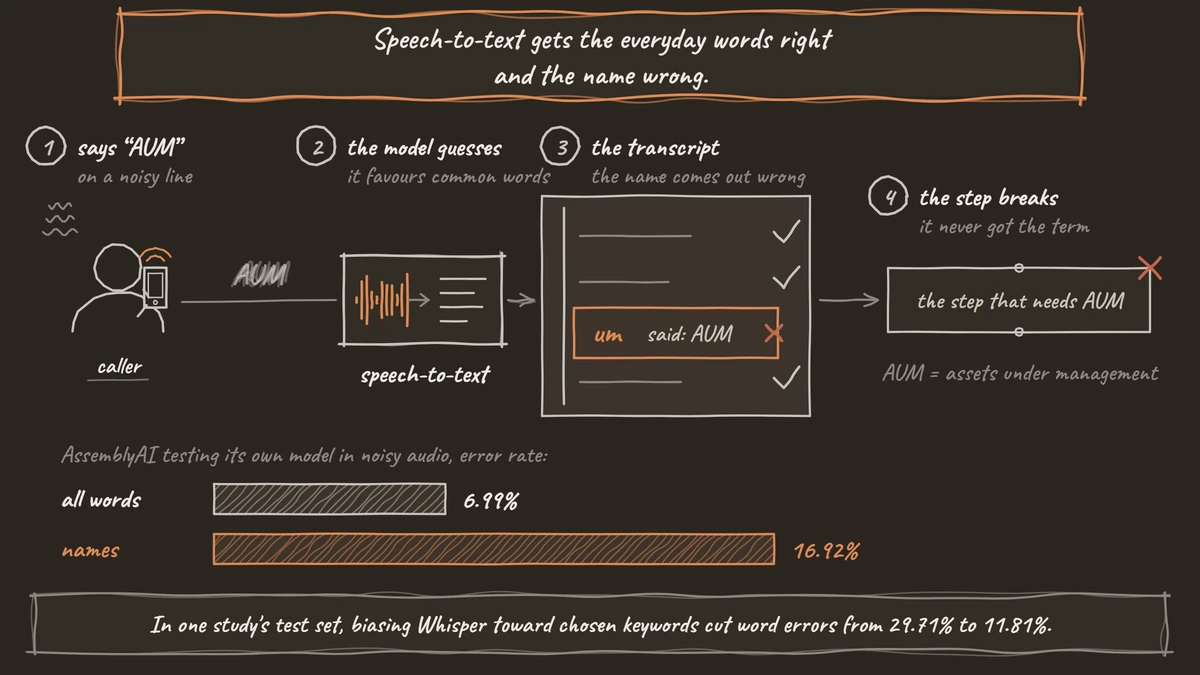
Telling the model which words to expect, called contextual biasing, helps. In a 2025 Interspeech study, biasing Whisper toward chosen keywords cut its word error rate on one test set from 29.71% to 11.81%. That was a research method trained for the task, not a product setting, but it shows how much weight a list of expected words can carry.
In our experience, this is a job for the orchestration layer. The agent should actively listen for brand names and terms like KYC (know your customer), because a misheard term breaks the step that depends on it.
How the Dictionary works in Dograh
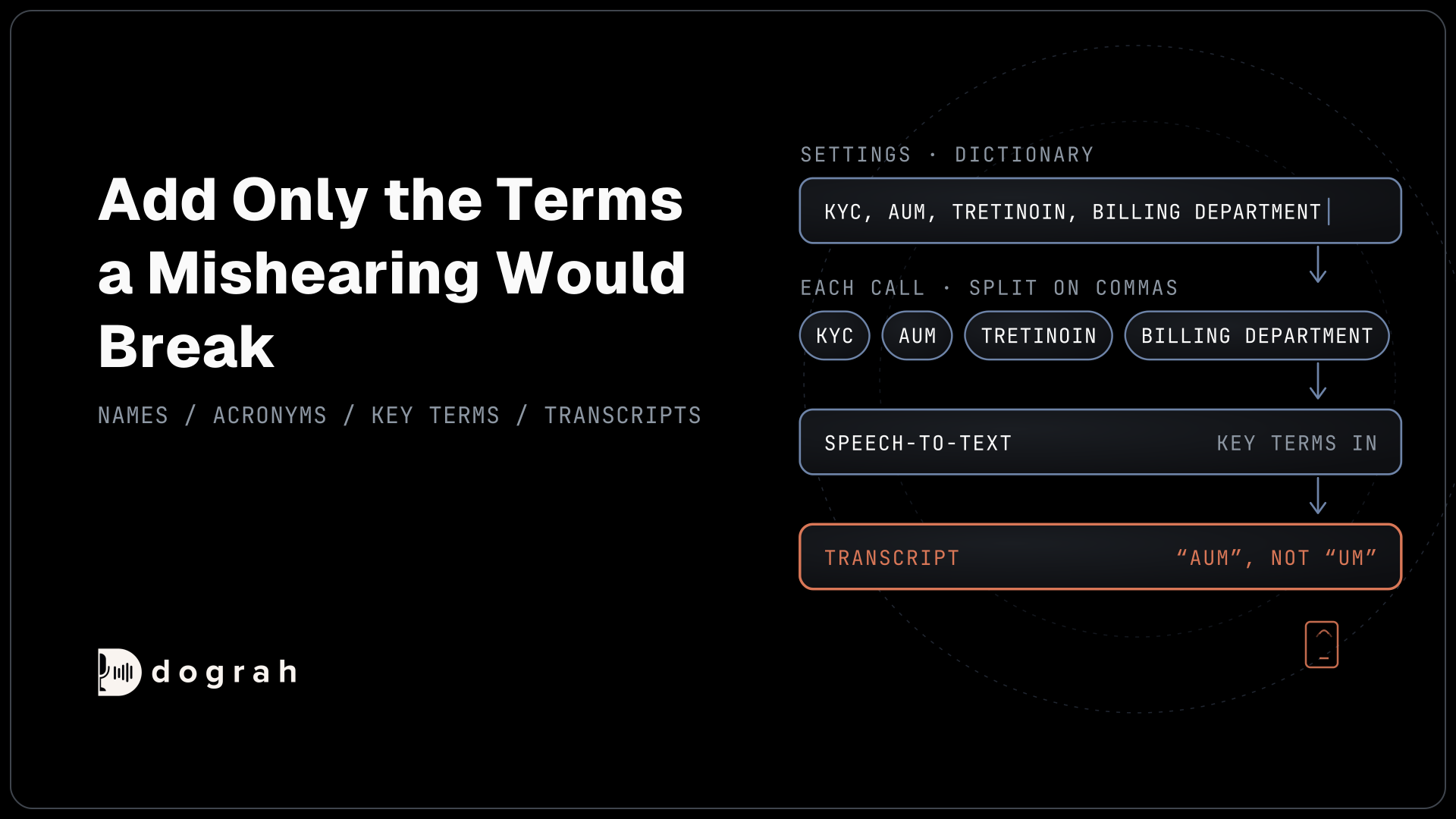
Dograh's Dictionary is one box in the agent's Settings. Open the agent, go to Settings, then Dictionary, and type the words separated by commas, such as "billing department, tretinoin". Click Save Dictionary, then publish the agent so live calls use the new list. The card notes that it may add cost, depending on the provider.
On every call, Dograh splits the box on the commas, trims each entry and sends the list to the speech-to-text provider as key terms, a feature providers call keyterm prompting. Dograh is the orchestration layer that runs the call flow, tools and telephony, and the speech and language models are a separate layer you choose. So the list only helps if the speech-to-text model you chose accepts it.
Five providers do: Deepgram (Nova-3 and Flux), Dograh's own speech-to-text, AssemblyAI, Soniox and Speechmatics. The other ten speech-to-text options in Dograh ignore it, including OpenAI, Google, Azure Speech and local models through Speaches. If names matter to your calls, pick one of the five.
The Dictionary is one of several jobs the platform runs around the models. What Is an Orchestration Layer in Voice AI? covers the rest.

Open Source Alternative to Vapi / Retell
Self-hosted voice agent platform — no per-minute fees
dograh-hq/dograh
Star on GitHub
What to put in the list
Start with the words whose mishearing would break a step, and stop there. Deepgram's keyterm guide recommends keeping to the 20 to 50 terms that matter most, and it takes up to 100 terms within a 500-token limit. It warns against common words and broad terms. AssemblyAI's streaming model takes up to 100 terms of up to 50 characters each.
Good candidates are words a general model has rarely heard. Think of your company and product names, and acronyms such as KYC or AUM (assets under management). Industry words count too, like polycrystalline and monocrystalline for a solar company. Add the names of people callers ask for, such as your doctors or account managers, spelled the way you want them written. Multi-word phrases work, so "billing department" can be one entry.
Leave out ordinary words, even ones you use a lot. A long list or common words can make the model "hear" a term nobody said, which is worse than a miss, because the agent then acts on it.
Build the first version from real misses. Read transcripts from test calls and add every term the model got wrong.
What the Dictionary cannot fix
The Dictionary nudges recognition toward your words, and that is all it does. It cannot rescue audio that is too poor to hear, and it does nothing on a provider that ignores it. It does not change how the agent pronounces a word either, because that is the voice model's job.
Long strings of digits, such as account or policy numbers, need a different fix. Tell the agent in its prompt to read the number back and ask the caller to confirm it. Our post on handling accents, background noise and real-world audio covers those prompt rules.
Languages need a check of their own. Dograh passes the terms whatever the call's language, but whether they help in, say, Hindi or Spanish depends on that provider. If your agent switches language mid-call, multilingual voice agents covers the setup.
Join the Dograh Community
Dograh is an OSS alternative to Vapi. Join our Slack community for queries, releases, best practices & community interactions.
How to test a Dictionary change
Test the list the way callers will use it, over a real phone line. Most phone calls reach the agent as 8 kHz audio, while a browser test runs at 16 kHz, so a term that is clear in the browser can still fail on the phone. Our guide to telephony for voice AI explains how phone calls reach the agent.
Run the same short script before and after the change. Have a colleague call in and say each term naturally, at normal speed, from a mobile. Then compare the transcripts line by line. Keep a term only if it fixed a miss, and remove any that caused a false hit.
The Dictionary works the same on a self-hosted install as on Dograh Cloud. Self-hosted Dograh has no per-minute platform fee (servers, model keys and phone minutes still cost). Dograh Cloud has a 1¢-a-minute platform fee. Some speech-to-text providers charge extra for key terms, so check your provider's price page before a long list goes live.
Repeat this whenever you add products or staff. Testing Voice Agents Before You Go Live puts the phone test in order with the other checks.
Glossary
- Keyterm prompting
- Sending a speech-to-text model a list of words to expect during a call, such as product names or acronyms. Deepgram and AssemblyAI use this name, and Dograh's Dictionary feeds it.
- Entity error rate
- The share of names, numbers and other specific items a transcript gets wrong. It is often far higher than the overall word error rate, which is why a voice agent mishears the details its flow depends on.
- Contextual biasing
- Any method that pushes a speech recognition model toward expected words. A dictionary does it at run time, while research methods can train it into the model.