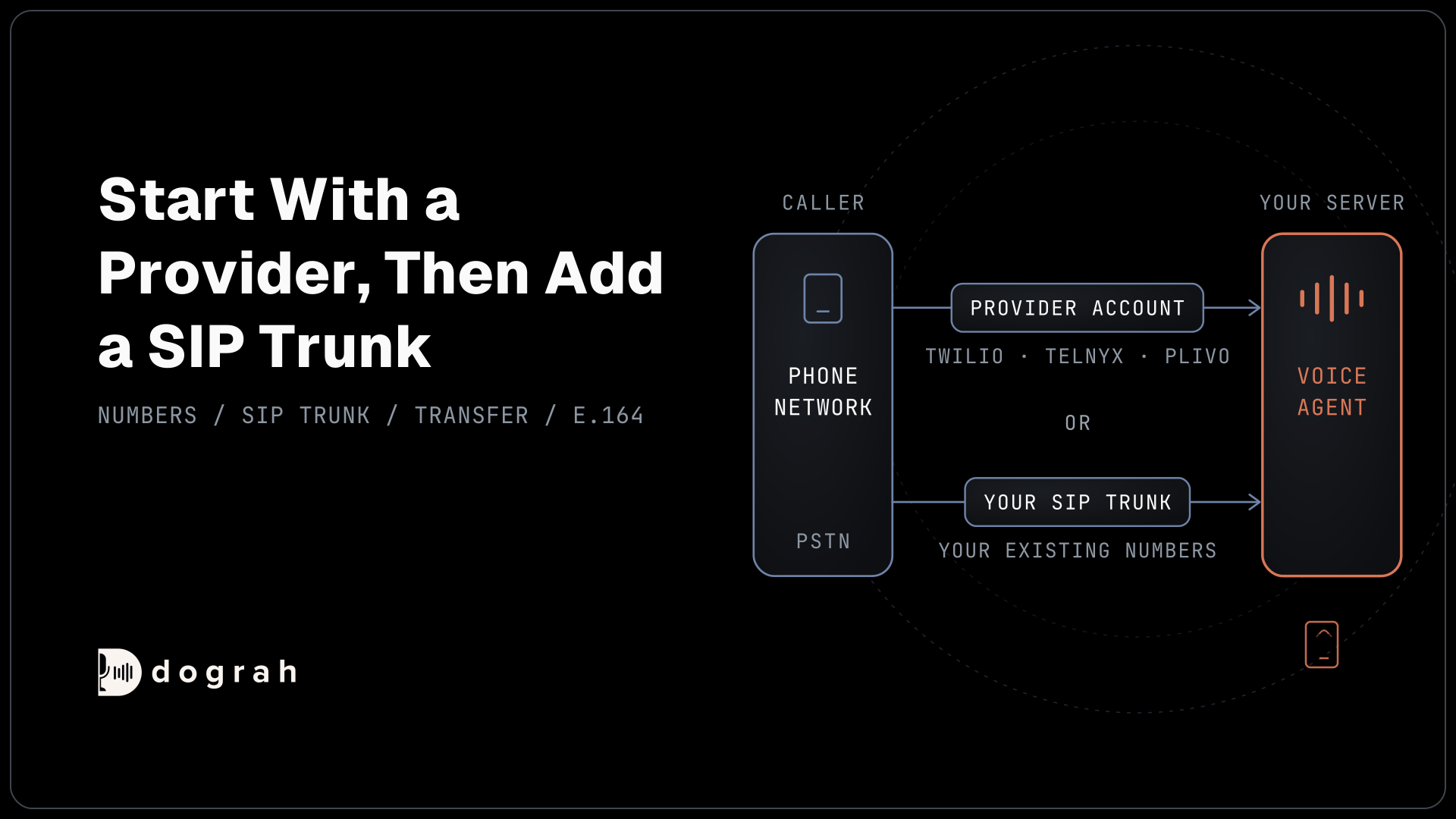

Telephony for voice AI is the layer that connects a voice agent to the phone network. A provider such as Twilio, Telnyx or Plivo rents you phone numbers and carries each call, often over SIP, the protocol that sets up internet phone calls. The provider then streams the caller's audio to your agent and sends the agent's voice back.
Key Takeaways
- The platform runs the agent, and a carrier such as Twilio carries the call.
- Start with a provider account, then add a SIP trunk for existing carriers.
- In Dograh, transfers to a person work on five providers, not every one.
This post is part of our guide to Voice AI Explained, where the section on how a call reaches the agent introduces the phone network and SIP. Here we explain phone numbers and SIP trunks, and which providers connect to Dograh, the open-source AI voice agent platform we build.
What a telephony provider does for a voice agent
A telephony provider is the company that connects your voice agent to the public phone network. That network, the PSTN (public switched telephone network), is what every mobile and landline call travels over. Your agent runs on a server, so something has to join the two.
The provider rents you phone numbers and carries each call between the phone network and your agent. When someone dials your number, the provider answers, then streams the caller's audio to your platform and plays the agent's voice back down the line. For an outbound call, the platform asks the provider to dial, and the same stream starts when the person picks up.
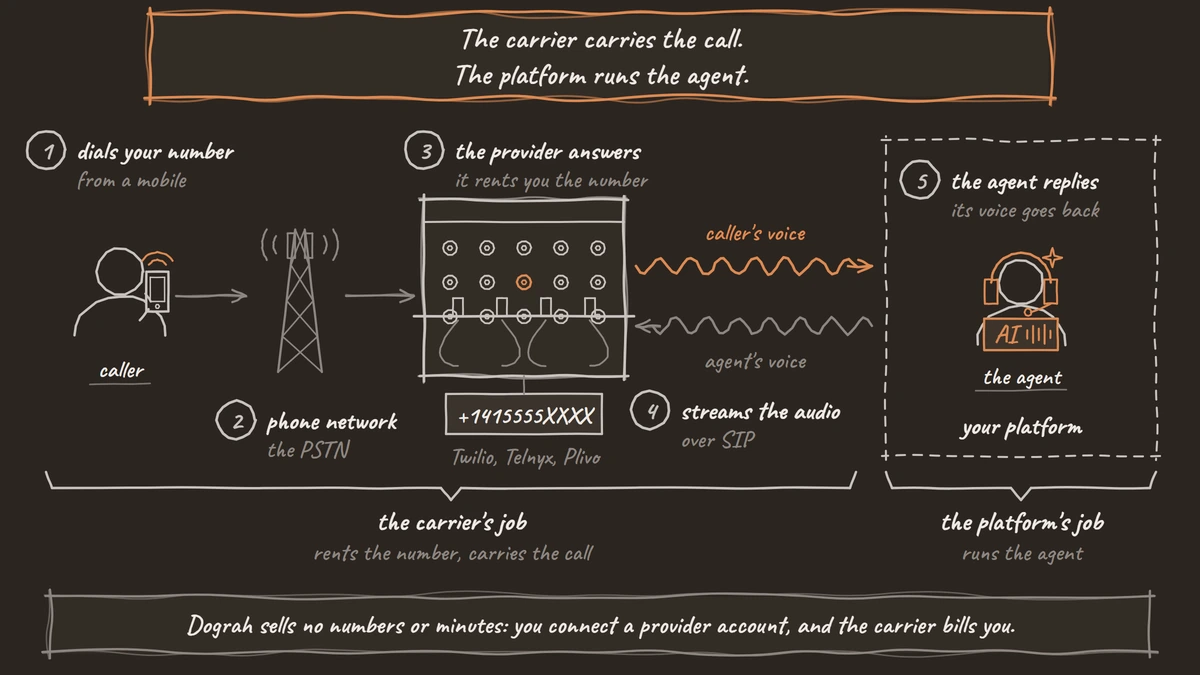
Most of this runs over SIP (Session Initiation Protocol), the internet standard for setting up calls, defined in RFC 3261. Browser calls skip the phone network and use WebRTC, which is how most builder test calls run. Our view is that SIP is the more reliable route for production phone traffic, while WebRTC belongs in the browser, so know which one your callers will use before you choose a stack.
Dograh sells no phone numbers and no minutes. You connect a provider account you already hold, or open one, and the carrier bills you directly.
A provider account or your own SIP trunk
There are two ways to bring phone lines to a voice agent, and the first is the quickest. A provider account at Twilio, Telnyx or Plivo gives you numbers and a programmable voice API. For a first agent, that is the shortest path, and many teams never need more.
A SIP trunk makes sense when you already have phone lines. If your company pays a carrier for its numbers, or runs its own PBX (the office phone system), a trunk lets the agent answer those same numbers. It also tends to cost less per minute at high volume, since you pay the carrier's trunk rate. Our page on an AI receptionist that answers your own phone lines shows that setup for a front desk.
Dograh supports both. Every organization gets a Dograh Cloudonix SIP setup, a SIP domain for your own trunk or PBX, in Global, India or UAE regions. You bring the trunk and the numbers and point the trunk at that domain. On a self-hosted install, Asterisk ARI connects Dograh to your own Asterisk server, and VICIdial call centers connect the same way.

Open Source Alternative to Vapi / Retell
Self-hosted voice agent platform — no per-minute fees
dograh-hq/dograh
Star on GitHub
What Twilio, Telnyx and Plivo charge
Carriers bill per minute for calls and per month for numbers, and the three in this post publish their US rates. These are the list prices for US local numbers:
| Provider | Outbound call | Inbound call | SIP minute | Local number |
|---|---|---|---|---|
| Twilio | $0.0140 a minute | $0.0085 a minute | $0.0040 a minute | $1.15 a month |
| Telnyx | $0.002 a minute plus SIP trunking | $0.002 a minute plus SIP trunking | trunking fee varies, $0.0032 to $0.005 in Telnyx's example | $1.00 a month |
| Plivo | $0.0115 a minute | $0.0055 a minute | $0.0033 a minute | $0.50 a month |
Twilio's US voice pricing lists the SIP rate for calls over its SIP interface or your own trunk, which carriers call bring your own carrier (BYOC). Telnyx's call control pricing adds a separate SIP trunking fee to every minute, so its total depends on that fee.
Plivo's US voice pricing gives one SIP rate for SIP and browser calls. The phone line is the smallest of the three costs on a voice agent minute. Models cost more, and so does a hosted platform's fee. Our breakdown of what an AI voice agent costs per minute adds all of them up.
Which providers can transfer a call
Dograh connects to eight telephony providers: Twilio, Telnyx, Plivo, Vonage, Vobiz, Exotel, Cloudonix and Asterisk ARI. The Dograh Cloudonix SIP setup covers your own trunk on top of those. The one feature that differs most between them is handing the caller to a person.
Transfer Call works on Twilio, Telnyx, Plivo, Cloudonix and Asterisk ARI. It does not work on Exotel, Vobiz or Vonage. Dograh calls the destination first and connects the caller only when someone answers. On Twilio, it can play a short spoken introduction to both people before connecting them. That introduction is off by default.
No summary travels with the call by default, so if staff need the details, the agent writes them to your system first. Browser test calls cannot transfer at all, so test every transfer on a real phone line.
The provider also sets the audio quality. Twilio, Plivo and Vobiz send the agent 8 kHz audio, while Vonage sends 16 kHz, the same rate as a browser call.
Join the Dograh Community
Dograh is an OSS alternative to Vapi. Join our Slack community for queries, releases, best practices & community interactions.
Connecting a number in Dograh
Setting up a line takes a few minutes once you have a provider account. Open Telephony in the sidebar and add a configuration. Pick the provider, paste its credentials, then add at least one phone number in E.164 format, such as +1415555XXXX.
Each number has an "Inbound workflow" setting, which is the agent that answers it. Several numbers can point at the same agent, and the dialled number is passed to Pre-Call Data Fetch, so one agent can serve several lines. Inbound calls from every provider reach Dograh at one webhook URL for your organization. The telephony overview lists what each provider needs.
On Twilio, saving an inbound workflow on a number switches it to Dograh at once. Removing it leaves the number blank and does not switch it back, so note the old setting first. Mark one configuration as the default outbound line, and test calls and campaigns dial from it. Outbound calls that reach a machine need their own handling, covered in what is voicemail detection.
Dograh is self-hostable, and you keep your own carrier either way. Self-hosted Dograh has no per-minute platform fee (servers, model keys and phone minutes still cost). Dograh Cloud has a 1¢-a-minute platform fee.
How to choose your provider
Pick the provider by where your callers are and whether you need transfers. If you already pay a carrier for your business numbers, start with your own SIP trunk. If you need to hand callers to staff, choose one of the five providers that can transfer.
Then place real calls before launch. Call from a mobile and a landline, and transfer at least one call to a colleague. Listen to how the agent sounds on the handset, not only in the browser.
Glossary
- PSTN
- The public switched telephone network that carries ordinary mobile and landline calls. A telephony provider joins it to your voice agent, which runs on a server.
- SIP trunk
- A connection that carries calls between your phone system or platform and a carrier over the internet using SIP. It lets a voice agent answer the numbers your company already has.
- E.164
- The international phone number format: the country code after a plus sign, then the number with no spaces, such as +1415555XXXX. Dograh expects numbers in this form.
- Bring your own carrier (BYOC)
- Using your existing carrier's SIP trunk with a calling platform instead of buying numbers and minutes from the platform's own carrier. Twilio lists a per-minute rate for it.