
To deploy a voice agent on Kubernetes, install the platform with a Helm chart, give its web pods a long shutdown window so live calls finish, and scale them on active calls. Dograh, the open-source AI voice agent platform, ships an alpha Helm chart, and you can also self-host it with Docker or run it on Dograh Cloud.
Key Takeaways
- Dograh's Helm chart is in alpha, so start on a test cluster.
- Web pods need a shutdown window longer than your longest call.
- Scale web pods on active calls, and measure calls per pod first.
This post is part of our guide to voice AI for developers, where running the platform yourself is one way to go live. Here we deploy Dograh on Kubernetes with its Helm chart, step by step, from choosing a values file to scaling web pods on live calls.
What you need before you start
Many platform teams already run everything else on Kubernetes. In the CNCF's 2025 annual survey, 82% of container users ran it in production, and 66% of organizations hosting generative AI models used it for some or all of their inference. You need a cluster on Kubernetes 1.28 or newer, Helm and kubectl, and a copy of Dograh's repository, because the chart installs from the cloned code:
git clone https://github.com/dograh-hq/dograh.git
cd dograh
git checkout dograh-v1.51.0
cd deploy/helm/dograh
What this does: It checks out the 1.51.0 release and moves into the chart folder. Using a release tag means the chart and the images you install later come from the same version.
The chart is in alpha. It passes Helm's lint and template checks, and its next step is runs on live clusters, so install it on a test cluster first and move production over after your own load test.
Keep the two layers apart while you plan. As the orchestration layer, Dograh handles the call flow, tools and telephony, while the speech and language models are a separate choice. Dograh's pods need no GPU. Hosted models need only your keys, and models you run yourself sit on their own GPU nodes with their own scaling signals.
Check: kubectl version shows a server at 1.28 or newer, and helm version answers.
Step 1: Pick a values file for your cluster
The chart splits Dograh into several workloads. Web pods carry the call connections, ARQ workers run background jobs, and the UI pods serve the dashboard. A telephony manager for Asterisk and a campaign scheduler each run as a single pod on purpose, because they keep state in memory. A coturn pod relays audio for browser calls through its own LoadBalancer Service.
Postgres, Redis and file storage can run inside the cluster or outside it. Each has a mode in the values file, and the chart comments recommend managed services for production. Dograh's Helm chart ships four example files to start from:
| Example file | Fits | Where state lives |
|---|---|---|
values-single-node.yaml | k3s, minikube or one VM | Postgres, Redis and MinIO in the cluster |
values-managed.yaml | Any cluster with managed databases | Your managed Postgres, Redis and storage |
values-aws.yaml | EKS | RDS, ElastiCache and S3 with IRSA |
values-k3s-prod.yaml | k3s with hosted models and browser calls only | In the cluster, telephony and TURN turned off |
The chart exposes the API and UI through an Ingress by default, which works on any cluster. For Gateway API, set exposure.mode=gatewayApi and give exposure.gatewayApi.gatewayClassName. Render the chart with your file before you install anything:
helm lint . -f examples/values-single-node.yaml
helm template dograh . -f examples/values-single-node.yaml > rendered.yaml
What this does:
helm lintchecks the chart against your values, andhelm templatewrites every Kubernetes object it would create intorendered.yaml, so you can read the Deployments, Services and Ingress before they exist.
Check: both commands finish without errors, and rendered.yaml contains a Deployment ending in -web.
Step 2: Install with your own secrets
The chart's image tags default to latest, so pin both images to the release you checked out. The image.tag value sets the API, web and worker image, and ui.image.tag sets the dashboard. Three secrets go in at install time:
helm install dograh . \
  -f examples/values-single-node.yaml \
  --set image.tag=1.51.0 \
  --set ui.image.tag=1.51.0 \
  --set secrets.ossJwtSecret="$(openssl rand -hex 32)" \
  --set secrets.turnSecret="$(openssl rand -hex 32)" \
  --set secrets.devopsSecret="$(openssl rand -hex 32)"
What this does: It installs Dograh 1.51.0 with random secrets.
ossJwtSecretsigns logins,turnSecretis shared with coturn for browser calls, anddevopsSecretprotects the health endpoints that the call drain and the autoscaler read.
A Kubernetes Job runs the database migrations during the install. Our post on how to update a self-hosted voice agent platform safely explains why the tag stays pinned until you choose the next release.
The coturn address needs one more pass. Its LoadBalancer gets an address only after the install, so read it with kubectl get svc, then run helm upgrade dograh . --reuse-values --set coturn.externalIp=<address> --set config.turnHost=<address>. The install notes print the same steps.
Check: kubectl get pods lists every pod as Running, and the dashboard opens at your Ingress host.

Open Source Alternative to Vapi / Retell
Self-hosted voice agent platform — no per-minute fees
dograh-hq/dograh
Star on GitHub
Step 3: Let live calls finish before a pod stops
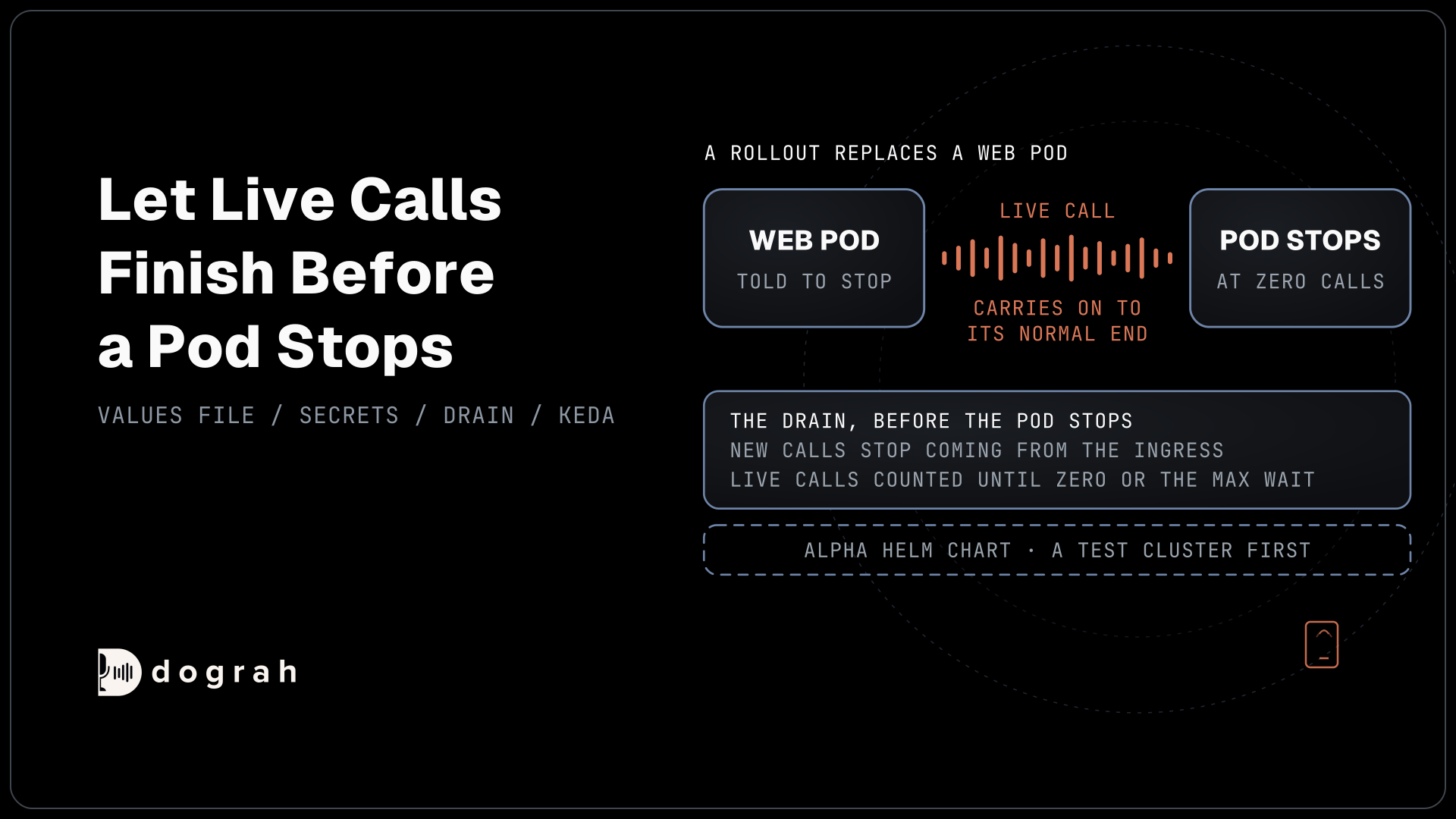
A pod that stops during a call cuts the caller off, so this step matters most. When Kubernetes stops a pod, it gives it 30 seconds by default. A preStop hook runs inside that window, and once it runs out, the pod lifecycle rules send SIGKILL to whatever is still running.
The chart changes both settings for web pods. It sets the window to 1,275 seconds, enough for a 20-minute call plus shutdown time. Its preStop hook runs scripts/drain_web.sh, which waits 15 seconds for the Ingress to stop sending new calls, then checks the pod's active-call count every few seconds and releases the pod when it reaches zero or after 1,200 seconds. A pod with no calls still stops fast. The drain reads the count with devopsSecret, and without it the hook falls back to a short fixed wait, which is why Step 2 set it.
Rolling updates and scale-downs both go through this drain, so neither should cut a call. If your agents' Max Call Duration is shorter, lower web.terminationGracePeriodSeconds and web.drainMaxWaitSeconds to match, keeping the drain below the window.
Check: start a test call, delete the web pod carrying it with kubectl delete pod, and the call carries on to its normal end while the pod shows Terminating.
Step 4: Scale web pods on active calls
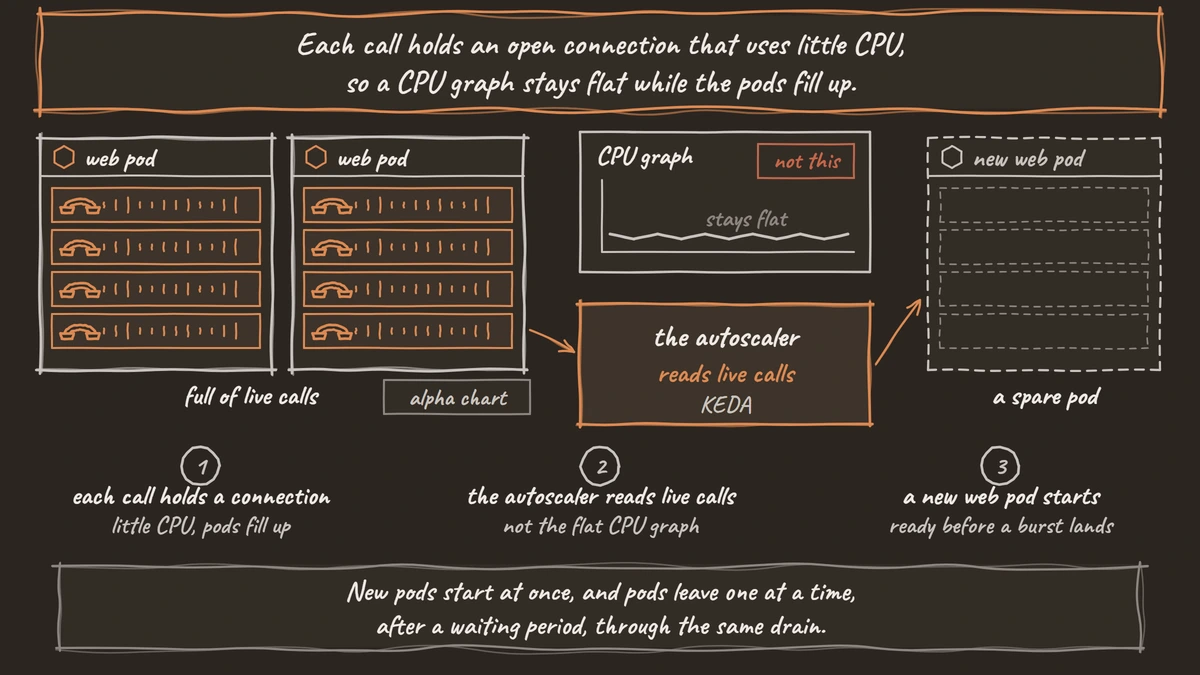
CPU is a poor signal for web pods. Each call holds an open connection that uses little CPU, so a CPU graph stays flat while the pods fill up. The chart scales web pods on live calls instead, through KEDA. Install KEDA in the cluster, then switch the chart's KEDA setting on and give it your own calls-per-pod figure:
helm repo add kedacore https://kedacore.github.io/charts
helm repo update
helm install keda kedacore/keda --namespace keda --create-namespace
helm upgrade dograh . --reuse-values \
  --set autoscaling.web.keda.enabled=true \
  --set autoscaling.web.keda.callsPerPod=<your measured number>
What this does: It installs KEDA and hands control of the web pod count to it. KEDA then sets the number of web pods from the live call count, divided by the calls one pod can carry.
KEDA's Metrics API scaler reads Dograh's /api/v1/health/autoscale-metric endpoint, sending devopsSecret in the X-Dograh-Devops-Secret header. The endpoint returns the number of calls running across all web pods plus a warm buffer, so spare pods are ready before a burst lands. If Redis is down, it returns an error instead of zero, and KEDA keeps the current pod count rather than scaling down. New pods start at once, and pods leave one at a time, after a waiting period, through the same drain.
The calls-per-pod value in the chart is a placeholder. The real figure depends on your models and call length, so measure it with a load test before you trust the autoscaler. ARQ workers keep a CPU-based autoscaler, off by default, and moving them to KEDA is next on the chart's list.
Check: kubectl get scaledobject shows the web ScaledObject as ready, and the web pod count rises during a test with several calls at once.
Join the Dograh Community
Dograh is an OSS alternative to Vapi. Join our Slack community for queries, releases, best practices & community interactions.
Before you ship it
More pods do not raise Dograh's own call limit. Self-hosted Dograh runs 10 concurrent calls per organization by default, set with DEFAULT_ORG_CONCURRENCY_LIMIT in the environment variables, and your carrier and model providers set their own ceilings. Our post on scaling to thousands of simultaneous calls walks through each limit in that chain.
The telephony manager and campaign scheduler stay at one pod each and restart by stopping the old pod first. Schedule chart upgrades for a quiet hour for that reason. Then raise traffic gradually. Agents behave differently over phone lines than in browser tests, and callers do things no test predicted, so start with small load tests over real telephony, as deploying an AI voice agent to production lays out.
If one server is enough, Docker Compose is the shorter path, and our tutorial on how to self-host a voice AI agent with Docker covers it. Self-hosted Dograh has no per-minute platform fee, but servers, model keys and phone minutes still cost money. Dograh Cloud charges a 1¢-a-minute platform fee.
Before production, write down four things: the tag you deployed, the calls per pod you measured, your grace window, and who gets paged when the ScaledObject stops reading its metric. The next rollout then starts from numbers you trust.
Glossary
- Values file
- A YAML file of settings passed to a Helm chart with -f. Dograh's chart ships example values files for a single node, managed databases, EKS and k3s, each choosing where Postgres, Redis and storage run.
- preStop hook
- A command Kubernetes runs inside a container before it sends the stop signal. Dograh's web pods use it to wait until their live calls have ended, within the pod's grace window.
- ScaledObject
- The KEDA resource that sets how many pods a Deployment runs from an outside metric. Dograh's chart creates one for the web pods that reads the live call count.
- Warm buffer
- Extra capacity, counted in calls, that keeps spare web pods running before they are needed. It covers the time a new pod takes to start when a burst of calls arrives.