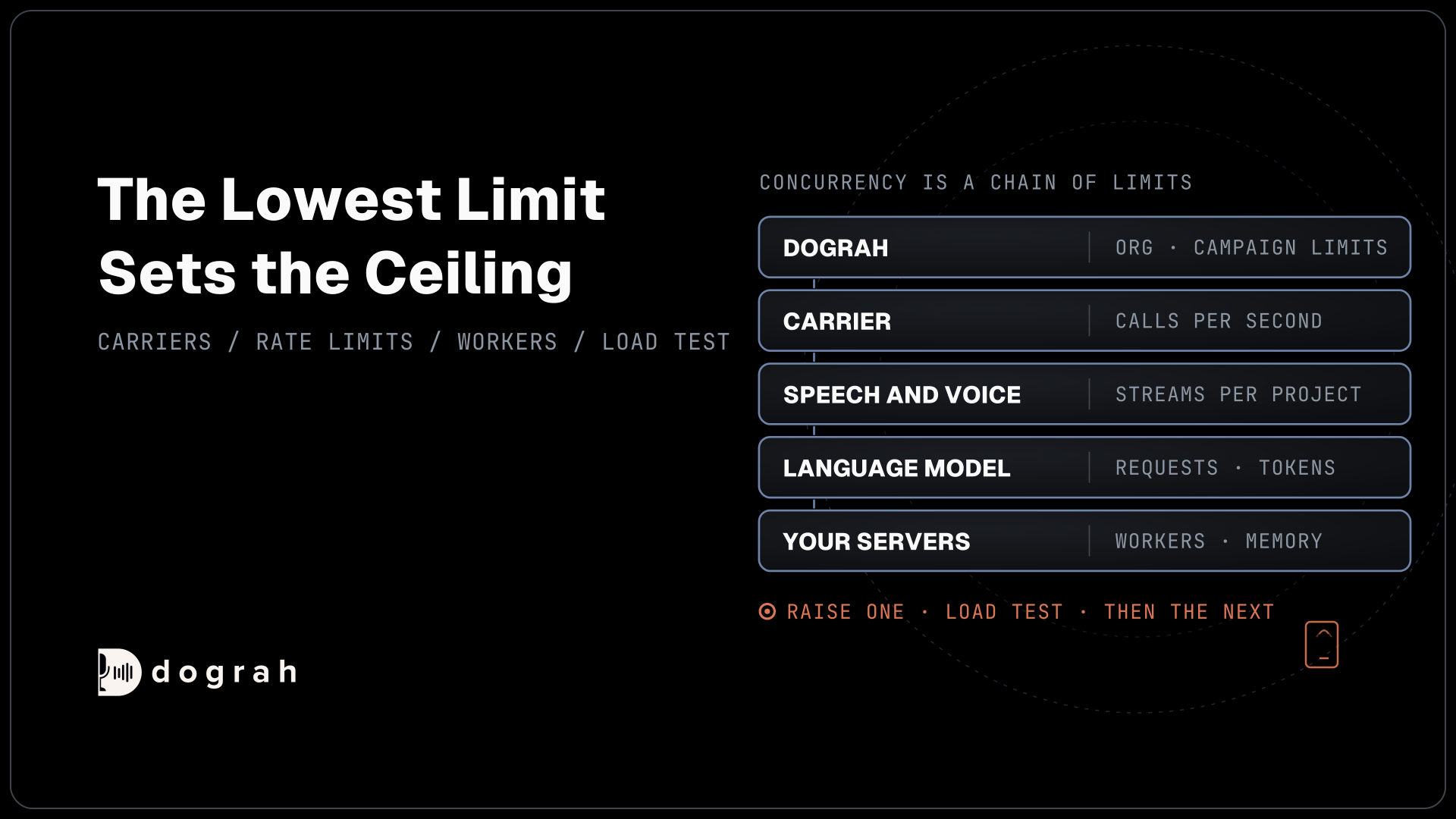

To scale a voice agent to thousands of simultaneous calls, raise your platform's concurrency limit first, then each campaign's concurrency and calls-per-second setting, your carrier's calls per second, your speech and model providers' rate limits and your servers, one at a time. Prove each step with a small load test before you raise the next.
Key Takeaways
- The lowest limit in the chain sets how many calls run at once.
- Outbound starts are capped by calls per second, even with spare lines.
- A provider key shares its project's limit, so more keys may not help.
Every live call holds a phone line, two speech streams, model requests and a server connection until it ends. We walk that chain one link at a time, from Dograh's concurrency setting to carrier rates, provider limits and your servers, testing each step under load. It builds on our guide to measuring voice-agent quality.
Concurrency is a chain of limits
A voice agent can only run as many calls at once as the lowest limit in its path allows. Every live call holds a phone line, a speech-to-text stream, a voice stream, model requests and a server connection for its whole length. Raise one limit and the next one becomes the ceiling.
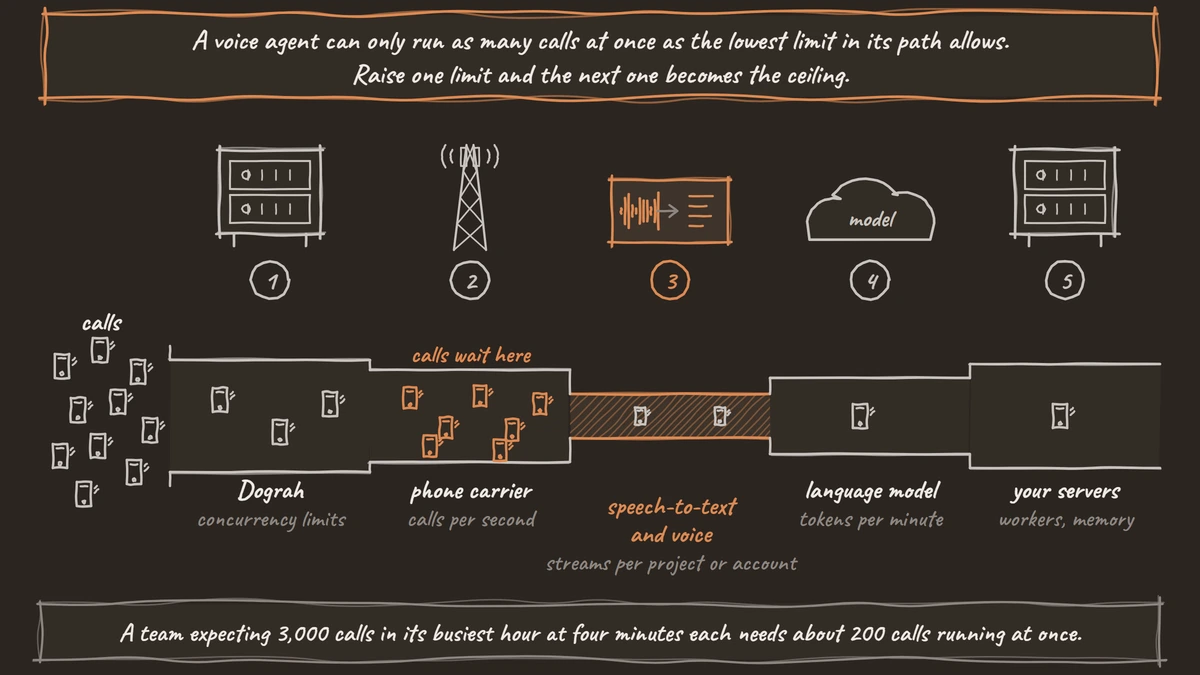
Size the target before you touch any limit. Concurrent calls at peak equal the calls in your busiest hour times the average call length in minutes, divided by 60. A team expecting 3,000 calls in its busiest hour at four minutes each needs about 200 calls running at once. "Thousands at once" usually means tens of thousands of calls an hour.
Inbound and outbound hit different limits. Inbound calls arrive when callers choose, so lines and your concurrency limit decide how many get answered. Outbound calls are started by you, so the rate at which new calls can start matters as much as how many can run.
| Layer | What limits it | Where you set or raise it |
|---|---|---|
| Dograh | Organization concurrency limit, campaign concurrency, calls started per second | DEFAULT_ORG_CONCURRENCY_LIMIT when self-hosted, campaign settings, Dograh for Cloud |
| Carrier | Calls per second for new outbound calls, trunk channels for inbound | Your carrier account |
| Speech-to-text and voice | Concurrent streams per project or account | Your provider plan |
| Language model | Requests and tokens per minute | Your provider plan and project |
| Servers | API workers, memory, database | Your own deployment |
Dograh's own limits
The first ceiling is the platform. Self-hosted Dograh runs 10 concurrent calls per organization by default, and you raise it with the DEFAULT_ORG_CONCURRENCY_LIMIT variable in the environment variables. The Pay as you go plan on Dograh Cloud includes 10 concurrent calls, and the team raises that on request.
Each campaign then has two settings of its own. Max Concurrent Calls sets how many of its calls can run at once, up to the organization limit, and an empty box uses that limit. Calls Started per Second sets how many new calls it can start each second. It defaults to 1, and you can raise it up to the organization limit.
Start both low. A list of 5,000 numbers at a high start rate can open more calls in a minute than your carrier or speech provider accepts, and the failures arrive together. If the campaign has several caller IDs, Dograh rotates them across calls, and the same ID can be in use on simultaneous calls.

Open Source Alternative to Vapi / Retell
Self-hosted voice agent platform — no per-minute fees
dograh-hq/dograh
Star on GitHub
Carrier limits on new calls
Your phone carrier caps how fast new outbound calls start, whatever your other limits allow. On Twilio, calls created through the API are limited to one call per second by default, and accounts with an approved Business Profile can raise that to five in the console. Calls over the limit wait in a queue and start at that rate. Inbound calls are not counted against it.
The arithmetic matters for campaigns. At one call per second, starting 1,000 outbound calls takes about 17 minutes, however many lines you have. At five per second it takes under four minutes. Match the campaign's Calls Started per Second to what your carrier allows, or calls pile up in two queues.
Inbound bursts hit a different limit: the channels on your SIP trunk or the lines on your account. Our post on telephony for voice AI covers numbers, carriers and trunks.
Outbound volume also meets the clock. US telemarketing calls are allowed only between 8 a.m. and 9 p.m. in the called person's local time under the Telephone Consumer Protection Act (TCPA) rules, so a national list cannot all go out at once. A Dograh campaign's calling hours run in one time zone, so split a national list by time zone, and confirm your calling windows with counsel.
Speech and model provider limits
Speech and model providers set their own ceilings, and these are often the first you hit. Deepgram's published rate limits allow up to 150 concurrent streaming speech-to-text requests and 45 streaming voice requests on Pay as You Go, and the limits apply per project, not per API key. A second key in the same project shares the same pool.
Language models limit by requests and by tokens. OpenAI's rate limits are counted in requests and tokens per minute, at the organization and project level. Going over returns a 429 error, and failed requests still count against the per-minute limit. A voice agent sends the whole conversation on every turn, so a long prompt across a thousand calls hits the token limit well before the request limit.
You can add several API keys to one provider connection in Dograh. It picks one key at random for each call, so size each key's rate limit for its share of calls, and use keys from separate projects where the provider's terms allow it. Our post on STT and TTS concurrency limits goes deeper on key pools.
When limits bite during a campaign, Dograh reacts in two ways. A 401, 402 or 403 from any provider pauses the campaign at once. Other pipeline failures count toward the circuit breaker, which is on by default for a new campaign and pauses it when half the calls in a 120-second window fail. With your own LLM keys, a backup LLM can take over after an error, once you turn it on.
Join the Dograh Community
Dograh is an OSS alternative to Vapi. Join our Slack community for queries, releases, best practices & community interactions.
Your own servers
If you self-host, your servers are the last limit in the chain. Each live call holds a long-running WebSocket, so the API needs several worker processes. Dograh runs them as FASTAPI_WORKERS behind nginx with least_conn routing, which sends each new call to the worker with the fewest open connections.
The scaling guide suggests one worker per vCPU, up to 8 until you have profiled your load, with 300 to 500 MB of memory for each. The server minimum is 4 vCPUs and 8 GB of memory. Background jobs scale separately through ARQ_WORKERS, and the campaign scheduler stays a single process by design.
Past one machine, move Postgres, Redis and file storage to managed services and point Dograh at them, then put a load balancer in front of several API hosts. How many calls one server carries depends on your models, prompt length and call length, so that number comes from your own load test. If you run speech and language models on your own GPUs, those GPUs join the chain with their own ceiling.
Prove each step with a load test
The formula gives you a target, and staged load tests get you there safely. Raise load in steps and watch each step before the next. Agents behave differently over the phone than in a browser, callers do things your tests never tried, and teams often change the flow once real calls arrive.
Start with a handful of calls over real telephony, then step up, for example to 50, then 200, then your target. At each step, watch the slowest turn and the provider errors. Rising turn times usually come before failed calls, so they are your early warning. Our post on observability for voice AI covers where those signals land.
To generate load, a testing tool such as Tuner can place calls into your agent over SIP and play the caller from generated scenarios. Then move live traffic over in shares, one call type first. The test, monitor and scale pillar covers the full sequence from first test call to full traffic.
Glossary
- Calls per second (CPS)
- How many new outbound calls a carrier or campaign starts each second. It sets how fast a campaign ramps up, separately from how many calls can run at once.
- Concurrency limit
- The most calls that can run at the same moment. Dograh has one per organization and one per campaign, and every provider in the call has its own.
- Tokens per minute (TPM)
- A language model provider's limit on how much text it processes each minute. Voice agents resend the conversation every turn, so long calls at scale often hit TPM first.
- least_conn load balancing
- An nginx routing rule that sends each new connection to the server process with the fewest open connections. It keeps long-running call connections spread evenly across Dograh's API workers.