
To embed a voice agent in a SaaS product, call the platform's API from your own backend: keep the API key on your server, give each customer an agent or per-call context, start calls with one request, and read the results back. Dograh, the open-source AI voice agent platform, works this way.
Key Takeaways
- Your backend holds the API key, never the browser.
- One agent with per-call context fits most products. Duplicate it when flows differ.
- model_overrides runs each customer's calls on that customer's own model keys.
This post is part of our guide to how to build an AI voice agent, where an API Trigger lets your own system start a call and pass details with it. Here we wire Dograh into a SaaS product, step by step, from the API key to the call results.
What you need before you start
You need an agent that already works in a browser test call, a phone provider connected for real calls, and an API key. Create the key under Developers in the sidebar. Keys start with dgr_ and appear only once, so save yours in your secret manager straight away. If your backend is in Python or TypeScript, the official SDKs wrap the same REST API and read the key and server address from DOGRAH_API_KEY and DOGRAH_API_URL.
You are not building a voice pipeline here. Pipecat, which Dograh is built on, is an excellent base, but a production phone agent needs a lot of plumbing around it, from telephony and turn-taking to recordings and retries. Dograh handles that plumbing, so your product only calls an API. Self-hosted, that API runs on your own servers, in the same cloud account as your product if you like.
Check: a request to /api/v1/workflow/fetch with your key in the X-API-Key header returns your agents.
Step 1: Keep the key on your server
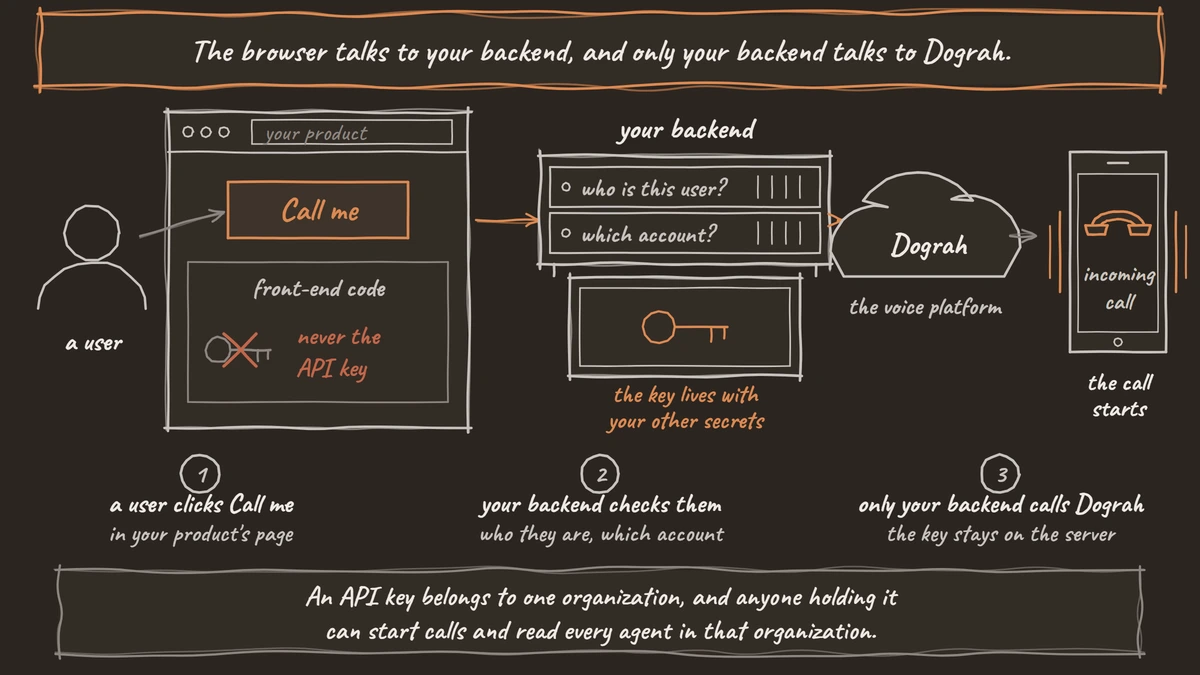
The browser talks to your backend, and only your backend talks to Dograh. An API key belongs to one organization, and anyone holding it can start calls and read every agent in that organization. So it lives where your other secrets live, as OWASP's secrets management cheat sheet recommends for any credential, and never in front-end code. When a user clicks a button such as Call me, your backend checks who they are and which customer account they belong to, then makes the request.
Voice or chat inside the page itself takes a different route. Dograh's web widget uses its own embed token and a list of allowed domains, so no API key reaches the page. Our guide to add a voice widget to your website covers that setup.
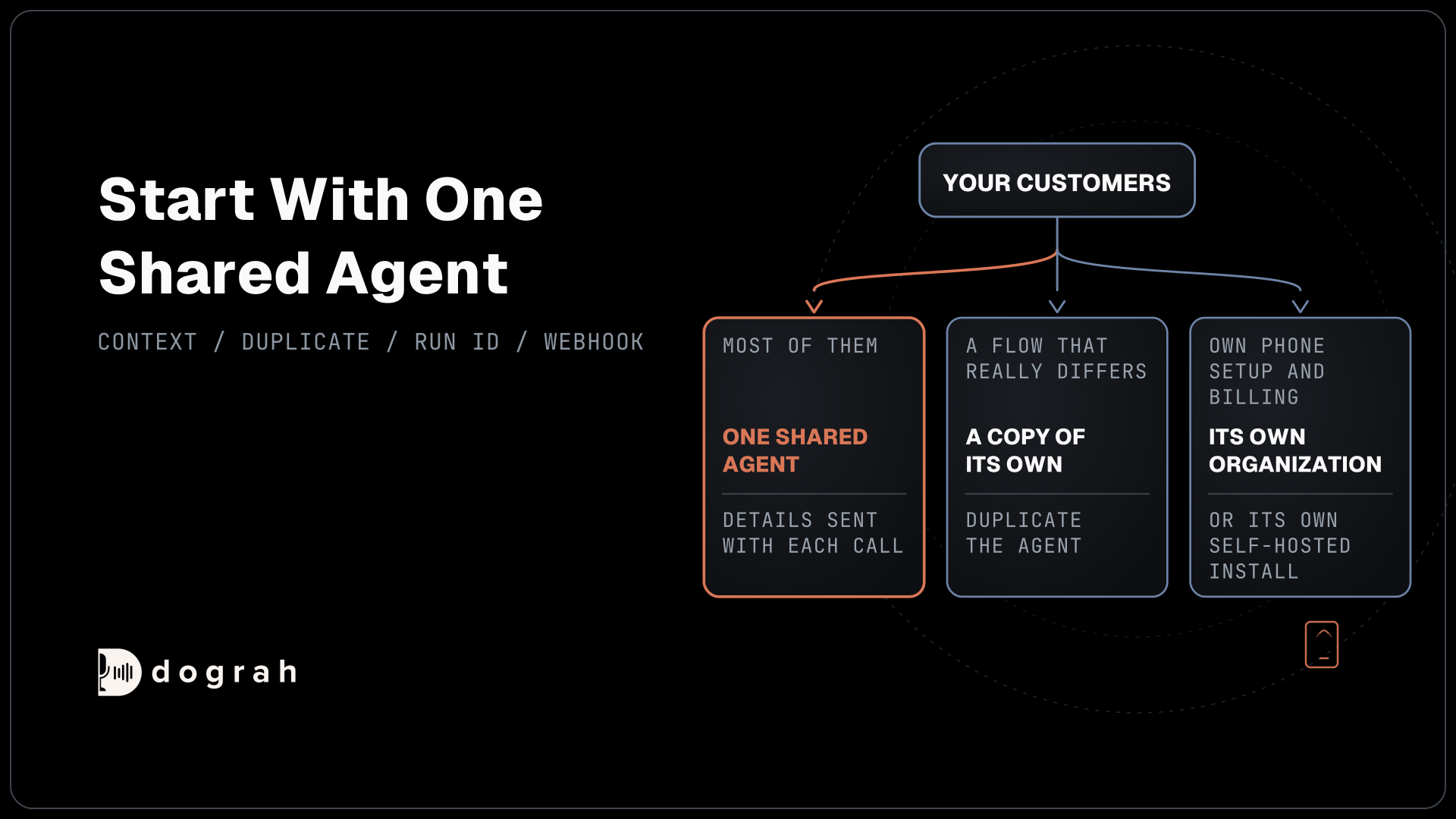
Then decide where customers sit. Most SaaS products keep every customer in one organization with an agent per customer, or one shared agent. A large customer that needs its own phone setup and billing can have its own organization, or its own self-hosted install. Our post on managing multiple clients on one voice AI platform weighs those options.
Check: a search of your front-end build for dgr_ finds nothing.
Step 2: Give each customer an agent
Start with one shared agent and pass each customer's details with every call, because most products never need more. A customer whose call flow really differs gets a copy of its own. The duplicate endpoint copies an agent's latest state, draft included, into a new agent named after the original with "- Duplicate" added, and gives any API Trigger nodes fresh IDs:
curl -X POST https://your-dograh-host/api/v1/workflow/123/duplicate \
  -H "X-API-Key: $DOGRAH_API_KEY"
What this does: It creates a new agent from agent
123and returns the copy, including its newid. Store thatidagainst the customer in your own database, so every later request for this customer finds the right agent.
To change the copy, send its new name or definition with PUT /api/v1/workflow/{id}, which saves a draft. POST /api/v1/workflow/{id}/publish then runs full validation and makes the draft the version that takes calls. Calls need the copy's Agent UUID, a stable ID that GET /api/v1/workflow/fetch/{id} returns as workflow_uuid and that never changes when you publish again.
Check: the copy appears under Voice Agents, and its Agent UUID is saved with the customer record.

Open Source Alternative to Vapi / Retell
Self-hosted voice agent platform — no per-minute fees
dograh-hq/dograh
Star on GitHub
Step 3: Start calls from your product
One request starts a call. Send it to the agent's UUID with the number to dial in phone_number, the customer's details in initial_context, and, if the customer brings their own model keys, their provider connection in model_overrides:
curl -X POST https://your-dograh-host/api/v1/public/agent/workflow/$AGENT_UUID \
  -H "Content-Type: application/json" \
  -H "X-API-Key: $DOGRAH_API_KEY" \
  -d '{
    "phone_number": "+1415555XXXX",
    "initial_context": {
      "account_name": "Northwind Dental",
      "customer_name": "Jane",
      "appointment_date": "March 15"
    },
    "model_overrides": {
      "llm": {
        "provider_connection_uuid": "22222222-2222-4222-8222-222222222222",
        "settings": { "model": "gpt-4.1-mini" }
      }
    }
  }'
What this does: It dials the number with the published agent. The prompt can use
{{account_name}}and{{customer_name}}, and the language model runs on the customer's own connection, so their key carries the model bill for this call.
Each customer's key goes in as its own connection on the Providers page, and named model setups live on the Models page. Overrides follow a fixed order: the organization default, then the agent's own setting, then the API request, then Pre-Call Data Fetch. Dograh checks them before dialing and answers with a 422 error if one is invalid, so a bad key never reaches the caller. While you test a draft, send the same request to /api/v1/public/agent/test/workflow/{uuid}.
The reply carries "status": "initiated" and a workflow_run_id. Save that run ID with the customer, because it is how you find the call later. Our post on API triggers covers what else belongs in initial_context and checking consent before you dial.
Check: the reply says initiated, and the call shows under Agent Runs with the customer's details in its context.
Step 4: Bring the results back
A call is only useful to your product once its outcome lands there. There are two routes, push and pull. For push, add a Webhook node to the agent. When the call ends, it posts a payload you design, with values such as {{workflow_run_id}}, {{initial_context.account_name}}, {{gathered_context.call_disposition}} and the recording and transcript links. It retries temporary failures automatically, up to 5 attempts.
For pull, ask for the run whenever your product needs it, using the agent ID and the run ID you saved:
curl https://your-dograh-host/api/v1/workflow/456/runs/78910 \
  -H "X-API-Key: $DOGRAH_API_KEY"
What this does: It returns run
78910of agent456, withis_completed, thegathered_contextthe agent extracted, and links to the transcript and recording. A product page can show the outcome next to the customer without waiting for a webhook.
If the result belongs in your customers' CRM as well, our post on connecting a voice agent to your CRM covers HubSpot and Salesforce.
Check: a finished test call's outcome appears in your product next to the right customer.
Join the Dograh Community
Dograh is an OSS alternative to Vapi. Join our Slack community for queries, releases, best practices & community interactions.
Before you ship it
Plan for volume per organization. Self-hosted Dograh runs 10 concurrent calls per organization by default, raised with DEFAULT_ORG_CONCURRENCY_LIMIT, and Dograh Cloud's Pay as you go plan includes 10, with more on request. Every customer in one organization shares that limit. For call lists, use the Campaigns API, which handles pacing and retries, rather than looping over single calls. The same API also offers text chat sessions on an agent, if your product wants typed conversations as well.
Support gets easier with the run ID in hand. Each run has a full trace of what the agent heard and said, and QA can score a sample of live calls. Self-hosted Dograh has no per-minute platform fee, but servers, model keys and phone minutes still cost money. Dograh Cloud charges a 1¢-a-minute platform fee.
Before launch, start one call from your product for each customer type and watch the outcome come back to the right account. That one test catches most wiring mistakes before a customer does.
Glossary
- Agent UUID
- A Dograh agent's stable ID, also called workflow_uuid. It never changes when you publish new versions, so your product can store it once per customer and start calls with it.
- initial_context
- A JSON object sent with the call request that holds the customer's details. The agent's prompts and greeting read its values as template variables, such as {{customer_name}}.
- model_overrides
- A field in the call request that swaps the model setup for one call, for example to a customer's own provider connection. Dograh validates it before dialing and rejects an invalid one with a 422 error.
- Embed token
- The token Dograh's web widget uses to start a browser call or chat on allowed domains. It stands in for the API key in front-end code, which keeps the key on your server.