
Whisper does not stream on its own, so real-time setups wrap it in a streaming policy. Run WhisperLiveKit with SimulStreaming on a GPU, tune the delay and feed it 16 kHz audio. For teams keeping speech on their own servers, Dograh, the open-source AI voice agent platform, sends each finished caller turn to self-hosted Whisper through Speaches.
Key Takeaways
- Whisper needs a streaming policy such as LocalAgreement or AlignAtt to emit words early.
- Lower delay settings give earlier words, and more audio context improves accuracy.
- Phone calls arrive at 8 kHz, so test streaming Whisper on real phone audio.
Whisper was built to transcribe finished clips, and a voice agent needs words while the caller is still talking. This guide sets up a streaming Whisper server, picks a policy and tunes its delay, then covers GPU size, phone audio and connecting Whisper to a Dograh agent.
What you need before you start
These steps follow each project's own README. Run them on a trial server before production. Every command below is copied from the README it names, so check it against the current version before you paste it.
- A Linux machine with an NVIDIA GPU, or a Mac with Apple Silicon for a first look.
- Python 3.11 to 3.13 for WhisperLiveKit.
- A few recorded calls from your own phone line, as test audio.
- A Dograh install if you plan to connect Whisper to an agent in Step 6.
Why Whisper does not stream on its own
Whisper reads a whole window of audio and writes text for that window at once. That suits a recording, and it does not suit a caller who expects a reply a moment after they stop talking.
The quick fix most tutorials teach is to cut the audio into short pieces and run Whisper on each one. The WhisperLiveKit project argues against it in its README, saying "Whisper is designed for complete utterances, not real-time chunks" and that small segments lose context and cut words off mid-syllable. Short chunks give fast text, and the text is worse.
Streaming Whisper servers solve this with a policy. The model keeps hearing a growing buffer of audio, and the policy decides which words are safe to send out now and which to hold back. The first open project to do this well was whisper_streaming from Charles University, and its own README now says it is becoming outdated and has been replaced by SimulStreaming, from the same team.
Step 1: Pick a policy, LocalAgreement or AlignAtt
The LocalAgreement policy re-runs Whisper as audio arrives and sends out only the words that two passes in a row agree on. It is simple and works with many backends, which is why whisper_streaming used it.
The AlignAtt policy, used in SimulStreaming, looks at where the model's attention sits in the audio. Once the model has clearly moved past a word, that word is sent. SimulStreaming's README says this makes it about five times faster than WhisperStreaming, a claim from the project itself.
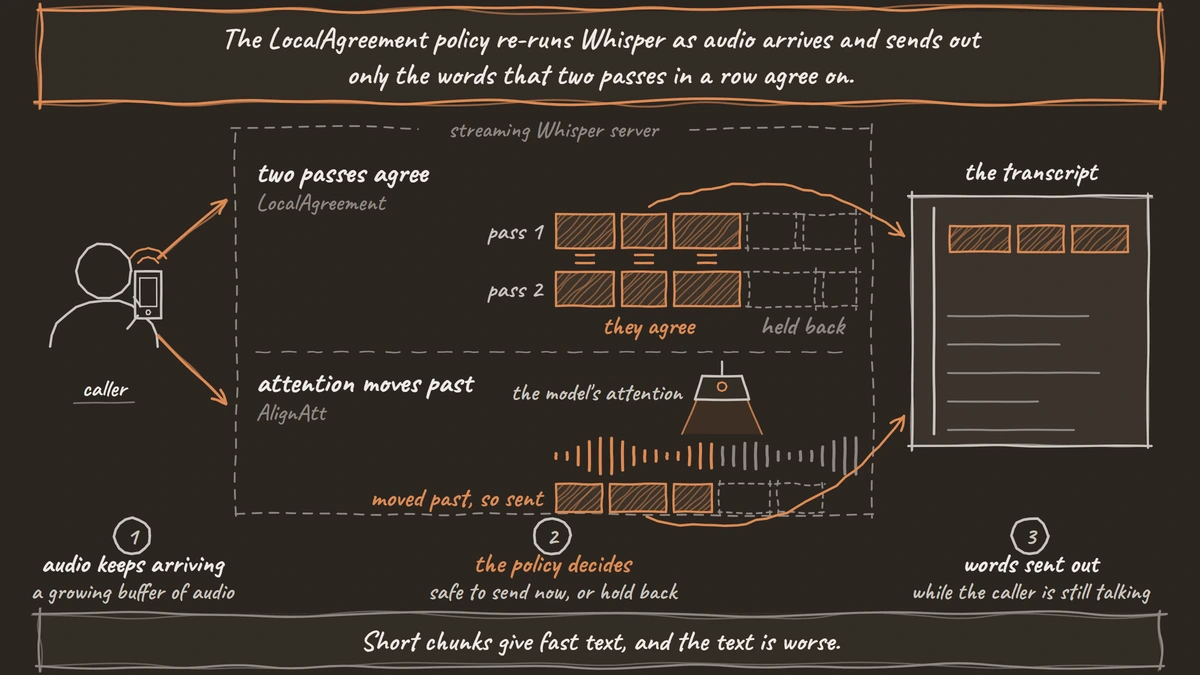
WhisperLiveKit runs both, and you pick with --backend-policy. Its default is simulstreaming, and localagreement is the other choice. Start with the default, and switch only if your audio or backend needs it, since some WhisperLiveKit backends support LocalAgreement only.
Check: you know which policy you will start with and which backend you will run it on.
Step 2: Start a WhisperLiveKit server
The quick start in the WhisperLiveKit README has two commands. The first installs the package with pip, and the second starts the server with the base model and --language en.
pip install whisperlivekit
wlk --model base --language en
What this does: It installs WhisperLiveKit and starts a server on
localhost:8000with a small Whisper model. Openhttp://localhost:8000in a browser and speak to see words appear while you talk.
The server also takes audio over a native WebSocket at ws://localhost:8000/asr and answers OpenAI-compatible requests at /v1/audio/transcriptions. Port 8000 is also what many other servers use by default, so if something else on the machine already holds it, start WhisperLiveKit with --port set to a free one.
If you would rather use WhisperLive from Collabora, its README starts a server with run_server.py, the faster_whisper backend and a limit of 4 clients.
pip install whisper-live
python3 run_server.py --port 9090 --backend faster_whisper --max_clients 4 --max_connection_time 600
What this does: It starts a WhisperLive server on port 9090 that serves up to 4 clients at once, each for up to 600 seconds. WhisperLive calls itself "a nearly-live implementation of OpenAI's Whisper".
Check: words appear on the WhisperLiveKit page, or in a WhisperLive client, while you are still speaking.

Open Source Alternative to Vapi / Retell
Self-hosted voice agent platform — no per-minute fees
dograh-hq/dograh
Star on GitHub
Step 3: Tune the delay against accuracy
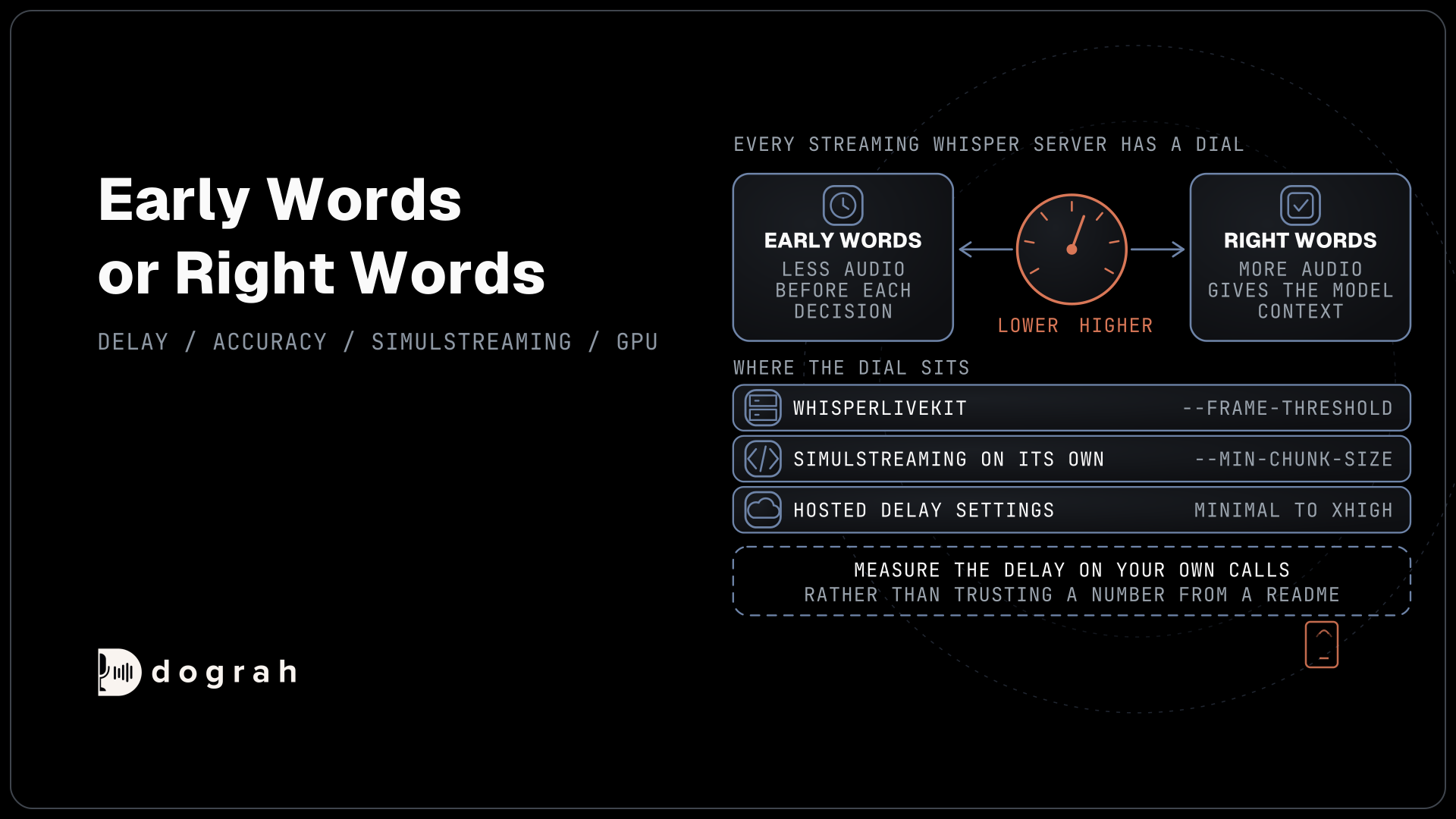
Every streaming Whisper server has a dial between early words and right words. Less audio before each decision gives text sooner, and more audio gives the model context to get the words right.
In WhisperLiveKit with SimulStreaming, that dial is --frame-threshold, with a default of 25. Its README describes it as "lower = faster, higher = more accurate". In SimulStreaming run on its own, the minimum chunk size (--min-chunk-size) sets how many seconds of audio the server waits for before it processes again.
Hosted services follow the same rule. OpenAI's realtime transcription guide offers delay settings from minimal to xhigh, and says lower settings can give earlier partial text while higher ones give the model more audio and can improve word error rate. It also says the exact delay in milliseconds varies by model configuration, and the same holds on your own GPU. So measure the delay on your own calls rather than trusting a number from a README.
Check: you have run the same recorded call at two settings and written down when the words arrived and how many were wrong.
Step 4: Size the GPU for your model
The model size decides most of the hardware. SimulStreaming's README recommends a GPU with at least 10 GB of VRAM to run Whisper large-v3, and says the code works on CPU but would be too slow for real time.
Smaller models fit in much less. faster-whisper, the backend most of these servers use, reports large-v2 at 2,926 MB of GPU memory in 8-bit mode in its own benchmark. That benchmark transcribes a recorded file, so treat it as a memory guide and leave headroom for several calls at once.
For a first phone test, a small English model on a modest GPU is enough, such as Systran/faster-distil-whisper-small.en, the default in Dograh's Speaches settings. Move up to large-v3 or large-v3-turbo once you see which words the small model misses.
Check: GPU memory stays below the card's limit with the number of calls you expect at once.
Join the Dograh Community
Dograh is an OSS alternative to Vapi. Join our Slack community for queries, releases, best practices & community interactions.
Step 5: Test it on 8 kHz phone audio
Most phone calls still reach an agent as 8 kHz audio, while a browser demo runs at 16 kHz. Whisper models expect 16 kHz input, and WhisperLive's README asks for mono 16 kHz PCM, so phone audio has to be resampled first and carries less detail even then.
How much accuracy the phone line costs depends on the model and the carrier path. Our comparison of Whisper, Parakeet and Voxtral on phone audio covers the published figures for each model. Run your own recorded calls through the server at the settings from Step 3, and listen for names, numbers and short replies like "yes" and "no".
Check: the transcript of a real recorded call is good enough on the words your agent acts on.
Step 6: Connect Whisper to a Dograh agent
Dograh runs the call flow, tools and telephony, and you choose the speech and language models it calls, so Whisper can sit in the speech-to-text slot. Self-hosted Whisper reaches it through the Local Models (Speaches) provider, which you add under Providers with Add Provider and then pick as the speech-to-text service in a model configuration.
Here is how that path works. Dograh's voice detector waits for the caller to pause, then sends the finished segment to Speaches' /v1/audio/transcriptions endpoint as one request. So Whisper in Dograh is segmented speech-to-text. It transcribes each finished turn rather than streaming words as the caller speaks. Speaches does stream its voice audio back when you also use it for text-to-speech. Our guide to run faster-whisper locally walks through the compose file, the model download and the http://speaches:8000/v1 address.
For words while the caller is still talking, choose a streaming speech-to-text provider in the same configuration, such as Deepgram or AssemblyAI. Each agent can use the organization default or its own named setup, as the Model Configurations page explains.
On Dograh Cloud the Speaches address has to be public, while a self-hosted install can reach it on the internal network. Running Whisper yourself puts the GPU server on your bill next to the phone minutes and any other model keys. Your team looks after that server, and on a self-hosted install also Dograh's database and each upgrade.
Check: a Phone Call test shows each caller turn in the transcript, and, with tracing set up, the call trace shows the speech-to-text time for each turn.
Before you ship it
Time each turn end to end before you choose a provider. Once tracing is set up, each call in Dograh has a View Trace button that opens its trace, and the speech-to-text span shows how long each turn took. Compare that with a streaming provider on the same recorded calls.
If you want streaming built into the model itself rather than wrapped around it, our Voxtral vs Whisper comparison covers Voxtral Realtime and its own delay dial. And if the hosted API might cost less than a GPU at your call volume, our post on OpenAI Whisper for voice agents works through both sides.
Glossary
- LocalAgreement policy
- A streaming rule that re-runs Whisper on growing audio and sends out only the words two passes in a row agree on.
- AlignAtt policy
- A streaming rule that uses the model's attention over the audio to decide when a word is safe to send. SimulStreaming uses it.
- Segmented speech-to-text
- Transcription that waits for a pause, then sends the finished stretch of speech as one request. It gives no words while the caller is still talking.
- Minimum chunk size
- In SimulStreaming, how many seconds of new audio the server waits for before it processes again. Larger values trade speed for accuracy.