
To run faster-whisper locally for a voice agent, add Speaches as a service in Dograh's docker-compose.yaml and download a Whisper model into it. In Dograh, add a Local Models (Speaches) provider at http://speaches:8000/v1, choose it on the STT tab of a model configuration, and make a browser test call, then a real phone call.
Key Takeaways
- Inside Dograh's container, localhost:8000 is Dograh itself, so use speaches:8000.
- Start on the small English model and move up only for real errors.
- A phone test call matters, because phone audio is harder to hear.
Point a local speech model at localhost inside Docker and your agent ends up calling its own API instead. We add Speaches to the compose file, download a Whisper model, connect it in Dograh and finish with a browser call and a phone call. It builds on our guide to self-hosted voice models.
What you need before you start
You need a self-hosted Dograh install running with Docker. If you don't have one yet, our tutorial on how to self-host a voice AI agent with Docker gets you there in one script.
For the speech model, an NVIDIA GPU is the right choice for calls, and Docker must be able to use it. On Linux that means the NVIDIA Container Toolkit. A CPU works for a first try, but each sentence takes longer to transcribe, and callers hear that as a slow agent.
You also need uv, a Python tool runner, to use the Speaches command-line tool that downloads models.
Last, plan the other two services. A model configuration in BYOK mode needs a provider for each service, so keep a language model key and a voice ready, or run a local voice as well.
Step 1: Add Speaches to Dograh's compose file
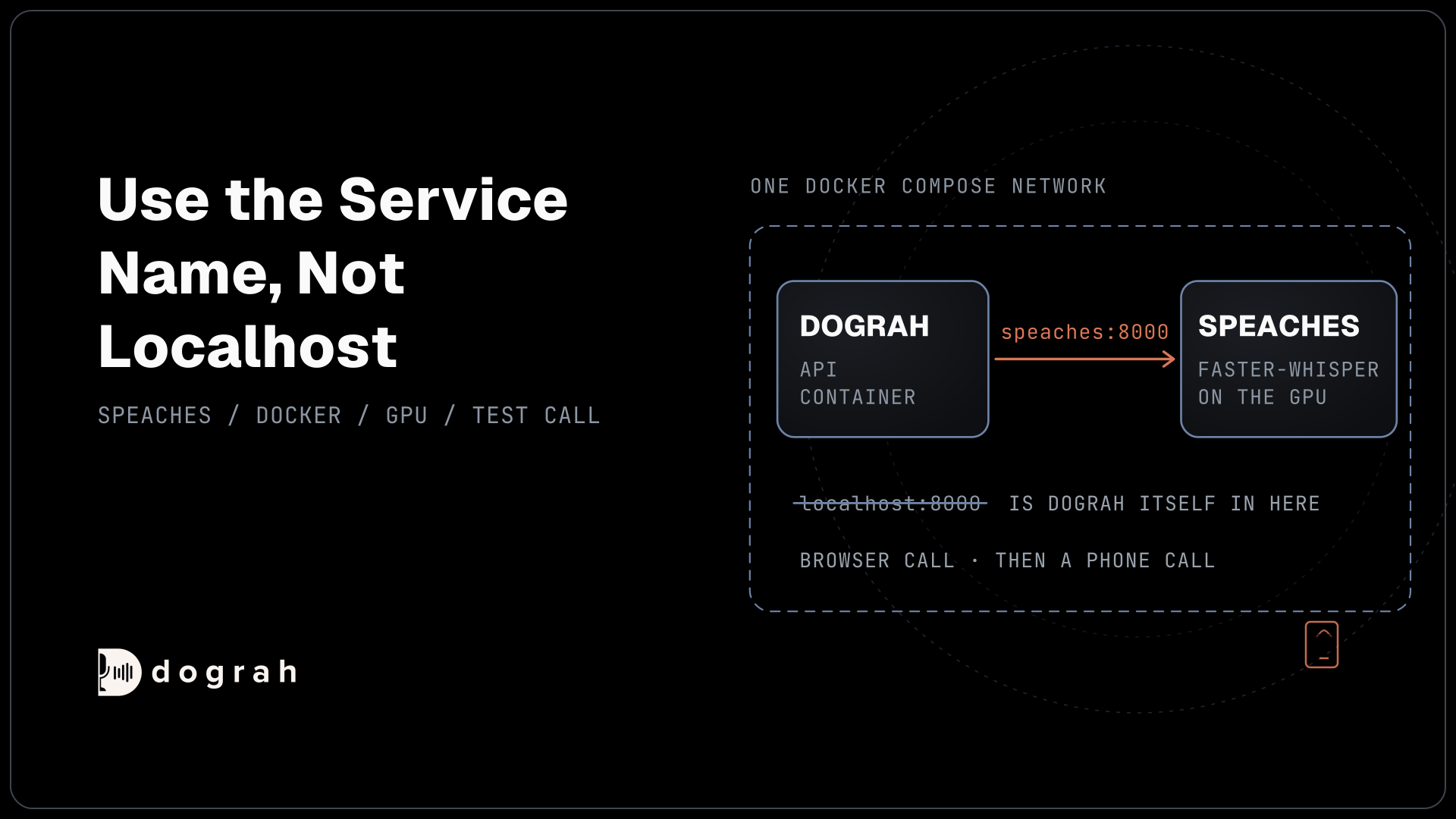
Run Speaches inside the same Docker setup as your agent platform, so the two containers share one compose network. This matters because the default address for a local model, http://localhost:8000/v1, points inside Dograh's API container, and there localhost:8000 is the platform's own API. As a service in the same compose file, Speaches is reachable at http://speaches:8000/v1 on Linux and Docker Desktop alike.
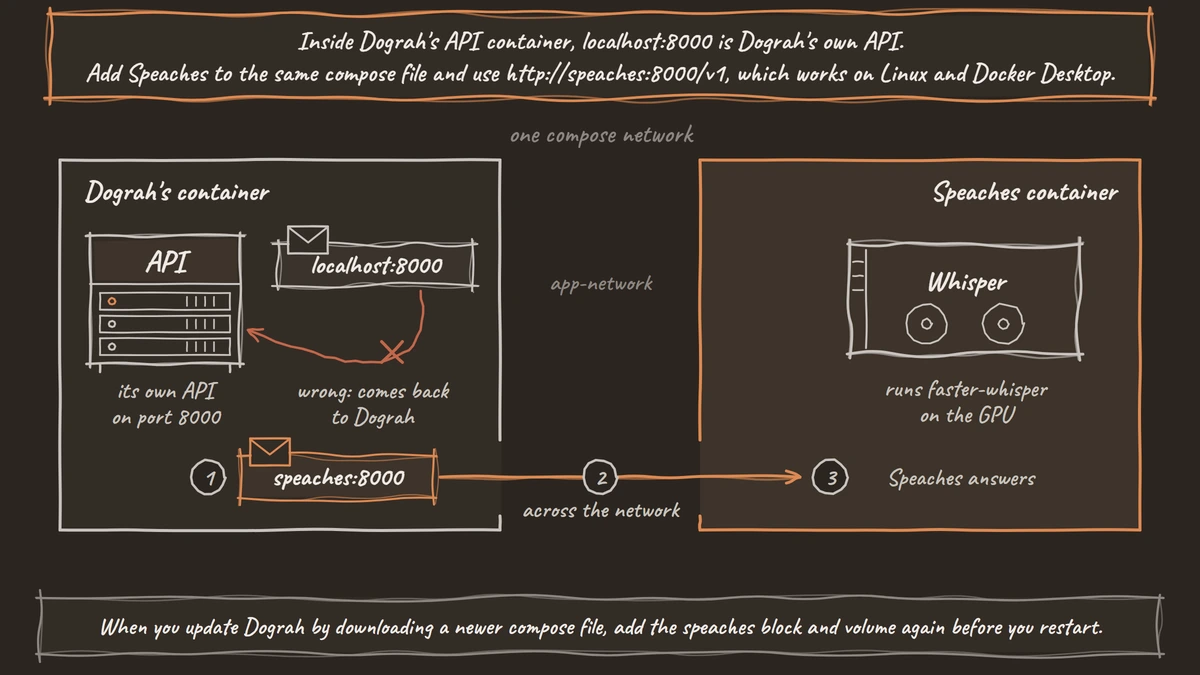
Open the docker-compose.yaml that Dograh's Docker install downloaded. Under services:, add the block below. It uses the CUDA image from the Speaches installation guide, keeps downloaded models in the hf-hub-cache volume, joins Dograh's app-network, and publishes port 8001 on your machine for the next step:
  speaches:
    image: ghcr.io/speaches-ai/speaches:latest-cuda
    ports:
      - "8001:8000"
    volumes:
      - hf-hub-cache:/home/ubuntu/.cache/huggingface/hub
    deploy:
      resources:
        reservations:
          devices:
            - driver: nvidia
              count: all
              capabilities: [gpu]
    networks:
      - app-network
What this does: It adds Speaches to the stack on a GPU. Dograh reaches it by the name
speacheson port 8000, and you reach it from your own machine on port 8001, so it never clashes with the API on port 8000.
Then add hf-hub-cache: under the top-level volumes: list and start the new service with docker compose up -d speaches. With no GPU, use the latest-cpu image and leave out the deploy block.
Check: curl http://localhost:8001/v1/models answers with a JSON list.
Step 2: Download a Whisper model
Download the model Dograh expects by default, Systran/faster-distil-whisper-small.en. It is a distilled, English-only Whisper model, small enough to answer quickly on phone calls. The Speaches tool reads the server address from SPEACHES_BASE_URL, so point it at port 8001:
export SPEACHES_BASE_URL="http://localhost:8001"
uvx speaches-cli model download Systran/faster-distil-whisper-small.en
What this does: It tells your running Speaches server to fetch the model into the
hf-hub-cachevolume, so it survives restarts.
Model size is a speed choice as much as an accuracy one. Dograh sends each finished stretch of the caller's speech to Speaches as one request, and the agent cannot answer until that text comes back. A bigger model adds that wait to every turn. faster-whisper's own benchmark shows the trade. The large-v2 model needed about 2.9 GB of GPU memory in int8, while the small model ran on a desktop CPU in about 1.5 GB of RAM.
Start with the small English model. Move to Systran/faster-whisper-large-v3 only when your own recorded calls show errors that matter, or when callers speak another language.
To try the model before Dograh uses it, send any short WAV file to the transcription route with its file and model fields:
curl http://localhost:8001/v1/audio/transcriptions -F "file=@sample.wav" -F "model=Systran/faster-distil-whisper-small.en"
What this does: It sends the same kind of request Dograh sends during a call, so a good answer here means the server side is ready.
Check: the reply is JSON with a text field holding what was said in sample.wav.

Open Source Alternative to Vapi / Retell
Self-hosted voice agent platform — no per-minute fees
dograh-hq/dograh
Star on GitHub
Step 3: Connect Speaches in Dograh
Tell Dograh where Speaches lives, then choose it as the speech-to-text service. In the sidebar, open Providers and click Add Provider. Choose Local Models (Speaches), give it a Connection name such as "Speaches STT", set the base URL to http://speaches:8000/v1, and leave the API key empty. Save it.
Next, open Models in the sidebar and click Add Configuration, as Model Configurations describes. Name it, choose BYOK, and open the STT tab. Pick your Speaches connection. Keep the Model as Systran/faster-distil-whisper-small.en, or use Enter Custom Value for another model you downloaded. Set Language to the caller's two-letter code, such as en.
Fill the LLM and TTS tabs with your other providers. For a local voice too, our tutorial on how to run Kokoro TTS for a phone voice agent adds a second Speaches-style connection on another address. Save, then click Make org default, or open one agent's Model tab and pick this configuration under Configuration.
Check: the configuration's row lists your Speaches model next to STT.
Step 4: Make a test call
Prove the whole path with a browser call first, then a phone call. Open the agent and click Test Agent. On the Test Audio tab, click Run Test, then Start Call, and speak a few sentences with a name and a number in them.
A browser call runs at 16 kHz, the most Dograh's pipeline uses. Most phone calls reach the agent as 8 kHz audio, which is harder for a speech model to hear, and how much harder depends on the model. So once the browser call works, click Phone Call in the editor, enter your own number and call it from a real phone. Read both transcripts in Agent Runs and look for misheard names.
While you call, docker compose logs -f speaches shows each transcription request as it arrives.
Check: both transcripts show your words, and the Speaches log shows one request per sentence you spoke.
Join the Dograh Community
Dograh is an OSS alternative to Vapi. Join our Slack community for queries, releases, best practices & community interactions.
Before you ship it
On Dograh Cloud, the server address must be public. Cloud rejects localhost and private network addresses, so put Speaches behind a public HTTPS address before you point a Cloud agent at it. Self-hosted installs skip that check.
Your edit lives in docker-compose.yaml. When you update Dograh by downloading a newer compose file, add the speaches block and volume again before you restart.
Speech recognition is one of the models, and the models form their own layer that you choose, while Dograh keeps running the call flow, the tools and the telephony. To try another speech model later, you edit the Model field and the base URL, and nothing else in the agent moves.
Running the stack on your own hardware means no per-minute platform fee from Dograh, though the servers, any model keys and the phone minutes still cost money. Dograh Cloud charges a 1¢-a-minute platform fee instead. Once you self-host, the GPU becomes the limit you plan around.
Measure before you scale. One GPU serves several calls at once, but every caller's sentence waits for its turn on the card, so load test at the number of calls you expect. If English is not enough, or you want to compare Whisper with NVIDIA's and Mistral's models, read Whisper vs Parakeet vs Voxtral.
To keep the whole setup on your machines, also disable the usage telemetry, which is anonymous and on by default in a self-hosted install. Set ENABLE_TELEMETRY=false and remove POSTHOG_API_KEY.
Glossary
- Compose network
- The private network Docker Compose creates for the services in one compose file. Services on it reach each other by service name, which is why Dograh can call Speaches at speaches:8000.
- int8
- Storing a model's weights as 8-bit integers in place of 16-bit numbers. faster-whisper uses it to shrink memory, and in its own test Whisper large-v2 needed about 2.9 GB of GPU memory in int8.
- Distil-Whisper
- A smaller Whisper model trained to copy a larger one's output. Dograh's default speech model, Systran/faster-distil-whisper-small.en, is a distilled English-only model chosen for quick replies.